
Subscription Notes
Keep a permanent timeline of subscription changes, renewal events, gateway activity, customer-visible notes, and private admin notes.
Availability: Free
Page Navigation
- Current guide: Subscription Notes
- Where to open it: WordPress Admin -> ArraySubs -> Subscriptions -> View Details
- Direct route pattern:
/wp-admin/admin.php?page=arraysubs-mainadmin#/subscriptions/detail/{subscription_id} - Section overview: Open overview
- Previous guide: Subscription Detail Cards
- Next guide: Coupons
- Troubleshooting: Audits, Logs, and Troubleshooting
Overview
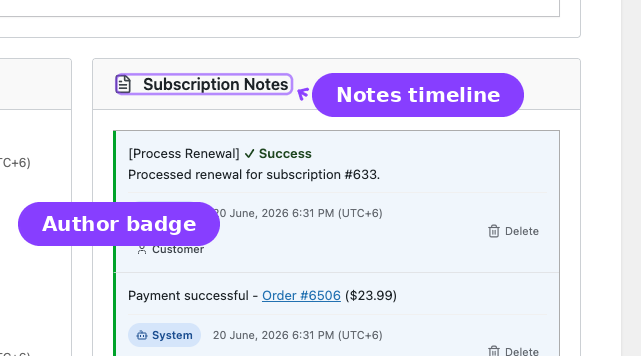
Subscription Notes is a dedicated record-keeping module in the free core plugin. Every subscription detail screen includes a notes panel that combines system-generated lifecycle events with manual notes from administrators and, when enabled, customer-visible notes.
Use this module when you need to answer "what happened to this subscription?" without checking orders, emails, gateways, and customer messages one by one.
What Gets Logged Automatically
ArraySubs creates system notes for important subscription events:
| Event Area | Examples |
|---|---|
| Status changes | Pending to Active, Active to On Hold, On Hold to Cancelled |
| Billing events | Renewal invoice created, payment completed, payment failed |
| Trial events | Trial started, trial converted to paid |
| Admin edits | Recurring amount changed, quantity changed, billing date updated |
| Customer actions | Cancelled, undo cancel, skipped renewal, paused, resumed |
| Plan changes | Plan switch requested, applied, cancelled, or failed |
| Coupons | Coupon captured, renewal cycles decremented, coupon expired |
| Gateways | Gateway attached, detached, resynced, or payment method updated |
System notes include enough context to reconstruct the change. For edited fields, notes include the previous value and new value.
Manual Notes
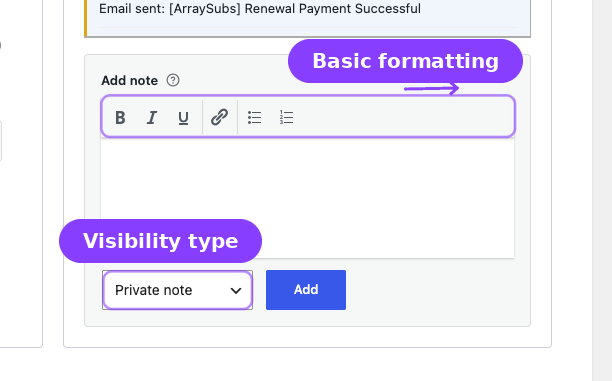
Admins can add manual notes from the notes panel.
| Note Type | Visibility | Use It For |
|---|---|---|
| Private | Admins only | Internal support context, risk notes, refund reasoning |
| Customer | Admins and the customer | Follow-up instructions or customer-facing service notes |
The editor supports basic formatting such as bold, italic, links, and lists. New notes appear at the top of the timeline.
Author Badges
Each note identifies who created it:
| Badge | Meaning |
|---|---|
| System | Auto-generated by ArraySubs |
| Admin | Written manually by an administrator |
| Customer | Submitted or exposed through a customer-facing flow |
| Gateway | Generated from payment gateway activity |
Deleting Notes
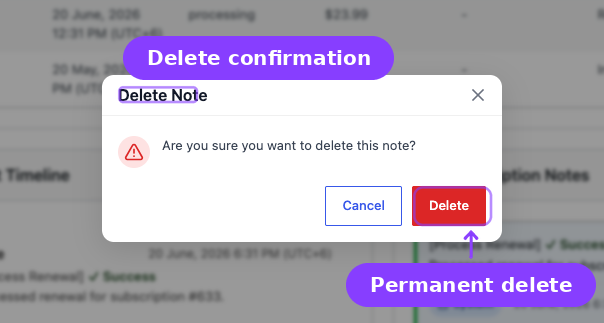
Admins can delete notes from the panel. Deleting a note is permanent.
System notes are part of the audit trail. Only delete them when you are intentionally cleaning test data or correcting an accidental manual note.
Real-Life Use Cases
Support Dispute Review
A customer says they never requested cancellation. Open the subscription, scroll to Subscription Notes, and review the cancellation event, selected reason, timestamp, and any retention offer interaction.
Billing Investigation
A renewal order failed and the customer later paid manually. Notes show when the invoice was generated, when payment failed, when the grace state changed, and when payment completed.
Admin Handoff
One team member adds a private note explaining why a subscription renewal date was extended. The next support agent sees that context before making another change.
Related Guides
- Subscription Operations — Opening and editing subscription records.
- Subscription Detail Cards — Conditional cards on the same screen.
- Coupons — Coupon cycle notes and subscription coupon tracking.
- Gateway Health — Gateway events that may create or explain notes.
FAQ
Do customers see every note?
No. Private notes are admin-only. Customer notes can be shown to the customer, depending on where they are surfaced in the customer portal.
Are system notes editable?
No. System notes are generated records. You can delete them, but you cannot edit their content.
Is this a Pro feature?
No. Subscription Notes is part of the free ArraySubs core plugin.