
Paddle Gateway
ProPaddle integration with Merchant of Record model — Paddle.js overlay checkout, automatic tax/VAT handling, native pause/resume support, and product catalog sync.
Availability: Pro
Page Navigation
- Current guide: Paddle Gateway
- Where to open it: Storefront checkout and WordPress Admin -> ArraySubs -> Checkout Builder
- Section overview: Open overview
- Previous guide: Gateway Health
- Next guide: payment-recovery
- Troubleshooting: Audits, Logs, and Troubleshooting
Overview
Paddle is unique among ArraySubs gateways because it operates as a Merchant of Record (MoR). This means Paddle is the legal seller of your product — it handles all payment processing, tax calculation, VAT collection, compliance, and customer invoicing. You receive net payouts after Paddle deducts its fee and applicable taxes.
Paddle uses the gateway-managed billing model and includes features that other gateways don't offer, such as native pause/resume and automatic tax handling in 200+ countries.
Current Capability Snapshot
| Capability | Paddle Behavior in ArraySubsPro |
|---|---|
| Automatic renewals | Yes. Paddle manages the billing schedule and confirms events by webhook. |
| Checkout type | Paddle.js overlay using a Paddle transaction. |
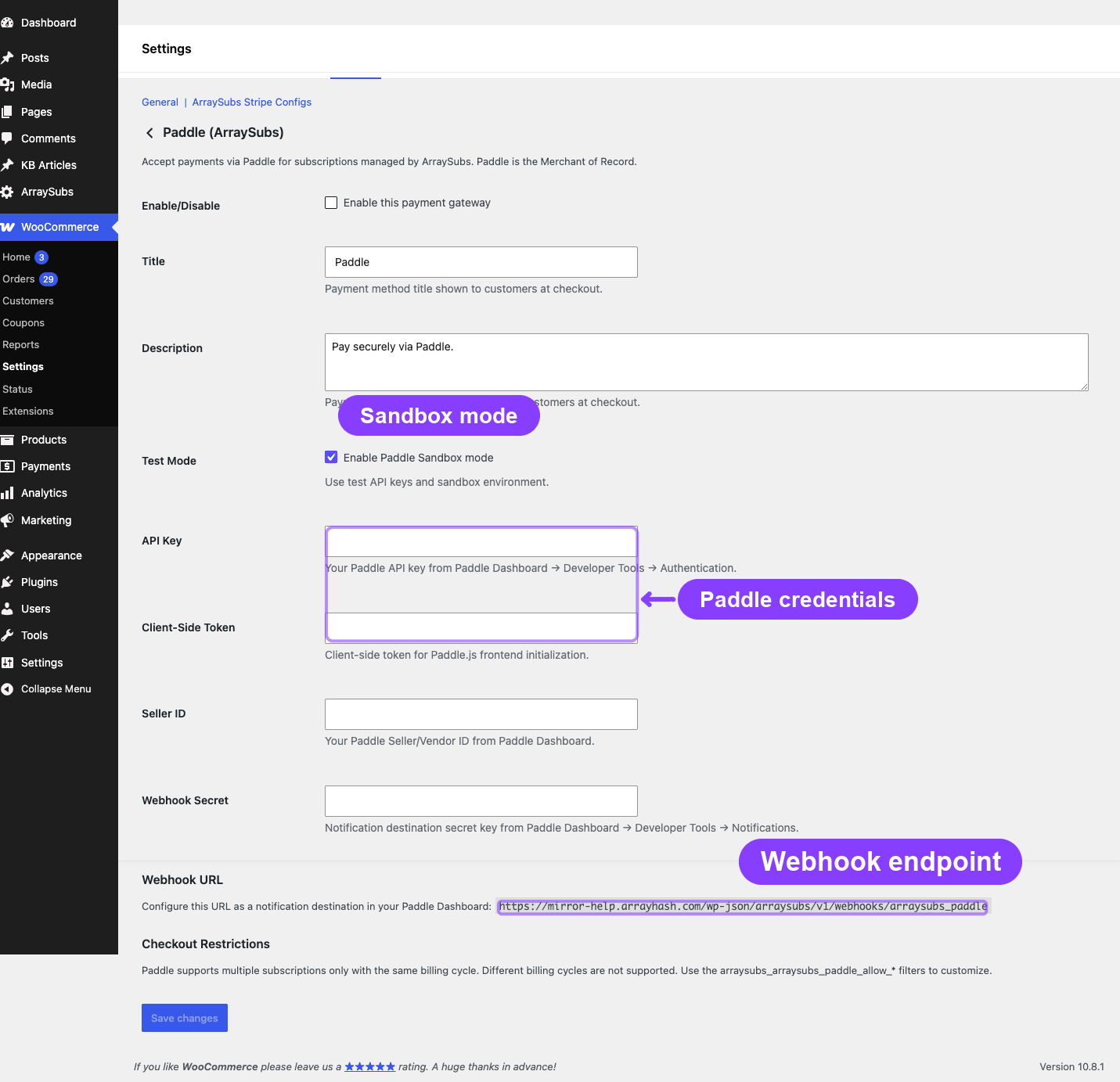
| Required credentials | API Key, Client-Side Token, Seller ID, and Webhook Secret. |
| Webhook URL | wp-json/arraysubs/v1/webhooks/arraysubs_paddle |
| Sandbox mode | Supported through the gateway settings. |
| Default Payment Link | Required in Paddle Dashboard before transactions can open. Set it to your WooCommerce checkout page. |
| Product sync | Required before checkout. ArraySubs creates or updates Paddle product/price records. |
| Mixed carts | Supported. |
| Multiple subscriptions in one checkout | Supported only when billing cycles are compatible. |
| Different billing cycles in one checkout | Not supported by default. |
| Native pause/resume | Supported. |
| End-of-period cancellation | Supported and reversible. |
| Payment method update | Supported through Paddle customer billing flows. |
| Card expiry notices | Not exposed by ArraySubs because Paddle owns the payment method experience. |
| Refunds | Supported through Paddle adjustment APIs. |
Paddle is the best fit when you want Merchant-of-Record handling for tax, invoices, and payment compliance. It is not the best fit when one checkout must contain subscriptions with unrelated billing cycles.
Required Paddle Dashboard Setup
Paddle needs a few dashboard settings before ArraySubs can create checkout transactions.
Default Payment Link
Paddle requires a Default Payment Link before transaction checkout URLs can be created. Configure it separately in the Paddle sandbox dashboard and live dashboard.
- Open WooCommerce -> Settings -> Payments -> ArraySubs Paddle
- Copy the checkout URL shown in the Default Payment Link settings guide, usually:
https://yoursite.com/checkout/
- In Paddle Dashboard, open Checkout -> Checkout settings -> Default payment link
- Paste the WooCommerce checkout URL and save
- For live mode, make sure the checkout domain is approved in Paddle before using it
The Default Payment Link is configured in Paddle, not saved inside WordPress. ArraySubs shows the recommended URL so you can copy it into the matching Paddle environment.
Paddle appends _ptxn=<transaction_id> to this URL when it creates a transaction checkout link. The checkout page must load WooCommerce checkout and Paddle.js. When Paddle returns a transaction URL, ArraySubs opens the Paddle.js checkout as an overlay on the current checkout page.
The same Paddle setting may also be used by Paddle for payment-method update links and customer-facing payment links. If it is missing, Paddle returns the API error transaction_default_checkout_url_not_set, and checkout setup cannot continue.
How Paddle Payments Work
Initial Checkout
- Customer selects Paddle at checkout
- ArraySubs ensures the subscription product is synced to Paddle's catalog (creates a Paddle Price if one doesn't exist)
- ArraySubs creates a corresponding Paddle Customer (or resolves an existing one by email)
- A Paddle Transaction is created with the correct price ID
- The Paddle.js overlay opens on top of your checkout page
- The customer completes payment within the Paddle overlay (supports cards, PayPal, Apple Pay, Google Pay, and local payment methods)
- Paddle sends a
transaction.completedwebhook followed bysubscription.created - ArraySubs captures the Paddle subscription ID, customer ID, and payment context
Renewal Payments
- Paddle manages its own billing cycle and charges the customer automatically
- When payment succeeds, Paddle sends a
transaction.completedwebhook (for the renewal) - ArraySubs creates a renewal order and marks it as paid
- If payment fails,
transaction.payment_failedfires and ArraySubs triggers the failure flow
Like PayPal, Paddle controls its own billing schedule. ArraySubs does not send charge requests to Paddle — it waits for Paddle's webhook to report each payment event.
Trial Support
Paddle supports trials natively through its Price object. When a subscription product has a trial period, ArraySubs configures the Paddle Price with a trial phase. Paddle handles the trial-to-paid conversion on its own schedule.
Merchant of Record Model
As the Merchant of Record, Paddle assumes these responsibilities:
| Responsibility | Who Handles It |
|---|---|
| Payment processing | Paddle |
| PCI compliance | Paddle |
| Tax / VAT calculation | Paddle (200+ countries) |
| Tax collection and remittance | Paddle |
| Customer invoicing | Paddle |
| Dispute / chargeback handling | Paddle |
| Currency conversion | Paddle |
| Payment method support | Paddle (cards, PayPal, Apple Pay, Google Pay, local methods) |
What you receive: Net payouts after Paddle's fee and taxes are deducted. Paddle provides detailed payout reports.
Because Paddle is the seller of record, the payout amount stored on the subscription (_gateway_paddle_payout_amount) may differ from the nominal subscription price due to taxes, currency conversion, and Paddle's fee.
Product Catalog Sync
Unlike Stripe and PayPal, Paddle requires products and prices to exist in its catalog before transactions can be created. ArraySubs handles this automatically:
- When a subscription product is first purchased via Paddle, ArraySubs checks for an existing Paddle Price
- If none exists, it creates a Paddle Product and Price through Paddle's API
- The Paddle Price ID is stored as product meta for future use
- Subsequent checkouts for the same product reuse the synced Price
If you change a subscription product's price in WooCommerce, the Paddle Price may need to be updated or recreated. Existing subscriptions keep the price they were created with; only new subscriptions use the updated price.
Native Pause and Resume
Paddle is the only gateway that supports native pause and resume at the gateway level.
Pause
When a subscription is paused through ArraySubs (customer self-service or admin action):
- ArraySubs sends a pause request to Paddle's API
- Paddle pauses its billing cycle — no future charges until resumed
- The
_gateway_statusis updated topaused - Paddle sends a
subscription.pausedwebhook for confirmation
Resume
When the subscription is resumed:
- ArraySubs sends a resume request to Paddle
- Paddle resumes its billing cycle
- The
_gateway_statusreturns toactive - Paddle sends a
subscription.resumedwebhook
For Stripe and PayPal, pause/resume is handled entirely within ArraySubs (by blocking renewal processing) since those gateways don't support native pause.
Limitations
| Feature | Status | Detail |
|---|---|---|
| Mixed carts | Supported | Subscription + regular products can be in the same cart |
| Multiple subscriptions | Supported | Multiple subscriptions per checkout |
| Different billing cycles | Not supported | All subscriptions must share the same billing schedule |
| Card auto-update | Supported | Paddle handles card updates internally |
| Card expiry notices | Not supported | Paddle manages payment method lifecycle |
| SCA / 3D Secure | N/A | Handled internally by Paddle |
| Dispute handling | N/A | Paddle handles disputes as MoR |
| Retention amount update | Not supported | Cannot change recurring amount through ArraySubs |
| Product sync required | Yes | Products must be synced to Paddle catalog |
Webhook Events
Configure these events in your Paddle webhook settings (Paddle Vendor Dashboard → Developer Tools → Notifications):
| Paddle Event | ArraySubs Handler |
|---|---|
transaction.completed |
Marks payment as successful |
transaction.payment_failed |
Triggers payment failure flow |
subscription.created |
Captures subscription context |
subscription.updated |
Updates payment method details |
subscription.canceled |
Handles remote cancellation |
subscription.paused |
Confirms pause |
subscription.resumed |
Confirms resume |
adjustment.created |
Records refund |
Webhook URL
https://yoursite.com/wp-json/arraysubs/v1/webhooks/arraysubs_paddle
Signature Verification
Paddle signs webhooks using SHA-256. ArraySubs verifies each webhook by computing the expected signature from the request body and the webhook secret.
Paddle-Specific Settings
Paddle gateway settings are configured in WooCommerce → Settings → Payments → ArraySubs Paddle:
| Setting | Description |
|---|---|
| Enable/Disable | Turn the gateway on or off |
| Title | Payment method name shown at checkout |
| Description | Text shown below the payment method |
| API Key | Paddle API authentication key |
| Webhook Secret | Secret for verifying webhook signatures |
| Default Payment Link | Setup guide showing which WooCommerce checkout URL to paste into Paddle Dashboard -> Checkout -> Checkout settings. This value is stored in Paddle, not WordPress. |
| Sandbox Mode | Enable to use Paddle's sandbox environment |
Troubleshooting
| Problem | Likely Cause | Solution |
|---|---|---|
| Paddle overlay not appearing | Paddle.js script blocked | Check for script-blocking plugins or Content Security Policy restrictions |
transaction_default_checkout_url_not_set or checkout setup fails before the overlay opens |
Paddle Default Payment Link is not configured in the active Paddle environment | Set Paddle Dashboard -> Checkout -> Checkout settings -> Default payment link to your WooCommerce checkout URL, then retry checkout |
| Product sync fails | API key invalid or permissions missing | Verify your Paddle API key has catalog write permissions |
| Customer charged but renewal order missing | transaction.completed webhook not arriving |
Check webhook configuration in Paddle Dashboard and verify the URL |
| Pause request fails | Paddle API error | Check Gateway Health Dashboard for the specific error; verify subscription is active on Paddle's side |
| Different billing cycles error | Paddle limitation | Paddle requires all subscriptions to share the same billing schedule. Separate the checkout into individual orders. |
Related Docs
- Gateway Overview — Architecture overview and capability matrix
- Auto-Renew and Manual Fallback — Customer toggle and manual payment
- Gateway Health Dashboard — Monitoring Paddle status
- Customer Portal — Self-Service Actions — How pause/resume works from the customer's perspective
FAQ
Do I need a Paddle account to use this gateway? Yes. You need a verified Paddle vendor account with API access enabled. Paddle has its own approval process for new vendors.
How does Paddle's pricing work? Paddle charges a percentage fee per transaction (varies by plan). Taxes are calculated and collected by Paddle on top of your set price, or included in the price depending on your Paddle configuration.
Can customers use Apple Pay or Google Pay? Yes. The Paddle.js overlay automatically displays all payment methods available in the customer's region, including Apple Pay, Google Pay, and local payment methods, without any additional configuration.
What happens to existing subscriptions if I deactivate the Paddle gateway? Paddle continues to bill customers on its own schedule until the subscriptions are cancelled on Paddle's side. However, ArraySubs won't process webhooks if the gateway is deactivated, so renewal orders won't be created locally. Always cancel Paddle subscriptions before deactivating the gateway.
Is Paddle suitable for physical product subscriptions? Paddle works best for digital products and services because it is designed as a MoR for digital goods. Physical product subscription stores should verify that Paddle's terms of service cover their product type.