
Cron Job Setup
Configure a reliable system cron so renewals, scheduled cancellations, expirations, and emails fire on time — not just when someone visits the site.
Availability: Free + Pro
Page Navigation
- Current guide: Cron Job Setup
- Where to open it: WordPress Admin -> ArraySubs
- Section overview: Open overview
- Previous guide: before-you-launch
- Next guide: easy-setup-wizard
- Troubleshooting: Audits, Logs, and Troubleshooting
Overview
ArraySubs runs almost every time-sensitive action through WordPress's scheduling system: renewal charges, end-of-period cancellations, free-trial conversions, on-hold transitions, expirations, dunning emails, and webhook cleanup. By default, WordPress fires those scheduled jobs through "WP-Cron," which only runs when somebody actually visits a page on your site. On a low-traffic store the next renewal can sit idle for hours; on a site that has been quiet for a day or two, jobs can pile up so badly that several customers' renewals run at the same moment when traffic resumes.
A real system cron — a tiny job on your server that hits WordPress every minute — eliminates that variance entirely. It is the single most important operational requirement for a reliable subscription store.
When to Use This
- Always, in production. Subscription stores cannot rely on WP-Cron's traffic-driven model.
- During staging tests where you need scheduled jobs to fire predictably.
- Right after launch, even if you currently have steady traffic — traffic patterns change.
Prerequisites
- SSH or cPanel access (or a managed-host equivalent like a "Cron Jobs" panel).
- The ability to add a line to your
wp-config.phpfile. - WordPress 5.0+ and ArraySubs installed.
How It Works
WP-Cron is not a cron at all — it is a queue checked every time a page loads. When a request comes in, WordPress inspects pending scheduled jobs and runs anything overdue. The result on a low-traffic site:
- Renewals scheduled for 2:00 AM might not fire until the first visit at 9:30 AM.
- A scheduled end-of-period cancellation can run hours past the customer's renewal window.
- Email queues drain in bursts whenever traffic happens.
- Some payment gateways (PayPal, Paddle) charge on their own clock — when WordPress falls behind, our local data drifts from the gateway's reality.
The fix is a two-step change:
- Disable WP-Cron so a casual page load no longer triggers it (this also speeds up every page request).
- Run a real cron every minute that calls
wp-cron.phpdirectly. This guarantees scheduled jobs are checked once per minute regardless of traffic.
Real-Life Use Cases
Use Case 1: Low-Traffic SaaS Site
A B2B subscription tool gets ~20 page views per day, mostly during business hours. Without a system cron, renewals scheduled for 6:00 AM only fire when the first user logs in, sometimes at 11:00 AM. With a system cron, every renewal fires within 60 seconds of its scheduled time.
Use Case 2: Site Recovery After Downtime
A site is down for two hours during a maintenance window. With WP-Cron, jobs sit idle and only fire when traffic resumes — sometimes minutes apart, sometimes all at once. With a system cron, the queue starts catching up immediately when the site is healthy again.
Use Case 3: Predictable Pending-Cancellation Timing
A customer schedules an end-of-period cancellation for the 15th. The cron job that performs the actual status flip fires within a minute of midnight on the 15th instead of waiting for traffic, so PayPal and Paddle subscribers don't risk being charged on the 15th before our cron flips the status.
Steps / Configuration
Step 1: Disable WP-Cron
Open wp-config.php and add this line before the /* That's all, stop editing! */ comment:
define('DISABLE_WP_CRON', true);
Save the file. After this, page loads no longer trigger scheduled jobs.
Step 2: Add a System Cron
Replace https://your-site.com/ with your actual site URL. Use the version that fits your hosting environment:
Option A: Linux / SSH (cPanel "Cron Jobs" or crontab -e)
* * * * * curl -s https://your-site.com/wp-cron.php?doing_wp_cron > /dev/null 2>&1
This runs every minute. If your host doesn't allow per-minute jobs, every 5 minutes is acceptable but increases the worst-case delay for renewal jobs to 5 minutes.
Option B: Windows Server / IIS
Use Task Scheduler to run the same URL every minute via curl.exe or Invoke-WebRequest.
Option C: Managed Hosting Without a Cron UI
Use an external service like EasyCron, cron-job.org, or Cronitor to ping your wp-cron.php URL every minute. The free tier of cron-job.org is sufficient for most stores.
Option D: Hosts With Built-in WP-Cron Replacements (Kinsta, WP Engine, Cloudways)
Some managed hosts already run a system cron internally. Check your host's documentation; if they confirm a 1-minute or 5-minute cron is running on your behalf, you only need to disable WP-Cron (Step 1) and skip the system cron command.
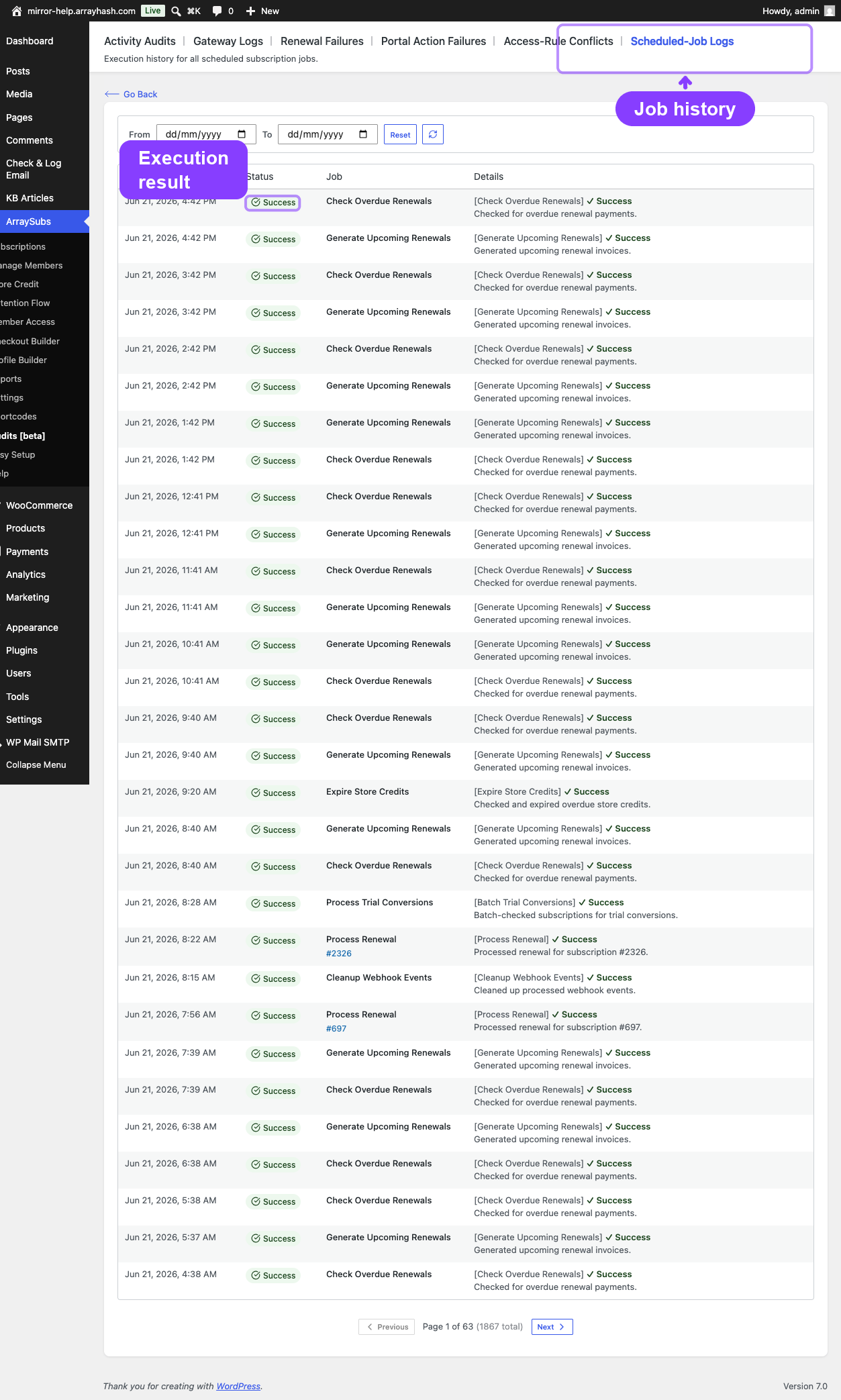
Step 3: Verify It's Working
- Install the WP Crontrol plugin (free).
- Go to Tools → Cron Events.
- Look at any event with a "Next Run" timestamp under 1 minute from now. After that minute passes, refresh — the timestamp should update.
- If timestamps stay frozen for more than 2 minutes, the system cron isn't reaching
wp-cron.php. Check your cron log on the server.
You can also test manually:
curl -v https://your-site.com/wp-cron.php?doing_wp_cron
A healthy response is HTTP 200 with no body. If you see a redirect or an error, the URL is wrong or the site has a firewall rule blocking the cron.
Settings Reference
| Setting | What It Controls | Recommended Use | Example |
|---|---|---|---|
DISABLE_WP_CRON in wp-config.php |
Whether page loads trigger scheduled jobs | Set to true once a system cron is in place |
define('DISABLE_WP_CRON', true); |
| Cron interval | How often wp-cron.php is hit |
Every 1 minute on production; every 5 min acceptable for small stores | * * * * * (every minute) |
| Cron user | Which OS user runs the cron | The same user that owns the WordPress files | www-data on most Linux hosts |
What Happens After Saving
- WP-Cron stops firing on page loads (so visitor pages load slightly faster).
- Every minute the system cron hits
wp-cron.php, which runs any overdue scheduled job. - Renewal charges, scheduled cancellations, expirations, trial conversions, and email sends all fire within 1 minute of their scheduled time.
- Action Scheduler (used by ArraySubs) continues to operate as before, just on a reliable clock.
- Existing scheduled jobs do not need to be re-queued — they simply start running on time.
Edge Cases / Important Notes
- Don't run multiple system crons against the same site. WordPress can handle concurrent runs but they waste resources.
- Don't disable WP-Cron without setting up a system cron first. Without either, no scheduled jobs run at all — renewals stop, emails stop, expirations stop. Test on staging first.
- Time zone matters. Scheduled jobs run in UTC at the database level; the cron itself doesn't care. But if you read "Next Run" times in WP Crontrol, they're shown in your site's WordPress timezone.
- Hosts with caching layers (Cloudflare, Pantheon, WP Engine) sometimes need the cron URL added to a "bypass cache" rule. If
curl wp-cron.phpreturns a cached response, the job won't actually run. - HTTPS only. Use
https://nothttp://so the cron isn't blocked by HSTS or a redirect. - Paid hosts may rate-limit cron URLs. If you see 429 responses, check your host's cron policy.
- Per-minute is the goal, not the floor. A 5-minute interval is fine for most stores; 15 minutes is the upper limit before subscription timing becomes noticeably unreliable.
Troubleshooting
| Problem | Likely Cause | What to Do |
|---|---|---|
| Renewals fire hours late | WP-Cron still running on traffic; system cron not hitting the site | Verify DISABLE_WP_CRON is set, run curl wp-cron.php manually, check the cron log on the server |
| Cron log shows 200 but jobs don't run | Cache is serving a stale response, or the cron URL is being redirected | Add wp-cron.php to your cache exclusion rules; use the canonical site URL (with or without www, matching your WP setting) |
| Action Scheduler "Past Due" count keeps growing | Cron interval too long, or PHP execution timing out | Reduce interval to 1 minute, increase max_execution_time for the cron user, check for fatal errors in the log |
| Multiple identical jobs running at the same time | Two crons configured against the same site | Remove the duplicate; run one cron per site |
| Cron stopped working after host migration | New host blocks outbound HTTP to itself, or wp-cron.php is now firewalled |
Use wp cron event run --due-now via WP-CLI as the cron command instead, or whitelist your own IP |
Why ArraySubs Cares So Much
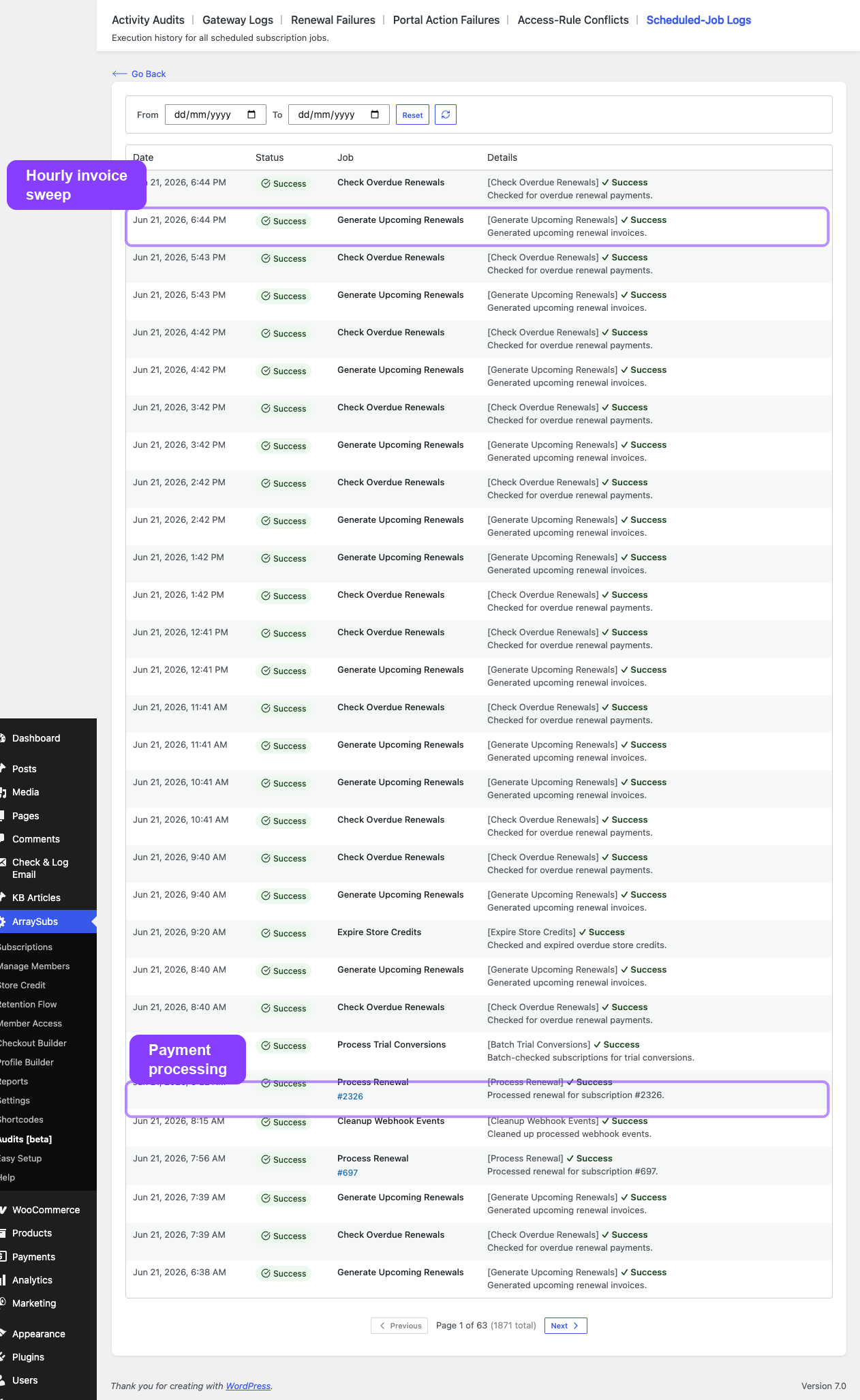
Because ArraySubs (free + pro) is built on a plugin-controlled renewal model for Stripe and manual gateways, the plugin's own cron is the only thing that triggers a renewal charge. If the cron doesn't fire, the renewal doesn't happen. PayPal and Paddle are gateway-controlled, so they will charge on their own — but the plugin still needs the cron to flip statuses, send emails, run grace-period transitions, and process scheduled cancellations.
Skipping the system cron is the single most common cause of "my renewals stopped working" support tickets. Setting it up correctly takes 5 minutes and prevents an entire category of problem.
Related Guides
FAQ
Do I need this if my site already has steady traffic?
Yes. Traffic patterns change; promotions end; you take a vacation. The system cron is a safety floor — it costs nothing and removes timing from the list of things that can fail.
Will this break anything that uses WP-Cron?
No. Other plugins that schedule WP-Cron jobs run exactly the same way; they're now triggered by your system cron instead of by visitors. The behavior is identical from their perspective, just more reliable.
What's the simplest setup if I don't have SSH?
Sign up for cron-job.org (free), point it at https://your-site.com/wp-cron.php?doing_wp_cron, set the schedule to every 1 minute, and you're done. Then add define('DISABLE_WP_CRON', true); to wp-config.php.
How do I know it's actually working?
Install WP Crontrol, look at any pending event, wait for its "Next Run" time to pass, refresh, and confirm the time updated. If it didn't, the cron isn't firing.
Does ArraySubs ever fall back to anything if the cron fails?
The hourly arraysubs_generate_upcoming_renewals batch is a soft safety net for missed precise invoice generation, but it still depends on cron firing at least once an hour. There's no fallback for "no cron at all."
What about Stripe — won't it charge customers anyway if my cron is down?
Not in this plugin's design. ArraySubs uses Stripe in plugin-controlled mode (off-session PaymentIntent at our scheduled time, not Stripe Subscriptions). If our cron doesn't fire, Stripe doesn't charge. Customers simply don't get charged until the cron resumes. PayPal and Paddle, by contrast, charge on their own schedule — so for those gateways your data falls behind, but charges still happen.
Should I test this before using it on a live store?
Yes. Test on staging: enable the cron, place a test subscription with a 1-day renewal interval (or use the admin's "Force renewal" tool), and confirm the renewal fires within a minute of the scheduled time without any page load.