
Billing and Renewals
How ArraySubs creates, schedules, and collects recurring payments — from the first invoice to the final renewal.
Availability: Free (core billing engine), with Pro extensions for automatic gateway payments
Page Navigation
- Current guide: Billing and Renewals
- Where to open it: WordPress Admin -> ArraySubs -> Subscriptions
- Section overview: Open overview
- Previous guide: scheduled-job-logs
- Next guide: renewal-operations
- Troubleshooting: Audits, Logs, and Troubleshooting
Overview
Billing and renewals form the heart of the ArraySubs subscription engine. Every active subscription follows a repeating cycle: an invoice is created before the due date, payment is collected (manually or automatically), and the next renewal date is scheduled. When payment doesn't arrive on time, a configurable grace period activates before the subscription is placed on hold or cancelled.
This section covers the complete billing lifecycle — how renewal invoices are generated, how first renewals can sync to predictable billing dates, how trials convert to paid subscriptions, how the grace period protects subscribers from immediate cancellation, and how the system communicates with customers throughout.
What this section covers
| Topic | What you will learn |
|---|---|
| Renewal Operations | How renewal invoices are created, how payment is routed (manual vs automatic), and how the different renewal price feature changes pricing after N payments |
| Renewal Sync | How to align first renewals to cycle boundaries, choose prorated or full first charges globally, and configure Pro Flexible Renewal Sync segments per product |
| Trial Management | How free trials start, what happens when a trial ends, how trial-to-paid conversion works, and what auto-downgrade does when a customer does not convert |
| Recovery and Grace Flows | The two-phase grace period timeline, how overdue renewals are detected, how skip and pause interact with the billing cycle, and how payment at any point during grace restores the subscription |
| Renewal Communication | What emails are sent during the billing cycle — renewal reminders, invoice notifications, payment confirmations, failure alerts, and on-hold notices |
How the billing engine works
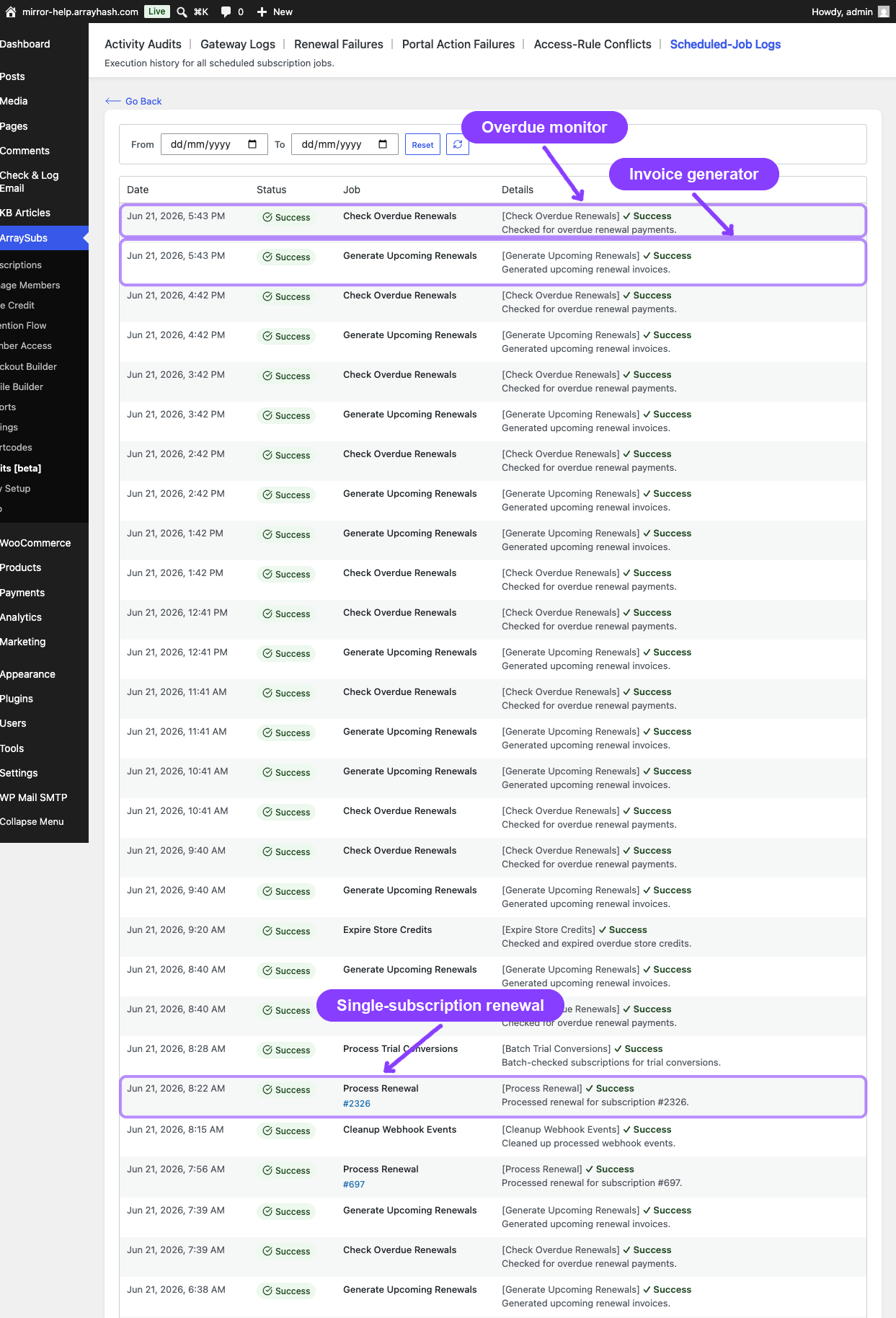
The billing engine runs on scheduled background jobs that execute automatically. You do not need to trigger renewals manually — the system handles everything based on each subscription's next payment date.
Three recurring background jobs power the billing cycle:
- Generate Upcoming Renewals — runs every hour, creates renewal invoices for subscriptions due within the configured advance window (default: 6 hours)
- Check Overdue Renewals — runs every hour, moves unpaid subscriptions through the grace period phases (active → on-hold → cancelled)
- Process Trial Conversions — runs daily at 2 AM, converts trial subscriptions to active paid subscriptions when the trial period ends
These jobs work together to keep every subscription on schedule without manual intervention.
Billing cycle at a glance
┌──────────────┐    ┌──────────────┐    ┌──────────────┐    ┌──────────────┐
│  Invoice      │    │  Payment     │    │  Next date   │    │  Renewal     │
│  created      │ →  │  collected   │ →  │  scheduled   │ →  │  reminder    │
│  (6h before)  │    │  (or grace)  │    │  (+ 1 cycle) │    │  (3d before) │
└──────────────┘    └──────────────┘    └──────────────┘    └──────────────┘
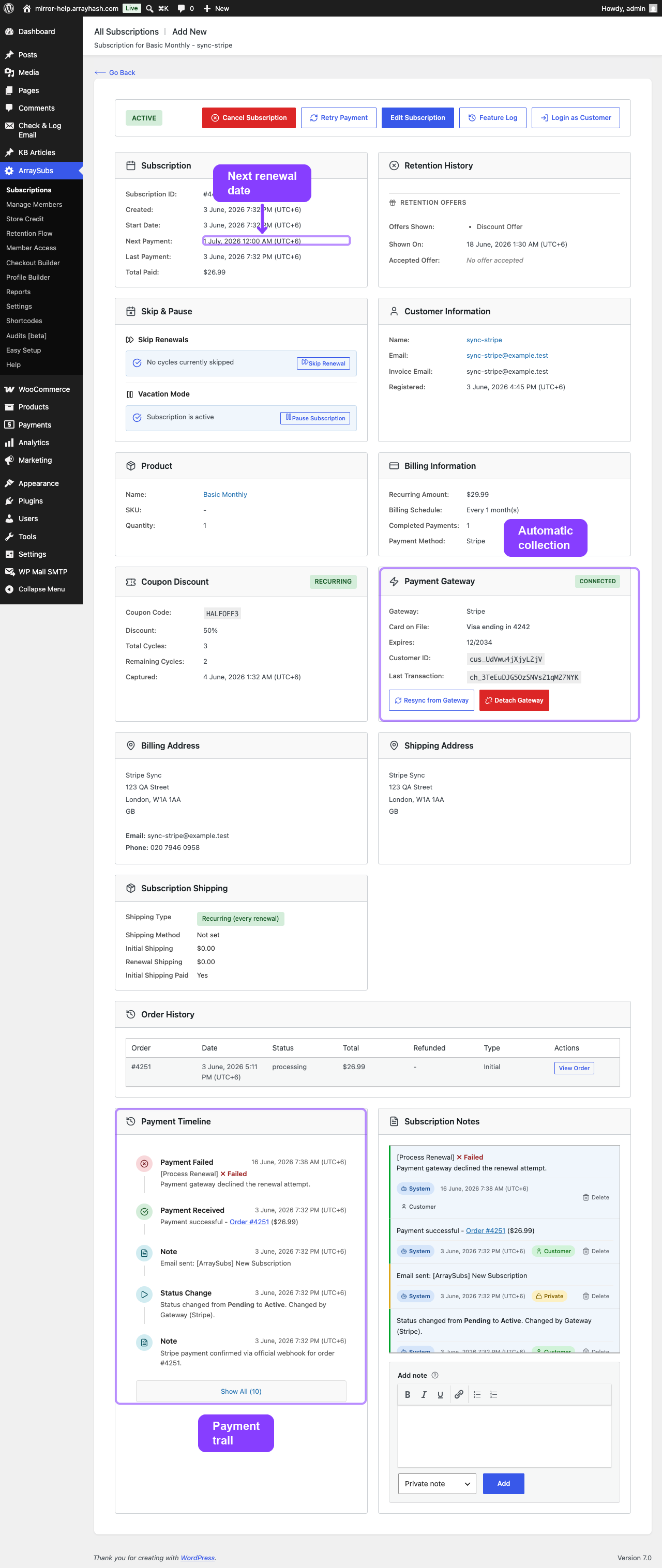
- Invoice creation — A pending WooCommerce order is created before the due date. The subscription status stays active.
- Payment — For automatic payment subscriptions Pro, the gateway charges the saved payment method. For manual subscriptions, the customer receives an invoice email with a payment link.
- Next date scheduled — After payment succeeds, the next payment date advances by one billing cycle and a renewal reminder is scheduled.
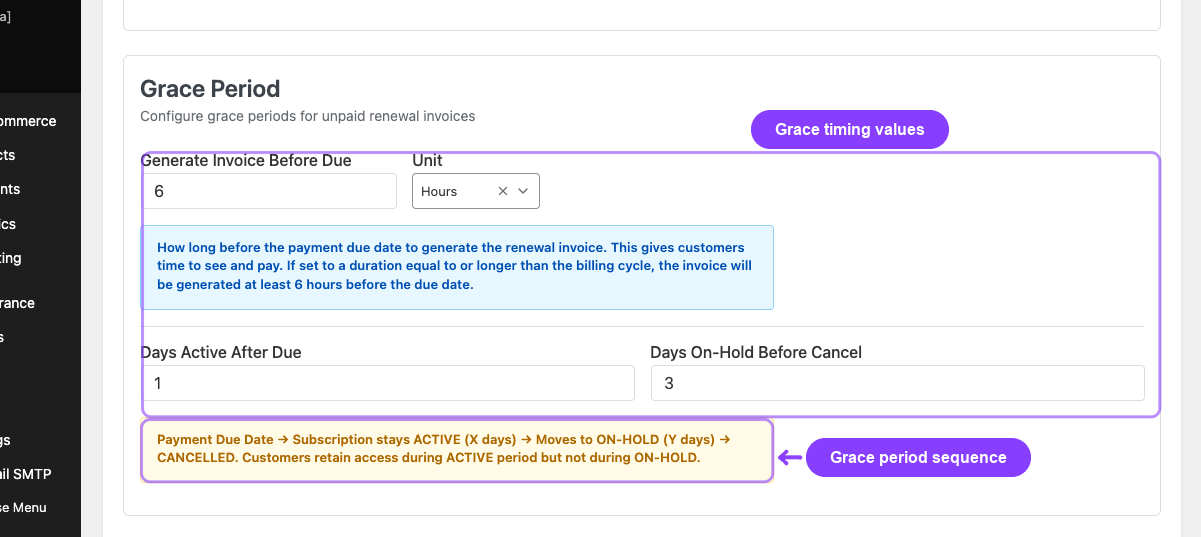
- Grace period — If payment is not received by the due date, the subscription enters a configurable grace period before status changes occur. See Recovery and Grace Flows.
Key concepts
Renewal invoice — A pending WooCommerce order created by the billing engine. It uses the subscription's stored prices, not the current product price. If the subscription has a retention discount or a different renewal price tier, the invoice reflects those amounts.
Billing cycle — The combination of billing interval and billing period that defines how often a subscription renews. For example, "every 2 months" means a billing interval of 2 and a billing period of month.
Renewal sync — A first-renewal alignment feature that moves eligible new subscriptions to a shared billing-cycle boundary while keeping future renewals on that schedule. See Renewal Sync.
Completed payments — A counter that tracks how many successful payments have been made on a subscription. This counter drives the different renewal price feature and subscription length expiration.
Grace period — A configurable window after the due date where the subscription remains accessible (or partially accessible) while waiting for payment. The default is 3 days active + 7 days on-hold before cancellation.
Related docs
- General Settings — Renewal and Grace Configuration for configuring invoice timing, grace periods, and reminders
- Renewal Sync for prorated or full first-charge alignment and Pro Flexible Renewal Sync product segments
- Lifecycle Management for the complete status transition reference
- Customer Emails for all billing-related email templates and placeholders
- Self-Service Actions for how skip and pause affect the billing timeline from the customer's perspective
- Automatic Payments Pro for gateway-managed billing and payment method lifecycle
FAQ
Does the billing engine run automatically?
Yes. Three background jobs (powered by Action Scheduler) run on fixed intervals — hourly for invoice generation and overdue checking, and daily for trial conversions. No manual triggering is needed.
What happens if the background jobs are delayed?
The system is designed to catch up. If the hourly job runs late, it processes all subscriptions whose next payment date has passed, including those that were due hours or days earlier. No renewals are skipped.
Can I manually create a renewal invoice?
Renewal invoices are generated automatically by the billing engine. To create an order for a subscription manually, use WooCommerce's standard order creation and link it to the subscription.
Does changing a product's price affect existing subscriptions?
No. Subscription prices are locked at checkout. Product price changes only affect new subscriptions purchased after the change. Existing subscriptions continue to renew at their original stored price (or the configured different renewal price, if set).
What is the difference between manual and automatic renewals?
Manual renewals create a pending invoice and email the customer a payment link. The customer must log in and pay. Automatic renewals Pro charge the customer's saved payment method through the configured gateway (Stripe, PayPal, or Paddle) without requiring customer action.