
Subscription Checkout
Controls everything that happens between "Add to Cart" and the moment a subscription is created — cart validation, checkout display, trial handling, automatic account creation, plan switching, and the final subscription record.
Availability: Free
Page Navigation
- Current guide: Subscription Checkout
- Where to open it: Storefront cart/checkout and WordPress Admin -> ArraySubs -> Settings -> General
- Section overview: Open overview
- Previous guide: README
- Next guide: payment-and-shipping
- Troubleshooting: Audits, Logs, and Troubleshooting
Overview
When a customer adds a subscription product to the cart, ArraySubs takes over several parts of the WooCommerce checkout experience. It validates the cart against your store rules, displays a detailed subscription summary, handles account creation for guest purchasers, detects plan-switching eligibility, and — once the order is paid — creates the subscription record with all its billing schedule, trial, and pricing data locked in.
Both Classic Checkout (shortcode-based) and Block Checkout (WooCommerce Store API) are fully supported. Cart validation, subscription creation, and plan-switching logic work identically in both flows.
How It Works
The checkout engine runs in three phases:
Phase 1 — Cart validation. Every time a subscription product is added to the cart, rules are checked against your General Settings: can this customer have multiple subscriptions? Is a mixed cart allowed? Are billing cycles compatible? Has this customer already had a trial?
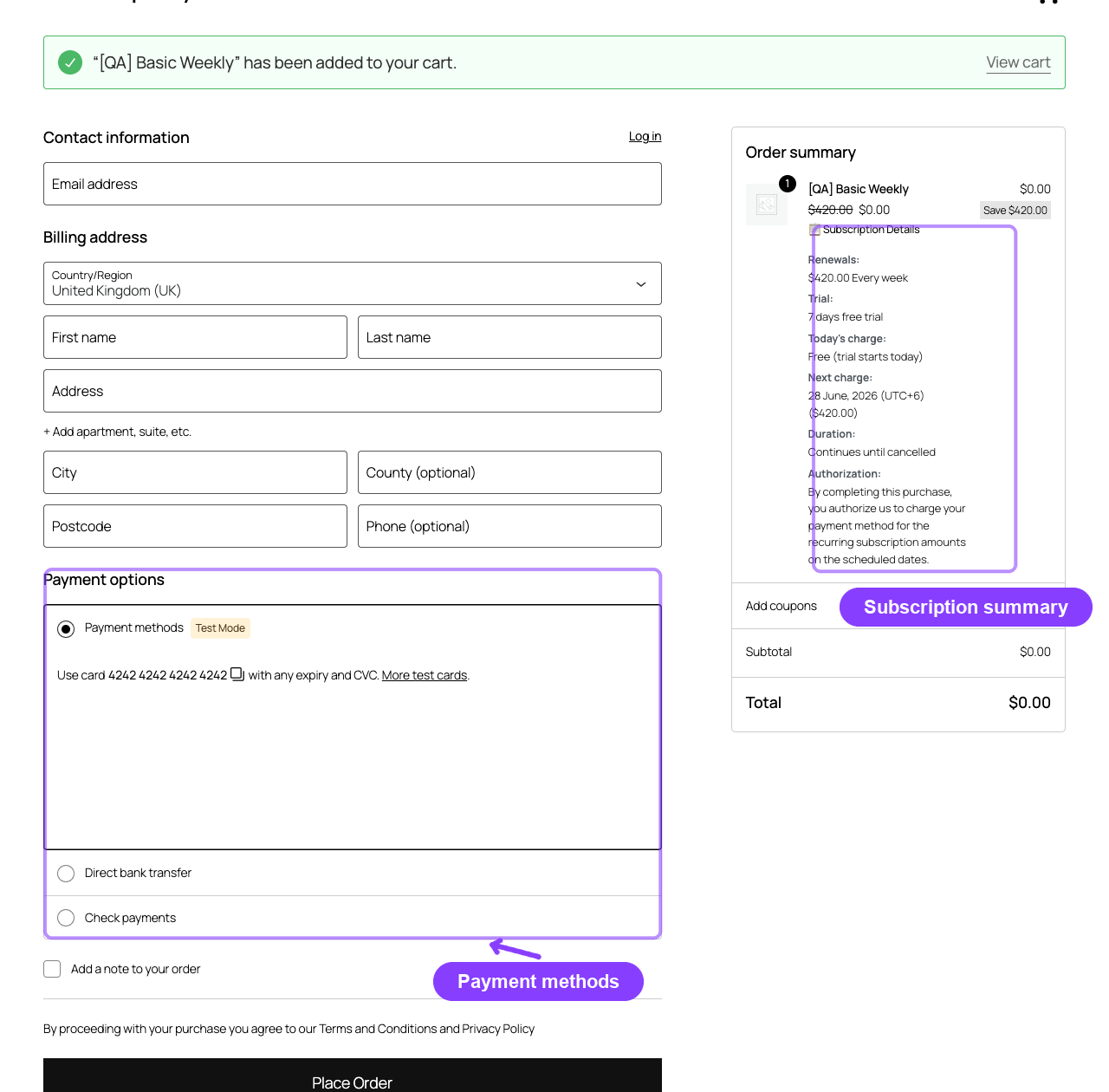
Phase 2 — Checkout display and account handling. The checkout page shows a subscription summary inside the order review table — recurring price, trial period, signup fee, today's charge, next payment date, and an authorization notice. If the customer is a guest and auto-create-account is enabled, WooCommerce shows the registration form.
Phase 3 — Subscription creation. After payment completes, ArraySubs creates one subscription record per subscription line item in the order. Prices are locked at the checkout amount (sale prices, coupons, and signup fees apply at this moment and never change retroactively). The subscription starts in Trial status if a trial is configured, or Pending if not.
Cart Validation Rules
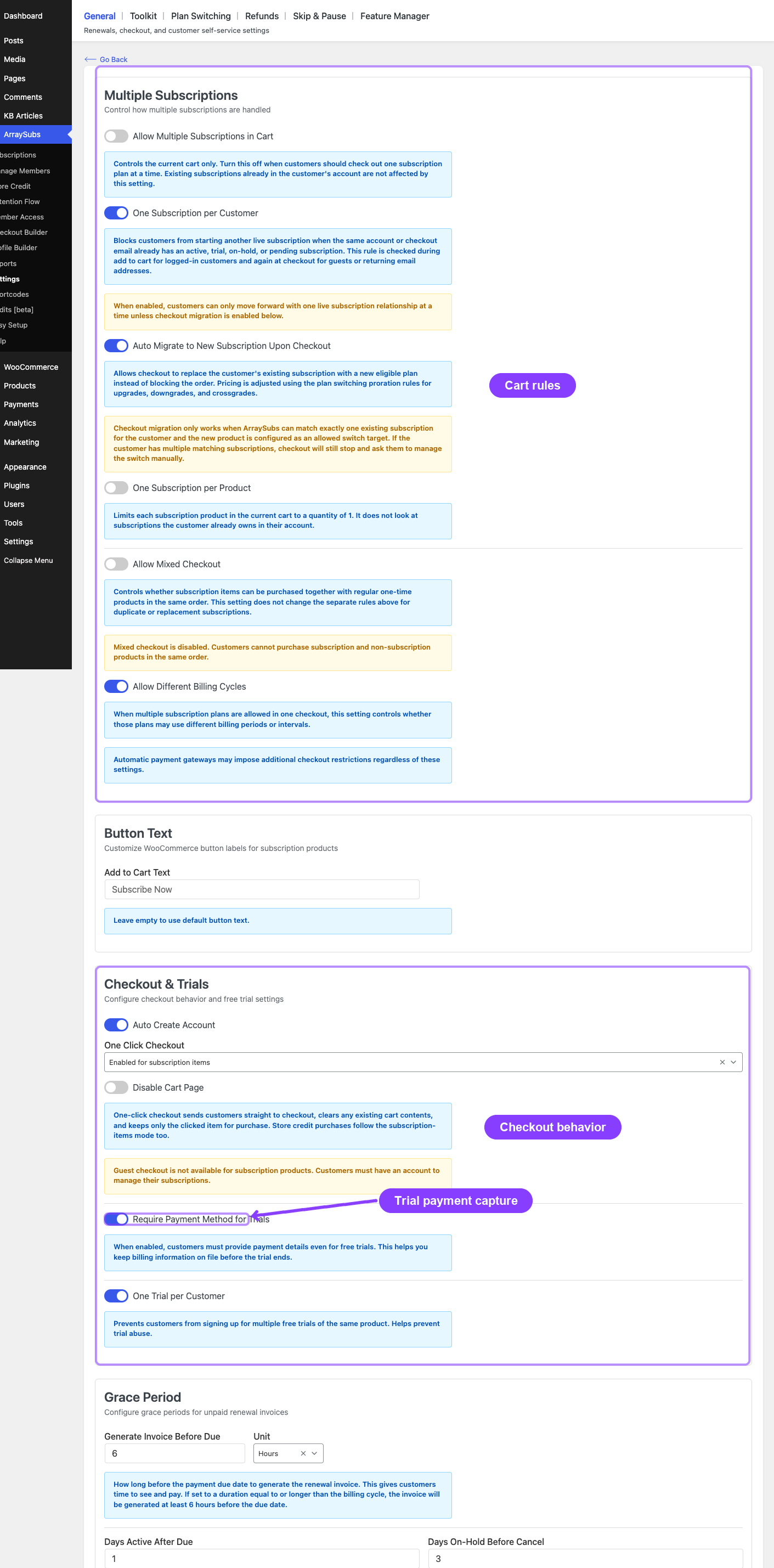
Cart validation runs every time a customer adds a product to the cart and again when viewing the cart page. All rules are configured in ArraySubs → Settings → General Settings under the Multiple Subscriptions section.
Mixed Cart Rule
Controls whether subscription and non-subscription products can coexist in the same cart.
| Setting | Default | Effect when disabled |
|---|---|---|
| Allow mixed cart | Enabled | Customer sees: "This order cannot contain subscription and regular products together." |
When disabled, adding a regular product to a cart that already contains a subscription (or vice versa) is blocked with an error message.
Multiple Subscriptions Rule
Controls whether more than one distinct subscription product can be in the cart at once.
| Setting | Default | Effect when disabled |
|---|---|---|
| Allow multiple subscriptions in cart | Enabled | Customer sees: "Only one subscription plan can be checked out at a time." |
One Per Product Rule
Prevents a customer from adding more than one quantity of any single subscription product.
| Setting | Default | Effect when enabled |
|---|---|---|
| One subscription per product | Disabled | Customer sees: "Each subscription product can only appear once per order. Reduce the quantity to 1." |
Different Billing Cycles Rule
Controls whether subscription products with different billing schedules (e.g., one monthly, one yearly) can be in the same cart.
| Setting | Default | Effect when disabled |
|---|---|---|
| Allow different billing cycles | Enabled | Customer sees: "These subscription plans use different billing cycles." |
One Trial Per Customer
Prevents a logged-in customer who has ever had a subscription (including cancelled or expired ones) from starting another free trial.
| Setting | Default | Effect when enabled |
|---|---|---|
| One trial per customer | Enabled | Customer sees: "You have already used a free trial. Free trials are limited to one per customer." |
Guest users are not subject to the trial restriction because their purchase history cannot be tracked. Once they create an account during checkout, the restriction applies to future purchases.
Gateway Cart Restrictions Pro
When Automatic Payments is active, enabled gateways may impose additional cart restrictions. The most restrictive gateway wins:
- If any enabled gateway does not support mixed carts, mixed carts are blocked
- If any enabled gateway does not support multiple subscriptions, only one is allowed
- If any enabled gateway does not support different billing cycles, all subscriptions must share the same schedule
See Gateway Overview for the capability comparison matrix.
One-Click Checkout
One-click checkout skips the cart page entirely, sending the customer straight from the product page to checkout.
How to Enable
Go to ArraySubs → Settings → General Settings → Checkout Options and set the One-Click Checkout Mode:
| Mode | Behavior |
|---|---|
Default |
Standard WooCommerce add-to-cart behavior (cart page) |
Subscription items |
Only subscription products skip to checkout; regular products go to cart normally |
All items |
Every product skips to checkout |
What Happens
- Customer clicks the add-to-cart button on a product page
- The cart is cleared — only the clicked product remains
- The customer is redirected directly to the checkout page
- AJAX add-to-cart is automatically disabled for one-click products (the page performs a full redirect)
Cart Page Redirect
An additional setting, Disable cart page, controls whether the cart page itself redirects to checkout when the cart contains a one-click product. If enabled, any attempt to visit the cart page sends the customer to checkout instead.
Button Text Customization
When one-click mode is active:
- Subscription products show the text configured in Add to Cart Text (default:
"Subscribe Now") - Non-subscription products (in
All itemsmode) show the text configured in Non-Subscription Button Text
These labels can be changed in General Settings → Button Text.
Trial Handling at Checkout
Subscription products with a trial period behave differently during checkout.
How Trials Affect the Order
| Scenario | Today's Charge | Subscription Status |
|---|---|---|
| Trial only (no signup fee) | Free — no charge today | Trial |
| Trial + signup fee | Signup fee only | Trial |
| No trial | Full subscription price (+ signup fee if set) | Pending |
The subscription's next payment date is calculated from the trial end date. For example, a 14-day trial that starts on April 2 sets the first renewal on April 16.
Payment Method Requirement
The setting Require payment method for trials (default: enabled) controls whether customers must enter a payment method even when the trial is free. This ensures the first paid renewal can be charged automatically when the trial ends.
Even with this setting enabled, gateway-level enforcement depends on the payment gateway integration. Verify with a test order that your gateway correctly captures a payment method during a free trial checkout.
One Trial Per Customer
When enabled, ArraySubs queries all of a logged-in customer's past subscriptions — including cancelled and expired ones — to determine whether they have ever had a trial. If they have, the trial product is blocked at add-to-cart with a clear error message.
Guest users can always start a trial because their history cannot be checked before account creation.
Auto-Create Account
When a guest customer purchases a subscription, ArraySubs can force WooCommerce to display the account creation form at checkout.
Setting
Go to ArraySubs → Settings → General Settings → Checkout Options and enable Auto-create account for subscription purchases.
| Setting | Default | Effect |
|---|---|---|
| Auto-create account | Enabled | Guest checkout is disabled when the cart contains a subscription product. WooCommerce shows the registration form. |
This applies to all subscription products, including store credit purchase products that are filtered as subscription-type items.
ArraySubs does not auto-create the account silently — it makes WordPress display the registration form so the customer fills in their desired credentials. WooCommerce handles the actual account creation.
Plan Switching at Checkout
When a customer with an existing subscription purchases a new subscription product, ArraySubs can automatically switch them to the new plan instead of creating a second subscription. This is called checkout migration.
Eligibility
All of the following must be true:
- The customer has exactly one active subscription (status: Active, On-Hold, Trial, or Pending)
- Plan Switching is enabled in General Settings
- The correct switch direction is allowed (upgrades, downgrades, or crossgrades)
- The new product is listed as an allowed switch target on the current product's Linked Products tab
- One subscription per customer is enabled
- Auto-migrate on checkout is enabled
When all conditions are met, the checkout automatically applies prorated pricing and marks the order as a plan switch.
What the Customer Sees
Instead of the regular subscription price, the checkout shows:
- The prorated amount due today (based on the proration method configured in General Settings)
- Context about the switch: "Replaces your current [Current Product] subscription"
- The new recurring price that will apply after the switch
What Happens After Payment
- The existing subscription's product and pricing are updated to the new plan
- The switch order is linked to the subscription as a related order
- An order note is added: "Existing subscription updated from checkout migration"
- The billing schedule resets according to the new product's configuration
No new subscription is created — the existing one is modified in place.
Proration Methods
The amount charged today depends on the proration type set in General Settings → Plan Switching:
| Method | Behavior |
|---|---|
| Prorate immediately | Calculates the unused value of the current plan and subtracts it from the new plan's price. The difference is charged today. |
| Apply at renewal | No charge today for the price difference. The new recurring price takes effect at the next renewal. |
| No proration | The full new plan price is charged today with no credit for unused time. |
Plan switching at checkout only works when the customer has exactly one live subscription. If they have two or more, checkout proceeds normally and creates a new subscription instead.
For more details on plan configuration, see Plan Switching and Product Relationships.
Checkout Subscription Summary
Every checkout page that includes a subscription product displays a detailed summary inside the order review table. This summary updates via AJAX as the customer changes quantities, coupons, or shipping options.
What's Displayed
For every subscription line item:
| Detail | Example | Shown When |
|---|---|---|
| Product name + quantity | "Premium Plan (x2)" | Always |
| Recurring price + schedule | "$29.99 every month" | Always |
| Different renewal price tiers | "$29.99 monthly for the first 3 payments, then $19.99 monthly" | Product has different renewal price enabled |
| Signup fee | "$10.00 one-time fee" | Signup fee > 0 |
| Free trial | "7 days" | Trial length > 0 |
| Duration | "12 billing cycles" or "Continues until cancelled" | Always |
| Today's charge calculation | "$29.99 + $10.00 signup = $39.99" | Always (varies by trial/fee combo) |
| Next charge date | "April 16, 2026" | Always (except lifetime deals) |
| Synced renewal note | "First full renewal: July 1, 2026 ($30.00)" | Renewal Sync is enabled for the checkout |
| Authorization notice | "By completing this purchase, you authorize us to charge..." | Always |
Special cases:
- Lifetime subscriptions show: "Lifetime Deal — No recurring charges" instead of a next charge date
- Trial + no fee shows: "Free (trial starts today)" as today's charge
- Plan switch at checkout shows the prorated amount and switch context instead of the regular summary
- Renewal Sync can show a prorated first charge today, then the full recurring amount on the synced first renewal date
Order Details Page
After checkout, the order confirmation and My Account order detail pages display a Related Subscriptions table with:
- Subscription ID (linked to the customer portal)
- Status badge (color-coded: green for Active, blue for Trial, yellow for Pending, etc.)
- Next payment date
- Recurring total with billing schedule
Subscription Creation
Once the order payment is confirmed, ArraySubs creates one subscription record per subscription line item.
What's Stored
Every subscription captures a snapshot of the checkout state:
| Data | Source | Example |
|---|---|---|
| Customer ID and email | Order billing | 42, [email protected] |
| Product and variation ID | Cart line item | 123, 456 |
| Quantity | Cart line item | 2 |
| Billing period and interval | Product configuration | month, 1 |
| Subscription length | Product configuration | 12 (or 0 for unlimited) |
| Recurring amount | Full product recurring price at checkout | $29.99 |
| Signup fee | Product configuration | $10.00 |
| Trial length and period | Product configuration | 14, day |
| Different renewal price | Product configuration | $19.99 after 3 payments |
| Payment method | Checkout selection | stripe, paypal |
| Currency | Store currency | USD |
| Start date | Order completion time | 2026-04-02 14:30:00 |
| Next payment date | Calculated from trial or billing cycle | 2026-04-16 14:30:00 |
| Renewal sync metadata | Checkout sync context when enabled | first charge mode, cycle start, first full renewal date, initial recurring charge |
| Billing and shipping addresses | Order addresses | JSON-encoded |
| Parent order ID | The checkout order | 789 |
Prices are locked at checkout. If you later change a product's price, existing subscriptions keep their original checkout price. Only new subscriptions use the updated pricing.
Renewal Sync at Checkout
If ArraySubs → Settings → General → Renewal Sync is enabled, eligible non-trial subscriptions can align their first full renewal to the next billing-cycle boundary.
Example:
- Product price is
$30/month. - Customer buys on the 20th.
- With Prorate until the synced renewal date, checkout charges
$10for the remaining full billing days in the current 30-day cycle. - The subscription's Next Payment Date is set to the 1st of the next month.
- The renewal order on the 1st charges the full
$30, and later renewals continue on the 1st.
With Charge the full recurring amount, checkout charges the full $30 on the 20th, but the first full renewal still lands on the 1st.
Renewal Sync is supported for manual/offline gateways and Stripe checkout. PayPal and Paddle automatic checkout options are hidden while a synced subscription is in the cart. Free trials and Lifetime Deal products are not synced.
For Stripe checkout, a very small prorated first charge may be raised to Stripe's minimum charge for the store currency. This adjustment affects only the signup charge; renewal orders still use the full recurring amount.
Duplicate Prevention
ArraySubs prevents double subscription creation through multiple safeguards:
- Classic Checkout and Block Checkout each have their own dedicated hook — a subscription created by one hook is not recreated by the other
- A fallback hook checks for an existing
_subscription_idsorder meta key before creating anything - Each order item receives a
_subscription_idmeta value after its subscription is created
Status After Creation
| Scenario | Initial Status |
|---|---|
| Product has a trial period | Trial |
| Product has no trial | Pending (transitions to Active when payment is confirmed) |
WooCommerce Order Status After Payment
The WooCommerce order status describes payment and fulfillment. It is not the same as the subscription status.
After payment is confirmed:
| Order condition | Expected order status | Subscription result |
|---|---|---|
| Subscription-only order with no shipping work | Completed |
Subscription becomes Active or stays Trial |
| Subscription order includes a shippable product or subscription shipping | Processing |
Subscription can still become Active because payment succeeded |
| Payment has not been confirmed yet | Pending payment |
Subscription remains Pending until payment succeeds |
| Payment failed | Failed |
Subscription may move to On-Hold until payment is retried or recovered |
Processing can be a normal paid status
If a paid subscription order is Processing, check whether the product needs shipping or whether subscription shipping added a shipping line. In that case, WooCommerce is waiting for fulfillment. The subscription can still be Active because payment was received.
For digital subscription products, make sure the product does not need shipping. ArraySubs completes paid subscription-only orders and renewals when there is no shipping work left.
Real-Life Use Cases
Gym Membership with Trial
A fitness center offers a 7-day free trial. A new customer adds the membership to cart, goes through checkout (auto-account creation is forced), pays nothing today (trial only, no signup fee), and receives a subscription with Trial status. On day 7, the first renewal invoice is generated and charged automatically.
SaaS with Monthly and Annual Plans
A software company sells monthly ($19/mo) and annual ($199/yr) plans. The store disables Different billing cycles in the cart, so customers cannot mix the two. If someone tries to add both, they see: "These subscription plans use different billing cycles." They must remove one to proceed.
Course Platform with One-Click
An online course platform enables one-click checkout for subscription items. A student clicks "Enroll Now" on a course product page, their cart is cleared, the course is added, and they land directly on the checkout page. No cart page visit needed.
Upgrade at Checkout
A customer on the Basic plan ($9/mo) visits the Pro plan product page ($29/mo) and adds it to cart. ArraySubs detects the existing subscription, applies prorated pricing (crediting the unused portion of the Basic plan), and shows the difference as today's charge. After payment, the Basic subscription becomes a Pro subscription — no second subscription is created.
Edge Cases and Important Notes
- Variable subscription products use the selected variation's subscription data (price, trial, billing period) rather than the parent product's data
- Coupons are applied to the cart total at checkout. Recurring coupons (with cycle limits) are captured at this point and applied to future renewals by the billing engine
- Store API compatibility — all cart validation errors surface as proper Store API cart errors, ensuring Block Checkout shows the same restrictions as Classic Checkout
- Guest checkout — if auto-create-account is disabled and WooCommerce allows guest checkout, the subscription is still created but may have limited customer portal access until the customer creates an account
Troubleshooting
| Problem | Likely Cause | Solution |
|---|---|---|
| "Only one subscription plan can be checked out at a time" | Multiple subscriptions in cart is disabled | Enable Allow multiple subscriptions in cart in General Settings, or remove one product from cart |
| "This order cannot contain subscription and regular products together" | Mixed cart is disabled | Enable Allow mixed cart in General Settings, or separate the order |
| "You have already used a free trial" | One-trial-per-customer is enabled and the customer has a past subscription | Disable the restriction or create a coupon-based discount instead of a trial |
| Subscription not created after checkout | Order payment not yet confirmed | Check the order status — subscriptions are created when the order is paid, not when it is placed |
| Subscription is Active but the order is Processing | Payment succeeded, but WooCommerce is waiting for fulfillment or shipping | Check whether the product needs shipping or whether subscription shipping is enabled. Complete the order after fulfillment, or remove shipping from digital subscription products. |
| Digital subscription order does not complete | Product or renewal still has shipping work, or the product is virtual but WooCommerce still considers it processable | Confirm the product does not need shipping and remove recurring shipping rules if the subscription is fully digital. Future non-shipping subscription orders complete automatically. |
| Plan switch did not trigger | Eligibility not met | Verify all 6 eligibility conditions listed above. The most common miss is that Auto-migrate on checkout is disabled |
| One-click not redirecting to checkout | Product uses AJAX add-to-cart | ArraySubs disables AJAX for one-click products automatically. Check for theme or plugin conflicts that re-enable it |
Related Docs
- General Settings — Cart rules, checkout options, trial settings
- Plan Switching and Product Relationships — Configuring upgrade/downgrade/crossgrade paths
- Lifecycle Management — What happens after subscription creation
- Automatic Payments — How gateways process the initial payment
FAQ
Does ArraySubs support Block Checkout (the new WooCommerce checkout)? Yes. Cart validation, subscription creation, plan switching, and all checkout hooks work identically in both Classic Checkout and Block Checkout (Store API). The subscription summary inside the order review table is also displayed in Block Checkout.
What happens if a customer uses a coupon at checkout? The coupon discount is applied to the checkout total as usual. If the coupon is configured as a recurring coupon with a cycle limit, it is captured at checkout and continues to apply to future renewal invoices for the specified number of cycles.
Can I disable auto-account creation but still sell subscriptions? Yes. If auto-account creation is disabled and WooCommerce allows guest checkout, the subscription is created with the order's billing email. The customer can claim the subscription later by creating an account with that same email.
What is the difference between "one subscription per customer" and "one subscription per product"? One per customer prevents a customer from having more than one active subscription total (and enables auto-migration). One per product prevents buying more than 1 quantity of any single subscription product in a single order but allows different products.
Can plan switching work with variable products? Yes. The variation ID is used for eligibility checks. If the current subscription's variation product lists the target variation as an allowed upgrade/downgrade/crossgrade, the switch is eligible.