
Renewal Failures and Billing Issues
Diagnose and resolve problems with subscription renewals, invoice creation, payment processing, and grace period behavior.
Availability: Free + Pro
Page Navigation
- Current guide: Renewal Failures and Billing Issues
- Where to open it: WordPress Admin -> ArraySubs -> Audits [beta]
- Direct route:
/wp-admin/admin.php?page=arraysubs-mainadmin#/audits/renewal-failures - Section overview: Open overview
- Previous guide: README
- Next guide: scheduled-job-logs
- Troubleshooting: Audits, Logs, and Troubleshooting
Overview
The renewal system is the core engine of ArraySubs. When a subscription's next payment date arrives, the system creates a renewal invoice, attempts payment (manual or automatic), and advances the subscription to the next billing cycle. When something goes wrong at any step, the subscription may stay unpaid, move to on-hold, or eventually be cancelled.
This guide walks through the most common renewal and billing failures, explains what causes them, and tells you exactly how to fix them.
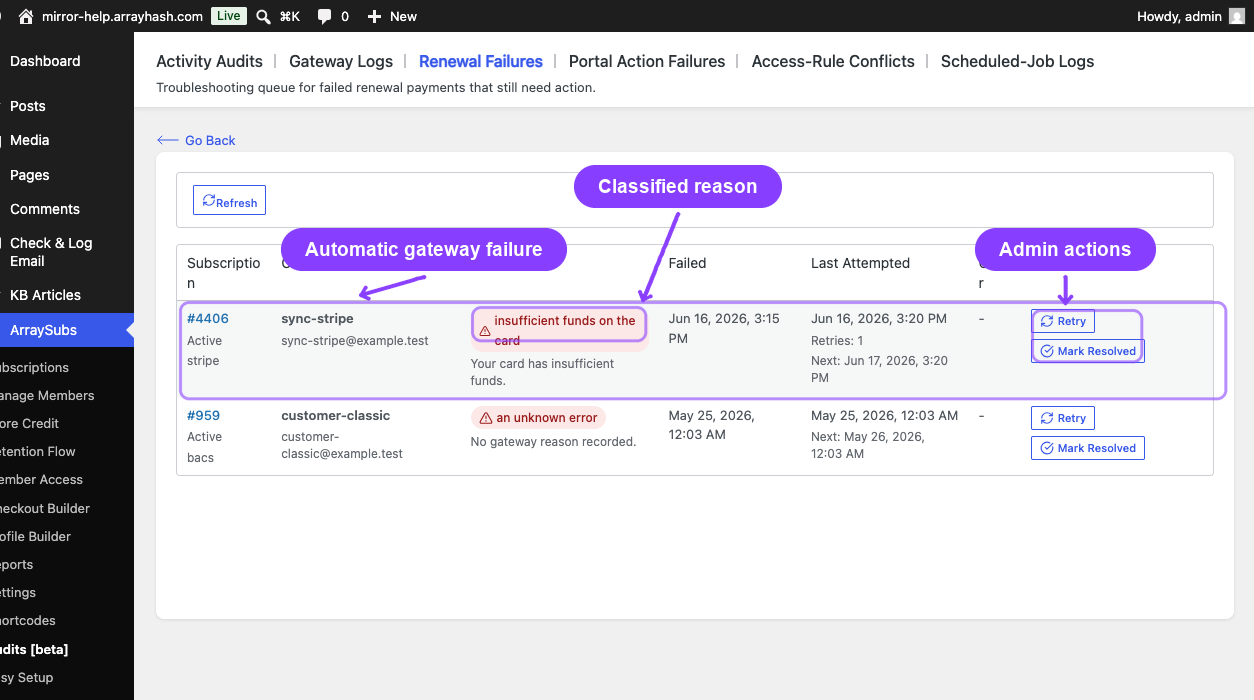
How the Renewal Process Works
Before diagnosing failures, it helps to understand the normal flow:
- Invoice generation — the system creates a renewal WooCommerce order a few hours before the next payment date
- Payment processing — if the subscription has an automatic gateway (Pro), payment is charged immediately; otherwise, the customer receives an invoice for manual payment
- Success path — the order is marked paid, the subscription stays active, and the next payment date advances
- Failure path — the order is marked failed, the subscription enters the grace period timeline
Grace Period Timeline
When a renewal goes unpaid:
| Day | Status | What Happens |
|---|---|---|
| Day 0 | Active | Payment is due. Invoice was created. Customer still has full access |
| Day 0–3 | Active (grace) | The subscription stays Active for the configured active grace period (default: 3 days). The customer retains access |
| Day 3 | On-Hold | The subscription moves to On-Hold. Access may be restricted depending on your access rule configuration |
| Day 3–10 | On-Hold (grace) | The subscription stays on-hold for the configured on-hold grace period (default: 7 days) |
| Day 10 | Cancelled | The subscription is Cancelled automatically. All pending renewal orders are cancelled. All future scheduled actions are removed |
The grace period durations are configurable in ArraySubs → Settings → General Settings under the Grace Period section. The defaults are 3 active grace days and 7 on-hold grace days, totaling 10 days before automatic cancellation.
If the customer pays at any point during the grace period, the subscription returns to active status and the next billing cycle resumes normally.
Common Renewal Failure Scenarios
Invoice Not Created
Symptoms: The next payment date passed, but no renewal order was created in WooCommerce.
Possible causes:
| Cause | How to Check | Fix |
|---|---|---|
| Subscription is not active or trial | Check the subscription status in the admin detail page | Only Active and Trial subscriptions generate renewal invoices. Reactivate or fix the status |
| Subscription is marked as lifetime | Check if the subscription has a _lifetime_subscription flag |
Lifetime subscriptions never create renewal invoices. This is by design |
| A pending renewal order already exists | Check the subscription's Related Orders for an order in Pending status |
Pay or cancel the existing pending order so a new one can be created |
| Action Scheduler is not running | Go to WooCommerce → Status → Scheduled Actions and check for queued arraysubs_process_renewal or arraysubs_generate_upcoming_renewals entries |
If the queue is paused or stuck, check your hosting cron configuration. WP-Cron or a system cron must be running |
| The subscription product was deleted | Check if _product_id meta on the subscription still points to a valid product |
Restore the product or manually edit the subscription product reference |
Payment Failed (Automatic Gateway)
Symptoms: The renewal order was created but payment was declined. The order shows Failed status.
First place to look: the subscription notes now include a customer-readable failure note alongside the raw gateway log — for example "Renewal payment failed: insufficient funds on the card. Gateway message: 'Your card has insufficient funds.'.". The same classified reason is stored in the _last_payment_failure_category subscription meta and shown in the Renewal Payment Failed customer email's reason callout. Use the category to triage quickly:
| Category | What it usually means | Fix path |
|---|---|---|
insufficient_funds |
Card had no balance / over-limit | Customer updates card or waits for funds; auto-retry will run on the configured schedule |
expired_card |
Card on file is past its expiry | Customer updates payment method; not worth retrying until they do |
incorrect_cvc / invalid_card |
Card details on file are wrong | Customer must update payment method |
authentication_required |
Bank requires 3D Secure / SCA | Customer must complete authentication via the Pay Now link in the email |
card_declined / generic_decline |
Issuer declined for unspecified reason | Auto-retry may succeed; if not, customer should contact their bank |
processing_error |
Transient gateway / network issue | Auto-retry usually resolves it |
unknown |
Gateway returned an unrecognized code — only the raw message is in the notes | Read the raw gateway message in the order/subscription notes |
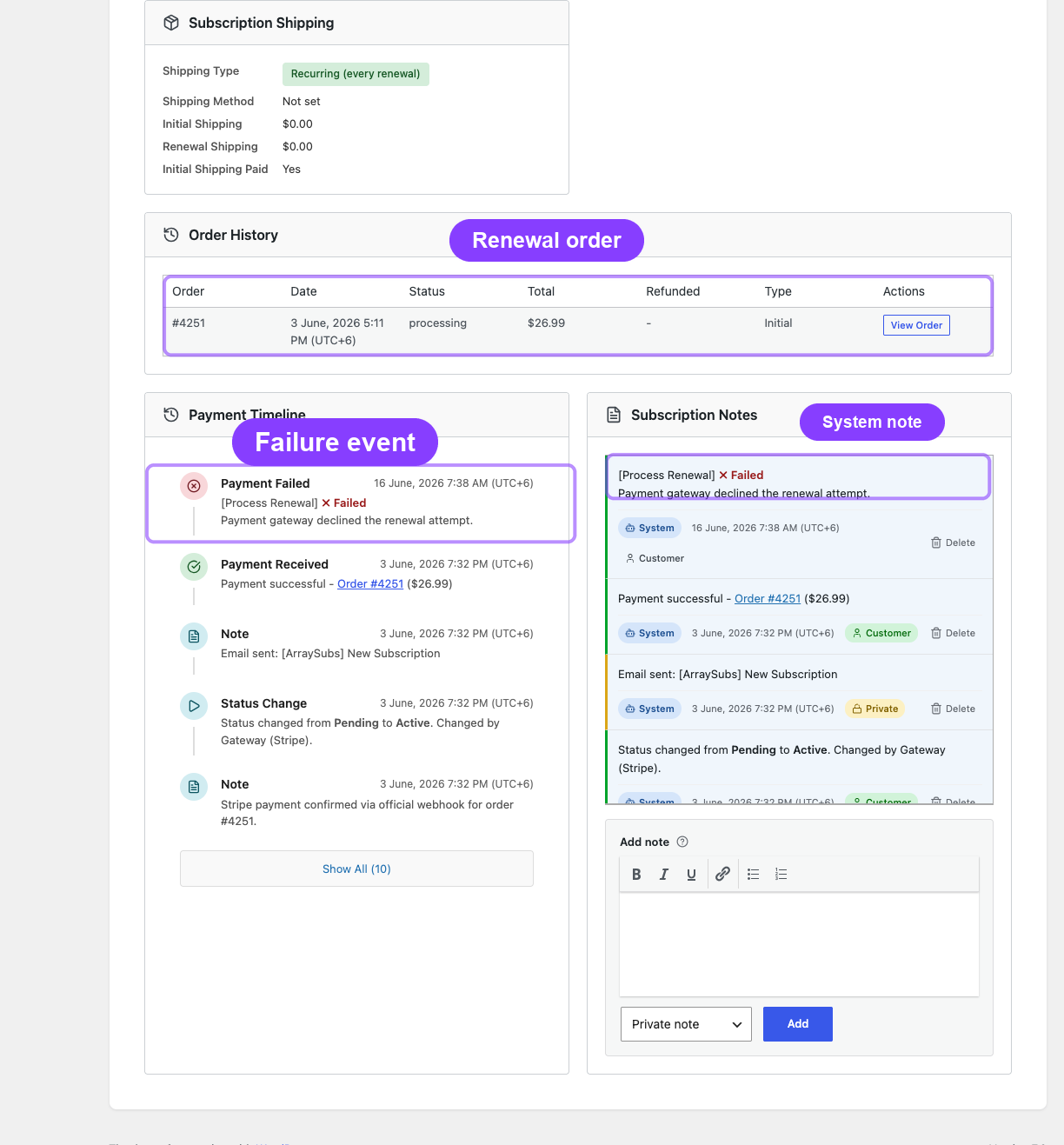
Other possible causes:
| Cause | How to Check | Fix |
|---|---|---|
| Gateway API error | Check the order notes and scheduled-job logs for error details | Verify gateway API credentials are valid; check the gateway's status page for outages |
| Gateway rate limit | Check server logs and gateway dashboard for rate limit responses | Wait for the rate limit to reset; the system retries failed payments on the next scheduled attempt |
| Payment method was detached | Check the subscription detail for _gateway_status = detached |
The customer needs to re-add a payment method. The subscription has been reverted to manual payments |
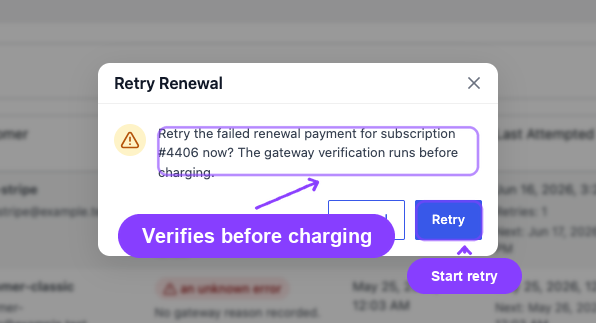
Payment Not Attempted (Manual Renewal)
Symptoms: A renewal invoice was created with Pending status, but no payment was collected.
This is expected behavior for manual renewals. When a subscription does not have an automatic payment gateway configured, ArraySubs creates the invoice and waits for the customer to pay manually. The customer receives a renewal invoice email with a payment link.
What to check:
- Verify the renewal invoice email was sent (check Activity Audits with Entity: Email)
- Verify the customer received the email (check spam folder)
- The customer can pay by clicking the pay link in the email or from My Account → Orders
Subscription Moved to On-Hold Unexpectedly
Symptoms: The subscription moved from Active to On-Hold without admin action.
Most common cause: The active grace period expired with an unpaid renewal.
How to verify:
- Check the subscription notes for a system note about the status change
- Check the Scheduled-Job Logs for a recent Check Overdue Renewals job
- Check the subscription's Related Orders for an unpaid renewal order
Fix: Pay the outstanding renewal order. The subscription returns to active status automatically.
Subscription Cancelled Automatically
Symptoms: The subscription was cancelled without admin or customer action.
Most common cause: The full grace period (active + on-hold) expired with an unpaid renewal.
What gets cleaned up on automatic cancellation:
- Subscription status set to
Cancelled _end_dateset to the cancellation timestamp_cancelled_byset tosystem_cancellation_reasonset tooverdue_payment- All pending renewal orders cancelled
- All future scheduled actions removed
How to verify: Check the subscription notes. The system logs the cancellation with "overdue_payment" as the reason.
Duplicate Renewal Orders
Symptoms: Two renewal orders appear for the same billing period.
Rare but possible causes:
| Cause | How to Check | Fix |
|---|---|---|
| A stale pending order was not detected | Check if _pending_renewal_order_id meta was cleared prematurely |
Cancel the duplicate order manually; the subscription should already be tracking the correct next payment date |
| Concurrent job execution | Check the Scheduled-Job Logs for two Process Renewal entries at the same timestamp | This should not happen due to execution locks, but if it does, cancel the extra order |
Settings That Affect Renewals
| Setting | Location | Effect |
|---|---|---|
| Grace Period: Active Grace Days | General Settings | How many days a subscription stays Active after a missed payment (default: 3) |
| Grace Period: On-Hold Grace Days | General Settings | How many days a subscription stays On-Hold before cancellation (default: 7) |
| Invoice Timing | General Settings | How far before the due date to create the renewal invoice |
| Renewal Reminder Days Before | General Settings | How many days before renewal to send the reminder email |
Diagnostic Checklist
When investigating a renewal problem, work through this checklist:
- Is the subscription active or trial? Only these statuses generate renewals
- Is the subscription lifetime? Lifetime subscriptions skip renewal processing
- Does a pending renewal order already exist? The system blocks new invoices when one is pending
- Does the product still exist? If the product was deleted, invoice creation fails
- Is Action Scheduler running? Check WooCommerce → Status → Scheduled Actions
- What do the subscription notes say? System notes record every status change and payment attempt
- What do the Scheduled-Job Logs show? (Pro) Check for failed Process Renewal or Check Overdue Renewals jobs
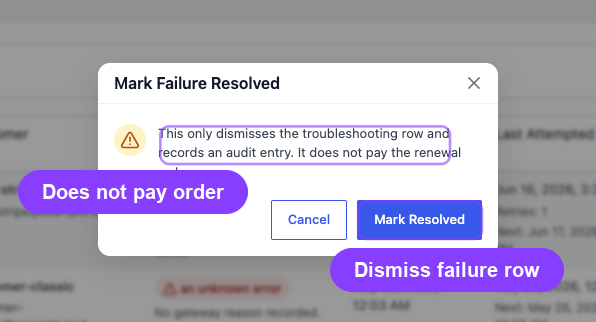
Related Guides
- Scheduled-Job Logs — check if renewal jobs ran successfully
- Activity Audits — trace the complete renewal timeline
- Gateway Health Dashboard — verify gateway connectivity
- Payment Method and Shipping Update Issues — resolve card and gateway problems
FAQ
Does ArraySubs retry failed payments automatically?
When a renewal payment fails, the system schedules a retry attempt. It also moves the subscription into the grace period timeline. If the customer pays manually or the retry succeeds, the subscription resumes normally.
What happens to the subscription if I manually pay the renewal order?
The subscription returns to active status. The next payment date is advanced to the next billing cycle, and normal renewal scheduling resumes.
Can I change the grace period for an existing subscription?
Changes to grace period settings apply to future grace period calculations. Subscriptions already in a grace period continue using the timing that was active when the grace period started.
How do I reactivate a subscription cancelled due to overdue payment?
From the subscription detail page, change the status back to Active. For cancelled, expired, on-hold, and trial subscriptions, ArraySubs recalculates the next payment date automatically from the current time using the stored billing schedule, then starts a new renewal cycle.
Why did the renewal happen early?
The invoice generation job runs a few hours before the due date (configurable as invoice timing), which can make it appear that the renewal happened early.