
Retention Use Cases
18 real-world scenarios showing how subscription businesses use the ArraySubs retention system to reduce churn, recover revenue, and build stronger customer relationships.
Availability: Free
Page Navigation
- Current guide: Retention Use Cases
- Where to open it: WordPress Admin -> ArraySubs -> Retention Flow
- Section overview: Open overview
- Previous guide: retention-offers
- Next guide: general-settings
- Troubleshooting: Audits, Logs, and Troubleshooting
Overview
The retention system is not just a feature — it is a revenue strategy. Every subscription cancelled is recurring revenue lost, and the cost of acquiring a new subscriber almost always exceeds the cost of keeping an existing one.
This guide presents real-life scenarios across different industries, business models, and customer situations. Each use case shows the problem, the retention configuration, what the customer experiences, and the business benefit. Use these as blueprints when setting up your own retention flow.
Use Case 1: The Price-Sensitive Monthly Subscriber
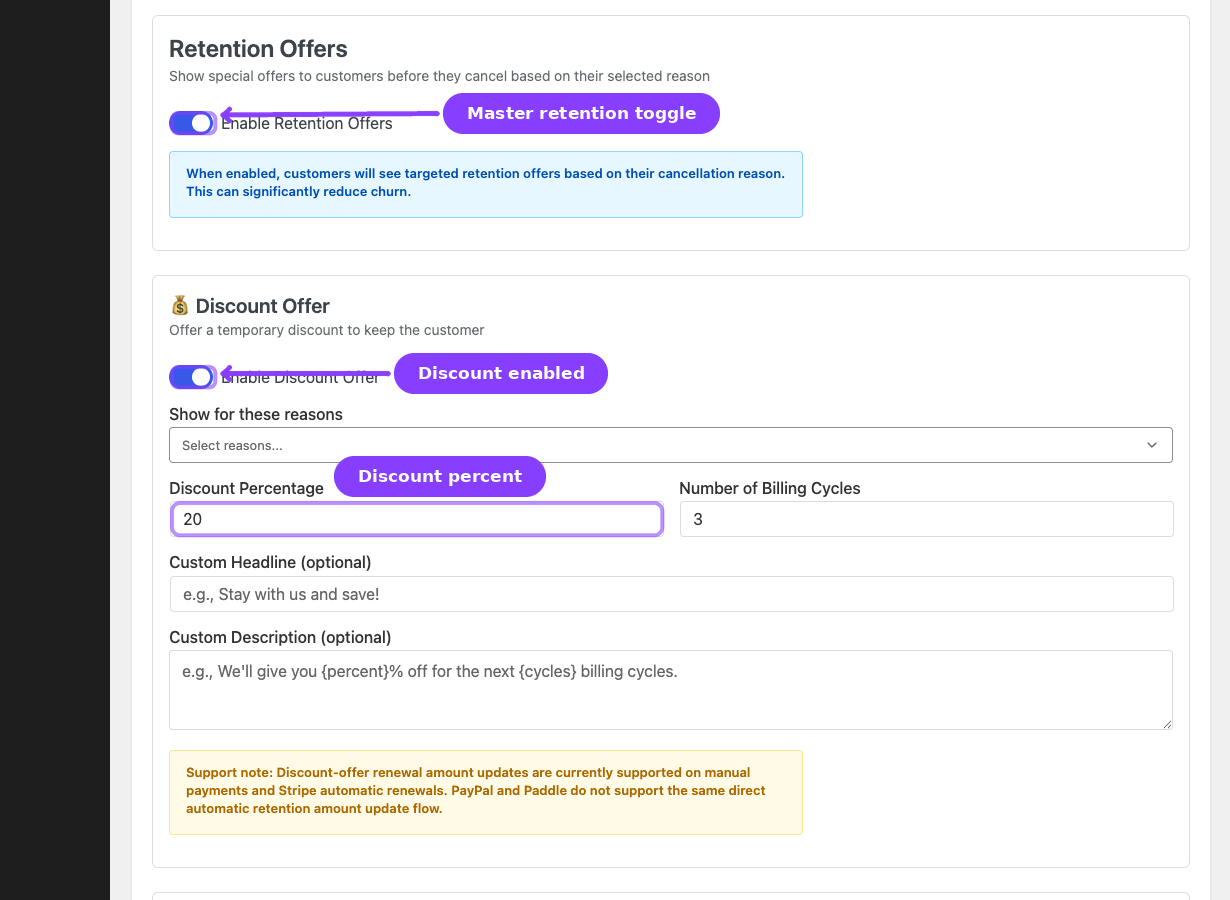
Business: A SaaS tool charging $29/month Customer situation: A subscriber of 4 months selects "Too expensive" as their cancellation reason.
Retention configuration:
- Discount offer enabled
- Trigger reasons:
too_expensive - Discount: 20% off for 3 billing cycles
- Headline: "Stay and save 20%!"
What the customer sees: After selecting "Too expensive" and clicking Continue, the retention modal shows a discount card: "We'll reduce your subscription to $23.20/month for the next 3 months."
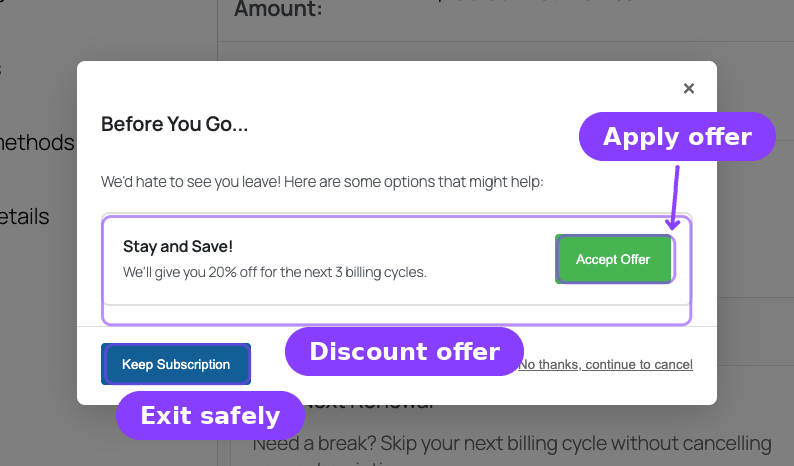
Customer accepts. The subscription stays active. Renewal invoices for the next 3 cycles are created at $23.20 instead of $29.00. After 3 cycles, billing returns to $29.00.
Business benefit: Instead of losing $29/month immediately, the store retains the customer at $23.20/month for 3 months ($69.60 retained revenue) and has a chance to demonstrate enough value that the customer stays at full price afterward. The total retained revenue over 3 months is $69.60 vs $0 from cancellation.
Use Case 2: The Seasonal Fitness Member
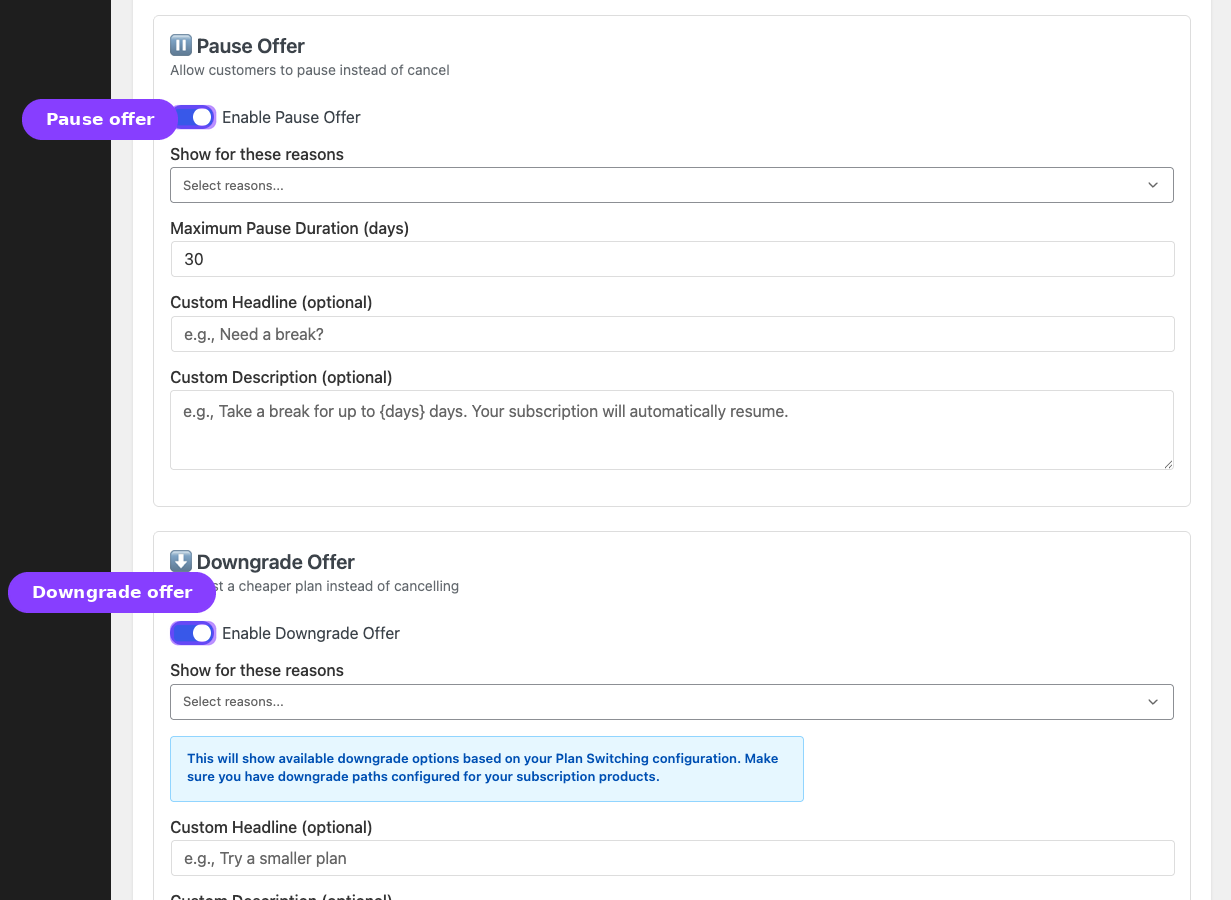
Business: An online fitness membership charging $19.99/month Customer situation: A member of 8 months selects "Just need a temporary break" because they're travelling for the summer.
Retention configuration:
- Pause offer enabled
- Trigger reasons:
temporary_pause - Pause duration: 60 days
- Headline: "Need a break from workouts?"
- Description: "Pause your membership for up to 60 days. It will automatically resume so you never miss a beat."
What the customer sees: A pause card: "Pause your membership for 60 days. It will automatically resume on [date]."
Customer accepts. The subscription moves to On-Hold. In 60 days, it automatically resumes and the next renewal is scheduled. The customer doesn't have to remember to reactivate — it just works.
Business benefit: Without the pause offer, this customer would have cancelled and the business would need to re-acquire them in the fall. The pause preserves the relationship and the member's history, and the auto-resume ensures billing restarts without friction.
Use Case 3: The Overwhelmed Subscriber Who Needs a Smaller Plan
Business: A project management SaaS with three tiers — Basic ($9/month), Pro ($29/month), Enterprise ($79/month) Customer situation: An Enterprise subscriber of 6 months selects "Too expensive" because they realized they only use basic features.
Retention configuration:
- Downgrade offer enabled
- Trigger reasons:
too_expensive,not_using - Headline: "Try a plan that fits better"
- Description: "Switch to a plan that matches how you use our service — no cancellation needed."
What the customer sees: A downgrade card that redirects to the plan switching flow, showing Basic ($9/month) and Pro ($29/month) as available downgrades.
Customer switches to Pro. The subscription is migrated to the Pro plan. The customer keeps their data, keeps their account, and continues paying — just at a lower tier.
Business benefit: Instead of losing $79/month entirely, the business retains $29/month. The customer is now on a tier that matches their usage, making them less likely to cancel again. Revenue retained: $29/month vs $0.
Use Case 4: The Customer with a Solvable Problem
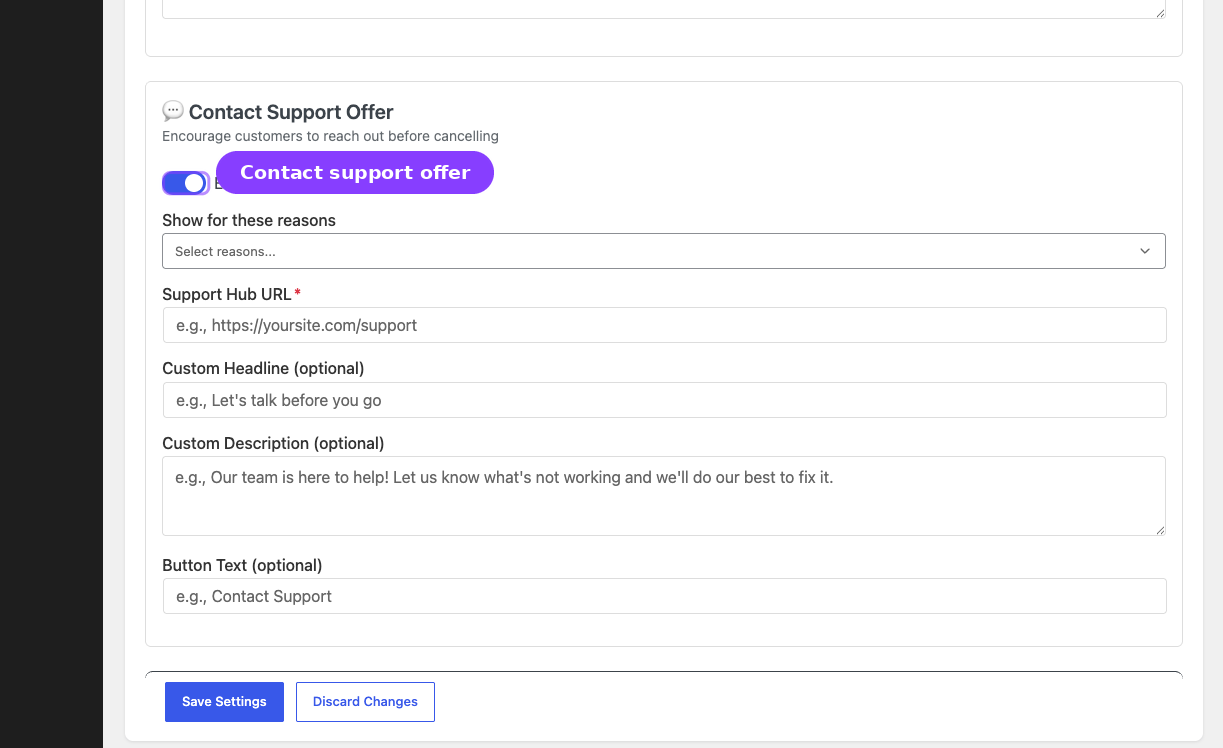
Business: A website builder platform charging $24.99/month Customer situation: A subscriber of 2 months selects "Technical issues" because they can't get a specific integration to work.
Retention configuration:
- Contact Support offer enabled
- Trigger reasons:
technical_issues,missing_features - Support URL:
https://example.com/support - Headline: "Let us help before you go"
- Description: "Our support team can often resolve technical issues quickly. Give us a chance to fix this for you!"
- Button text: "Talk to Support"
What the customer sees: A contact support card with a button that opens the support page in a new tab.
Customer clicks the link and files a support ticket. The subscription stays active. Support resolves the integration issue the next day.
Business benefit: The customer's problem was actually solvable. Without the support offer, they would have cancelled and possibly left a negative review. Instead, they got help and stayed. The support interaction also builds loyalty and goodwill.
Use Case 5: The Newsletter Subscriber Who Isn't Reading
Business: A premium newsletter at $12/month Customer situation: A subscriber of 10 months selects "Not using it enough" because they've fallen behind on reading.
Retention configuration:
- Pause offer enabled, with trigger reason:
not_using - Discount offer enabled, with trigger reason:
not_using
What the customer sees: Two offer cards — pause for 30 days, or 15% off for 2 months.
Customer accepts the pause. They catch up on the backlog during the 30-day break and return refreshed. The subscription auto-resumes.
Business benefit: "Not using it enough" often means "I intend to use it later." A pause gives the customer space without burning the bridge. The alternative — cancellation — usually means the customer never returns.
Use Case 6: The Post-Price-Increase Exodus
Business: A meal-kit subscription that just increased prices from $59 to $69 per box Customer situation: Multiple customers selecting "Too expensive" in the first two weeks after the price increase.
Retention configuration:
- Discount offer enabled
- Trigger reasons:
too_expensive - Discount: 15% off for 4 billing cycles (effective price: ~$58.65, close to the old price)
- Headline: "We value your loyalty"
- Description: "As a loyal customer, enjoy 15% off your next 4 deliveries while you try our improved offerings."
What customers see: A discount that essentially brings them back to the old price for 4 cycles, giving them time to adjust.
Business benefit: Price increases inevitably cause a churn spike. The retention discount acts as a soft landing period — loyal customers get time to adjust, and by the end of the discount period, most have accepted the new price. Check Retention Analytics after 4 weeks to measure the spike and the save rate.
Use Case 7: The Annual Subscriber Considering Alternatives
Business: A design tool offering monthly ($15) and annual ($144/year) plans Customer situation: An annual subscriber at renewal time selects "Found a better alternative."
Retention configuration:
- Discount offer enabled, trigger reason:
found_alternative - Discount: 25% off for 1 billing cycle (the next annual renewal)
- Contact Support offer enabled, trigger reason:
found_alternative - Support headline: "Tell us what you found"
- Support description: "We'd love to know what caught your eye. Maybe we can match it!"
What the customer sees: Two offers — a 25% discount on the next year ($108 instead of $144), and a link to share feedback with the team.
Customer accepts the discount. The annual renewal processes at $108 instead of $144.
Business benefit: Losing an annual subscriber is a $144 hit. Discounting one renewal to $108 keeps the customer in the ecosystem for another year, during which the product can be improved to compete with the alternative. The support offer also provides competitive intelligence.
Use Case 8: The Subscription Box Burnout
Business: A snack subscription box at $34.99/month Customer situation: A subscriber of 14 months selects "Not using it enough" — they have too many snacks piling up.
Retention configuration:
- Pause offer enabled, trigger reason:
not_using,temporary_pause - Pause duration: 45 days
What the customer sees: "Take a break for 45 days. Your subscription will automatically resume on [date]."
Customer accepts. They work through their backlog and the subscription auto-resumes.
Business benefit: Subscription box fatigue is real. A 45-day pause converts what would be a permanent cancellation into a temporary break. When the customer returns after consuming their stockpile, they're actually excited to receive the next box.
Use Case 9: The Free Trial That Didn't Convert
Business: A video streaming service with a 14-day free trial, then $9.99/month Customer situation: A trial subscriber who is about to cancel before the trial converts to paid. They select "Missing features I need."
Retention configuration:
- Contact Support offer enabled, trigger reason:
missing_features - Discount offer enabled, trigger reason:
missing_features - Discount: 30% off for 2 cycles (first two paid months at $6.99)
What the customer sees: Two offers — contact support to request the missing feature, and a 30% discount for the first 2 paid months.
Customer accepts the discount. They convert from trial to paid at $6.99/month for 2 months, giving the product team time to address the missing feature.
Business benefit: Trial cancellations have the highest opportunity cost — you've already invested in acquiring the lead. Even a deeply discounted conversion is better than losing the customer entirely, because each additional month increases the chance of long-term retention.
Use Case 10: The Entrepreneur Downsizing Their Stack
Business: A marketing automation platform — Starter ($29/month), Growth ($79/month), Scale ($199/month) Customer situation: A Growth subscriber of 12 months selects "Too expensive" because their startup is cutting costs.
Retention configuration:
- Downgrade offer enabled, trigger reason:
too_expensive - Discount offer enabled, trigger reason:
too_expensive - Discount: 20% off Growth for 3 months ($63.20/month)
What the customer sees: Two offers — downgrade to Starter ($29/month), or keep Growth at 20% off for 3 months.
Customer accepts the downgrade to Starter. They keep core features and continue using the platform at a price their budget can handle.
Business benefit: The customer is going through a temporary budget constraint. If they cancel entirely, they'll migrate to a competitor and probably never come back. By downgrading, the relationship stays intact and when their startup grows, upgrading back to Growth is one click away. Revenue retained: $29/month vs $0.
Use Case 11: The Holiday Season Pause
Business: A weekly recipe and ingredients subscription at $49.99/week Customer situation: A subscriber of 6 months selects "Just need a temporary break" because they're travelling for the December holidays.
Retention configuration:
- Pause offer enabled, trigger reason:
temporary_pause - Pause duration: 21 days (3 weeks to cover the holiday period)
- Headline: "Enjoy your holidays!"
- Description: "Pause your deliveries for 21 days. We'll start fresh when you're back."
What the customer sees: A pause option with a specific resume date.
Customer accepts. Three weeks later, the subscription auto-resumes. The first delivery lands just as they're getting back to their normal routine.
Business benefit: High-frequency subscriptions (weekly, biweekly) are especially vulnerable to seasonal cancellations. A short holiday pause prevents the customer from breaking the habit of their subscription. Cost of pause: 3 missed deliveries. Cost of cancellation: all future deliveries.
Use Case 12: The B2B Subscriber Re-Evaluating ROI
Business: A business analytics platform at $199/month per seat Customer situation: A subscriber of 18 months with 5 seats selects "Not using it enough" — their team has grown but not all seats are being used effectively.
Retention configuration:
- Contact Support offer enabled, trigger reason:
not_using,too_expensive - Support headline: "Let's make this work for your team"
- Support description: "Our success team can help optimize your setup and ensure every seat is delivering value."
- Downgrade offer enabled, trigger reason:
not_using
What the customer sees: A support offer promising optimization help, and a downgrade option to reduce seats.
Customer contacts support. The success team runs an onboarding session for the underutilized seats. Usage increases over the next month.
Business benefit: At $199/month × 5 seats × 12 months, this is a $11,940/year account. The contact support offer routes the customer to a conversation instead of an exit. In B2B subscriptions, a single support interaction can save more revenue than hundreds of individual consumer retention offers combined.
Use Case 13: The Competitor Promotional Period
Business: A cloud storage service at $4.99/month Customer situation: A subscriber of 3 months selects "Found a better alternative" because a competitor is running a promotional deal.
Retention configuration:
- Discount offer enabled, trigger reason:
found_alternative - Discount: 25% off for 3 cycles ($3.74/month)
- Contact Support offer enabled, trigger reason:
found_alternative - Support description: "Tell us what you found — we're always working to give you the best deal and features."
What the customer sees: A competitive counter-offer at $3.74/month and an invitation to share feedback.
Customer accepts the discount. The competitor's promo is temporary; by the time the retention discount expires, the competitor's prices are back to normal and the customer has no reason to switch.
Business benefit: Competitor promotions create short-term vulnerability. A time-limited retention discount matches or beats the competitor's offer without permanently reducing your price. The customer stays, the competitor's promo ends, and you win.
Use Case 14: The First-Month Cancellation Risk
Business: A learning platform at $39/month Customer situation: A subscriber in their first month selects "Missing features I need" — they signed up expecting a specific course that isn't available yet.
Retention configuration:
- Contact Support offer enabled, trigger reason:
missing_features - Support description: "Tell us which features you're looking for — our content team is always adding new courses based on member requests."
- Discount offer enabled, trigger reason:
missing_features - Discount: 30% off for 2 cycles
What the customer sees: An invitation to request the course, plus a discount while they wait.
Customer contacts support and learns the course launches next month. They accept the discount and stay.
Business benefit: First-month churn is typically the highest. These customers haven't yet experienced enough value to be committed. The combination of personal engagement (support) and reduced cost (discount) buys time for the product to deliver on its promise.
Use Case 15: The Power User Who Wants More
Business: A productivity app — Free, Pro ($14.99/month), Teams ($29.99/month) Customer situation: A Pro subscriber of 22 months selects "Missing features I need" — they need collaboration features only available in Teams but don't want to pay double.
Retention configuration:
- Contact Support offer enabled, trigger reason:
missing_features - Discount offer enabled, trigger reason:
missing_features - Discount: 20% off for 6 cycles on current plan
What the customer sees: A support offer to discuss their needs, plus a discount to keep their current plan while the team evaluates options.
Customer contacts support. The CS team discovers the customer only needs one specific Teams feature (shared workspaces). They flag it as a Pro feature request. The customer accepts the 20% discount and waits for the feature to be added to Pro.
Business benefit: Long-tenured power users are your most valuable subscribers and your best product feedback source. Losing a 22-month subscriber is devastating for LTV metrics. The support offer converts a cancellation into a product feedback loop, while the discount keeps revenue flowing.
Use Case 16: The Budget Reset Subscriber
Business: A professional development subscription at $49/month Customer situation: A subscriber of 11 months selects "Too expensive" at the start of a new fiscal quarter — their professional development budget was cut.
Retention configuration:
- Pause offer enabled, trigger reason:
too_expensive,temporary_pause - Pause duration: 90 days (one quarter)
- Downgrade offer enabled, trigger reason:
too_expensive
What the customer sees: A pause for 90 days while they wait for their next budget cycle, or a downgrade to a cheaper tier.
Customer accepts the 90-day pause. When budget is available in the next quarter, the subscription auto-resumes.
Business benefit: Budget cycles are predictable in B2B and professional contexts. A 90-day pause perfectly aligns with quarterly budget resets, preserving the relationship during a temporary financial constraint. The customer never has to go through re-evaluation, re-approval, or re-onboarding — they just come back.
Use Case 17: The Parent Subscription During School Year
Business: A children's educational content subscription at $14.99/month Customer situation: A subscriber of 10 months selects "Not using it enough" — their child is too busy during the school year but loved it during summer.
Retention configuration:
- Pause offer enabled, trigger reason:
not_using - Pause duration: 90 days
- Headline: "We'll be here when school's out!"
- Description: "Pause for 90 days and pick right back up when your family has more free time."
What the customer sees: A friendly pause offer acknowledging the seasonal usage pattern.
Customer accepts the pause. The subscription auto-resumes in time for the next school break.
Business benefit: Educational and children's subscriptions have inherently seasonal usage. A pause converts a seasonal cancellation into a planned break. The messaging shows empathy for the customer's situation, building brand loyalty.
Use Case 18: The Multi-Subscription Consolidation
Business: A media bundle offering separate subscriptions for news ($9.99), podcasts ($7.99), and video ($14.99) Customer situation: A subscriber with all three selects "Too expensive" on the video subscription — they want to reduce total spending across all three.
Retention configuration:
- Discount offer on video subscription, trigger reason:
too_expensive - Discount: 20% off for 3 cycles ($11.99 instead of $14.99)
- Downgrade offer on video subscription (to a lighter video tier if available)
What the customer sees: A discount on the most expensive subscription, reducing their total monthly spend.
Customer accepts the discount. Total monthly spend drops from $32.97 to $29.97 — a manageable reduction that keeps all three subscriptions active.
Business benefit: Customers with multiple subscriptions represent the highest LTV. Losing even one subscription often triggers a cascade — they start questioning the other subscriptions too. A targeted discount on the most expensive item preserves the full bundle relationship.
The Retention Math: Why It Matters
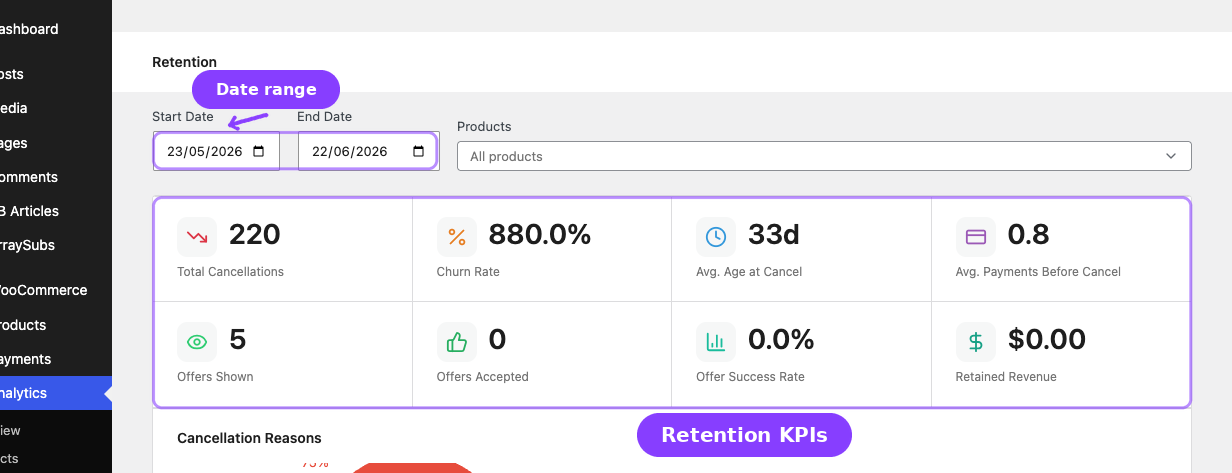
The financial impact of retention is dramatic. Consider these numbers:
| Metric | Without Retention | With Retention (40% save rate) |
|---|---|---|
| Monthly cancellations | 50 | 50 attempts, 20 saved |
| Revenue lost per month (at $30 avg) | $1,500 | $900 |
| Annual revenue saved | — | $7,200 |
| Avg lifetime extension per saved customer | — | +4.2 months |
A 40% offer acceptance rate — which is achievable with well-targeted offers — can recover thousands in annual recurring revenue. And the cost of running retention offers is essentially zero: the discount is applied to revenue you would have otherwise lost entirely.
The Golden Rule of Retention
A discounted subscriber is always more valuable than a cancelled subscriber. Even if you give 30% off for 3 months, that's 70% of 3 months of revenue you would have received $0 from otherwise.
Related Guides
- Retention Offers — How to configure each offer type
- Cancellation Setup — Configure the cancellation flow that feeds into retention
- Retention Analytics — Measure the impact of your retention strategy
- Refund Management — What happens after cancellation is confirmed