
Access-Rule Conflicts
Troubleshoot overlapping membership rules, unexpected access denials, and content restriction evaluation problems.
Availability: Free + Pro
Page Navigation
- Current guide: Access-Rule Conflicts
- Where to open it: WordPress Admin -> ArraySubs -> Audits [beta]
- Direct route:
/wp-admin/admin.php?page=arraysubs-mainadmin#/audits/access-rule-conflicts - Section overview: Open overview
- Previous guide: woocommerce-analytics-extension
- Next guide: activity-audits
- Troubleshooting: Audits, Logs, and Troubleshooting
Overview
ArraySubs evaluates access rules to determine what content, URLs, products, downloads, and discounts a subscriber can access. Rules are built from conditions (subscription status, product ownership, user role, lifetime spend, etc.) combined with AND/OR logic. When multiple rules overlap or conflict, the result can be unexpected — a subscriber may be denied access they should have, or granted access they should not.
This guide explains how rule evaluation works and how to diagnose and fix conflicts.
How Access Rules Are Evaluated
Condition Types
Each access rule contains one or more conditions. The system evaluates each condition and combines the results:
| Condition Type | What It Checks |
|---|---|
subscription_status |
Whether the user has a subscription in one of the specified statuses (e.g., Active, Trial) |
has_active_subscription |
Whether the user has an active subscription for a specific product |
has_subscription_variation |
Whether the user has an active subscription for a specific product variation |
user_role |
Whether the user has one of the specified WordPress roles |
lifetime_spent |
Whether the user's total spend meets a threshold |
purchased_product |
Whether the user has purchased a specific product (any order) |
feature_value |
Whether the user's subscription entitlement for a feature key matches a specific value (Pro) |
AND / OR Logic
Conditions within a rule are combined using AND or OR logic:
- AND (default): Every condition must be true. Short-circuits on the first false result
- OR: At least one condition must be true. Short-circuits on the first true result
Rules can also be nested into groups, where each group has its own AND/OR logic. This allows complex conditions like "must have an Active subscription for Product A AND (must be an Editor OR must have spent more than $500)."
Evaluation Order
- The system receives a user ID and a set of conditions
- It checks an in-memory cache for a previous result with the same user + conditions combination
- If no cache hit, it evaluates each condition top to bottom
- For AND logic, it stops at the first
false(access denied) - For OR logic, it stops at the first
true(access granted) - Nested groups are evaluated recursively with their own logic
- The final result is cached for the remainder of the page load
Common Conflict Scenarios
Scenario 1: Multiple Rules with Different Logic
Problem: You have a URL restriction rule using AND logic with two conditions — the user must have an Active subscription AND be in the Editor role. A subscriber who is not an Editor is denied access even though they have an active subscription.
Why it happens: AND logic requires all conditions to be true. If any condition fails, access is denied.
Fix: If you want subscribers or editors to have access, change the logic to OR. If you want only subscribers who are also editors, keep AND — the behavior is correct.
Scenario 2: Guest Users Always Denied
Problem: A rule using subscription_status or has_active_subscription always denies access to logged-out visitors.
Why it happens: All subscription-based conditions return false for user ID 0 (guest users). The system cannot check subscription ownership without a logged-in user.
Fix: This is expected. If you want guests to see certain content, use the [arraysubs_visibility] shortcode with logged_out="true" instead of access rules, or create a separate rule that does not depend on subscription conditions.
Scenario 3: URL Rule Overlaps a Per-Post Restriction
Problem: A URL rule protects a path, but the target page or post also has its own per-post access restriction.
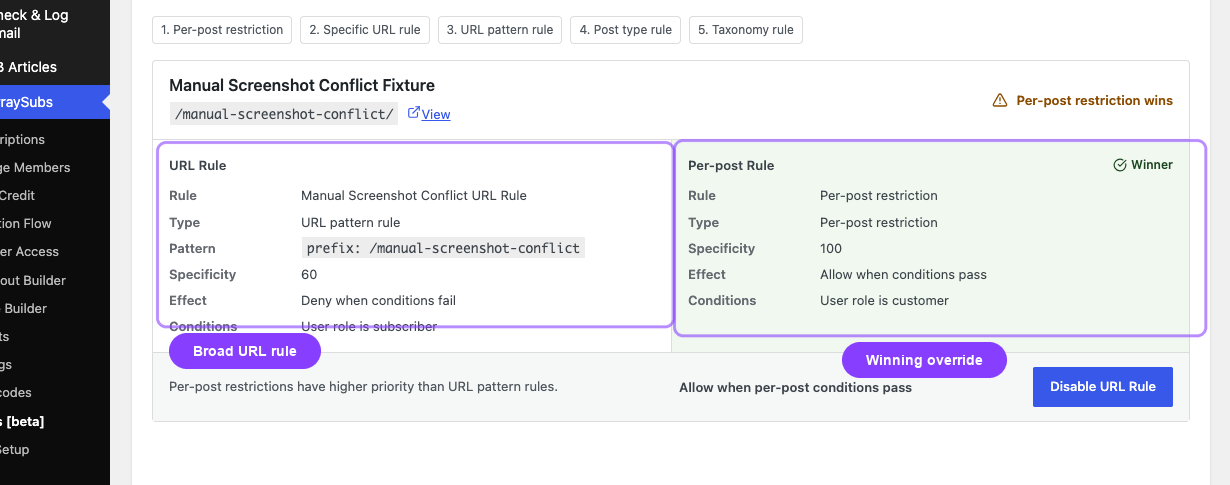
Why it happens: Per-post restrictions are more specific than URL pattern rules, so the per-post rule wins when both apply to the same content. The Access-Rule Conflicts audit highlights these overlaps so you can compare the broad URL rule with the higher-priority per-post restriction.
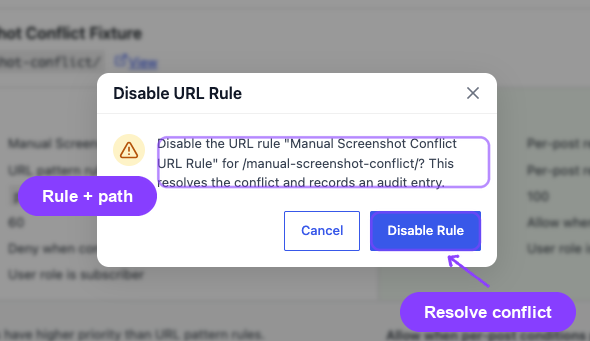
Fix: Open ArraySubs → Audits [beta] → Access-Rule Conflicts and compare the URL Rule panel with the Per-post Rule panel. If the per-post restriction is intentional, leave it in place. If the URL rule should control the page instead, remove or adjust the per-post restriction, or disable the overlapping URL rule from the audit resolution action.
Scenario 4: Post-Level Override vs. Global Rule
Problem: A CPT/post has a per-post access restriction set, but the global post-type rule grants broader access. The post restriction takes priority and blocks access.
Why it happens: Per-post restrictions (set in the post editor) override global post-type rules. The more specific restriction wins.
Fix: If you want the global rule to apply, remove the per-post restriction from the individual post editor.
Scenario 5: Feature Value Condition Not Matching (Pro)
Problem: A rule using feature_value denies access even though the feature is enabled on the subscription.
Why it happens: The feature_value condition checks for an exact match between the condition's expected value and the subscription's entitlement value. If the feature stores a numeric usage count and the condition expects a boolean, the comparison fails.
Fix: Verify the feature key and expected value in the access rule match exactly what the Feature Manager stores on the subscription.
Scenario 6: Cancelled Subscription Retains Access
Problem: A customer's subscription was cancelled but they can still access restricted content.
Why it happens: Possible causes:
| Cause | How to Check |
|---|---|
| End-of-period cancellation | The subscription has _waiting_cancellation set but is still in Active status until the period ends |
| Role not removed | The user's WordPress role was not downgraded after cancellation (check role mapping rules) |
| Caching | A page cache is serving a stale version of the page that was rendered before the status change |
| Pause access setting | The "Access During Pause" setting may be granting continued access |
Fix: For each cause:
- End-of-period: Wait for the scheduled cancellation date, or change to immediate cancellation
- Role: Verify role mapping rules remove the premium role on cancellation
- Caching: Clear all caches (page cache, object cache, CDN)
- Pause access: Check the pause access setting in General Settings
Debugging Access Rules
Step 1: Identify the Rule
Go to ArraySubs → Member Access and find the rule that controls access to the content in question. Note the conditions, logic (AND/OR), and what entity the rule protects (URL, post type, specific post, etc.).
Step 2: Check the User
For the user who is experiencing the issue:
- Are they logged in?
- What is their WordPress role?
- Do they have an active subscription? For which product?
- What is the subscription status?
- If using feature conditions (Pro), what are the feature values on their subscription?
Step 3: Evaluate the Conditions Manually
Walk through each condition in the rule with the user's data:
- For
subscription_status: Does the user have any subscription in the specified statuses? - For
has_active_subscription: Does the user have an active subscription for the exact product ID in the condition? - For
user_role: Is the user in one of the specified roles? - For
lifetime_spent: Does the user's total order spend meet the threshold?
Step 4: Check for Overlapping Rules
If the targeted content is protected by multiple rules (URL rules, post-type rules, per-post rules), check all of them. The most specific rule wins. The Access-Rule Conflicts audit currently focuses on URL rules that overlap per-post overrides.
Step 5: Check Caching
If the site uses page caching, object caching, or a CDN, the access check result may be stale. Access rules set a Cache Compatibility mode in settings — verify it is configured appropriately:
- Enable cache compatibility if your site uses full-page caching
- Clear all caches after changing access rules
Rule Priority Order
When multiple rules could apply to the same content, this is the evaluation priority from most specific to least specific:
- Per-post restriction (set in the individual post editor)
- Specific URL rule (exact URL match)
- URL pattern rule (wildcard or prefix match)
- Post type rule (applies to all posts of a type)
- Taxonomy rule (applies to all posts in a taxonomy/term)
The first matching rule wins. If no rule matches, content is unrestricted by default.
Settings That Affect Access Evaluation
| Setting | Location | Effect |
|---|---|---|
| Default Restricted Message | Member Access Settings | The message shown to users who are denied access |
| Default Redirect URL | Member Access Settings | Where to send users who are denied access to a protected URL |
| Cache Compatibility | Member Access Settings | Adjusts caching behavior for access-checked pages |
| Access During Pause | General Settings | Whether paused subscriptions retain content access (none, limited, or full) |
Related Guides
- Member Access Overview — how the access rule system works, condition types, and rule configuration
- Member Access — Overview of the actual Member Access tabs and shared condition system
- URL — URL rule details and priority behavior
- Post Types — Post/page/CPT restriction details and per-post overrides
- Shop Access — Product restriction details when the overlap is storefront-related
- Self-Service Actions — customer actions that change subscription status and affect access
- Activity Audits — trace status changes that may have affected access
- Lifecycle Management — how subscription status transitions work
FAQ
Do access rules apply to admin users?
Admin users with manage_options or manage_woocommerce capabilities can access all content regardless of access rules. Rules only apply to regular subscribers and non-admin users.
What happens if no access rule matches?
Content is unrestricted by default. If you want to restrict a page, you must explicitly create an access rule for it.
Can I combine subscription-based and role-based conditions?
Yes. Use a group with AND/OR logic to combine different condition types. For example, you can require an Active subscription AND the Editor role (AND logic), or allow either an Active subscription OR the Editor role (OR logic).
Do access rules work with WooCommerce Store API and Block themes?
Access rules apply to front-end page rendering. WooCommerce Store API responses for products, cart, and checkout are not filtered by content access rules. Product purchase restrictions use separate Shop Access Rules.
How do scheduled/drip access rules interact with regular access rules?
Scheduled access adds a time delay on top of the regular access check. The user must first pass the regular access conditions, and then the drip schedule determines when individual pieces of content become available based on the subscription start date.