
Admin Emails
Four automated notifications alert you to the subscription events that need your attention — new signups, payment failures, scheduled cancellations, and completed cancellations.
Availability: Free
Page Navigation
- Current guide: Admin Emails
- Where to open it: WordPress Admin -> WooCommerce -> Settings -> Emails
- Section overview: Open overview
- Previous guide: self-service-actions
- Next guide: customer-emails
- Troubleshooting: Audits, Logs, and Troubleshooting
Overview
ArraySubs sends admin emails to keep the store owner (or a designated team) informed about critical subscription activity. Unlike customer emails, admin emails are sent to the store's admin email address (or a custom recipient list) rather than to the subscribing customer.
All four admin emails appear in WooCommerce → Settings → Emails alongside customer emails. Each admin email supports a customizable Recipient(s) field so you can route notifications to specific team members.
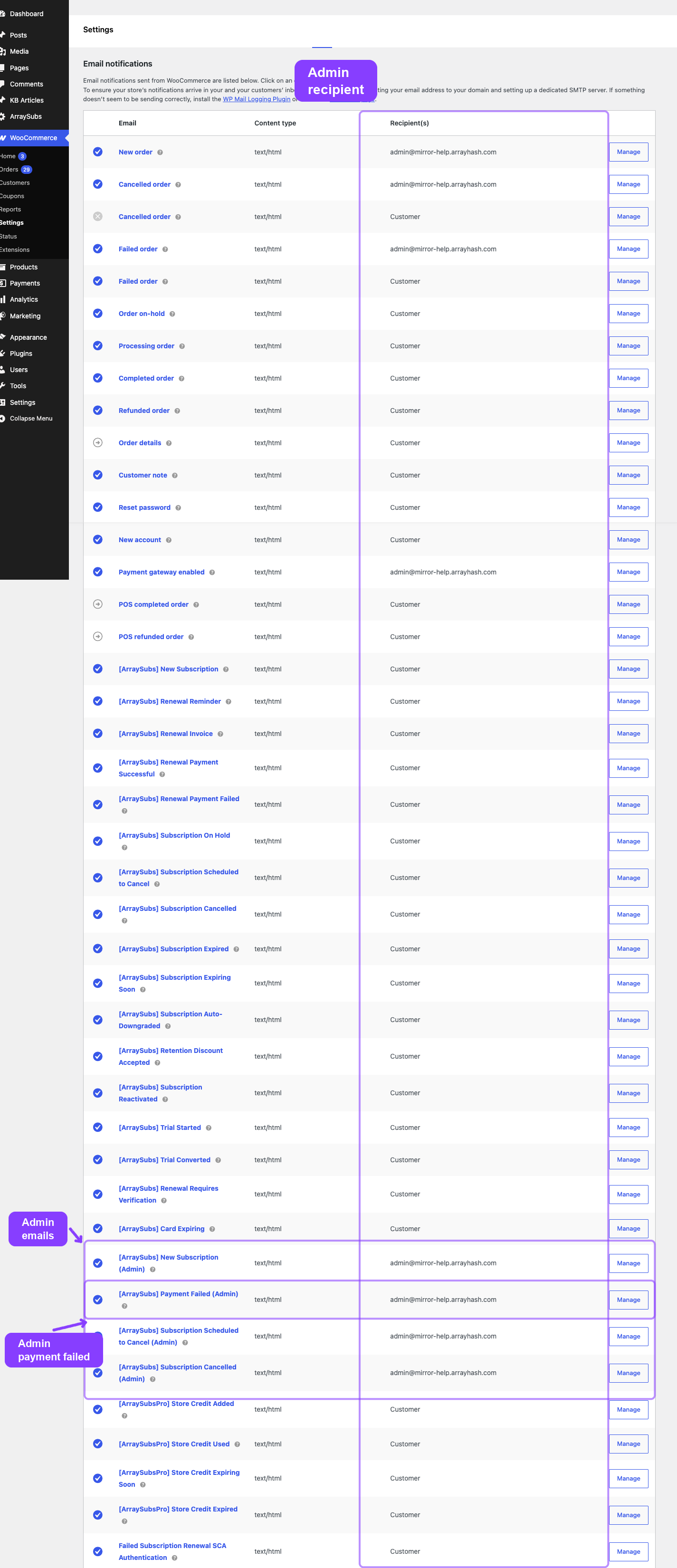
Admin New Subscription
Notifies the admin when a new subscription is activated.
WooCommerce email ID: arraysubs_admin_new_subscription
Default subject: [{site_title}] New subscription #{subscription_id} from {customer_name}
Default heading: New subscription received
Trigger: Fires on the arraysubs_data_status_changed hook when a subscription transitions to Active from Pending, Trial, or Auto-Draft — the same event that sends the customer's New Subscription email.
What the Email Contains
- Admin greeting
- Customer details:
- Full name
- Email address
- Subscription details table:
- Subscription ID
- Product name
- Price and billing period
- Start date
- Next payment date
- Payment method used
- Direct link to the subscription in the ArraySubs admin:
Admin → ArraySubs → Subscriptions → #ID
Configuration
| Setting | Description | Default |
|---|---|---|
| Enable / Disable | Toggle this admin notification on or off | Enabled |
| Recipient(s) | Comma-separated email addresses | Site admin email |
| Subject | Email subject line (supports placeholders) | See default above |
| Email heading | Heading inside the email body | See default above |
| Additional content | Custom text appended after the main content | Empty |
| Email type | HTML, Plain text, or Multipart | HTML |
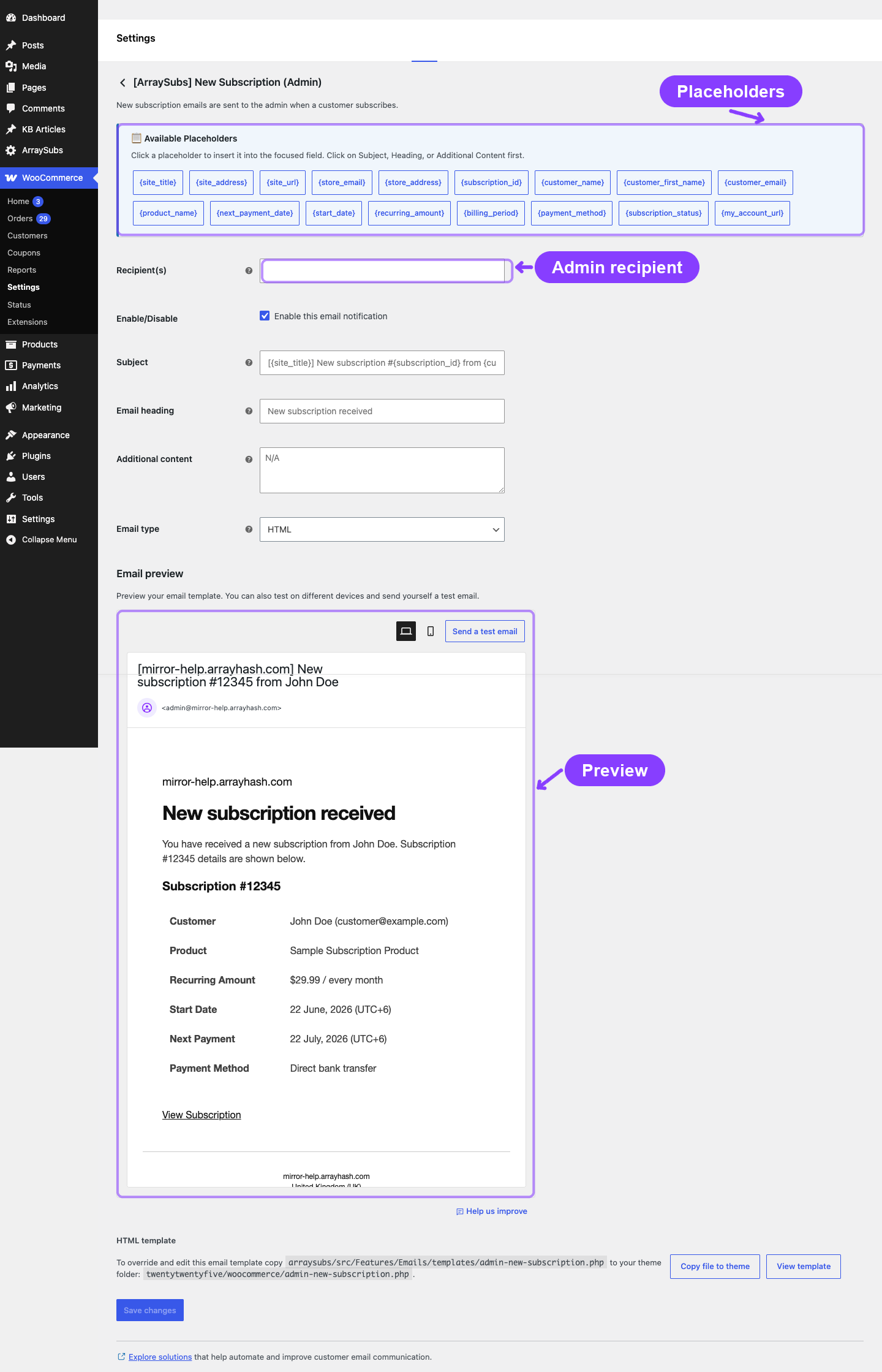
When It Is Sent
| Scenario | Sent? |
|---|---|
| Customer completes checkout for a subscription product | Yes |
| Admin creates a subscription manually and sets it to Active | Yes |
| Trial converts to paid Active status | Yes |
| Subscription reactivated from cancelled/on-hold/expired | No |
Specific Placeholders
Uses the base placeholders. No additional admin-specific placeholders beyond what the base set provides.
Admin Payment Failed
Notifies the admin when a subscription renewal payment fails.
WooCommerce email ID: arraysubs_admin_payment_failed
Default subject: [{site_title}] Payment failed for subscription #{subscription_id}
Default heading: Subscription payment failed
Trigger: Fires on the same hooks as the customer Payment Failed email:
arraysubs_payment_failedarraysubs_renewal_payment_failedarraysubs_gateway_payment_failed
What the Email Contains
- Admin greeting
- Alert that a subscription payment has failed
- Failure details:
- Subscription ID
- Customer name and email
- Order number and total
- Product name
- Current subscription status
- Direct link to the subscription in the ArraySubs admin
Configuration
| Setting | Description | Default |
|---|---|---|
| Enable / Disable | Toggle this admin notification on or off | Enabled |
| Recipient(s) | Comma-separated email addresses | Site admin email |
| Subject | Email subject line (supports placeholders) | See default above |
| Email heading | Heading inside the email body | See default above |
| Additional content | Custom text appended after the main content | Empty |
| Email type | HTML, Plain text, or Multipart | HTML |
When It Is Sent
| Scenario | Sent? |
|---|---|
| Automatic renewal charge fails at the gateway | Yes |
| Gateway webhook reports a declined card | Yes |
| Manual renewal order expires without payment | No |
Specific Placeholders
| Placeholder | Description |
|---|---|
{order_id} |
The failed renewal order number |
{order_total} |
The amount that failed to charge |
Payment failure admin emails fire alongside the customer Payment Failed email. If you receive this notification, the customer has also been notified with a "Pay Now" link.
Admin Subscription Cancelled
Notifies the admin when a subscription is cancelled.
WooCommerce email ID: arraysubs_admin_subscription_cancelled
Default subject: [{site_title}] Subscription #{subscription_id} cancelled by {customer_name}
Default heading: Subscription cancelled
Trigger: Fires on the arraysubs_data_status_changed hook when the new status is Cancelled — the same event that sends the customer's Subscription Cancelled email.
What the Email Contains
- Admin greeting
- Alert that a subscription has been cancelled
- Cancellation details:
- Subscription ID
- Customer name and email
- Product name
- Cancellation reason (if the customer provided one through the cancellation flow)
- Direct link to the subscription in the ArraySubs admin
Configuration
| Setting | Description | Default |
|---|---|---|
| Enable / Disable | Toggle this admin notification on or off | Enabled |
| Recipient(s) | Comma-separated email addresses | Site admin email |
| Subject | Email subject line (supports placeholders) | See default above |
| Email heading | Heading inside the email body | See default above |
| Additional content | Custom text appended after the main content | Empty |
| Email type | HTML, Plain text, or Multipart | HTML |
When It Is Sent
| Scenario | Sent? |
|---|---|
| Customer cancels from the customer portal | Yes |
| Scheduled end-of-period cancellation executes | Yes |
| Admin cancels the subscription manually | Yes |
| On-hold grace period expires and subscription auto-cancels | Yes |
Specific Placeholders
| Placeholder | Description |
|---|---|
{cancellation_reason} |
The reason the customer selected during cancellation (blank if cancelled by admin or system) |
Admin Subscription Pending Cancellation
Notifies the admin when a customer schedules a subscription to cancel at the end of the current billing period. This is different from the completed cancellation email: the subscription is still active until the scheduled date.
WooCommerce email ID: arraysubs_admin_subscription_pending_cancellation
Default subject: [{site_title}] Subscription #{subscription_id} scheduled to cancel on {scheduled_cancel_date}
Default heading: Subscription scheduled to cancel
Trigger: Fires when the subscription receives an end-of-period cancellation date.
What the Email Contains
- Customer and subscription summary
- Scheduled cancellation date
- Cancellation reason, when one was collected
- Direct link to the subscription record in ArraySubs admin
Specific Placeholders
| Placeholder | Description |
|---|---|
{scheduled_cancel_date} |
The date the subscription will cancel |
{cancellation_reason} |
Customer-selected reason, or "Not specified" |
Admin Email Settings in ArraySubs
In addition to the per-email settings on the WooCommerce email page, the ArraySubs General Settings include quick toggles for admin emails:
Location: ArraySubs settings (stored as emails.admin_new_subscription, emails.admin_cancelled, emails.admin_payment_failed)
These toggles control whether the main admin emails are evaluated for sending during lifecycle events. The WooCommerce email settings page provides the detailed per-email customization (subject, heading, recipient, content, and type). The pending-cancellation admin email is managed from WooCommerce email settings.
| Settings Key | Controls | Default |
|---|---|---|
emails.admin_email |
Custom admin email address (overrides site admin email when set) | Empty (uses site admin email) |
emails.admin_new_subscription |
Enable Admin New Subscription email | true |
emails.admin_cancelled |
Enable Admin Subscription Cancelled email | true |
emails.admin_payment_failed |
Enable Admin Payment Failed email | true |
Real-Life Use Cases
Use Case 1: Routing Failures to the Support Team
You set the Recipient(s) for the Admin Payment Failed email to [email protected], [email protected]. Now your billing team and support team are both notified the moment a payment fails, allowing them to follow up proactively.
Use Case 2: Monitoring Cancellation Reasons
The Admin Subscription Cancelled email includes the customer's cancellation reason. By reviewing these emails, you can identify patterns — for example, if many customers cite "Too expensive", you might consider adjusting pricing, adding a lower-tier plan, or enabling retention discount offers.
Use Case 3: Tracking Daily Signups
A store with high subscription volume routes the Admin New Subscription email to a shared inbox. The team uses these notifications for daily signup tracking without needing to log into the admin dashboard.
Troubleshooting
| Problem | Likely Cause | What to Do |
|---|---|---|
| Admin not receiving emails | The recipient address is wrong, or the email is disabled | Check the Recipient(s) field in WooCommerce → Settings → Emails for the specific admin email. Also verify the admin quick toggle in ArraySubs settings. |
| Emails going to a single address instead of multiple | The recipient list is not comma-separated correctly | Open the email settings and ensure addresses are separated by commas with no trailing spaces. |
| Cancellation email shows no reason | The subscription was cancelled by admin or system, not by the customer through the cancellation flow | The cancellation reason is only populated when the customer uses the self-service cancellation flow. Admin and system cancellations do not capture a reason. |
| Admin receiving too many emails | High subscription activity volume | Consider using email filters or routing to a dedicated inbox. You can also disable specific admin emails that are not actionable for your workflow. |
Related Guides
- Email Overview — How ArraySubs emails work, placeholder reference, and template overrides.
- Customer Emails — The matching customer emails that fire alongside admin notifications.
- General Settings — Quick admin email toggles.
- Lifecycle Management — Status transitions that trigger admin emails.
FAQ
Can I send admin emails to multiple people?
Yes. Open the admin email in WooCommerce → Settings → Emails and enter multiple email addresses in the Recipient(s) field, separated by commas.
Do admin emails and customer emails fire at the same time?
Yes. When a subscription activates, both the customer New Subscription email and the Admin New Subscription email are triggered by the same status-change event. The same applies to cancellations and payment failures.
Can I disable admin emails without affecting customer emails?
Yes. Each admin email has its own independent toggle. Disabling the Admin New Subscription email does not affect the customer's New Subscription email.
What if I set a custom admin email in ArraySubs settings?
The emails.admin_email setting in ArraySubs overrides the default WordPress admin email for all admin subscription notifications. If left empty, the site admin email (Settings → General → Administration Email Address) is used.
Does the admin get notified for reactivations?
No. There is no admin email for subscription reactivations in the current release. Only the customer receives the Subscription Reactivated email.