
Payment Method and Shipping Update Issues
Resolve problems with auto-renew toggles, payment method updates, gateway detachment, and shipping address changes.
Availability: Free + Pro
Page Navigation
- Current guide: Payment Method and Shipping Update Issues
- Where to open it: WordPress Admin -> ArraySubs -> Audits [beta]
- Section overview: Open overview
- Previous guide: Gateway Health
- Next guide: portal-action-failures
- Troubleshooting: Audits, Logs, and Troubleshooting
Overview
Subscribers may need to update their payment method, toggle automatic renewals, or change their shipping address between billing cycles. These actions involve validation checks for gateway capabilities, subscription status, ownership, and timing cutoffs. When a check fails, the customer sees an error that can be confusing without context.
This guide covers the most common payment method and shipping update failures and how to fix them.
Auto-Renew Toggle Issues (Pro)
The auto-renew toggle lets customers switch between automatic and manual renewal billing. It is a Pro feature that requires a compatible payment gateway.
Toggle Not Visible
Symptoms: The auto-renew toggle does not appear on the customer portal's subscription detail page.
Possible causes:
| Cause | Fix |
|---|---|
| Pro plugin is not active | Install and activate the Pro plugin |
| The auto-renew toggle setting is disabled | Enable Allow Customers to Toggle Auto-Renew in ArraySubs → Settings → General Settings |
| The subscription does not have an automatic gateway | The toggle only appears when a subscription has an active payment gateway with automatic payment capability |
| The gateway does not support auto-renew | Check the Gateway Health Dashboard for the gateway's capabilities |
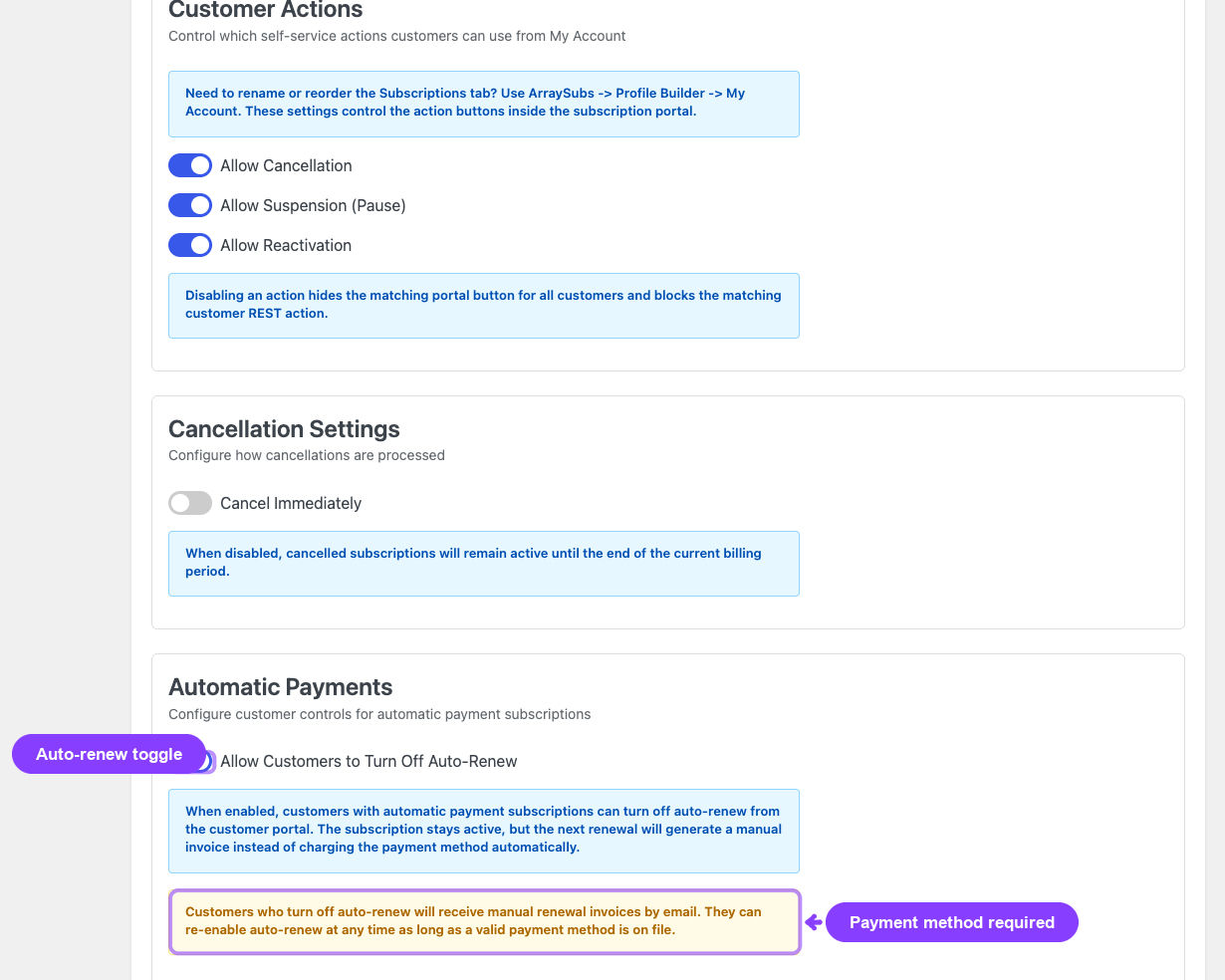
Turning Off Auto-Renew
When a customer disables auto-renew:
- The subscription reverts to manual renewal
- The next renewal invoice will require manual payment
- The customer receives the invoice by email and can pay through their account
Turning On Auto-Renew — Errors
| Error Message | Cause | Resolution |
|---|---|---|
| "Auto-renew toggle is not available." | The setting is disabled globally | Enable the toggle in General Settings |
| "Subscription not found." | Invalid subscription ID | Verify the subscription exists |
| "This subscription does not have an active automatic payment gateway." | No gateway is configured, the gateway is disabled, or it does not support automatic payments | Check the subscription's payment gateway; the customer may need to add a payment method |
| "Auto-renew is already enabled." | The subscription is already set to auto-renew | No action needed |
| "Auto-renew can only be changed for active, on-hold, or trial subscriptions." | The subscription is cancelled, expired, or pending | The subscription must be in an eligible status |
| "Cannot change auto-renew for a subscription pending cancellation." | The subscription has a scheduled end-of-period cancellation | The customer must undo the cancellation first, then toggle auto-renew |
| "Cannot enable auto-renew: your automatic payment setup is no longer active. Please update your payment method first." | The stored payment method is detached, errored, cancelled, or inactive | The customer needs to update their payment method before re-enabling auto-renew |
Expired Payment Method
When a customer's stored card has expired (past the _payment_method_expiry_month and _payment_method_expiry_year), re-enabling auto-renew may fail because the gateway cannot charge an expired card.
Fix: The customer should update their payment method first through the portal's payment method update flow, then toggle auto-renew on.
Payment Method Update Issues (Pro)
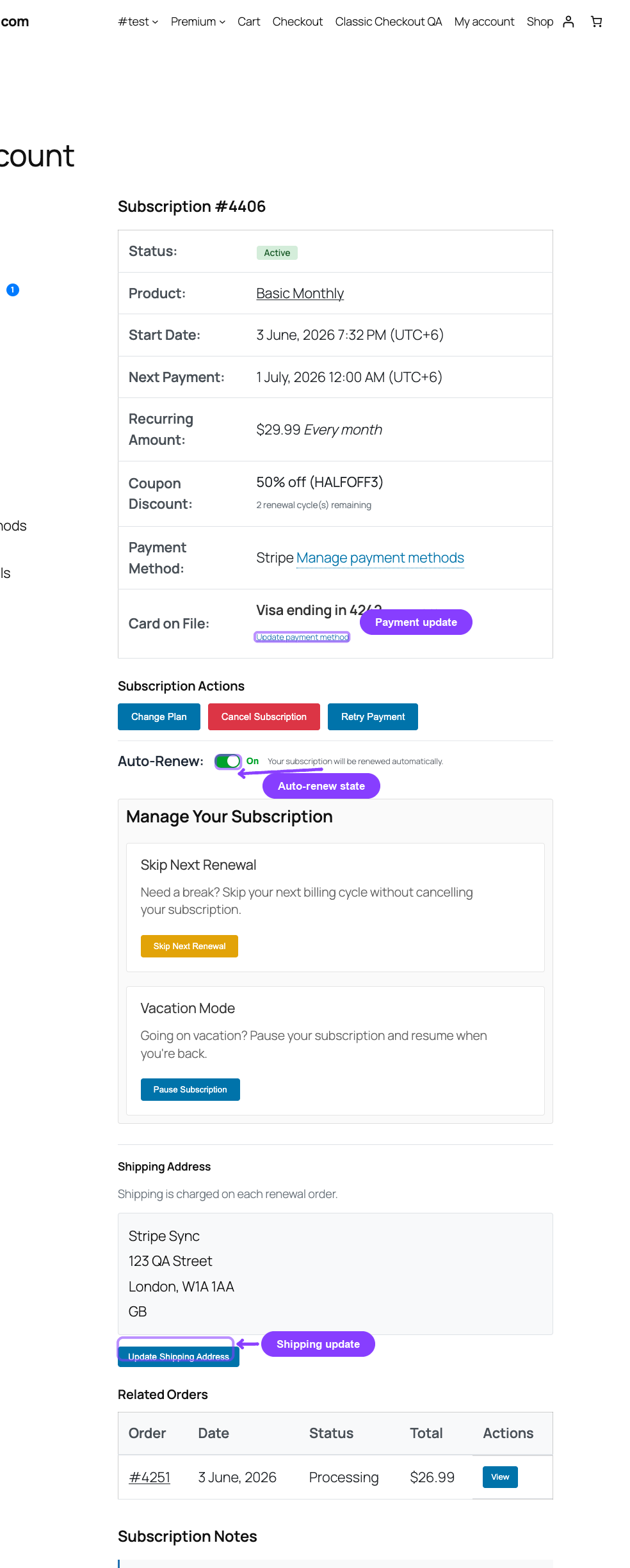
Update Link Not Available
Symptoms: The "Update Payment Method" option does not appear on the subscription detail page in the customer portal.
Possible causes:
| Cause | Fix |
|---|---|
| No gateway is configured on the subscription | The subscription uses manual payments and has no gateway to update |
| The gateway does not support payment method updates | Check the Gateway Health Dashboard for the payment_method_update capability |
| Pro plugin is not active | Install and activate the Pro plugin |
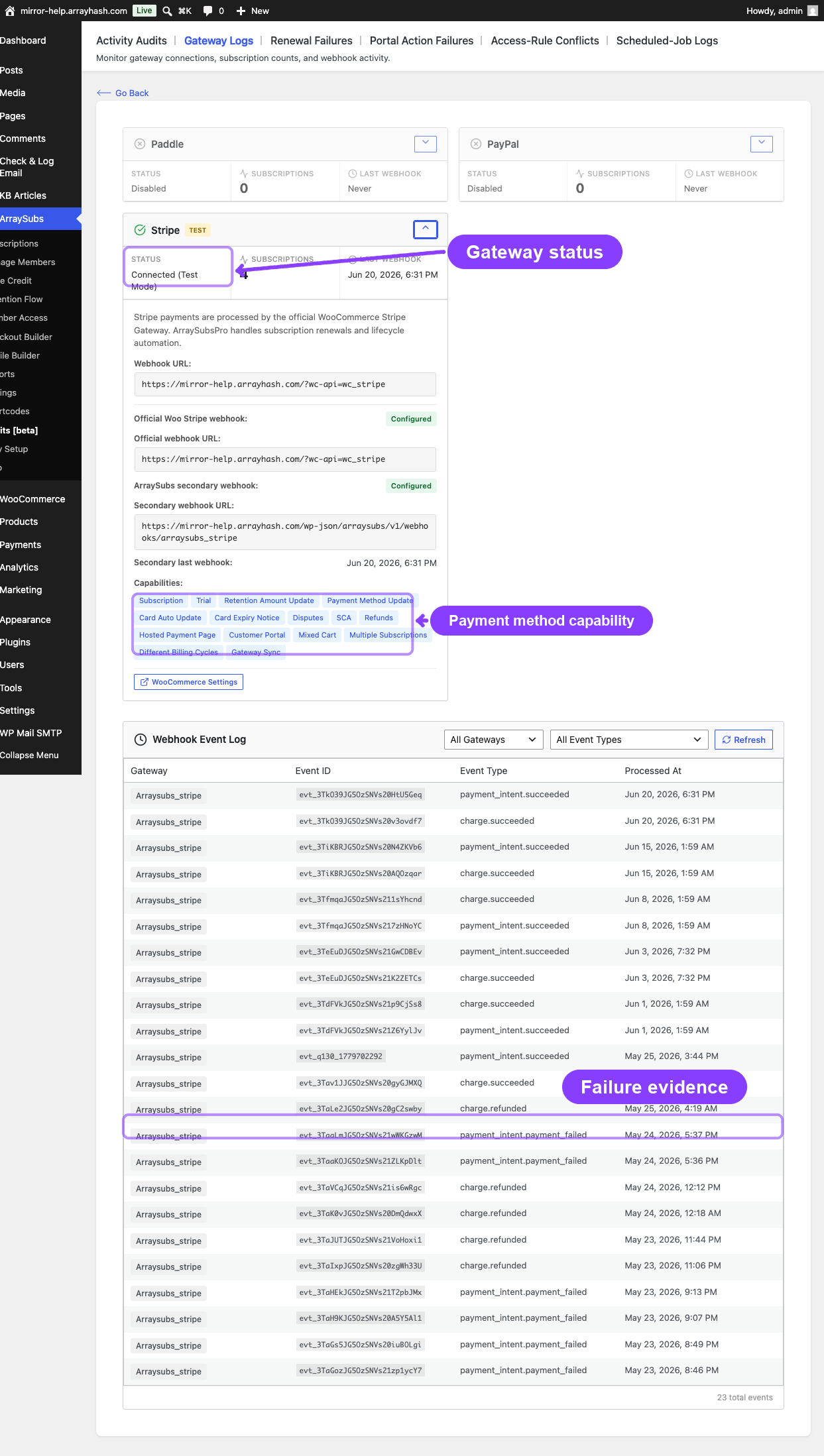
Update Request Fails
| Error Message | Cause | Resolution |
|---|---|---|
| "No payment method found for this subscription." | The subscription does not have a stored payment method or gateway assignment | Check the subscription's gateway metadata in the admin detail page |
| "Payment method update is not available for this subscription." | The gateway does not support the payment_method_update capability |
This is a gateway limitation; the customer cannot update the method through ArraySubs for this gateway |
| "Unable to initiate payment method update." | The gateway returned an error when creating the update session | Check the gateway dashboard for errors; verify API credentials; the customer can try again later |
How Payment Method Updates Work
- The customer clicks "Update Payment Method" in the portal
- ArraySubs asks the gateway to create an update session (e.g., a Stripe SetupIntent or a PayPal billing agreement update)
- The customer is redirected to the gateway's secure form to enter new card details
- On success, the gateway sends a webhook to ArraySubs with the new payment method
- ArraySubs updates the stored card details on the subscription
If any step fails, the old payment method remains unchanged.
Gateway Detachment
Admins can detach a gateway from a subscription through the Detach Gateway button inside the Payment Gateway card on the subscription detail page. This is a deliberate action, not an error, but it has important consequences.
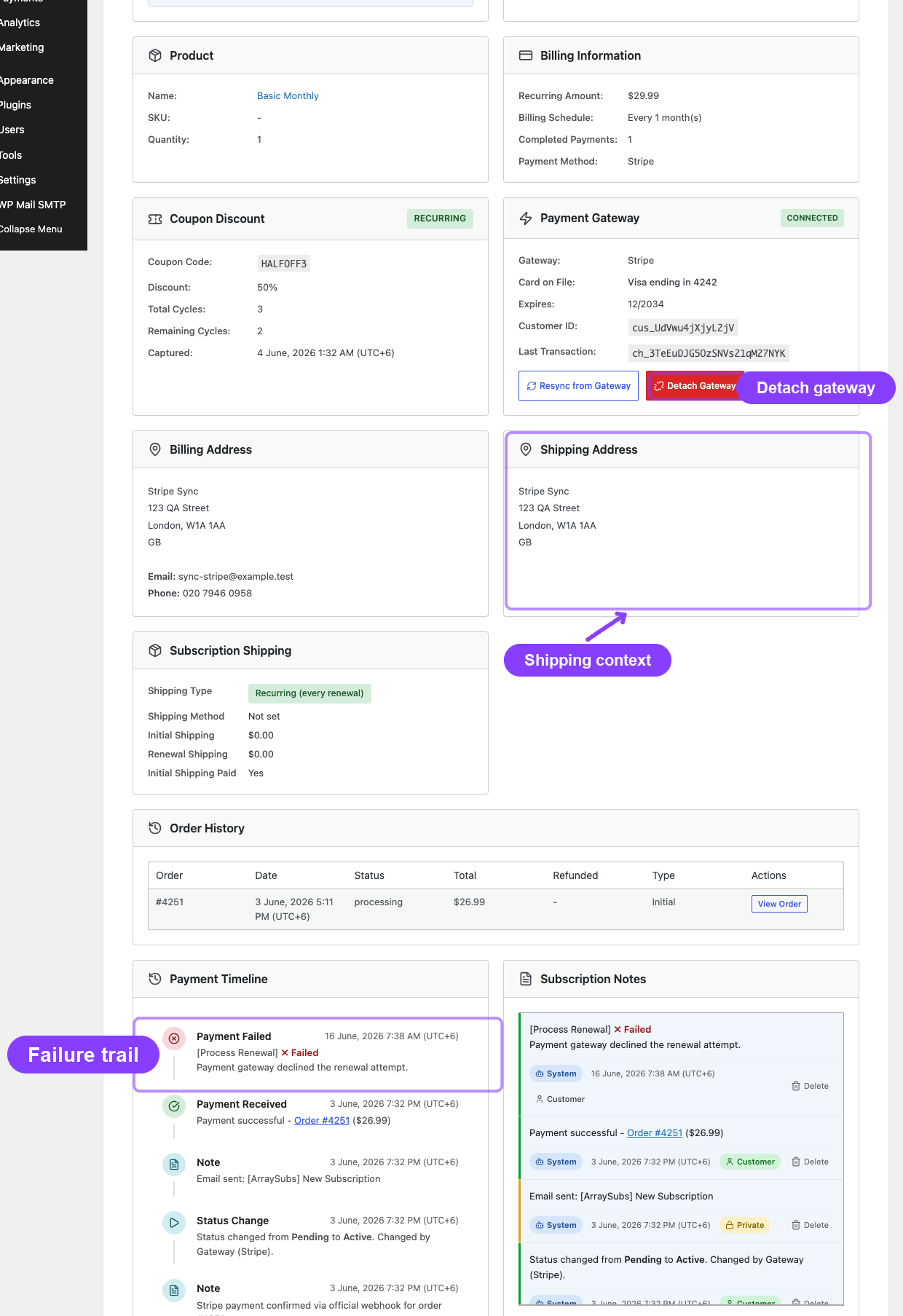
The Detach Gateway button appears only on automatic-gateway subscriptions (Stripe, PayPal, Paddle). Manual gateways like BACS, Cheque, or COD do not show the Payment Gateway card at all — there is nothing to detach because no remote payment method is on file.
What happens on detach:
- All stored payment method metadata is removed (
_payment_gateway,_gateway_payment_method_id, card brand, last four digits, expiry, etc.) _gateway_statusis set todetached- The subscription reverts to manual renewal — the customer must pay invoices manually
- The Payment Gateway card disappears (the subscription is now treated as manual-gateway)
- A note is added to the subscription audit trail
When to use detach:
- The customer requests removal of their stored card
- The gateway token is invalid and cannot be refreshed
- You are migrating the subscription to a different payment method
After detaching, the customer needs to go through a new payment flow (e.g., pay a renewal invoice) to re-establish automatic payments with a new payment method.
Store Credit Reversal Trail (Pro)
When a renewal payment fails on a subscription that had store credit auto-applied, ArraySubs automatically restores the credit. The trail an auditor can follow:
- Order notes — the failed renewal order has a "Store credit reversed after payment failure: $X.XX" note.
- Subscription notes — a system note tagged
credit_reversed: "Store credit $X.XX restored after renewal payment failed on order #1234." - Credit history table — the customer / subscription gets a new transaction with source
Reversalmatching the originally-applied amount(s). Subscription bucket and customer bucket are restored separately so each goes back to where it came from. - Order meta —
_arraysubs_credit_reversed = yesand_arraysubs_credit_reversed_at = <UTC timestamp>are stamped on the order._arraysubs_credit_appliedis cleared so a follow-up retry can re-apply credit cleanly.
If you see a debit followed by a matching Reversal credit on the same day, that is the system working correctly — no manual reconciliation needed. If credit was deducted but no reversal entry appears even though the renewal failed, check that the Pro plugin is active (the listener lives in arraysubspro/StoreCredit/Services/Hooks.php) and that the arraysubs_renewal_payment_failed action actually fired (look in the subscription notes for the failure entry).
Shipping Address Update Issues (Pro)
Feature Not Available
Symptoms: The "Update Shipping Address" option does not appear on the subscription detail page.
Possible causes:
| Cause | Fix |
|---|---|
| The subscription does not require shipping | Only subscriptions with _arraysubs_needs_shipping = yes show the shipping update option |
| Pro plugin is not active | Install and activate the Pro plugin |
Cutoff Period Error
Error: "Shipping address cannot be changed within X days of the next payment."
Cause: A cutoff period prevents shipping address changes close to the renewal date. The default cutoff is 3 days before the next payment date.
How it works:
- The system calculates the cutoff time as
next_payment_date - (cutoff_days × 24 hours) - If the current time is past the cutoff, the update is blocked
- This prevents last-minute address changes that could disrupt order fulfillment
Fix: The customer must wait until after the next renewal to update their address, or contact the store admin to update it manually.
Address Validation Errors
| Error | Cause | Fix |
|---|---|---|
| "Invalid address" | The submitted address data is empty or malformed | The customer must fill in all required fields |
| "Missing field" | A required address field (first name, last name, address line 1, city, postcode, country) is empty | Complete all required fields |
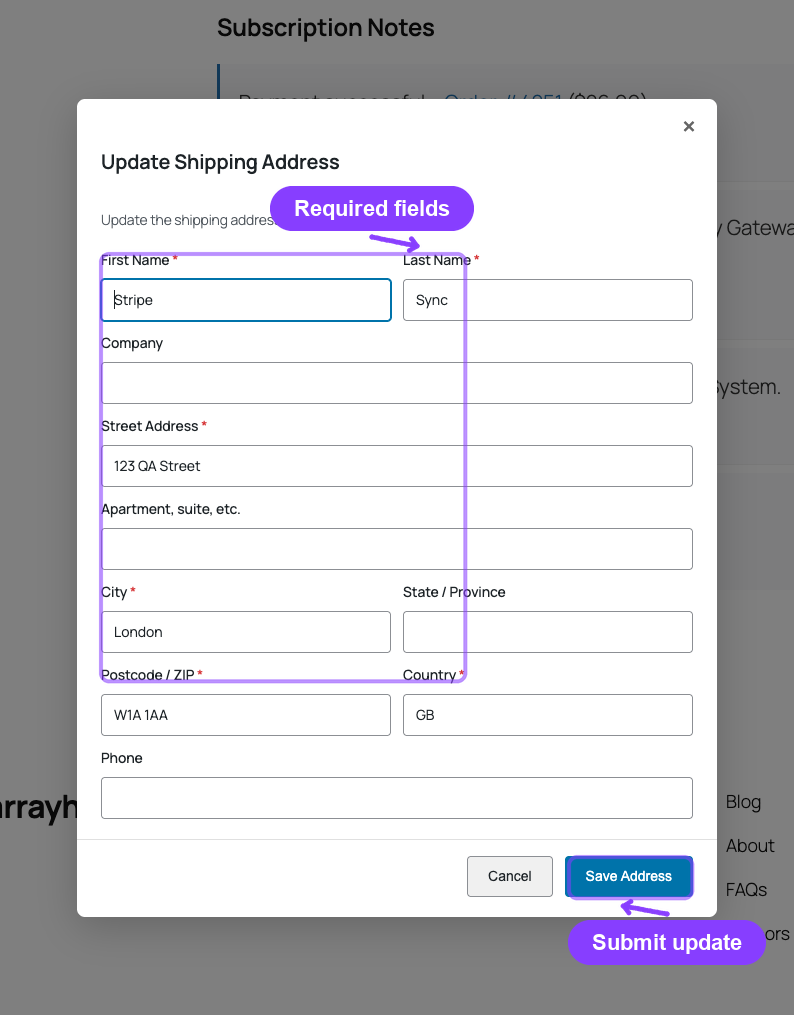
Required Address Fields
The following fields are required for a shipping address update:
| First Name | Last Name |
| Address Line 1 | City |
| Postcode | Country |
Optional fields: Company, Address Line 2, State/Province, Phone.
Diagnostic Checklist
When investigating a payment method or shipping issue:
- Is the Pro plugin active? Payment method updates, auto-renew toggle, and shipping updates all require Pro
- Does the subscription have a gateway? Check the subscription detail page for the payment gateway card
- What capabilities does the gateway support? Check the Gateway Health Dashboard
- What is the subscription status? Most update actions require Active, On-Hold, or Trial status
- Is there a pending cancellation? Auto-renew cannot be toggled when
_waiting_cancellationis set - Is the stored payment method valid? Check card expiry, gateway status, and whether the method was detached
- For shipping: is the cutoff period active? Compare the current date with the next payment date minus the cutoff days
Related Guides
- Gateway Health Dashboard — verify gateway capabilities and connection status
- Portal Pages — what customers see on the subscription detail page
- Renewal Failures and Billing Issues — when payment method problems cause renewal failures
FAQ
Can the customer have different payment methods on different subscriptions?
Yes. Each subscription stores its own payment method independently. Updating the payment method on one subscription does not affect others.
What happens when auto-renew is turned off mid-cycle?
The current billing cycle is not affected. The change takes effect at the next renewal — instead of charging automatically, the system creates a manual invoice that the customer must pay.
Can an admin update the payment method on behalf of a customer?
Admins can detach a gateway from the subscription detail page, but they cannot directly add or update payment method tokens. The customer must go through the gateway's secure payment form to provide new card details.
How do I change the shipping address cutoff period?
The cutoff period is controlled by a filter (arraysubs_shipping_address_cutoff_days). The default is 3 days. A developer can adjust this value through custom code.
What happens if the gateway is in test mode?
Test-mode gateways function normally for all operations — auto-renew, payment method update, and webhook processing. Test events appear in the Gateway Health Dashboard webhook log. No real charges are made.