
Trial Management
How free trials start, what happens when a trial ends, and how the system converts trials to paid subscriptions or downgrades them automatically.
Availability: Free (core trial engine), with Pro extensions for auto-downgrade on trial expiry
Page Navigation
- Current guide: Trial Management
- Where to open it: WordPress Admin -> ArraySubs -> Subscriptions
- Section overview: Open overview
- Previous guide: renewal-operations
- Next guide: auto-renew-and-manual-fallback
- Troubleshooting: Audits, Logs, and Troubleshooting
Overview
Trials let customers try a subscription before paying. During the trial period, the customer has full access to their subscription benefits without being charged (beyond an optional signup fee). When the trial ends, the system automatically converts the subscription to a paid active subscription and schedules the first real billing cycle.
This page covers the complete trial lifecycle — from checkout through conversion — including what happens when a trial expires without payment and how the auto-downgrade feature works.
When to use this
- You offer free or discounted trial periods on subscription products
- You want to understand what happens when a trial period ends
- You need to know when the first real payment occurs after a trial
- You want to configure auto-downgrade behavior for trial expirations
Prerequisites
- A subscription product with a trial period configured (trial length and trial period set on the product)
- For auto-downgrade: Pro plugin active with plan switching configured
How it works
Trial start
When a customer purchases a subscription product with a trial, the subscription is created with status Trial instead of Active. The trial end date is calculated from the purchase date by adding the trial length and period.
What the customer pays at checkout:
| Scenario | Amount charged |
|---|---|
| Free trial, no signup fee | $0 (no charge) |
| Free trial + signup fee | Signup fee only |
| No trial + signup fee | Subscription price + signup fee |
| No trial, no signup fee | Subscription price |
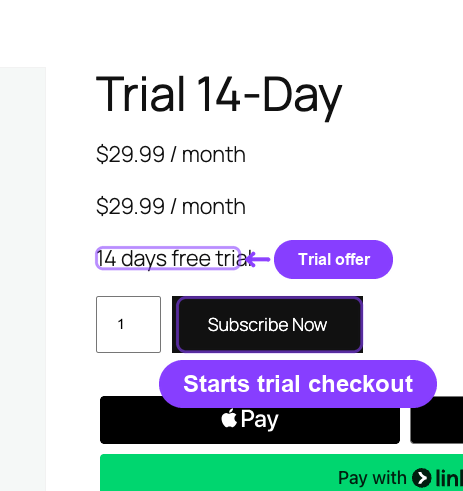
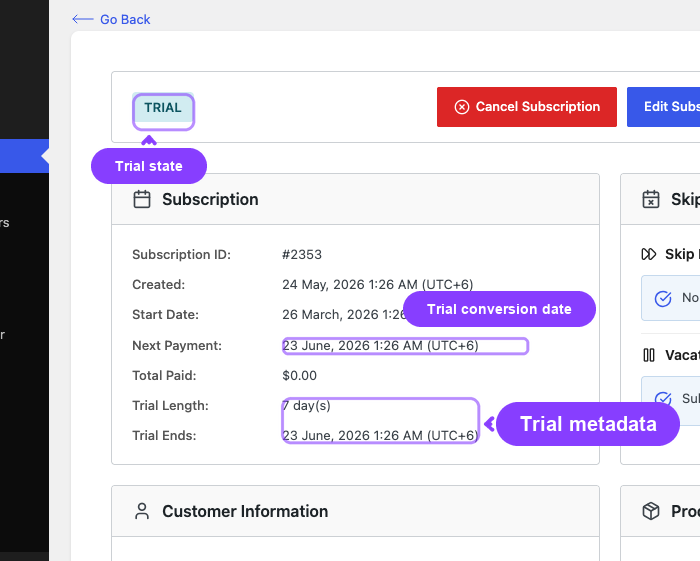
When the subscription is created:
- Status is set to
Trial - Trial end date is stored (purchase date + trial length × trial period)
- Next payment date is set to the trial end date
- Trial length and period are recorded on the subscription
- A Trial Started email is sent to the customer
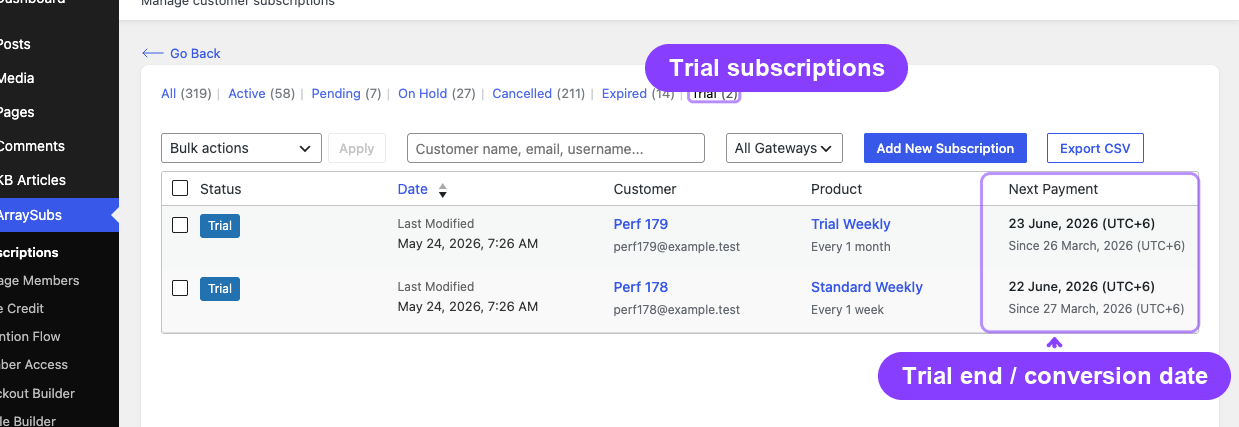
During the trial period, the subscription's next payment date equals the trial end date. This is used by the trial conversion job to know when to convert the subscription.
Trial conversion
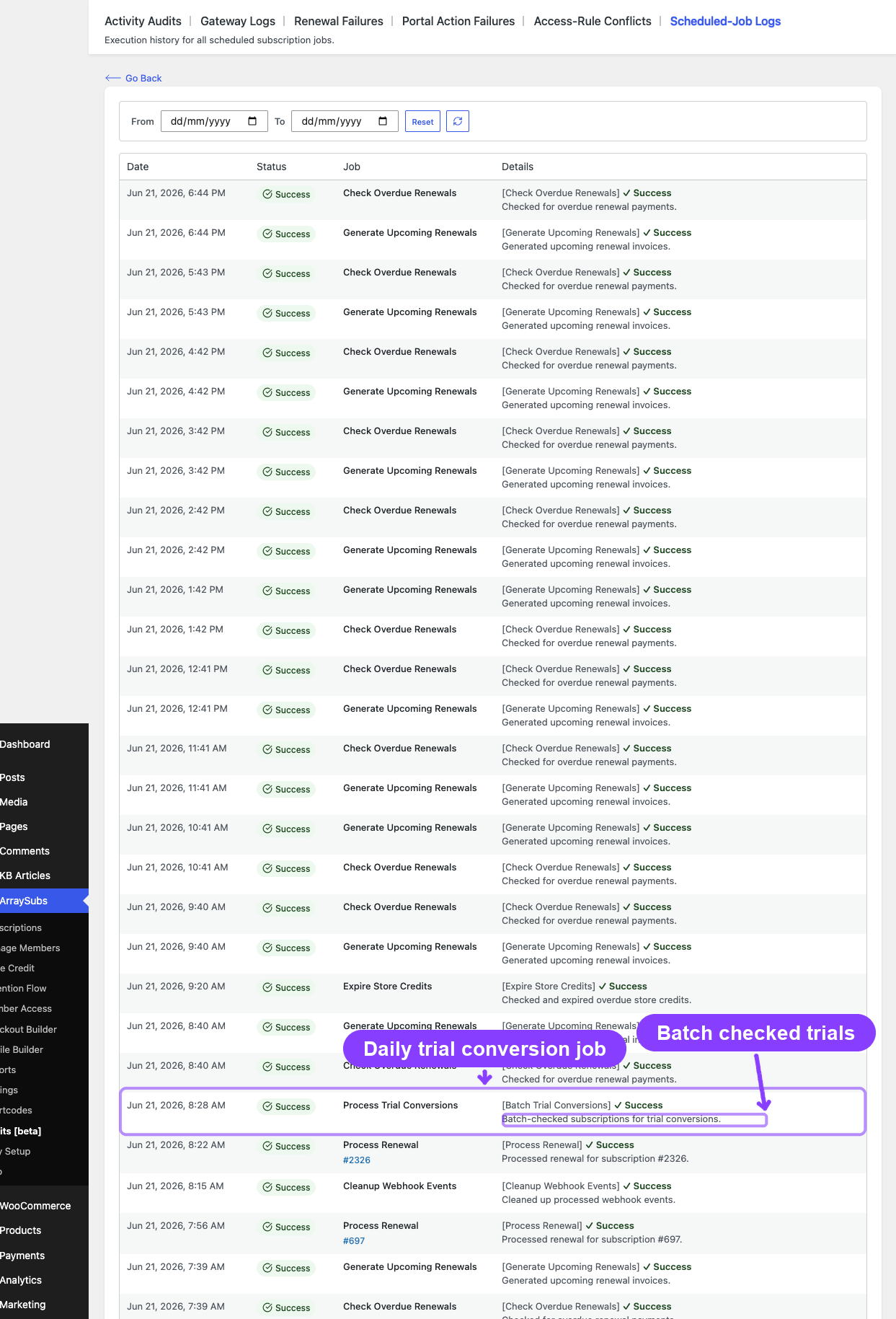
A daily background job called Process Trial Conversions runs at 2:00 AM and checks for trial subscriptions whose next payment date has passed.
For each qualifying subscription, the system:
- Checks for auto-downgrade — If the Pro plugin is active and auto-downgrade on trial expiry is configured, the system delegates to the auto-downgrade handler instead of converting normally
- Converts to Active — Changes the subscription status from Trial to Active
- Calculates the first renewal date — Adds one billing cycle (billing interval × billing period) from the current date. The billing cycle uses the subscription's billing period, not the trial period.
- Clears trial data — Sets the trial length to 0 (the trial end date is preserved for historical records)
- Sends notification — Fires the Trial Converted email to the customer
First renewal date calculation:
The first paid renewal is calculated from the conversion date, not the trial end date. This means:
Example: A monthly subscription with a 14-day trial purchased on January 1.
- Trial ends: January 15
- Conversion runs: January 15 (2 AM job)
- First paid renewal: February 15 (one billing cycle from conversion)
After conversion, the subscription enters the normal billing cycle. The hourly Generate Upcoming Renewals job will create the first renewal invoice at the appropriate time before the first paid renewal date.
Trial auto-downgrade (Pro)
When the Pro plugin is active and auto-downgrade is configured for trial expiration, the system can switch the subscription to a different (usually lower-tier) product instead of converting to a paid active subscription.
How it works:
- During trial conversion, the system checks the product's auto-downgrade settings
- If
auto_downgrade_timingincludeson_trial_expireand a downgrade target product is configured, the subscription is switched to the target product - The customer receives an Auto Downgrade email instead of a Trial Converted email
- The subscription may become free (if the target product has no recurring charge) or move to a lower pricing tier
Use case: A SaaS product offers a 14-day trial of the Premium plan. If the customer does not pay after the trial, the subscription automatically switches to the Free plan with limited features.
For auto-downgrade configuration, see Plan Switching and Relationships.
Trial settings
Trial behavior is controlled by a combination of product-level configuration and global settings.
Product-level settings
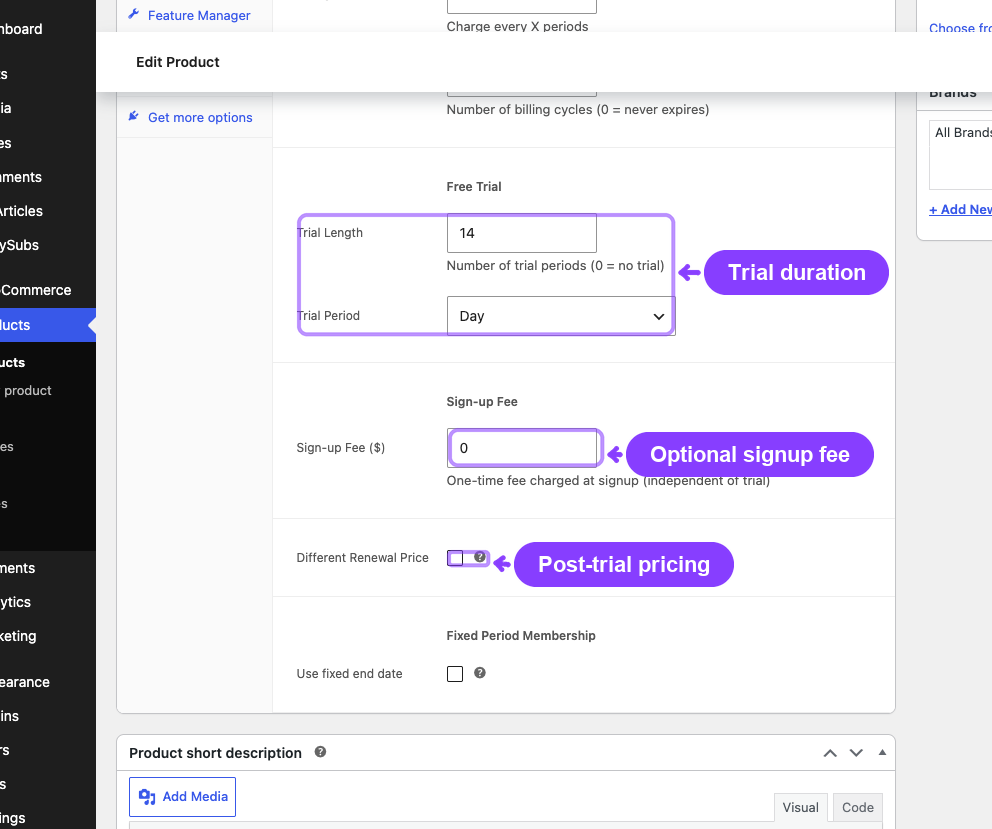
Set on each subscription product under the Subscription tab:
| Setting | What it controls | Example |
|---|---|---|
| Trial Length | How many trial periods the customer gets | 14 |
| Trial Period | The unit of the trial length | Days, Weeks, Months, or Years |
Each product variation can have its own independent trial configuration.
Global settings
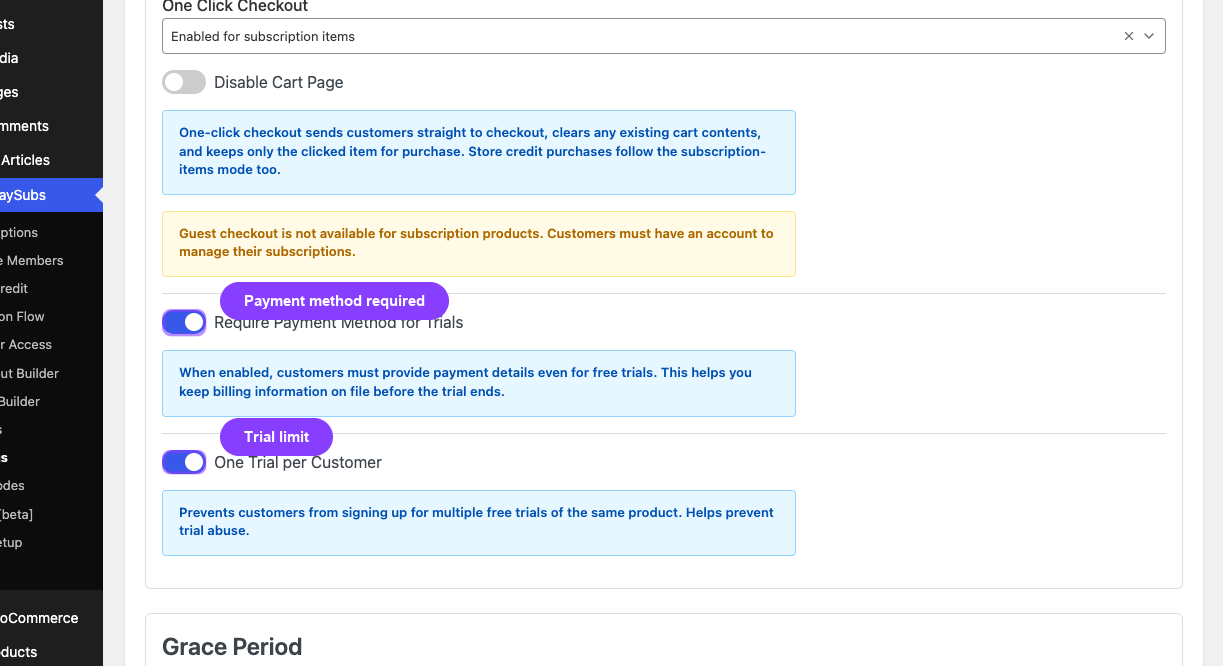
Configure at ArraySubs → Settings → General Settings → Trials:
| Setting | What it controls | Default |
|---|---|---|
| Require Payment Method | Whether customers must enter a payment method during checkout even for $0 free trials | On |
| One Trial Per Customer | Whether a customer can start only one trial per product | On |
Payment method requirement
When Require Payment Method is enabled, customers must provide a valid payment method at checkout even if the trial is free ($0). This helps ensure a smooth transition to paid billing when the trial ends.
Gateway behavior varies:
- Stripe (Pro): Creates a SetupIntent to capture the payment method without charging
- PayPal (Pro): Does not support $0 trial authorization — trials are handled through PayPal Billing Plans
- Paddle (Pro): Captures payment method natively through the Paddle checkout overlay
Trial emails
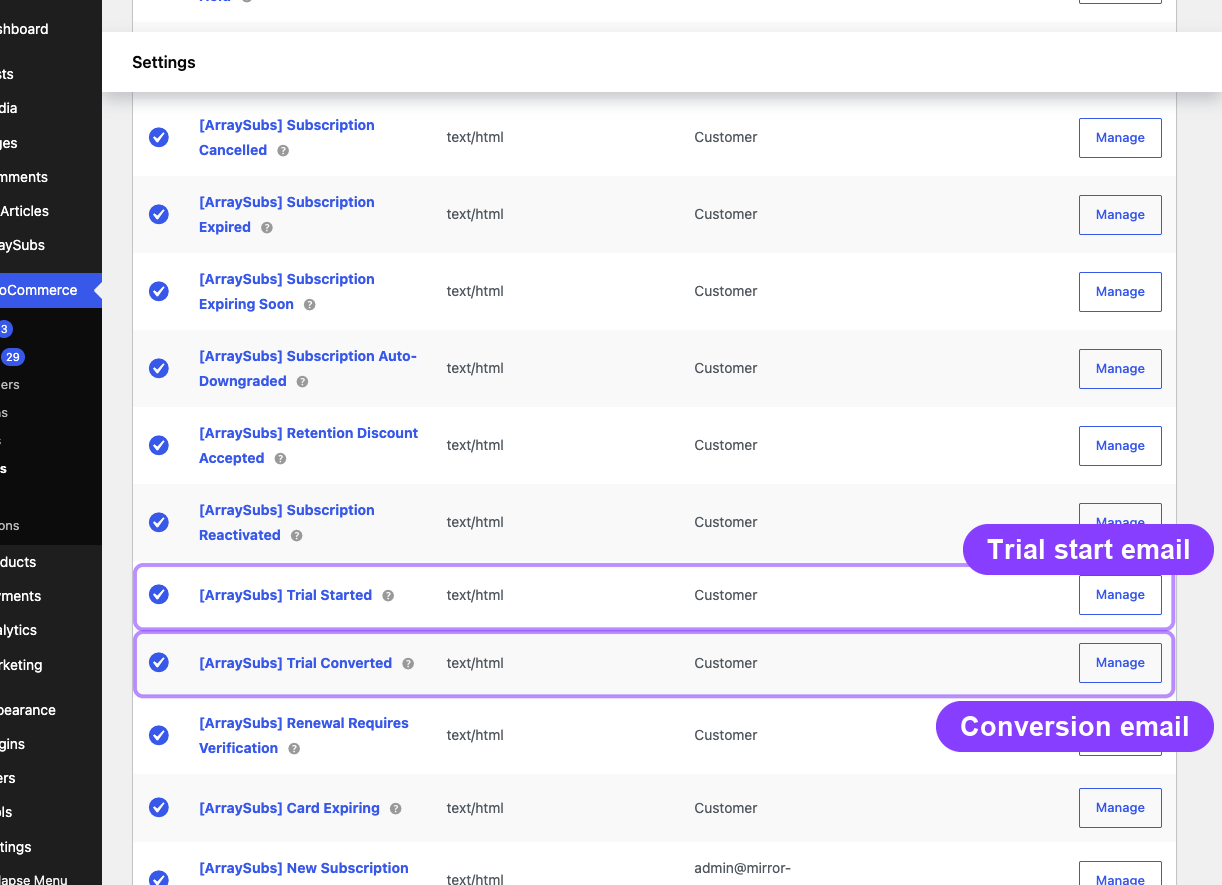
Two emails are associated with the trial lifecycle:
| When it sends | What it includes | |
|---|---|---|
| Trial Started | When the trial subscription is created | Trial end date, trial length (e.g., "14 days"), subscription details |
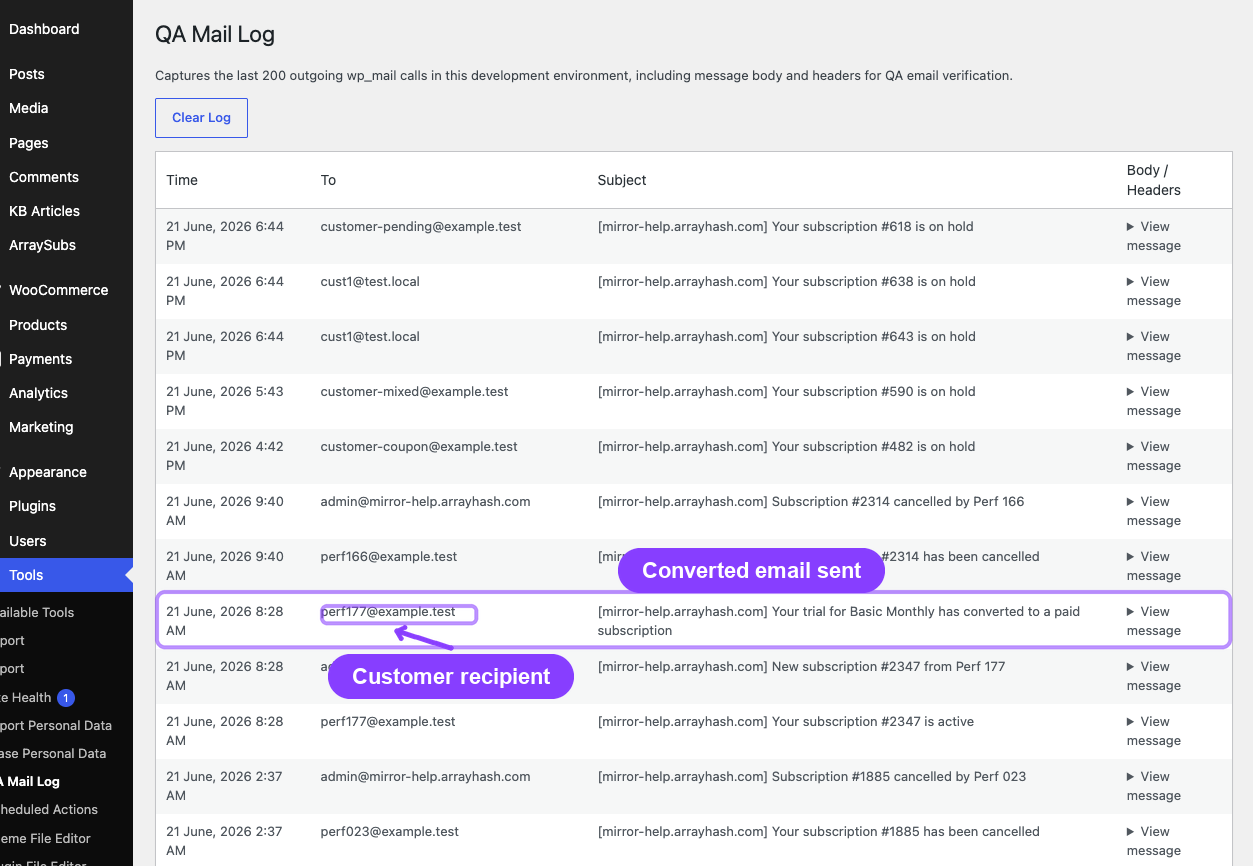
| Trial Converted | When the trial converts to a paid Active subscription | Next payment date, subscription price, billing schedule |
The Trial Converted email is suppressed when auto-downgrade handles the conversion — in that case, the Auto Downgrade email is sent instead.
For complete email configuration and placeholders, see Customer Emails.
Real-life use cases
Use case 1: SaaS free trial with payment capture
A project management tool offers a 14-day free trial of the Pro plan at $49/month with payment method required at checkout.
- Customer signs up on March 1, enters credit card, pays $0
- Trial ends March 15 — subscription converts to Active
- First charge of $49 on April 15
- Customer can cancel anytime during the trial from the customer portal
Use case 2: Trial with signup fee
A fitness membership offers a 7-day trial with a $5 signup fee. The monthly subscription is $29/month.
- Customer pays $5 at checkout on March 1
- Trial ends March 8 — subscription converts to Active
- First renewal of $29 on April 8
- The $5 signup fee is a one-time charge and does not repeat
Use case 3: Auto-downgrade on trial expiry (Pro)
A membership site offers a 30-day trial of the Premium tier ($99/month) with auto-downgrade to the Free tier.
- Customer signs up on March 1, trial starts
- March 31 — trial conversion job runs, detects auto-downgrade configuration
- Subscription switches from Premium to Free plan automatically
- Customer receives Auto Downgrade email explaining the change
- If the customer wants Premium, they can upgrade through the customer portal
Edge cases and important notes
- Trial conversion is automated. The conversion job runs daily at 2 AM. Subscriptions whose trial ends between job runs are processed during the next execution. There is no immediate-trigger conversion.
- Manual status changes skip trial hooks. If an admin manually changes a subscription from Trial to Active, the
trial_convertedhook does not fire and the Trial Converted email is not sent. The system does not run the conversion logic for manual changes. - Variation-level trials. Each variation on a variable product can have its own trial length and period. The trial stored on the subscription matches the variation the customer purchased.
- Trial counter on the subscription. The trial end date is preserved on the subscription even after conversion. This immutable record is used for analytics (trial conversion rate calculations) and order type classification.
Troubleshooting
| Problem | Likely cause | What to do |
|---|---|---|
| Trial not converting to Active | Conversion job has not run yet (runs daily at 2 AM) | Wait for the next scheduled run, or check Scheduled-Job Logs (Pro) for the trial conversion job status. |
| Customer received Auto Downgrade email instead of Trial Converted | Auto-downgrade on trial expiry is enabled for the product | Check the product's linked products and auto-downgrade timing settings. Disable on_trial_expire if you want normal conversion. |
| Customer was charged at checkout during free trial | Signup fee is configured on the product | Check the product's signup fee field. A signup fee is charged even during free trials. |
| Trial Started email not sent | Email is disabled in WooCommerce email settings | Go to WooCommerce → Settings → Emails and check the Trial Started email is enabled. |
| One Trial Per Customer not enforced | This setting exists but enforcement depends on checkout validation | Verify the setting is enabled in Settings → General → Trials. |
Related docs
- Create and Configure Subscription Products for setting trial length and period on products
- Plan Switching and Relationships for auto-downgrade configuration
- Customer Emails for Trial Started and Trial Converted email templates
- Renewal Operations for how the first paid renewal is generated after trial conversion
- Recovery and Grace Flows for what happens if payment fails after trial conversion
- Subscription Checkout for trial checkout behavior and pricing
FAQ
When does the first real charge happen after a trial?
The first charge happens one billing cycle after the trial converts. For example, a monthly subscription with a 14-day trial purchased on March 1 converts on March 15 and charges on April 15.
Can a customer cancel during the trial?
Yes. Customers can cancel from the customer portal during the trial just like any active subscription. The cancellation can be immediate or end-of-period, depending on your settings.
Does the trial count as a "completed payment" for different renewal pricing?
No. The trial period does not increment the completed payments counter. The counter starts at 0 when the trial converts and increments only when actual payments are received.
Can I offer trials on variable products?
Yes. Each variation can have its own trial length and period. The customer's subscription uses the trial configuration from the specific variation they purchased.
What happens if the trial conversion job fails?
The job runs daily and catches up on any trials that were missed. If a trial end date was two days ago, it will still be processed during the next job run. No trial conversions are permanently skipped.
Can a customer have multiple active trials?
This depends on the One Trial Per Customer setting. When enabled, a customer can only have one active trial per product. They can still have trials on different products simultaneously.