
Feature Manager Settings
ProEvery setting in the Feature Manager panel — what it does, what options it accepts, and what the default is.
Availability: Pro
Page Navigation
- Current guide: Feature Manager Settings
- Where to open global settings: WordPress Admin -> ArraySubs -> Settings -> Feature Manager
- Direct route:
/wp-admin/admin.php?page=arraysubs-mainadmin#/settings/feature-manager - Where to define product features: WordPress Admin -> Products -> Edit Product -> Feature Manager product data tab
- Section overview: Open overview
- Previous guide: defining-product-features
- Next guide: README
- Troubleshooting: Audits, Logs, and Troubleshooting
Overview
Feature Manager settings control the entire module: whether it's active, how features display to customers and admins, how entitlements are grouped, and whether usage tracking is visible.
All settings are located at ArraySubs → Settings → Feature Manager.
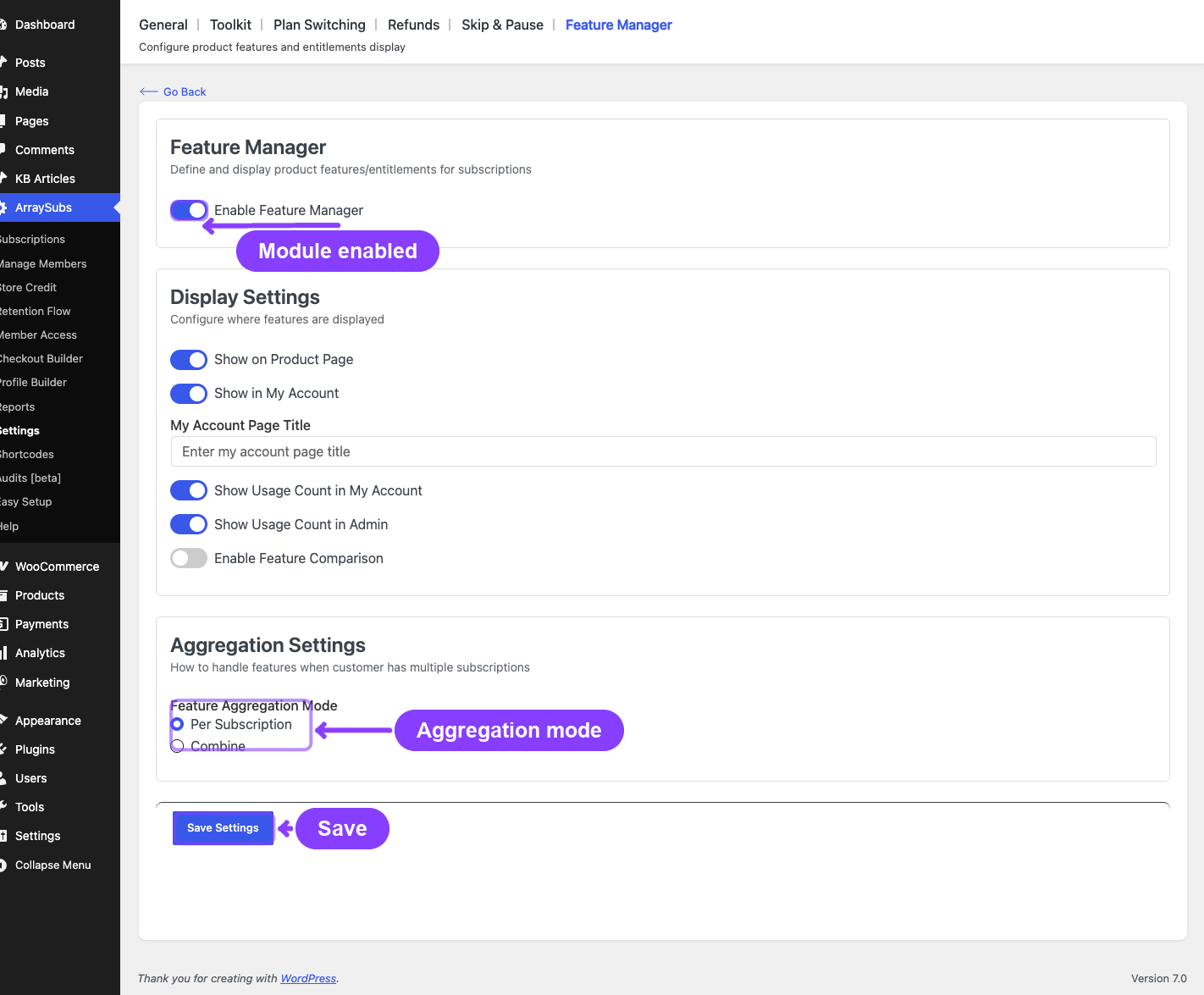
Settings Reference
Enable Feature Manager
| Property | Value |
|---|---|
| Setting key | feature_manager.enabled |
| Type | Toggle (on/off) |
| Default | On |
| Effect | Master switch for the entire Feature Manager module. When off, the product editor tab, storefront display, My Account page, REST endpoints, and all Feature Manager behavior are disabled. |
Turning this off does not delete any existing feature data on products. Features are preserved in meta and will reappear if you re-enable the module.
Display Settings
These settings control where and how features appear. They are only visible when Enable Feature Manager is on.
Show on Product Page
| Property | Value |
|---|---|
| Setting key | feature_manager.show_on_product_page |
| Type | Toggle (on/off) |
| Default | On |
| Effect | When on, a "What's Included" section appears on the storefront single product page listing the product's enabled features. Only applies to simple subscription products — variable products do not display features at the product level. |
Show in My Account
| Property | Value |
|---|---|
| Setting key | feature_manager.show_in_my_account |
| Type | Toggle (on/off) |
| Default | On |
| Effect | When on, a "My Features" menu item and page appear in the customer's WooCommerce My Account area. The page shows all feature entitlements from the customer's active subscriptions. |
My Account Page Title
| Property | Value |
|---|---|
| Setting key | feature_manager.my_account_page_title |
| Type | Text field |
| Default | Empty (displays "My Features") |
| Effect | Sets a custom heading for the My Features page in My Account. Leave blank to use the default "My Features" title. |
| Visibility | Only shown when Show in My Account is on. |
Show Usage Count in My Account
| Property | Value |
|---|---|
| Setting key | feature_manager.show_usage_count_in_my_account |
| Type | Toggle (on/off) |
| Default | On |
| Effect | When on, an extra Usage column appears in the customer's My Features tables for number-type features. Shows consumption progress (e.g., "3 / 10"). Usage data must be populated by your site's code or integrations. |
| Visibility | Only shown when Show in My Account is on. |
Show Usage Count in Admin
| Property | Value |
|---|---|
| Setting key | feature_manager.show_usage_count_in_admin |
| Type | Toggle (on/off) |
| Default | On |
| Effect | When on, the admin Feature Log view shows a Usage column alongside feature entitlements. This is independent of the customer-facing usage toggle. |
Enable Feature Comparison
| Property | Value |
|---|---|
| Setting key | feature_manager.show_comparison |
| Type | Toggle (on/off) |
| Default | Off |
| Effect | Reserved for a future plan-switching experience that shows a side-by-side comparison of current vs. new plan features before the customer confirms a switch. The setting is present but not yet connected to an active UI flow. |
Aggregation Settings
This section controls how features from multiple subscriptions are grouped.
Feature Aggregation Mode
| Property | Value |
|---|---|
| Setting key | feature_manager.aggregation_mode |
| Type | Radio group |
| Default | Per Subscription |
| Options | See below |
| Option | Label | Description |
|---|---|---|
per_subscription |
Per Subscription | Show features separately for each active subscription. Each subscription gets its own feature table. |
combine |
Combine | Sum numeric values and OR boolean values across all subscriptions into a single table. |
When to choose Per Subscription: Use this when customers may have multiple subscriptions with overlapping features and need to see what each one provides individually. This is the clearest option for stores with diverse product lines.
When to choose Combine: Use this when customers should see a single, unified view of all their entitlements. Number values are summed (e.g., 10 downloads from Plan A + 20 from Plan B = 30 total). Toggle values are OR'd (if any subscription grants "Yes", the combined value is "Yes"). Best for stores where subscriptions stack.
Settings Summary Table
| Setting | Key | Type | Default | Depends On |
|---|---|---|---|---|
| Enable Feature Manager | feature_manager.enabled |
Toggle | On | — |
| Show on Product Page | feature_manager.show_on_product_page |
Toggle | On | Enabled = On |
| Show in My Account | feature_manager.show_in_my_account |
Toggle | On | Enabled = On |
| My Account Page Title | feature_manager.my_account_page_title |
Text | (empty) | Show in My Account = On |
| Show Usage in My Account | feature_manager.show_usage_count_in_my_account |
Toggle | On | Show in My Account = On |
| Show Usage in Admin | feature_manager.show_usage_count_in_admin |
Toggle | On | Enabled = On |
| Feature Comparison | feature_manager.show_comparison |
Toggle | Off | Enabled = On |
| Aggregation Mode | feature_manager.aggregation_mode |
Radio | Per Subscription | Enabled = On |
FAQ
Where do I find Feature Manager settings? Go to ArraySubs → Settings in your WordPress admin, then select the Feature Manager tab/section.
Can I have usage visible to customers but hidden from admins? Yes. The "Show Usage Count in My Account" and "Show Usage Count in Admin" toggles are independent. You can enable one without the other.
What does "Enable Feature Comparison" do right now? This setting is reserved for a future feature. Currently, toggling it on has no visible effect. It will eventually power a comparison table during plan switching.
If I disable Feature Manager, are my features deleted? No. Disabling the module hides the feature UI, storefront display, and My Account page, but all feature data stored on products remains in the database. Re-enabling the module brings everything back.
Does the aggregation mode affect the admin Feature Log? Yes. The admin Feature Log respects the same aggregation mode setting. In per-subscription mode, the admin sees separate tables per subscription. In combined mode, the admin sees a single merged table.
Related Docs
- Defining Product Features — How to add features to products and variations.
- Customer and Storefront Display — How features appear to customers.
- General Settings — Store-wide subscription settings.