
Retention, Cancellation, and Refunds
Reduce churn, capture cancellation insights, win back leaving customers with targeted offers, and manage refunds — all from one unified toolkit.
Availability: Free (cancellation, retention offers, analytics, refunds), with Pro extensions for store credit refunds
Page Navigation
- Current guide: Retention, Cancellation, and Refunds
- Where to open it: WordPress Admin -> ArraySubs -> Retention Flow
- Section overview: Open overview
- Previous guide: cancellation-setup
- Next guide: refund-management
- Troubleshooting: Audits, Logs, and Troubleshooting
Overview
Losing subscribers is the single most impactful threat to recurring revenue. ArraySubs provides a complete retention and cancellation management system that goes far beyond a simple "Cancel" button. You can capture the reasons customers leave, present targeted retention offers at the exact moment a customer is about to cancel, track the results with a dedicated analytics dashboard, and manage refunds with configurable policies.
This section covers the full lifecycle of a cancellation — from the moment a customer clicks Cancel Subscription to the final refund decision — and the admin tools you use to configure, monitor, and improve the process.
What this section covers
| Topic | What you will learn |
|---|---|
| Cancellation Setup | How to configure cancellation timing (immediate vs end-of-period), manage cancellation reasons, and set up the Retention Flow admin page |
| Retention Offers | How to configure and trigger Discount, Pause, Downgrade, and Contact Support offers — including eligibility conditions, trigger reasons, and the customer-facing modal flow |
| Retention Use Cases | 15+ real-life scenarios showing how subscription businesses use the retention system to reduce churn, increase lifetime value, and recover revenue |
| Retention Analytics | How to read the retention analytics dashboard — summary cards, churn reasons chart, offer performance, trend data, and the activity log |
| Refund Management | How to configure refund policies, process prorated and full refunds, understand refund-driven cancellation behavior, and use store credit refunds Pro |
How the retention system works
The retention system activates when a customer initiates a cancellation from their account portal. Instead of silently processing the cancellation, ArraySubs inserts a multi-step flow between the customer's intent to cancel and the actual status change.
┌──────────────┐    ┌──────────────┐    ┌──────────────┐    ┌──────────────┐
│  Customer     │    │  Reason      │    │  Retention   │    │  Cancellation│
│  clicks       │ →  │  capture     │ →  │  offers      │ →  │  or retained │
│  Cancel       │    │  modal       │    │  modal       │    │  outcome     │
└──────────────┘    └──────────────┘    └──────────────┘    └──────────────┘
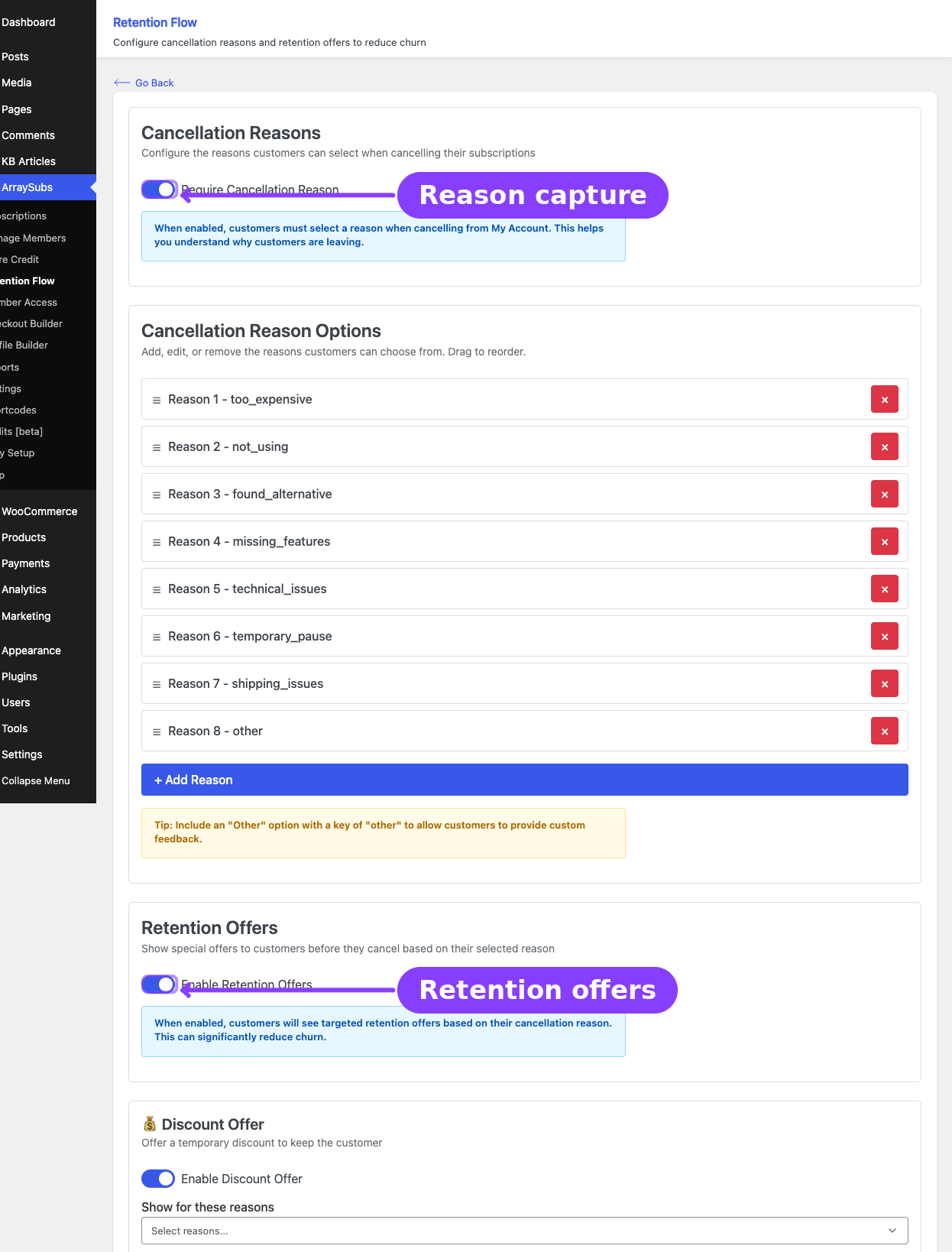
- Reason capture — The customer selects why they want to cancel from a configurable list of reasons. This data feeds the analytics dashboard.
- Retention offers — Based on the selected reason and the subscription's eligibility, ArraySubs presents targeted offers (discount, pause, downgrade, or contact support).
- Outcome — The customer either accepts an offer (subscription is retained) or declines all offers and proceeds with cancellation.
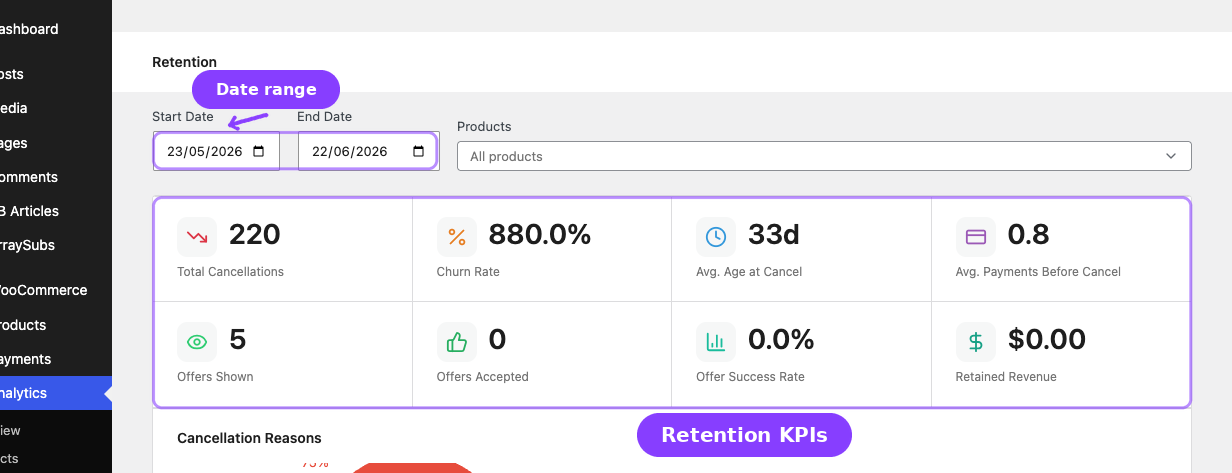
- Analytics — Every step is logged: reason selected, offers shown, offers accepted or declined, cancellation completed. This gives you a clear picture of churn drivers and retention effectiveness.
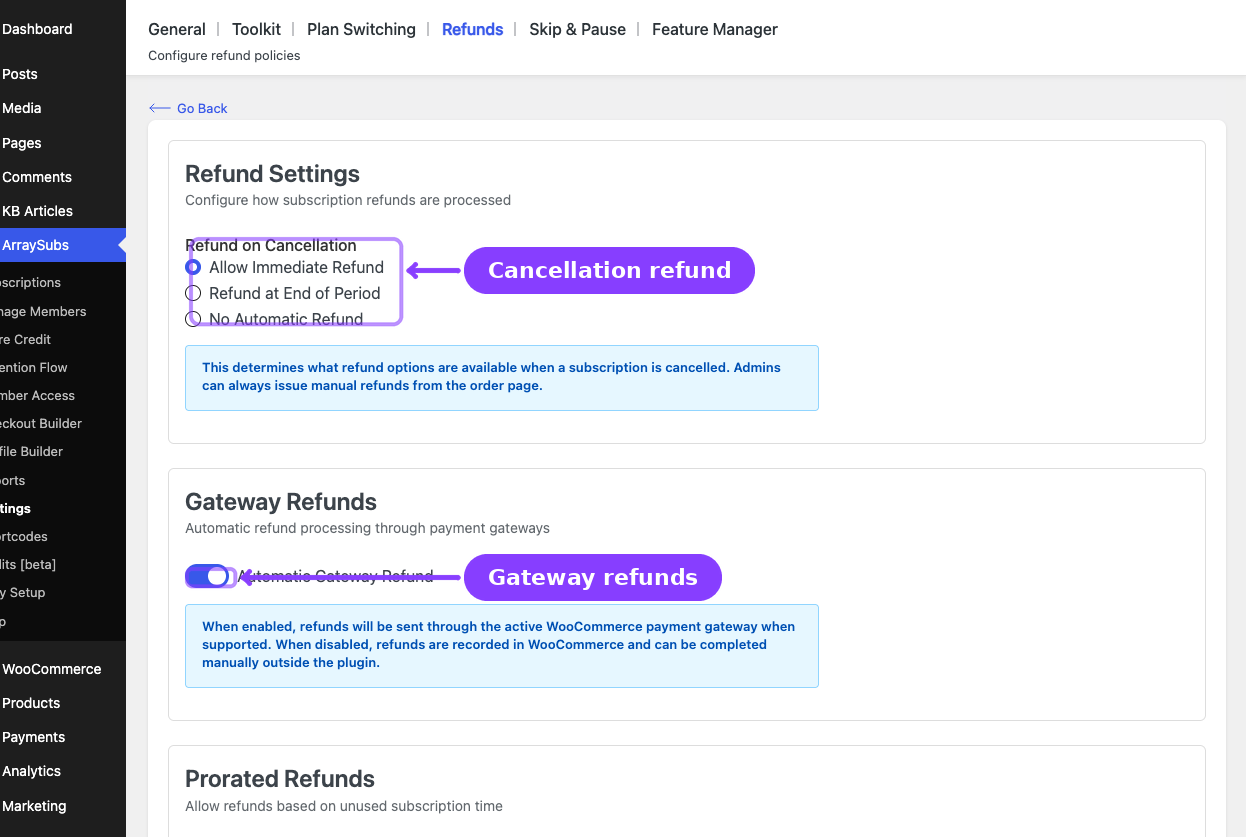
- Refund policy — After cancellation, your configured refund policy determines whether refunds are issued automatically, at end of period, or manually.
Key concepts
Cancellation timing — Controls whether subscriptions are cancelled immediately or at the end of the current billing period. End-of-period cancellation keeps the customer active until their paid time runs out.
Cancellation reasons — A configurable list of reasons customers must (or may) select when cancelling. These reasons drive retention offer targeting and analytics.
Retention offers — Special offers shown to cancelling customers to encourage them to stay. Each offer type targets different reasons for leaving: discounts for price-sensitive customers, pausing for those taking a break, downgrading for those who need less, and contact support for those with problems to solve.
Retention analytics — A dedicated dashboard under WooCommerce Analytics that tracks cancellations, offer performance, churn rate, and retained revenue over time.
Refund policy — Configurable rules that control what happens when a subscription is cancelled — whether refunds are processed automatically, after the billing period ends, or only when an admin manually issues them.
Prorated refunds — An optional refund type that calculates the unused portion of a billing cycle and refunds only that amount, rather than refunding the full payment.