
Shortcodes
Use shortcodes to display login/logout links, personalized greetings, gated content, and store credit purchase forms anywhere on your WordPress site.
Availability: Free — [arraysubs_buy_credits] requires Pro
Page Navigation
- Current guide: Shortcodes
- Where to open it: WordPress Admin -> ArraySubs -> Shortcodes
- Direct route:
/wp-admin/admin.php?page=arraysubs-mainadmin#/shortcodes - Section overview: Open overview
- Previous guide: content-gating
- Next guide: store-credit-shortcode
- Troubleshooting: Audits, Logs, and Troubleshooting
Overview
ArraySubs provides six shortcodes that let you embed dynamic, user-aware content into any WordPress page, post, widget, or page-builder block. Drop them into your content editor and they render the right output for each visitor based on login state, subscription status, product ownership, and more.
Every shortcode is also documented inside your admin panel at ArraySubs → Shortcodes, which shows a live catalog with examples you can copy directly.
When to Use This
- You need login or logout links that automatically show or hide based on visitor state.
- You want personalized greetings like "Welcome back, Sarah!" on any page.
- You need to show different content to logged-in vs logged-out visitors.
- You want to lock premium content behind subscription status, product ownership, a user role, a spending threshold, or a feature entitlement.
- You want to embed a store credit purchase form on a landing page Pro.
Quick Reference
| Shortcode | Category | Purpose | Availability |
|---|---|---|---|
[arraysubs_login] |
Account | Login link for logged-out visitors | Free |
[arraysubs_logout] |
Account | Logout link for logged-in users | Free |
[arraysubs_user] |
Account | Display the current user's name | Free |
[arraysubs_visibility] |
Content gating | Show/hide content by login state | Free |
[arraysubs_restrict] |
Content gating | Gate content by subscription, role, spending, features, and more | Free |
[arraysubs_buy_credits] |
Store Credit | Purchase form for store credits | Pro |
Shortcodes Catalog in Admin
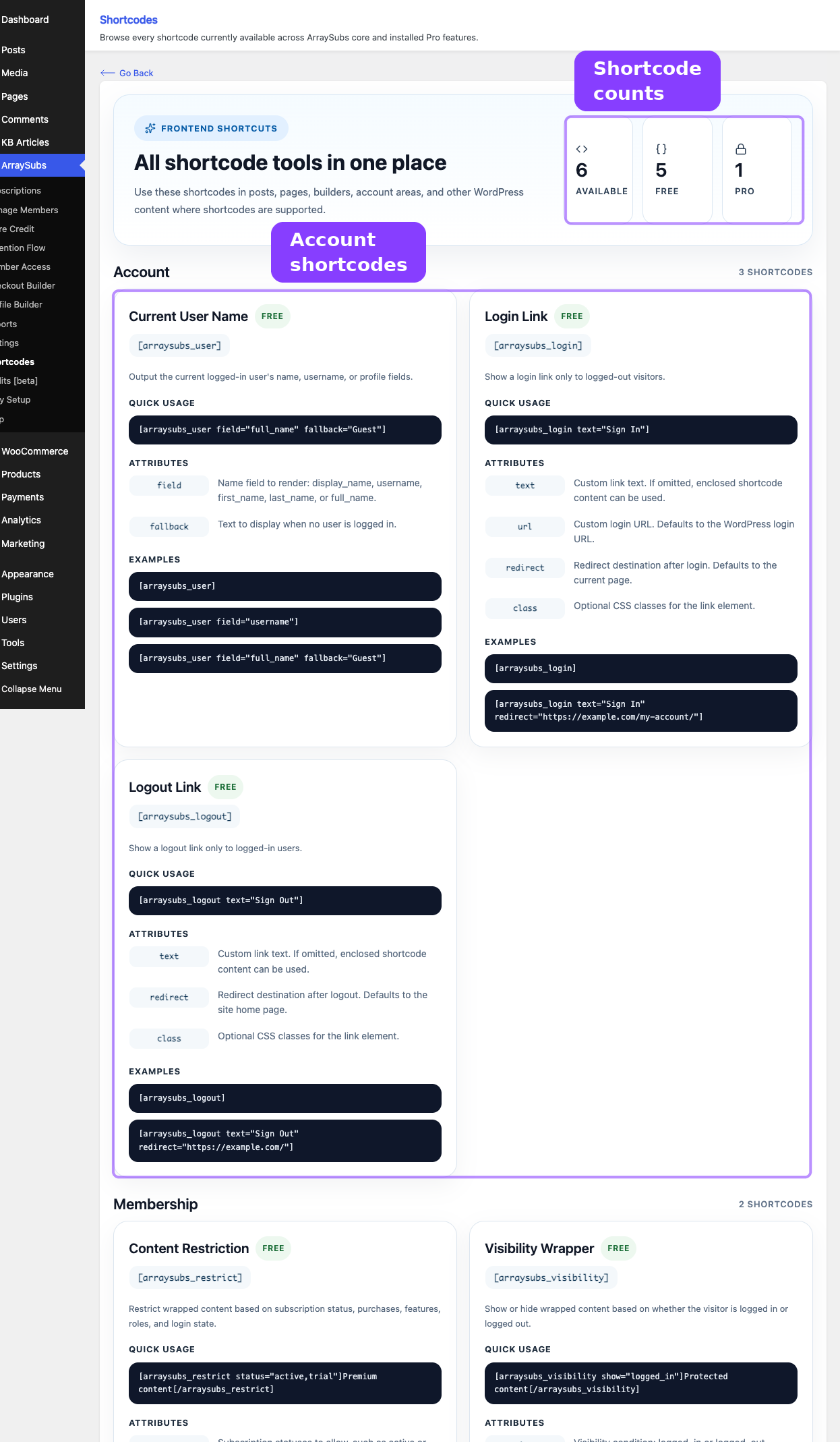
ArraySubs includes a built-in shortcodes catalog at ArraySubs → Shortcodes. This page lists every registered shortcode grouped by category, with:
- A Free or Pro badge on each card.
- The shortcode tag ready to copy.
- A description of what it does.
- Quick usage examples.
- The full list of attributes with descriptions.
- Additional code examples for advanced patterns.
Stats at the top of the page show how many shortcodes are available and how many are free vs Pro.
The shortcode catalog is auto-generated from the plugin's internal registry. If a Pro module registers a shortcode, it appears in the catalog automatically when the Pro plugin is active.
Detailed Guides
Each shortcode category has its own guide:
- Account Shortcodes —
[arraysubs_login],[arraysubs_logout],[arraysubs_user] - Content Gating Shortcodes —
[arraysubs_visibility]and[arraysubs_restrict] - Store Credit Shortcode —
[arraysubs_buy_credits]Pro
General Notes
- Where shortcodes work. All ArraySubs shortcodes work in the Classic Editor, the Gutenberg Shortcode block, text widgets, and most page builders.
- Caching. Shortcodes that produce user-specific output (login state, user name, restricted content) may show stale results if your site uses full-page caching. Exclude pages with these shortcodes from cache, or use a caching plugin that supports fragment caching.
- Nesting. You can nest shortcodes freely. For example, place
[arraysubs_login]inside[arraysubs_visibility], or nest[arraysubs_visibility]inside[arraysubs_restrict]. - Security. Restricted content is never rendered in the page source when a visitor does not meet the conditions. It is not simply hidden with CSS — the server omits it entirely.
Related Guides
- Member Access and Restriction Rules — Rule-based restrictions for entire pages, URLs, post types, and commerce behavior
- Content Gate — Choose the right Member Access gating surface for Elementor, Gutenberg, shortcodes, and PHP.
- Post Types — Full-page restrictions for posts, pages, and custom post types
- Store Credit — Purchase Product — Configuring store credit products for
[arraysubs_buy_credits] - Profile Builder — Custom profile fields and My Account customization
- Customer Portal — What customers see in their account area
FAQ
Can I use these shortcodes in Gutenberg?
Yes. Use the Shortcode block in the Gutenberg editor, paste the shortcode, and it renders on the frontend. Shortcodes also work in Classic Editor, text widgets, and most page builders.
Do I have to type shortcodes in Elementor?
No. ArraySubs adds an ArraySubs Content Restrictions section to the Elementor Container's Advanced tab, so you can gate a section by subscription, role, purchase, or feature without typing a shortcode. See Content Gate.
Do I have to type shortcodes in Gutenberg?
No. Use the Restricted Content block when you want to gate nested blocks from the block sidebar. See Content Gate.
Is restricted content visible in the page source?
No. When a visitor does not meet the conditions, the server omits the content entirely. It is not hidden with CSS — it is never rendered.
Do shortcodes work with full-page caching?
Shortcodes that depend on user state (login, subscription, etc.) may show incorrect results with aggressive full-page caching. Exclude those pages from cache or use fragment caching.
Can I create my own shortcodes using the ArraySubs registry?
Developers can register additional shortcodes using the arraysubs_shortcode_registry filter. Registered shortcodes appear automatically in the admin catalog page.