
Gateway Overview and Architecture
ProHow ArraySubs connects to payment gateways for automatic recurring billing — the two billing models, supported gateways, capability matrix, and payment method lifecycle.
Availability: Pro
Page Navigation
- Current guide: Gateway Overview and Architecture
- Where to open it: Storefront checkout, WordPress Admin -> ArraySubs -> Audits [beta] -> Gateway Logs, and ArraySubs -> Subscriptions -> subscription detail
- Section overview: Open overview
- Previous guide: paypal
- Next guide: stripe
- Troubleshooting: Audits, Logs, and Troubleshooting
Overview
ArraySubs Pro integrates with three payment gateways — Stripe, PayPal, and Paddle — to process subscription payments automatically. Each gateway handles initial checkout payments, stores customer payment methods, and charges renewal invoices without merchant or customer intervention.
The architecture supports two fundamentally different billing models, and understanding which model your gateway uses is essential for configuring your store correctly.
Two Billing Models
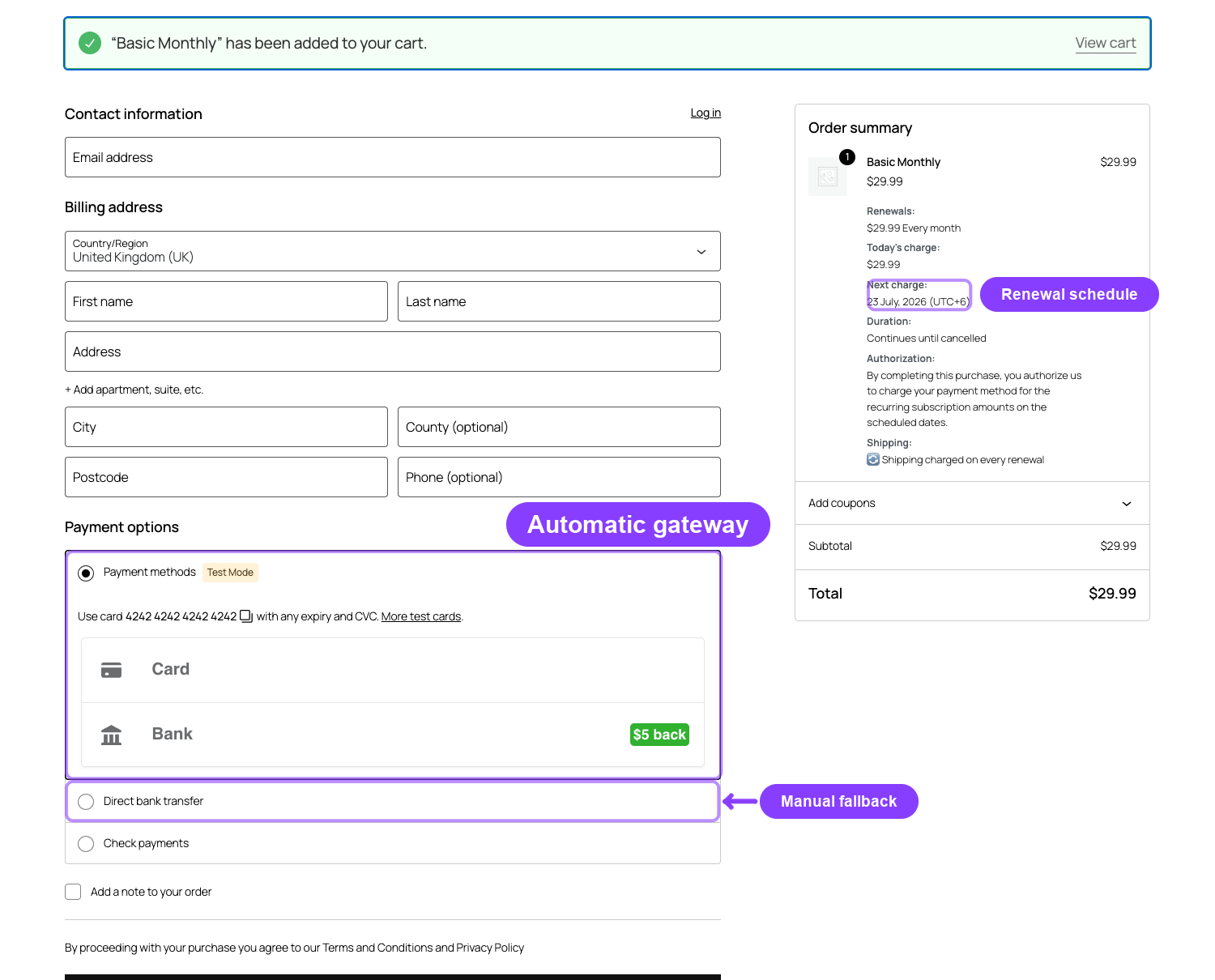
ArraySubs-Managed Billing
ArraySubs controls the entire billing schedule. It decides when to charge, generates the renewal invoice, and sends a charge request to the gateway.
How it works:
- ArraySubs calculates the next payment date based on the subscription's billing cycle
- When the date arrives, the renewal engine creates an invoice and tells the gateway to charge the stored payment method
- The gateway processes the charge off-session (no customer action needed)
- The result (success or failure) comes back to ArraySubs via webhook
Used by: Stripe
Advantages: Full control over billing timing, grace periods, retry logic, and renewal dates. The billing schedule in ArraySubs is always the single source of truth.
Gateway-Managed Billing
The payment gateway controls its own billing cycle. ArraySubs creates the initial subscription agreement, and the gateway handles all future charges on its own schedule.
How it works:
- During checkout, ArraySubs creates a billing agreement or subscription on the gateway's platform
- The gateway charges the customer according to its own schedule
- When a charge occurs, the gateway sends a webhook to ArraySubs
- ArraySubs creates the corresponding renewal order and updates the subscription
Used by: PayPal, Paddle
Advantages: Simpler integration, the gateway handles PCI compliance and SCA challenges internally, and features like Paddle's automatic tax/VAT are handled natively.
With gateway-managed billing, the gateway is the source of truth for payment timing. When ArraySubs fires a renewal event for PayPal or Paddle subscriptions, no local charge is sent — the system waits for the gateway's webhook to confirm a payment occurred.
Gateway Capability Matrix
Not all gateways support the same features. Use this matrix to choose the right gateway for your store's needs.
| Capability | Stripe | PayPal | Paddle |
|---|---|---|---|
| Automatic payments | Yes | Yes | Yes |
| Billing model | ArraySubs-managed | Gateway-managed | Gateway-managed |
| Trials | Yes (via SetupIntent) | No | Yes (native) |
| Pause / Resume | No | No | Yes (native) |
| Payment method update | Yes (SetupIntent) | Yes (new agreement) | Yes (new transaction) |
| Card auto-update | Yes (scheme update) | No | Yes |
| Card expiry notices | Yes (webhook) | No | No |
| SCA / 3D Secure | Yes (automatic) | N/A (handled by PayPal) | N/A (handled by Paddle) |
| Dispute handling | Yes (webhook events) | Yes (webhook events) | No (Paddle handles as MoR) |
| Refunds | Yes | Yes | Yes |
| Hosted payment page | Yes (Checkout Sessions) | No | Yes (Paddle.js overlay) |
| Customer portal | Yes (Stripe hosted) | No | Yes (Paddle hosted) |
| Mixed cart | Yes | No | Yes |
| Multiple subscriptions | Yes | No | Yes |
| Different billing cycles | Yes | No | No |
| Retention amount update | Yes | No | No |
| Product sync required | No | No | Yes |
PayPal does not support mixed carts, multiple subscriptions, or different billing cycles in a single checkout. If PayPal is enabled, these restrictions are enforced automatically — even if your General Settings allow them.
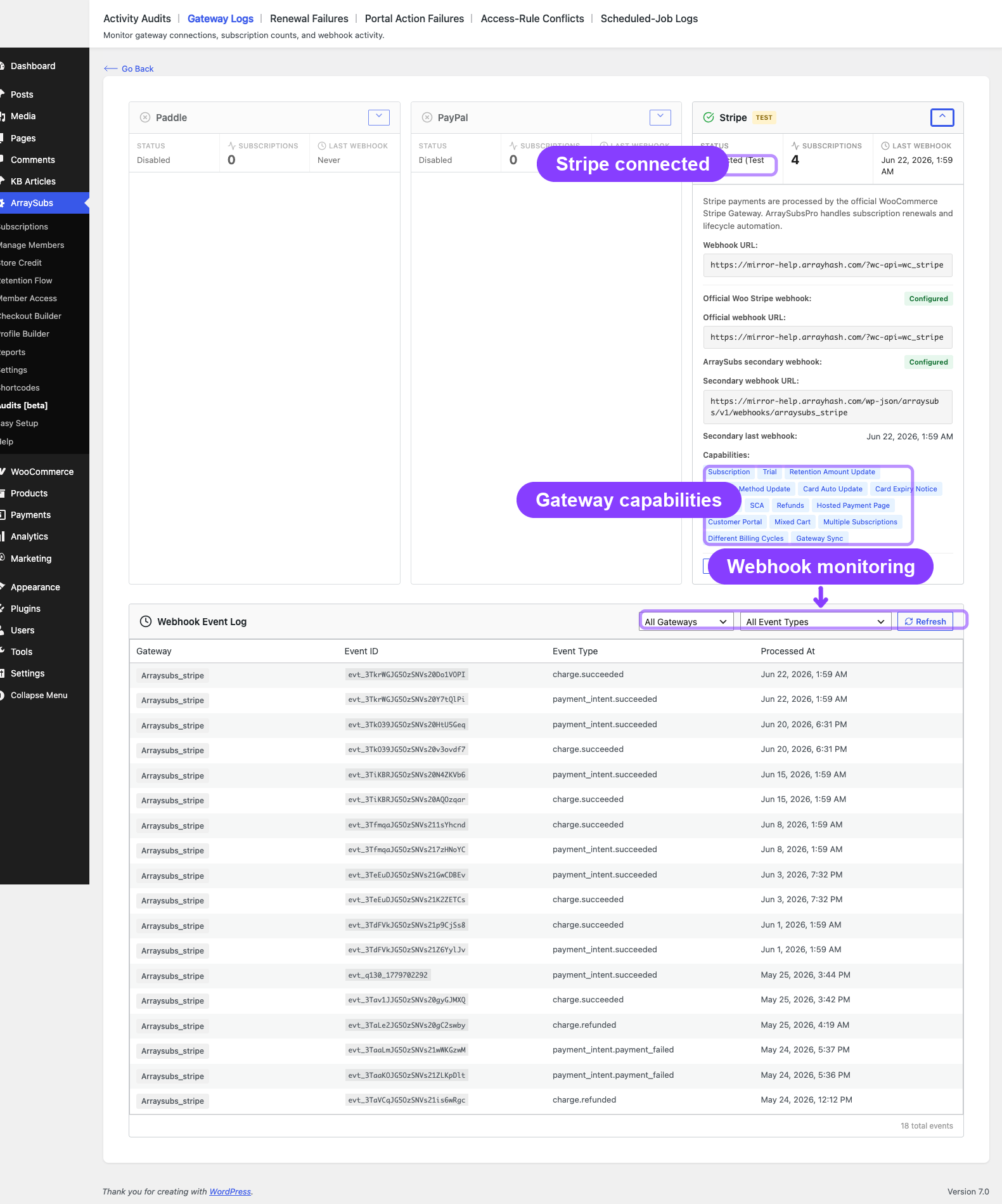
Payment Method Lifecycle
Every subscription that uses a gateway stores payment method details as metadata on the subscription record.
Stored Data
| Meta Key | Description | Example |
|---|---|---|
_payment_gateway |
Gateway slug | stripe |
_gateway_customer_id |
Remote customer/payer ID | cus_abc123 |
_gateway_payment_method_id |
Remote payment method ID | pm_xyz789 |
_gateway_status |
Gateway connection status | active, paused, errored, detached, cancelled |
_payment_method_brand |
Card brand | visa, mastercard, amex |
_payment_method_last4 |
Last 4 digits | 4242 |
_payment_method_expiry_month |
Expiry month | 12 |
_payment_method_expiry_year |
Expiry year | 2027 |
_payment_method_type |
Payment instrument type | card, paypal, generic |
Gateway Status Values
| Status | Meaning |
|---|---|
active |
Gateway is connected and ready to charge |
paused |
Billing paused at gateway level (Paddle only) |
errored |
Last charge failed; awaiting retry or manual action |
detached |
Gateway disconnected by admin; subscription reverted to manual payments |
cancelled |
Subscription cancelled at the gateway level |
Detaching a Gateway
Administrators can detach a gateway from a subscription through the admin subscription detail page. Detaching:
- Clears all payment method metadata (brand, last4, expiry, session, transaction IDs)
- Sets
_gateway_statustodetached - Converts the subscription to manual payment mode — future renewals generate invoices that the customer must pay manually
This is useful when migrating a subscription from one gateway to another or when a customer's payment method is permanently invalid.
Webhook Architecture
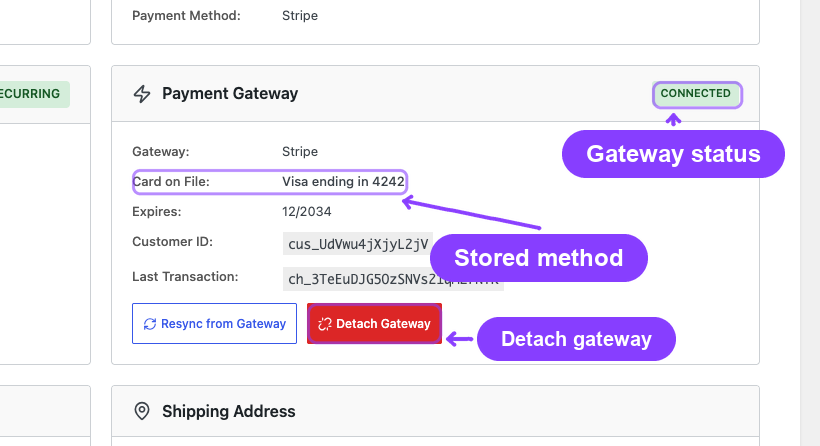
All three gateways communicate with ArraySubs through webhooks — HTTP POST requests sent when events occur on the gateway side.
Webhook URL
Each gateway has a dedicated webhook endpoint:
https://yoursite.com/wp-json/arraysubs/v1/webhooks/{gateway_slug}
For example:
- Stripe: official WooCommerce Stripe Gateway webhook URL for core payment events, plus an ArraySubs secondary endpoint
https://yoursite.com/wp-json/arraysubs/v1/webhooks/arraysubs_stripefor ArraySubs-specific payment-method, card, and reconciliation events. ArraySubsPro creates or repairs this secondary endpoint automatically through the active WooCommerce Stripe API connection. - PayPal:
https://yoursite.com/wp-json/arraysubs/v1/webhooks/arraysubs_paypal - Paddle:
https://yoursite.com/wp-json/arraysubs/v1/webhooks/arraysubs_paddle
You can find the exact URL for each gateway on the Gateway Health Dashboard.
Processing Pipeline
Every incoming webhook goes through a standardized pipeline:
- Signature verification — cryptographic check using the gateway's webhook secret (HMAC-SHA256 for Stripe/Paddle, API verification for PayPal)
- Payload parsing — gateway-specific parsing into a normalized event structure
- Idempotency check — duplicate detection using the event ID (stored in
wp_arraysubs_webhook_eventstable) - Entity resolution — maps the webhook data to the correct subscription, order, and customer
- Event dispatch — routes to the appropriate handler based on the normalized event type
- Logging — records the event in the webhook events table
Normalized Event Types
Regardless of which gateway sends the webhook, events are mapped to these standardized types:
| Normalized Event | Meaning |
|---|---|
payment_succeeded |
A charge completed successfully |
payment_failed |
A charge attempt failed |
payment_requires_action |
Customer authentication needed (SCA/3DS) |
payment_method_updated |
Card or payment method changed |
card_expiring |
Stored card is about to expire |
refund_created |
A refund was processed |
dispute_created |
A chargeback/dispute was opened |
dispute_resolved |
A chargeback/dispute was closed |
subscription_cancelled |
Subscription was cancelled at the gateway |
Real-Life Use Cases
SaaS with Global Customers (Stripe)
A software company serving customers worldwide chooses Stripe for full SCA/3D Secure support, card auto-update (so expired cards are replaced automatically), and ArraySubs-managed billing for precise control over grace periods and retry timing.
Marketplace with PayPal Buyers (PayPal)
An online marketplace where many customers prefer PayPal uses PayPal's Billing Agreements. Customers approve the agreement once during checkout, and PayPal handles all future charges on its own schedule. The marketplace doesn't store any card data.
Digital Products with Tax Compliance (Paddle)
A digital course seller uses Paddle as Merchant of Record. Paddle handles all tax/VAT calculations and compliance automatically. The seller receives net payouts and doesn't need to worry about tax filings in 100+ countries.
Related Docs
- Stripe Gateway — Detailed Stripe integration guide
- PayPal Gateway — Detailed PayPal integration guide
- Paddle Gateway — Detailed Paddle integration guide
- Payment Recovery Tools — Automatic retries, manual retry, sync from gateway, pending-cancel handling
- Auto-Renew and Manual Fallback — Customer toggle and manual payment flow
- Gateway Health Dashboard — Monitoring and webhook event log
- Cron Job Setup — Required for automatic retries and scheduled jobs to fire reliably
FAQ
Can I use multiple gateways at the same time? Yes. All three gateways can be enabled simultaneously. Customers choose their preferred gateway at checkout. Each subscription is tied to the gateway used for its initial purchase.
What happens if a webhook fails to arrive? The renewal engine has a fallback: if no webhook confirms payment within the grace period, the subscription follows the standard overdue flow (Active → On-Hold → Cancelled). For ArraySubs-managed gateways like Stripe, the system also has retry logic.
Can I switch a subscription from one gateway to another? Not directly. You would need to detach the current gateway (converting to manual payments) and then have the customer pay a renewal invoice with the new gateway. The new gateway's payment method is then stored for future renewals.
Do I need to configure webhooks manually? For Stripe, normally no. Configure and connect the official WooCommerce Stripe Gateway first; ArraySubsPro uses that official connection to create or repair its secondary ArraySubs Stripe webhook automatically for the active test/live mode. PayPal and Paddle still require their webhook details to be configured in their provider dashboards. Paddle also requires a Default Payment Link in Paddle Dashboard -> Checkout -> Checkout settings before transaction checkout can open.
What if a customer's card expires?
For Stripe: the card network may automatically update the card details (card auto-update). If not, Stripe sends a card_expiring webhook and ArraySubs notifies the customer. For PayPal/Paddle: account-level payment method management is handled by the gateway's own customer portal.