
PayPal Gateway
ProPayPal integration using Billing Agreements for recurring subscription payments — gateway-managed billing schedule, Smart Payment Buttons, and dispute handling.
Availability: Pro
Page Navigation
- Current guide: PayPal Gateway
- Where to open it: Storefront checkout and WordPress Admin -> ArraySubs -> Checkout Builder
- Section overview: Open overview
- Previous guide: payment-recovery
- Next guide: README
- Troubleshooting: Audits, Logs, and Troubleshooting
Overview
PayPal uses the gateway-managed billing model. ArraySubs creates a PayPal Billing Plan and Subscription during checkout, and PayPal handles all future charges on its own schedule. When PayPal processes a payment, it sends a webhook to ArraySubs, which creates the corresponding renewal order and updates the subscription.
This model is simpler than ArraySubs-managed billing but gives you less direct control over renewal timing, retry behavior, and grace periods.
Current Capability Snapshot
| Capability | PayPal Behavior in ArraySubsPro |
|---|---|
| Automatic renewals | Yes. PayPal charges on its own schedule and ArraySubs records webhook-confirmed payments. |
| Checkout type | PayPal Smart Payment Buttons through the PayPal JS SDK. |
| Required credentials | Client ID, Client Secret, and Webhook ID. |
| Webhook URL | wp-json/arraysubs/v1/webhooks/arraysubs_paypal |
| Sandbox mode | Supported through the gateway settings. |
| Mixed carts | Not supported by default. |
| Multiple subscriptions in one checkout | Not supported by default. |
| Different billing cycles in one checkout | Not supported by default. |
| Native pause/resume | Not supported. |
| Payment method update | Supported by creating a new Billing Agreement. |
| Card expiry notices | Not applicable because the payer is tied to a PayPal account, not a stored card in ArraySubs. |
| Refunds and disputes | Refunds are supported; disputes are handled through PayPal Resolution Center events. |
PayPal is stricter than manual renewal or Stripe checkout. Plan around one PayPal subscription per checkout, no mixed regular products, and no mixed billing cycles unless you intentionally customize the gateway filters in code.
How PayPal Payments Work
Initial Checkout
- Customer selects PayPal at checkout and clicks the Smart Payment Button
- ArraySubs creates a PayPal Billing Plan with the subscription's billing cycle, price, and any trial configuration
- A PayPal Subscription is created with the billing plan, and the customer is redirected to PayPal for approval
- The customer logs into PayPal and approves the Billing Agreement
- PayPal sends a
BILLING.SUBSCRIPTION.ACTIVATEDwebhook - ArraySubs captures the PayPal subscription ID, payer ID, and payment context
Renewal Payments
- PayPal charges the customer according to its own billing schedule
- When a payment succeeds, PayPal sends a
PAYMENT.SALE.COMPLETEDwebhook - ArraySubs creates a renewal order, marks it as paid, and updates the subscription's next payment date
- If payment fails, PayPal sends
BILLING.SUBSCRIPTION.PAYMENT.FAILEDand ArraySubs triggers the failure flow
When the ArraySubs renewal engine fires for a PayPal subscription, no local charge is sent. The system recognizes PayPal as gateway-managed and waits for PayPal's webhook to confirm any payment.
Trial Setup
PayPal does not support trials in the same way as Stripe. Trial handling is configured through the Billing Plan itself — the plan includes a trial cycle with a $0 charge for the specified duration. This is managed automatically by PayPal's billing system.
Smart Payment Buttons
The PayPal integration uses Smart Payment Buttons at checkout. These are PayPal's modern payment buttons that adapt to the customer's device and region, showing options like:
- Pay with PayPal account
- Pay with PayPal Credit (where available)
- Pay with Venmo (US only, where available)
The button is rendered at checkout using PayPal's JavaScript SDK. Customers complete the entire payment flow in a popup or redirect without leaving your site (popup) or via a redirect to PayPal's hosted page.
Payment Method Updates
When a customer needs to update their PayPal payment method:
- A new Billing Agreement is created
- The customer is redirected to PayPal to approve the new agreement
- PayPal confirms the new agreement via
BILLING.SUBSCRIPTION.ACTIVATEDwebhook - ArraySubs switches the subscription to the new PayPal subscription ID
This is essentially a re-authorization — the customer agrees to a new billing relationship with PayPal.
Dispute Handling
PayPal notifies ArraySubs of disputes through webhooks:
| PayPal Event | ArraySubs Action |
|---|---|
CUSTOMER.DISPUTE.CREATED |
Logs dispute details as a subscription note |
CUSTOMER.DISPUTE.RESOLVED |
Logs resolution outcome |
Disputes should be managed in the PayPal Resolution Center. ArraySubs does not automatically cancel subscriptions when a dispute is opened.
Limitations
PayPal has several capability restrictions compared to Stripe and Paddle:
| Feature | Status | Detail |
|---|---|---|
| Mixed carts | Not supported | Subscription + regular products cannot be in the same cart |
| Multiple subscriptions | Not supported | Only one subscription per checkout |
| Different billing cycles | Not supported | Cannot process subscriptions with different schedules |
| Card auto-update | Not supported | PayPal manages payment methods internally |
| Card expiry notices | Not applicable | PayPal accounts, not cards |
| Pause / Resume | Not supported | Must cancel and resubscribe |
| SCA / 3D Secure | N/A | Handled internally by PayPal |
| Retention amount update | Not supported | Cannot change recurring amount mid-cycle |
When PayPal is enabled, these restrictions are enforced automatically at checkout — even if your General Settings allow mixed carts or multiple subscriptions.
Webhook Events
Configure these events in your PayPal webhook settings (PayPal Developer Dashboard → Webhooks):
| PayPal Event | ArraySubs Handler |
|---|---|
BILLING.SUBSCRIPTION.ACTIVATED |
Captures initial payment context |
BILLING.SUBSCRIPTION.CANCELLED |
Handles remote cancellation |
BILLING.SUBSCRIPTION.SUSPENDED |
Triggers payment failure flow |
BILLING.SUBSCRIPTION.PAYMENT.FAILED |
Triggers payment failure flow |
PAYMENT.SALE.COMPLETED |
Marks renewal as paid |
PAYMENT.SALE.REFUNDED |
Records refund |
CUSTOMER.DISPUTE.CREATED |
Logs dispute |
CUSTOMER.DISPUTE.RESOLVED |
Logs resolution |
Webhook URL
https://yoursite.com/wp-json/arraysubs/v1/webhooks/arraysubs_paypal
Signature Verification
PayPal uses API-based verification instead of HMAC signatures. Each incoming webhook is verified by calling PayPal's /v1/notifications/verify-webhook-signature endpoint with the webhook ID and payload.
PayPal-Specific Settings
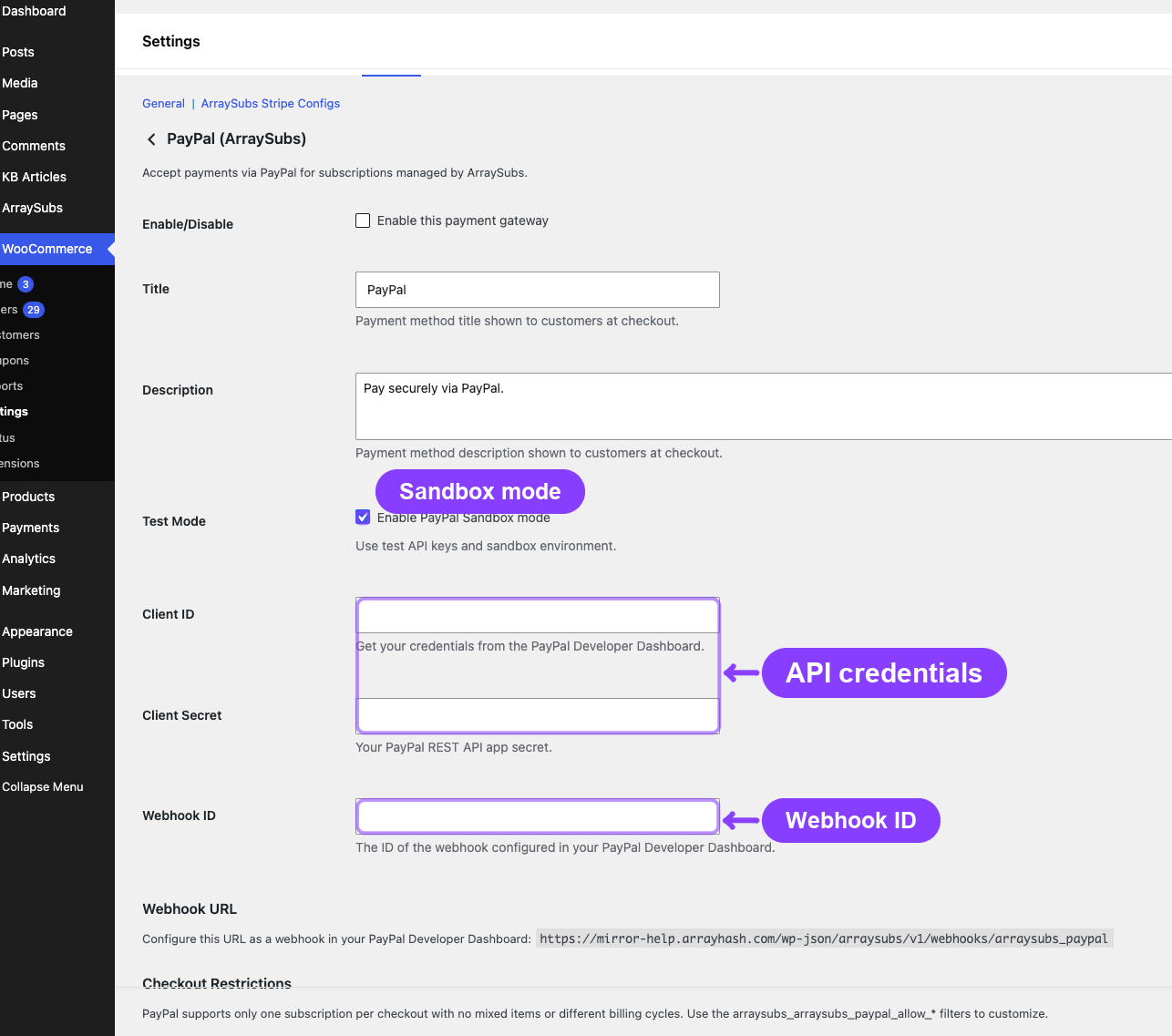
PayPal gateway settings are configured in WooCommerce → Settings → Payments → ArraySubs PayPal:
| Setting | Description |
|---|---|
| Enable/Disable | Turn the gateway on or off |
| Title | Payment method name shown at checkout |
| Description | Text shown below the payment method |
| Client ID | PayPal REST API Client ID (live and sandbox) |
| Client Secret | PayPal REST API Client Secret (live and sandbox) |
| Webhook ID | PayPal webhook ID for signature verification |
| Sandbox Mode | Enable to use PayPal's sandbox environment |
Troubleshooting
| Problem | Likely Cause | Solution |
|---|---|---|
| Smart Payment Button not appearing | JavaScript SDK not loaded | Check for JavaScript errors in the browser console; verify Client ID is correct |
| Customer approves but subscription not created | Webhook not arriving | Verify the webhook URL in PayPal Developer Dashboard |
| Renewal order not created after payment | PAYMENT.SALE.COMPLETED event not configured |
Add this event to your PayPal webhook config |
| "Cannot process subscription and regular products together" | PayPal mixed cart restriction | Remove regular products from cart or switch to a gateway that supports mixed carts |
| Refund issued but not reflected | PAYMENT.SALE.REFUNDED not configured |
Add this event to PayPal webhooks |
Related Docs
- Gateway Overview — Architecture and capability comparison
- Auto-Renew and Manual Fallback — What happens when auto-renew is toggled off
- Gateway Health Dashboard — Monitoring PayPal connection and webhooks
FAQ
Can I use PayPal as the only payment gateway? Yes, but be aware of the limitations: no mixed carts, no multiple subscriptions per checkout, and no different billing cycles. These restrictions may limit your product catalog design.
Does PayPal support test/sandbox mode? Yes. Enable sandbox mode in the PayPal gateway settings and use sandbox API credentials from the PayPal Developer Dashboard.
What happens if PayPal suspends the billing agreement?
PayPal sends a BILLING.SUBSCRIPTION.SUSPENDED webhook. ArraySubs treats this as a payment failure and follows the grace period flow.
Can customers pay with Venmo or PayPal Credit? Smart Payment Buttons automatically show available payment options based on the customer's location and device. Venmo and PayPal Credit appear when eligible without additional configuration.