
Renewal Communication
Every email the billing engine sends during the renewal cycle — reminders before payment, invoices at generation, confirmations after payment, and alerts when things go wrong.
Availability: Free
Page Navigation
- Current guide: Renewal Communication
- Where to open it: WordPress Admin -> ArraySubs -> Subscriptions
- Section overview: Open overview
- Previous guide: recovery-and-grace-flows
- Next guide: renewal-operations
- Troubleshooting: Audits, Logs, and Troubleshooting
Overview
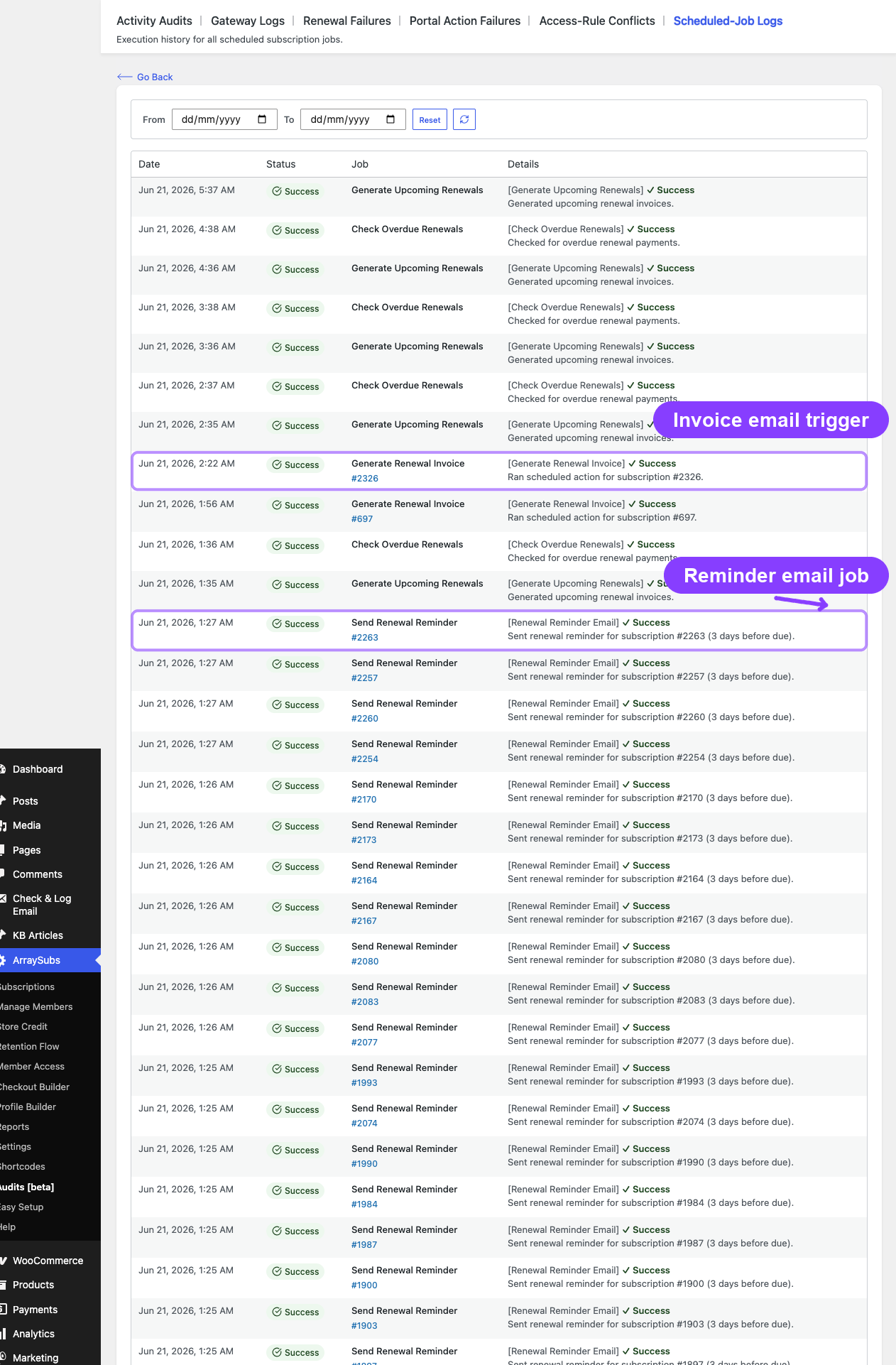
The billing engine sends targeted emails at specific points in the renewal cycle to keep customers informed and drive timely payment. Renewal reminders give advance notice, invoice emails provide payment links, success confirmations acknowledge payment, and failure alerts prompt action. This page maps every billing-related email to its trigger point in the lifecycle.
When to use this
- You want to understand which emails are sent and when during the billing cycle
- You need to verify that customers are receiving the right notifications
- You need to configure the timing of renewal reminders
- You want to know what happens when a payment fails from a communication standpoint
How it works
Billing email timeline
The billing cycle sends emails at five key moments. Not every subscription hits all five — automatic payment subscriptions may skip the invoice email and go straight to success or failure.
                    Renewal Reminder           Renewal Invoice
                    (3 days before)       (invoice timing setting)
                         │                        │
  ─────────────────────┬─┼────────────────────────┼──┬──────────────────
                       │ │                        │  │
                       │ │                        │  └─ Payment Due Date
                       │ │                        │
                       │ │              ┌─────────┴─────────┐
                       │ │              │                    │
                       │ │     Payment Successful     Payment Failed
                       │ │              │                    │
                       │ │     Confirmation email     Failure alert +
                       │ │     Next reminder queued   grace period starts
                       │ │                                   │
                       │ │                          On-Hold email
                       │ │                          (after active grace)
Email reference
| Trigger | Recipient | Purpose | |
|---|---|---|---|
| Renewal Reminder | Scheduled X days before next payment | Customer | Advance notice that a renewal payment is coming |
| Renewal Invoice | Renewal invoice order created based on the invoice timing setting | Customer | Notifies the customer that a renewal invoice is ready, includes payment link for manual payments |
| Payment Successful | Renewal order paid (status = Completed or Processing) | Customer | Confirms that the renewal payment was received |
| Payment Failed | Renewal payment attempt fails | Customer + Admin | Alerts both parties that the payment did not go through |
| Subscription On-Hold | Subscription moves from Active to On-Hold (after active grace period) | Customer | Notifies the customer that their access is now restricted |
| Subscription Expired | Subscription reaches its end date or payment count limit | Customer | Notifies the customer that the subscription has ended |
| Admin Payment Failed | Same as Payment Failed | Admin only | Separate admin notification for failed payments |
Renewal reminder
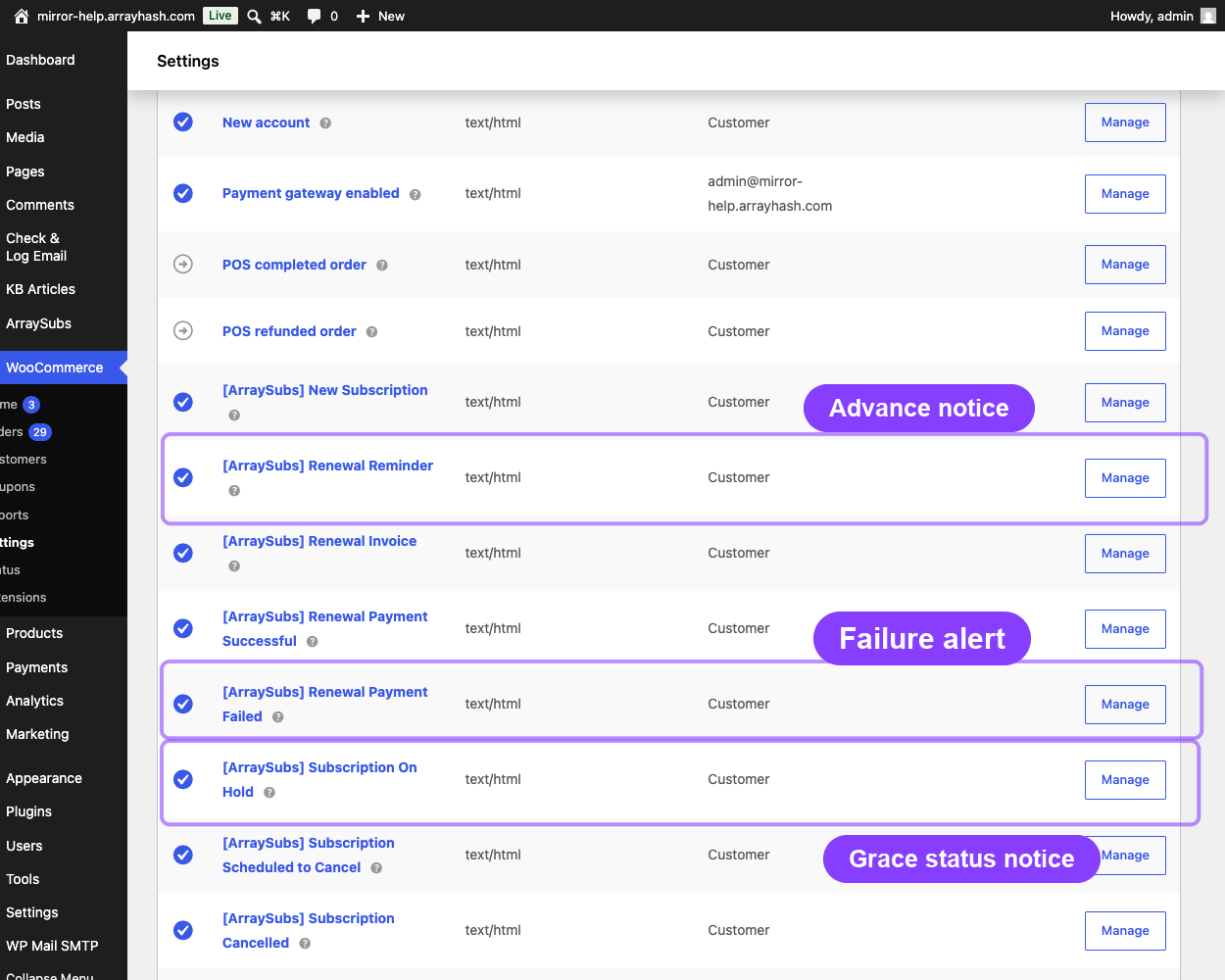
The renewal reminder is the first notification in the billing cycle. It is sent a configurable number of days before the next payment date to give customers advance notice.
Trigger: Scheduled via Action Scheduler for exactly X days before the next payment date.
Scheduling points:
- When a subscription becomes Active
- After each successful payment (reschedules for the next cycle)
- When a subscription is reactivated
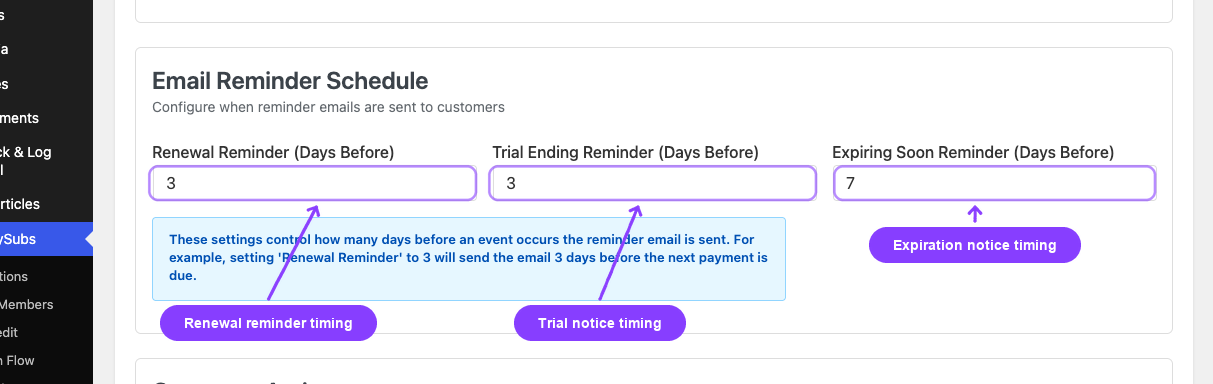
Configuration: Set the reminder timing at ArraySubs → Settings → General Settings → Renewals:
| Setting | Default | Range |
|---|---|---|
| Renewal reminder days before | 3 | 1–30 days |
What the email includes:
- Days until renewal
- Subscription details (product name, next payment date, recurring amount, billing period)
Behavior notes:
- Only sent when the subscription is still Active at the time the scheduled job fires
- If the subscription is paused, skipped, or cancelled before the reminder fires, the email is not sent
- A new reminder is scheduled after every successful payment so the cycle repeats
Renewal invoice
The renewal invoice email notifies the customer that a renewal order has been created and is awaiting payment. For manual payment subscriptions, this email is critical because it contains the payment link.
Trigger: Fires when the billing engine creates the renewal invoice order using the configured invoice timing setting. The default option is 6 hours before the payment due date.
What the email includes:
- Renewal order ID
- Order total (formatted with currency)
- Payment link (for manual payment subscriptions)
- Subscription details
Behavior notes:
- For automatic payment subscriptions, the invoice is created and the gateway charges the card immediately. The invoice email may still be sent, but the customer typically receives a Payment Successful email shortly after.
- For manual payment subscriptions, the invoice email is the primary action prompt — the customer must click the payment link and pay through the WooCommerce checkout page.
Payment successful
Sent after a renewal payment is completed, whether through automatic gateway charging or manual customer payment.
Trigger: Renewal order reaches Completed or Processing status.
What the email includes:
- Renewal order ID
- Payment amount
- Payment method used (e.g., "Stripe", "PayPal")
- Subscription details
Behavior notes:
- Also triggers rescheduling of the next renewal reminder
- Confirms to the customer that their subscription continues uninterrupted
Payment failed
Sent when a renewal payment attempt fails. Both the customer and the store admin receive separate notifications.
Trigger: Payment processing returns an error (gateway decline, insufficient funds, expired card, etc.).
Customer email includes:
- Renewal order ID
- Amount that failed to charge
- Payment link where the customer can retry manually
- Subscription details
Admin email includes:
- Same failure details
- Subscription and customer identification
Behavior notes:
- For automatic payment subscriptions Pro, payment retries may be scheduled after this initial failure. See Automatic Payments for retry logic.
- The subscription remains Active during the active grace period even after a payment failure. The grace timeline starts from the payment due date, not the failure notification.
Subscription on-hold
Sent when a subscription transitions from Active to On-Hold, which happens when the active grace period expires with an unpaid renewal invoice.
Trigger: The overdue checker moves the subscription to On-Hold (default: 3 days after the due date).
What the email includes:
- Standard subscription placeholders (product name, status, dates)
- No specific payment link (the pending invoice email was already sent)
Behavior notes:
- This email signals to the customer that their access is now restricted
- The customer can still recover by paying the outstanding invoice during the on-hold period
- See Recovery and Grace Flows for the full timeline
Subscription expired
Sent when a subscription reaches its configured end — either the payment count limit (subscription length) or a fixed end date.
Trigger: The expiration checker detects that the subscription has completed all required payments or passed its end date.
What the email includes:
- Subscription details
- Expiration date
Behavior notes:
- This email is for natural expiration, not for overdue cancellation
- If the subscription was cancelled due to overdue payment, a Subscription Cancelled email is sent instead
Email enable/disable and customization
All billing emails can be individually enabled or disabled in the settings. Each email also supports subject line and body customization.
Where to configure: ArraySubs → Settings → General Settings → Emails section, and WooCommerce → Settings → Emails for the email templates.
| Setting key | Default state | |
|---|---|---|
| Renewal Reminder | emails.renewal_upcoming.enabled |
Enabled |
| Renewal Invoice | emails.renewal_invoice.enabled |
Enabled |
| Payment Successful | emails.renewal_payment_received.enabled |
Enabled |
| Payment Failed | emails.payment_failed.enabled |
Enabled |
| Subscription On-Hold | emails.subscription_on_hold.enabled |
Enabled |
| Subscription Expired | emails.subscription_expired.enabled |
Enabled |
| Admin Payment Failed | emails.admin_payment_failed |
Enabled |
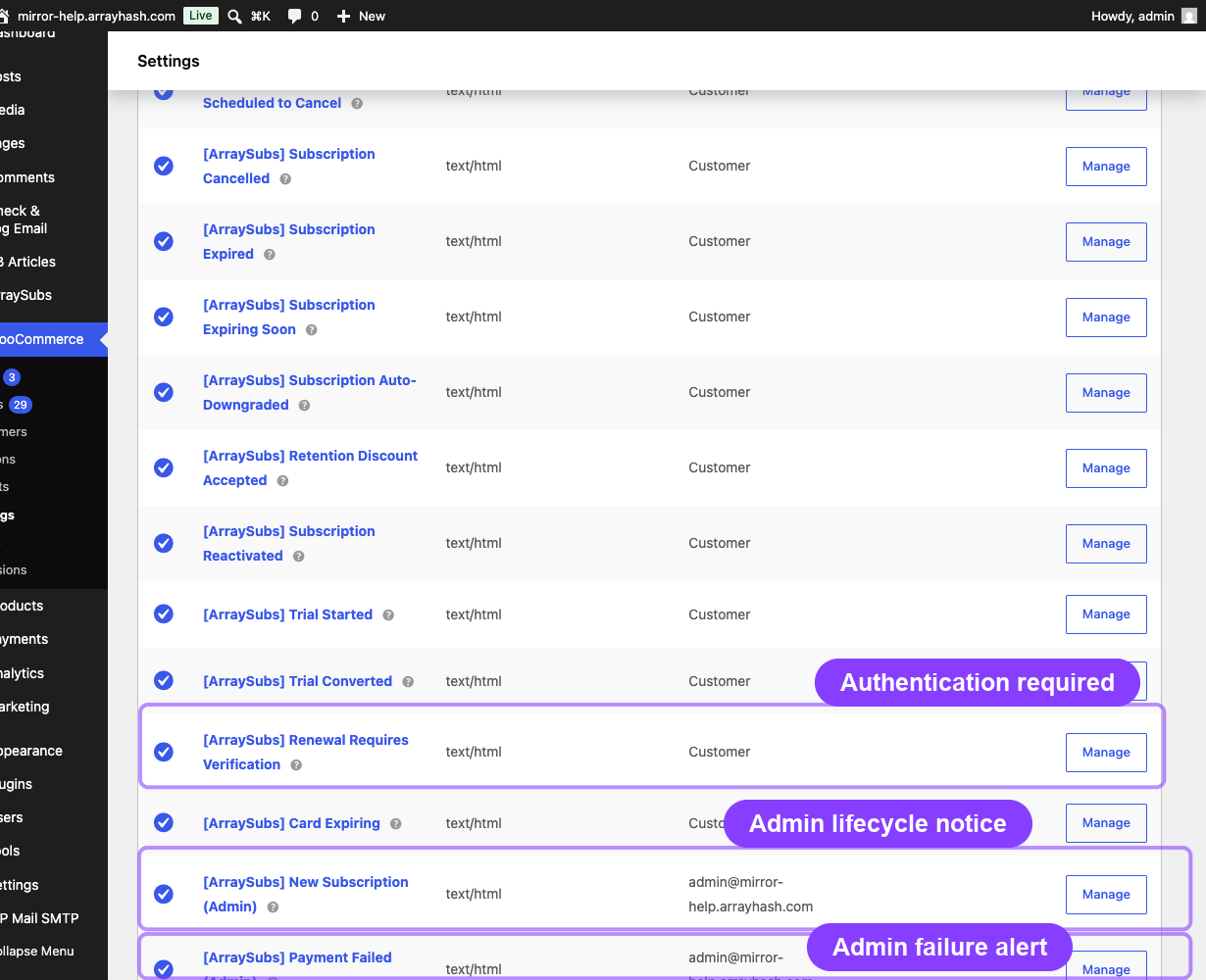
All emails use the WooCommerce email system and support both HTML and plain-text templates.
For the complete email reference including placeholders, template files, and customization options, see Customer Emails and Admin Emails.
Real-life use cases
Use case 1: Manual payment subscription cycle
A membership site with manual billing sends:
- Renewal Reminder — 3 days before the billing date, customer sees the upcoming charge
- Renewal Invoice — based on the invoice timing setting, customer receives the payment link
- Payment Successful — Customer pays within the active grace period, confirmation sent
- Next cycle's Renewal Reminder is scheduled
Use case 2: Automatic payment failure recovery
A SaaS product using Stripe automatic billing:
- Renewal Invoice is created and Stripe charges the card
- Card is declined → Payment Failed sent to customer and admin
- Customer does not update card → 3 days pass → Subscription On-Hold sent
- Customer updates card and pays → Payment Successful sent, subscription restored
Use case 3: Subscription expiration
A 12-month subscription reaching its final payment:
- Renewal Reminder sent 3 days before the 12th payment
- Renewal Invoice created, payment collected
- Payment Successful confirms the final payment
- Subscription reaches length limit → Subscription Expired sent
Edge cases and important notes
- Renewal reminder may not fire for short billing cycles. If the billing interval is shorter than the configured reminder days (e.g., weekly subscription with 3-day reminder), the reminder may fire very close to or at the same time as the previous payment. Consider reducing the reminder days for short-cycle subscriptions.
- Invoice email timing does not guarantee payment timing. The invoice is created in advance, but payment collection depends on whether the subscription uses manual or automatic billing. For automatic billing, the charge may happen immediately after invoice creation.
- Disabled emails still log events. Even if an email is disabled in settings, the underlying lifecycle events still fire. Other features (notes, audit logs, webhooks) can still capture these events.
- Admin emails are not scheduled. Admin notifications (Admin Payment Failed, Admin Subscription Cancelled) fire immediately on the lifecycle event. They are not queued through Action Scheduler.
Troubleshooting
| Problem | Likely cause | What to do |
|---|---|---|
| Renewal reminder not being sent | Email disabled, subscription is not Active at trigger time, or reminder days setting is 0 | Check the email enable/disable setting and the reminder days configuration. Verify subscription status. |
| Customer did not receive invoice email | Email delivery issue or email disabled | Check WooCommerce email logs. Verify the Renewal Invoice email is enabled. Check spam folders. |
| Payment Failed email sent but subscription still Active | This is expected — the active grace period keeps the subscription Active for the configured number of days after the due date | No action needed unless the grace period is too long for your use case. |
| Multiple Payment Failed emails | Some gateways retry payment automatically, generating multiple failure events | This is normal for gateways with retry logic. Each retry attempt that fails triggers a new notification. |
| On-Hold email not sent | Email disabled, or overdue checker has not run yet | The overdue checker runs hourly. The email fires when the status transitions to On-Hold — not at the exact minute the grace period expires. |
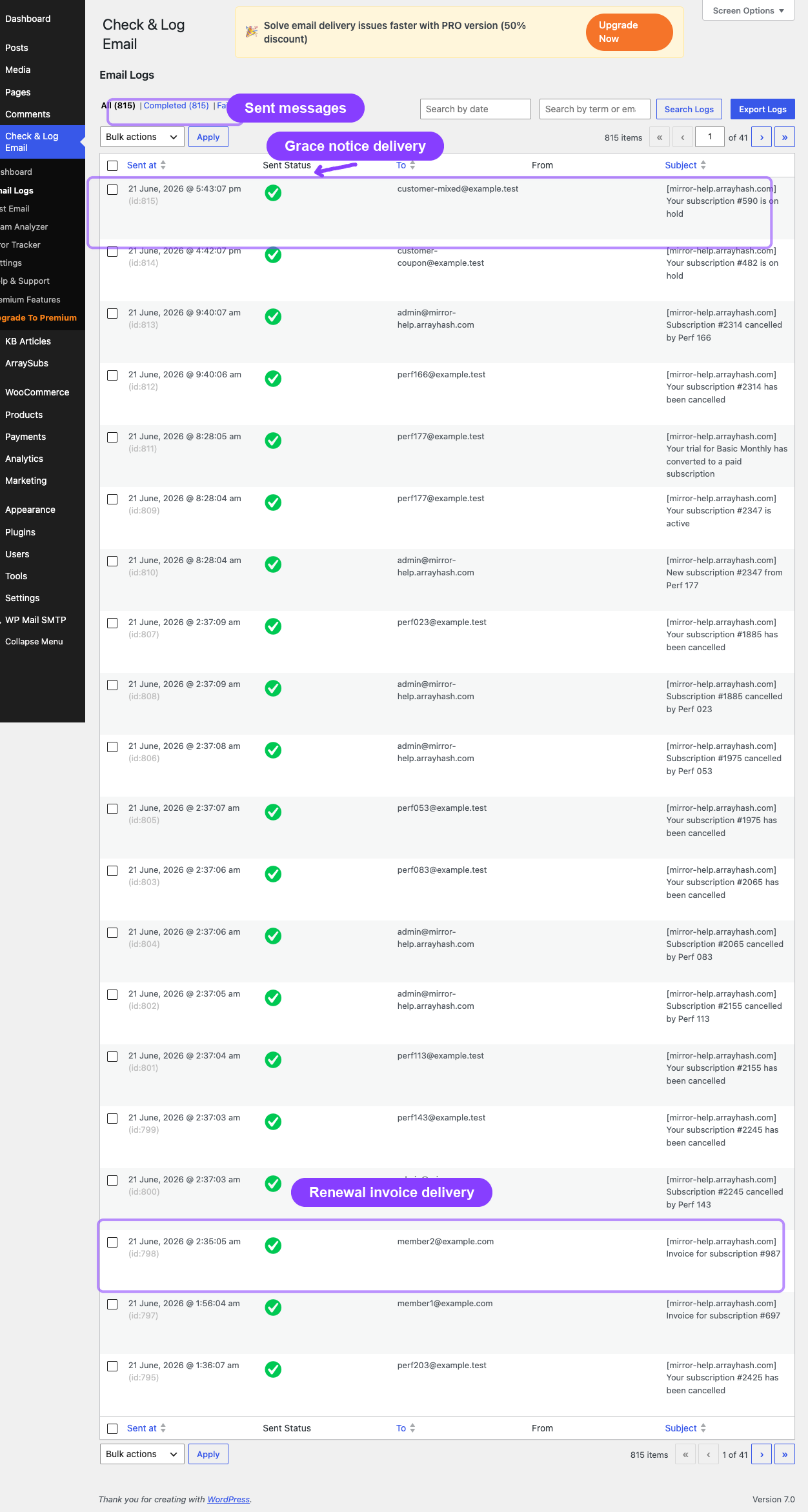
Related docs
- Customer Emails for the complete email template reference, placeholders, and customization
- Admin Emails for admin notification configuration
- Renewal Operations for how invoices are created and when payment is collected
- Recovery and Grace Flows for the timeline from missed payment to cancellation
- General Settings for configuring email timing and enable/disable toggles
FAQ
Can I change how many days before the renewal the reminder is sent?
Yes. Go to ArraySubs → Settings → General Settings → Renewals and adjust the renewal reminder days. The default is 3 days.
Does the customer receive both a reminder and an invoice email?
Yes, they are separate emails. The reminder is sent days before the due date as a heads-up. The invoice is sent when the actual renewal order is created (hours before the due date, by default). They serve different purposes.
What email does the customer receive when the subscription is cancelled for non-payment?
The customer receives a Subscription Cancelled email (not covered on this page — see Customer Emails). This is separate from the On-Hold email, which is sent when the subscription first enters the grace period's on-hold phase.
Can I send a test email for any of these notifications?
WooCommerce's built-in email preview and test system applies. You can preview templates through WooCommerce → Settings → Emails by clicking on each email type.
Are renewal emails sent for trial subscriptions?
Trial subscriptions do not generate renewal invoices during the trial period, so no renewal-specific emails are sent. The customer receives a Trial Started email when the trial begins and a Trial Converted email when it converts to paid. After conversion, the normal renewal email cycle begins.