
Stripe Gateway
ProStripe subscription payments powered by the official WooCommerce Stripe Gateway for checkout, saved payment methods, refunds, wallets, and SCA, with ArraySubs managing renewal scheduling and lifecycle.
Availability: Pro
Page Navigation
- Current guide: Stripe Gateway
- Where to open it: Storefront checkout, WooCommerce -> Settings -> Payments -> Stripe, and WooCommerce -> Settings -> Payments -> ArraySubs Stripe Configs
- Section overview: Open overview
- Previous guide: README
- Next guide: field-types
- Troubleshooting: Audits, Logs, and Troubleshooting
Overview
Stripe is the most fully featured gateway in ArraySubs. It uses the ArraySubs-managed billing model, meaning ArraySubs controls renewal dates, grace periods, retry timing, proration, and subscription lifecycle while the official WooCommerce Stripe Gateway owns checkout UI, Stripe credentials, saved payment methods, refunds, wallets, Link, and SCA/3D Secure handling.
How Stripe Payments Work
Initial Checkout
- Customer chooses the official Stripe payment method at WooCommerce checkout.
- ArraySubs marks the cart/order as subscription-aware so Stripe saves a reusable payment method with
setup_future_usage: off_sessionwhen needed. - The official WooCommerce Stripe Gateway creates the PaymentIntent or SetupIntent, handles any SCA/3D Secure challenge, and stores Stripe order metadata.
- ArraySubs copies the Stripe customer ID, payment method ID, payment type, mandate ID, and card details from the WooCommerce order to the subscription.
- Official Stripe webhooks continue to process normal order payment, refund, dispute, and failed-payment events.
Renewal Payments
- The ArraySubs renewal engine fires when a subscription's payment is due
- ArraySubs creates a PaymentIntent with
off_session: trueusing the stored customer and payment method - Stripe charges the customer immediately without any browser interaction
- If Stripe immediately succeeds, ArraySubs marks the renewal order paid and the subscription lifecycle continues.
- If Stripe reports
processing, ArraySubs waits for the official Stripe webhook confirmation. - If Stripe returns
requires_action, ArraySubs stores a verification URL and sends a renewal verification email so the customer can complete authentication.
Order Status After Successful Stripe Payment
Stripe payment success, subscription status, and WooCommerce order status are related but not identical.
When Stripe confirms payment:
- The WooCommerce order is marked as paid.
- ArraySubs activates the subscription or advances the renewal cycle.
- WooCommerce decides whether the order should be Completed or Processing.
For subscription-only orders that do not need shipping, ArraySubs completes the order after payment. This applies to initial purchases and renewal orders when all subscription products are non-shipping products and no shipping line exists on the order.
If the subscription order includes a product that needs shipping, or a recurring subscription shipping line is added, the paid order remains Processing. This is normal WooCommerce fulfillment behavior: Processing means payment was received and the order still needs merchant fulfillment.
Processing does not always mean payment failed
For Stripe orders, check the order's payment details first. If the order has a Stripe transaction ID, a paid date, and the subscription is Active, payment succeeded. A Processing status usually means WooCommerce is waiting for fulfillment, not that Stripe is still charging the customer.
Virtual is not the same as completed in WooCommerce
WooCommerce's default auto-complete behavior is strict: orders auto-complete only when products are both virtual and downloadable. ArraySubs adds subscription-specific handling so non-shipping subscription orders can complete even when the product is virtual but not downloadable. Orders with shipping work still stay Processing.
Trial Orders ($0 Total)
When a trial has no signup fee, the checkout total is $0. Stripe cannot charge $0, so:
- The official WooCommerce Stripe Gateway creates the appropriate SetupIntent or PaymentIntent.
- ArraySubs forces reusable/off-session capture for subscription checkouts.
- The saved payment method is stored on the subscription for the first real renewal after the trial ends.
- If the trial product also has a signup fee, the official gateway charges that amount during checkout.
SCA and 3D Secure
Stripe handles Strong Customer Authentication (SCA) and 3D Secure automatically through the PaymentIntent API.
At Checkout
SCA challenges (bank verification prompts, SMS codes, biometric checks) are handled natively by Stripe's Checkout Session. The customer completes any required authentication on Stripe's hosted page before being returned to your site.
During Renewals
Off-session renewal charges may trigger an SCA challenge if the customer's bank requires it:
- Stripe returns a
requires_actionstatus on the PaymentIntent - A
payment_intent.requires_actionwebhook fires - ArraySubs logs the event and the renewal is flagged
- ArraySubs sends the customer a Renewal Requires Verification email with the order verification link.
- The customer completes authentication through Stripe/WooCommerce, then the official Stripe webhook confirms the order.
Most off-session renewal charges with previously authenticated cards complete without SCA challenges. Challenges during renewals are uncommon but possible depending on the customer's bank and region.
Card Auto-Update
Stripe participates in card network update programs (Visa Account Updater, Mastercard Automatic Billing Updater). When a customer's card is reissued — due to expiration, loss, or replacement — the card network may push the new card details to Stripe automatically.
When this happens:
- Stripe fires a
payment_method.automatically_updatedwebhook - ArraySubs updates the stored card details (last4, expiry month, expiry year) on the subscription
- A subscription note is logged for the merchant's reference
This means many expired-card scenarios resolve silently without any customer action.
Card Expiry Notices
When a stored card is approaching expiration and auto-update has not occurred, Stripe sends a customer.source.expiring webhook. ArraySubs logs the event and can trigger a card expiry notification to the customer, prompting them to update their payment method.
Dispute Handling
When a customer opens a chargeback with their bank:
- Stripe sends a
charge.dispute.createdwebhook - ArraySubs logs the dispute details as a subscription note (dispute ID, reason, amount)
- When the dispute is resolved (won, lost, or withdrawn), Stripe sends
charge.dispute.closed - ArraySubs logs the resolution
ArraySubs does not automatically cancel subscriptions when a dispute is opened. Merchants should review disputes promptly in the Stripe Dashboard and decide whether to contest or accept. Consider your store's chargeback policy when managing disputed subscriptions.
Payment Method Updates
Customers can update their card on file through the Customer Portal → View Subscription → Update Payment Method link.
- Customers update their saved Stripe payment method through WooCommerce/Stripe payment-method flows.
- The official Stripe gateway stores the new payment method.
- ArraySubs mirrors the new customer/payment-method details to the subscription when the order or webhook context is available.
Webhook Events
Configure and connect the official WooCommerce Stripe Gateway first. It owns normal payment, refund, dispute, and checkout events. ArraySubsPro then uses that official WooCommerce Stripe API connection to automatically create or repair the ArraySubs secondary webhook for the active test/live mode.
| Stripe Event | Handled By |
|---|---|
payment_intent.succeeded |
Official Stripe webhook plus ArraySubs renewal context bridge |
payment_intent.payment_failed |
Official Stripe webhook plus ArraySubs failure logging |
payment_intent.requires_action |
ArraySubs verification email flow |
charge.refunded |
Official Stripe refund flow plus ArraySubs logging |
charge.dispute.created / charge.dispute.closed |
Official Stripe webhook plus ArraySubs logging |
payment_method.updated |
Auto-provisioned ArraySubs secondary endpoint |
payment_method.automatically_updated |
Auto-provisioned ArraySubs secondary endpoint |
payment_method.card_automatically_updated |
Auto-provisioned ArraySubs secondary endpoint |
customer.source.expiring |
Auto-provisioned ArraySubs secondary endpoint |
Webhook URL
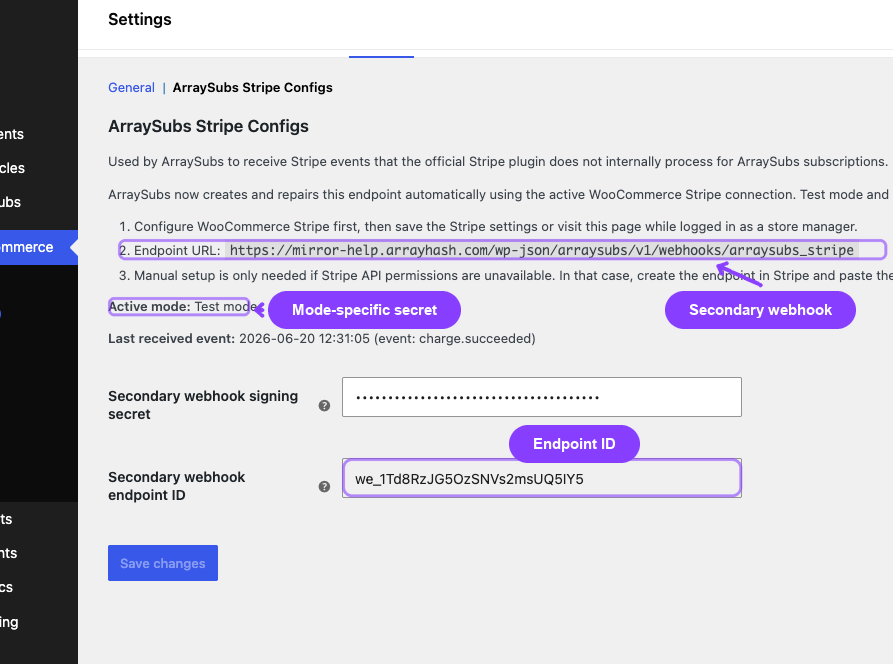
Use the official WooCommerce Stripe Gateway webhook URL for normal Stripe payment events. ArraySubsPro also maintains this secondary endpoint automatically for payment-method, card, and reconciliation events:
https://yoursite.com/wp-json/arraysubs/v1/webhooks/arraysubs_stripe
Open WooCommerce -> Settings -> Payments -> ArraySubs Stripe Configs to check the live secondary webhook status. The page verifies the Stripe-side endpoint on load and shows whether the ArraySubs webhook is enabled for the active test/live mode. If someone deletes or disables the auto-created endpoint in Stripe, or if required events are missing, click Refresh on that page. ArraySubs checks the current Stripe connection, recreates the endpoint when needed, saves the new signing secret and endpoint ID, and updates the status text.
Use Refresh for endpoint repair. Use Save changes only when you manually paste or change the secondary webhook signing secret.
Stripe-Specific Settings
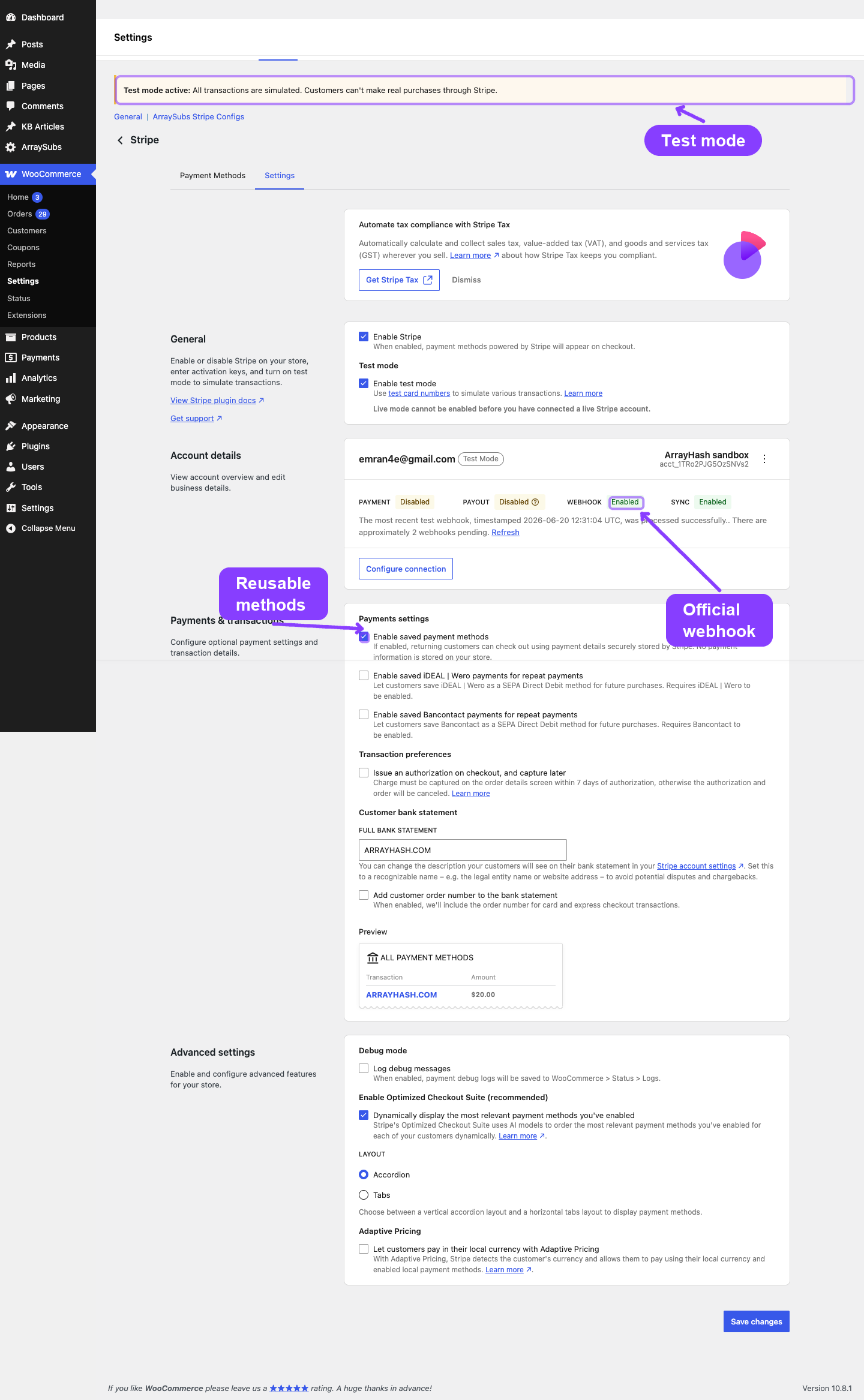
Stripe checkout and API credentials are configured in WooCommerce → Settings → Payments → Stripe. ArraySubs adds a sibling settings section for secondary webhook status and emergency repair values:
| Setting | Where |
|---|---|
| Enable/Disable | WooCommerce Stripe Gateway settings |
| Title/Description | WooCommerce Stripe Gateway settings |
| API keys and test mode | WooCommerce Stripe Gateway settings |
| Official webhook secret | WooCommerce Stripe Gateway settings |
| ArraySubs secondary webhook secret | Auto-managed by ArraySubsPro in WooCommerce → Settings → Payments → ArraySubs Stripe Configs |
| ArraySubs secondary webhook status and Refresh | WooCommerce → Settings → Payments → ArraySubs Stripe Configs |
The secondary webhook secret is stored separately for test mode and live mode. In normal operation you do not paste a whsec_ value manually; saving WooCommerce Stripe settings or visiting admin after credentials are available lets ArraySubsPro ensure the endpoint exists. Manual entry is only for repairing a known provisioning failure.
The Webhook status line on the ArraySubs Stripe Configs page is a live check against Stripe, not just a local saved-option check. A healthy setup shows Enabled. If it shows Disabled or a repair message, use Refresh to recreate the secondary endpoint from the active WooCommerce Stripe API connection.
Troubleshooting
| Problem | Likely Cause | Solution |
|---|---|---|
| Stripe is unavailable in ArraySubs | Official WooCommerce Stripe Gateway is missing, disabled, or older than the supported version | Install/update WooCommerce Stripe Gateway and enable the stripe payment method |
Renewal payment fails with authentication_required |
Customer's bank requires SCA | Customer must use the Renewal Requires Verification email link to complete authentication |
Stripe payment succeeded but the WooCommerce order is Processing |
The subscription order still has shipping/fulfillment work, or WooCommerce would normally require processing for the product type | If the product should not ship, make the product non-shipping and remove subscription shipping rules. If it does ship, fulfill the order and complete it when appropriate. |
Subscription is Active but the order is Processing |
Payment and subscription activation succeeded, but WooCommerce is keeping the order open for fulfillment | Treat the subscription as paid. Only manually complete the WooCommerce order when there is no remaining fulfillment work. |
Stripe checkout fails with No such PaymentMethod |
A saved Stripe payment method belongs to an old/disconnected Stripe account or test/live mode context | Ask the customer to use a new payment method. ArraySubs removes stale saved Stripe tokens during subscription checkout when Stripe reports they no longer exist. |
| Card auto-update not working | Card network doesn't participate in updater program | Not all card issuers support auto-update. Customer needs to manually update their card. |
| Webhook events not arriving | Official webhook URL/secret is misconfigured, or the ArraySubs secondary endpoint was deleted, disabled, missing required events, or could not be provisioned | Check the WooCommerce Stripe Gateway webhook settings first, then open ArraySubs Stripe Configs. If the Webhook status is not Enabled, click Refresh to recreate the secondary endpoint and save a new signing secret. Then confirm Gateway Health shows recent webhook activity after a test event |
| Payment method details missing on a subscription | Checkout completed before Stripe order meta was available or webhook was delayed | Open the subscription and run Resync from Gateway |
Related Docs
- Gateway Overview — Architecture and capability comparison
- Auto-Renew and Manual Fallback — Customer toggle behavior
- Gateway Health Dashboard — Monitoring Stripe status and webhook events
FAQ
Does Stripe store card details on my server? No. Stripe's Checkout Sessions and Elements handle all card input on Stripe's servers. ArraySubs only stores the payment method ID, card brand, last4, and expiry — never the full card number or CVV.
What happens if a renewal charge fails? The plugin records the failure with a classified reason (insufficient funds, expired card, authentication required, etc.) and the customer receives a Renewal Payment Failed email that includes the reason in plain language. ArraySubs then schedules the next automatic retry using your gateway settings (max attempts and interval); before each retry the plugin queries Stripe to confirm the customer was not already charged via a missed webhook. If all retries fail, the subscription enters the standard grace-period flow (Active → On-Hold → Cancelled). An admin or the customer can also click Retry Payment at any time to trigger an immediate verification + retry — see Payment Recovery Tools.
How do I know the local subscription state matches Stripe? Open the subscription detail page and click Resync from Gateway in the Payment Gateway card (next to Detach Gateway). The reconciler pulls the customer record, the saved payment method, and recent PaymentIntents matching this subscription, then applies safe corrections to local meta and reconciles any successful charge whose webhook was missed. The card itself only appears for automatic gateways — manual gateways have nothing to resync.
Can I use Stripe in test mode? Yes. Enable test mode in the official WooCommerce Stripe Gateway settings and use Stripe's test API keys. Test mode uses Stripe's sandbox environment — no real charges occur. ArraySubsPro stores a separate secondary webhook secret for test mode and creates or repairs that endpoint automatically from the WooCommerce Stripe connection.
Does Stripe support PayPal or bank transfers? Stripe checkout methods are owned by the official WooCommerce Stripe Gateway. ArraySubs allows subscription checkouts only for methods that can be reused for automatic renewals, such as cards, Link/supported wallets, and supported bank debit methods.