
Store Credit Emails
ProFour automated emails keep customers informed about their store credit balance — when credit is added, used, about to expire, and after it expires.
Availability: Pro
Page Navigation
- Current guide: Store Credit Emails Pro
- Where to open it: WordPress Admin -> WooCommerce -> Settings -> Emails
- Section overview: Open overview
- Previous guide: README
- Next guide: customer-and-storefront-display
- Troubleshooting: Audits, Logs, and Troubleshooting
Overview
The Store Credit module Pro includes its own set of four customer-facing WooCommerce emails. These emails are registered separately from the core subscription emails but follow the same WooCommerce email framework — they appear in WooCommerce → Settings → Emails, support HTML and Plain Text, and can be toggled independently.
All four emails are enabled by default when the Pro plugin is active.
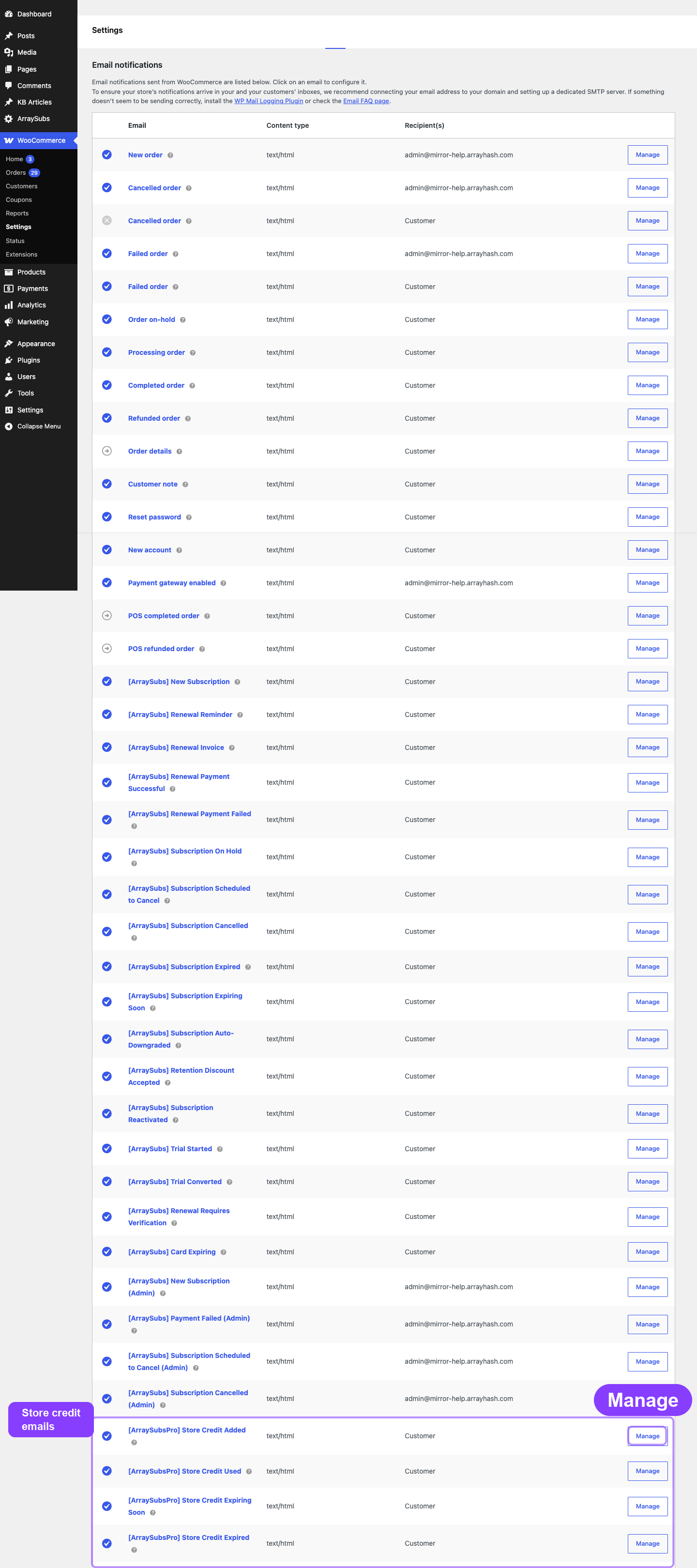
Store Credit emails are registered by the ArraySubs Pro plugin. If the Pro plugin is deactivated, these emails will no longer appear in WooCommerce settings and will stop sending.
Email Summary
| ID | Triggered When | Type | |
|---|---|---|---|
| Store Credit Added | arraysubs_credit_added |
Credit is added to the customer's account (admin adjustment, refund, downgrade, promotion, or purchase) | Customer |
| Store Credit Used | arraysubs_credit_used |
Credit is applied to an order (renewal or checkout) | Customer |
| Store Credit Expiring Soon | arraysubs_credit_expiring |
A credit entry is about to expire (7 days before) | Customer |
| Store Credit Expired | arraysubs_credit_expired |
A credit entry has expired and the balance was deducted | Customer |
Store Credit Added
Sent when credit is added to a customer's account from any source except debit operations.
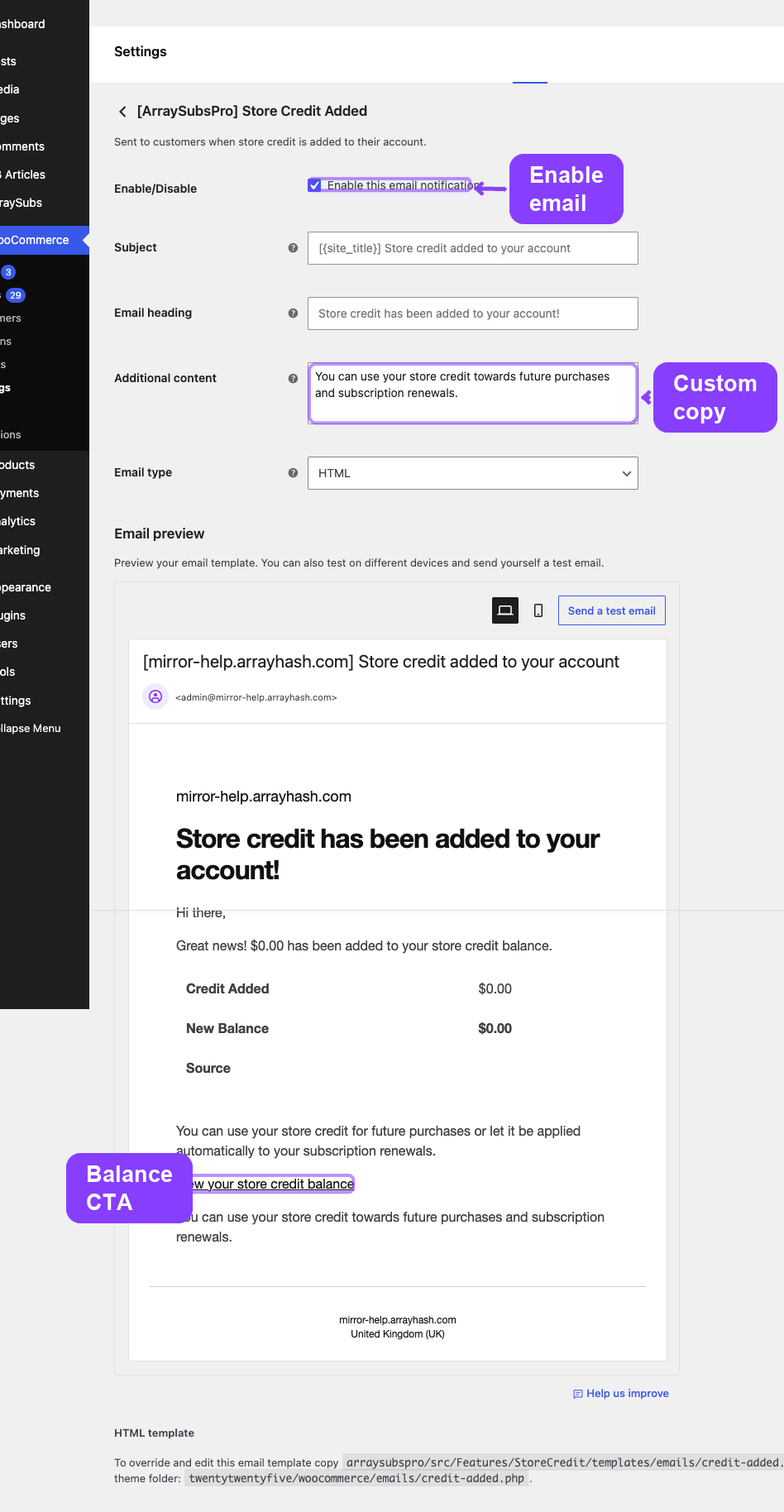
WooCommerce email ID: arraysubs_credit_added
Default subject: [{site_title}] Store credit added to your account
Default heading: Store credit has been added to your account!
Trigger: Fires on arraysubs_customer_credit_added or arraysubs_subscription_credit_added.
What the Email Contains
- Customer greeting
- Amount of credit added
- Information table: Credit Added, New Balance (bold), Source label
- Explanation that credit can be used for purchases or renewals
- Link to the Store Credit page in My Account
Important Behavior
This email does not fire for debit operations. The following sources are excluded:
renewal_applied— credit auto-applied to a renewalorder_applied— credit applied at checkoutexpired— credit deducted due to expiration
Source Labels
The {credit_source} placeholder displays a human-readable label:
| Source | Label Shown |
|---|---|
| Admin adjustment | Admin Adjustment |
| Refund conversion | Refund |
| Plan downgrade | Plan Downgrade |
| Promotional credit | Promotional Credit |
| Credit purchase | Credit Purchase |
Specific Placeholders
| Placeholder | Description |
|---|---|
{credit_amount} |
Amount of credit added |
{new_balance} |
Updated credit balance |
{credit_source} |
Human-readable source label |
Store Credit Used
Sent when credit is applied to an order — whether a subscription renewal or a checkout purchase.
WooCommerce email ID: arraysubs_credit_used
Default subject: [{site_title}] Store credit used for Order #{order_id}
Default heading: Store credit applied to your order
Trigger: Fires on arraysubs_credits_applied_to_order.
What the Email Contains
- Customer greeting
- Notification that credit was applied to order #X
- Information table: Credit Applied, Remaining Balance (bold), Order (linked)
- Link to view order details in My Account
Specific Placeholders
| Placeholder | Description |
|---|---|
{credit_used} |
Amount of credit applied |
{remaining_balance} |
Remaining credit balance |
{order_id} |
WooCommerce order number |
{order_url} |
Link to order details in My Account |
Store Credit Expiring Soon
Sent 7 days before a credit entry is scheduled to expire.
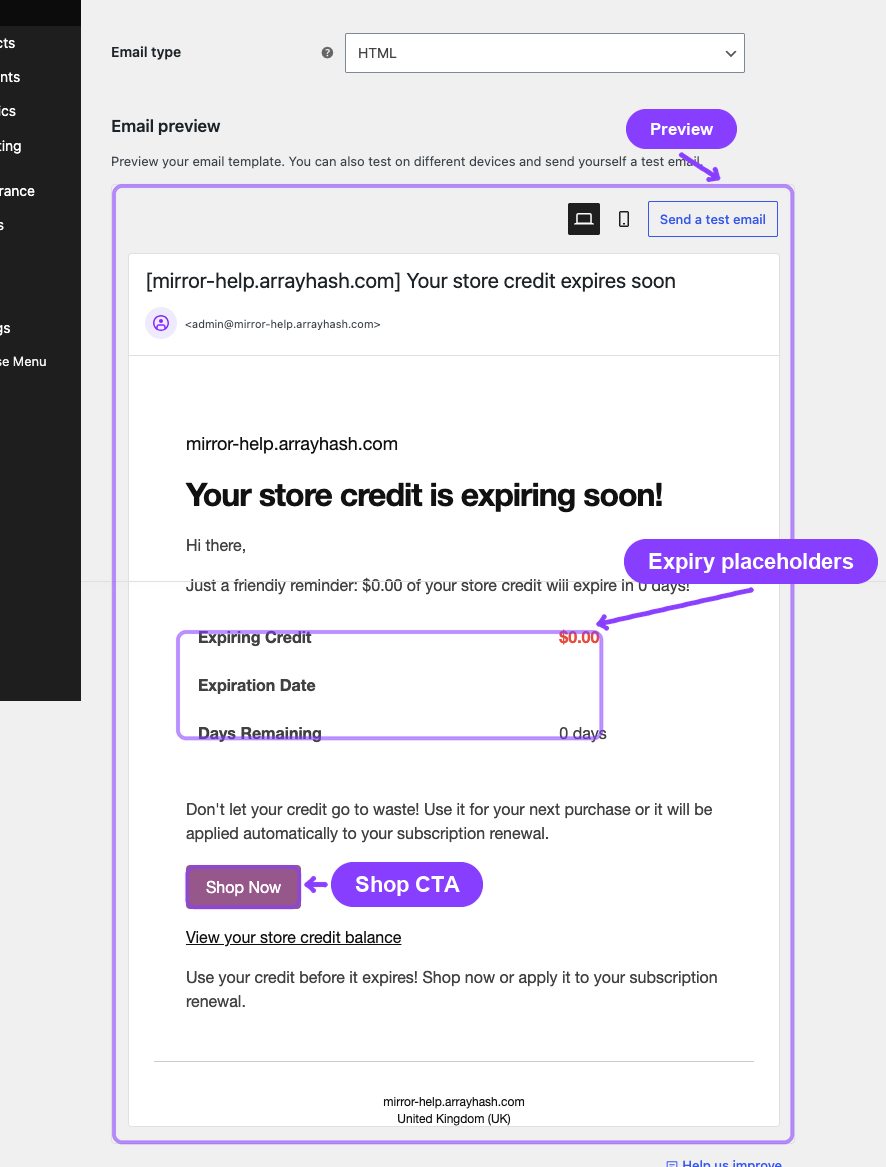
WooCommerce email ID: arraysubs_credit_expiring
Default subject: [{site_title}] Your store credit expires soon
Default heading: Your store credit is expiring soon!
Trigger: Fires on arraysubs_credit_expiring_soon, dispatched by the daily credit expiration batch job.
What the Email Contains
- Customer greeting with urgency message
- Information table: Expiring Credit (bold, red), Expiration Date, Days Remaining
- Warning not to let the credit go to waste
- "Shop Now" call-to-action button linking to the shop page
- Link to the Store Credit balance in My Account
This email only fires when the Expiration Period in Store Credit Settings is set to a value greater than 0. If credits never expire, this email is never sent.
Specific Placeholders
| Placeholder | Description |
|---|---|
{expiring_amount} |
Amount about to expire |
{expires_at} |
Expiration date |
{days_remaining} |
Days until expiration |
{shop_url} |
Link to the shop page |
Store Credit Expired
Sent after a credit entry has expired and the balance has been deducted.
WooCommerce email ID: arraysubs_credit_expired
Default subject: [{site_title}] Your store credit has expired
Default heading: Your store credit has expired
Trigger: Fires on arraysubs_credit_expired, dispatched by the daily credit expiration batch job.
What the Email Contains
- Customer greeting
- Notification that credit has expired
- Information table: Expired Credit (strikethrough, grayed out)
- Suggestion to contact support
- "Visit Our Shop" call-to-action button
- Link to the Store Credit balance in My Account
Specific Placeholders
| Placeholder | Description |
|---|---|
{expired_amount} |
Amount that expired |
{shop_url} |
Link to the shop page |
Edge Cases and Important Notes
- Credit Added skips debit sources. Only actual credit additions trigger the email. Applying credit to renewals, orders, or expirations does not.
- Expiring email fires once per credit entry. Each expiring credit is notified only once, 7 days before expiration. An internal flag prevents duplicates.
- Expiring email depends on the background job. The daily batch (3:00 AM server time) handles both expirations and expiring notifications. If the background job is not running, neither emails nor expirations will process.
- All emails use WooCommerce's template system. Override templates by copying them from the Pro plugin's
templates/emails/directory to your theme'swoocommerce/emails/directory. - Base subscription placeholders are not available. Store Credit emails use their own placeholder set (site info + credit-specific), not the full subscription placeholder set.
Troubleshooting
| Problem | Likely Cause | What to Do |
|---|---|---|
| Store Credit emails not appearing in WooCommerce settings | ArraySubs Pro is not active | Activate the Pro plugin |
| Expiring email not sent | Expiration period is 0 (no expiration), or the daily batch has not run yet | Set an expiration period > 0 in Store Credit Settings and wait for the 3:00 AM batch |
| Credit Added email not sent for a refund-to-credit | The credit was categorized as a debit source, or the email is disabled | Verify the email is enabled in WooCommerce settings and confirm the operation was a credit addition |
| Email shows wrong balance | Balance changed between the event and email delivery (concurrent transactions) | Rare edge case — the balance reflects the state at the triggering moment |
Related Guides
- Email Overview — How ArraySubs emails work and the full placeholder reference.
- Store Credit Settings — Configure the expiration period that triggers Expiring and Expired emails.
- Store Credit Management — Admin adjustments that trigger the Credit Added email.
- Refund to Credit — Refund conversions that trigger the Credit Added email.
- Purchase Product — Credit purchases that trigger the Credit Added email.
FAQ
Do Store Credit emails use the same WooCommerce styling as subscription emails?
Yes. They use the standard WooCommerce email header and footer, inheriting your store logo, colors, and footer text.
Can I disable individual Store Credit emails?
Yes. Open each email in WooCommerce → Settings → Emails and toggle it off independently.
Are there admin notifications for Store Credit events?
No. All four Store Credit emails are customer-facing. There are no admin-only Store Credit notifications.
What happens to pending credit emails if I deactivate the Pro plugin?
Any scheduled expiring/expired notifications will not be sent. The WooCommerce email classes are no longer registered when the Pro plugin is inactive.