
Customer Portal
The customer portal is your subscribers' self-service hub inside the WooCommerce My Account area. Customers can view subscriptions, manage actions like cancelling or pausing, update payment details, and track orders — all without contacting support.
Availability: Free + Pro
Page Navigation
- Current guide: Customer Portal
- Where to open it: Storefront -> My Account -> Subscriptions
- Section overview: Open overview
- Previous guide: portal-pages
- Next guide: self-service-actions
- Troubleshooting: Audits, Logs, and Troubleshooting
Overview
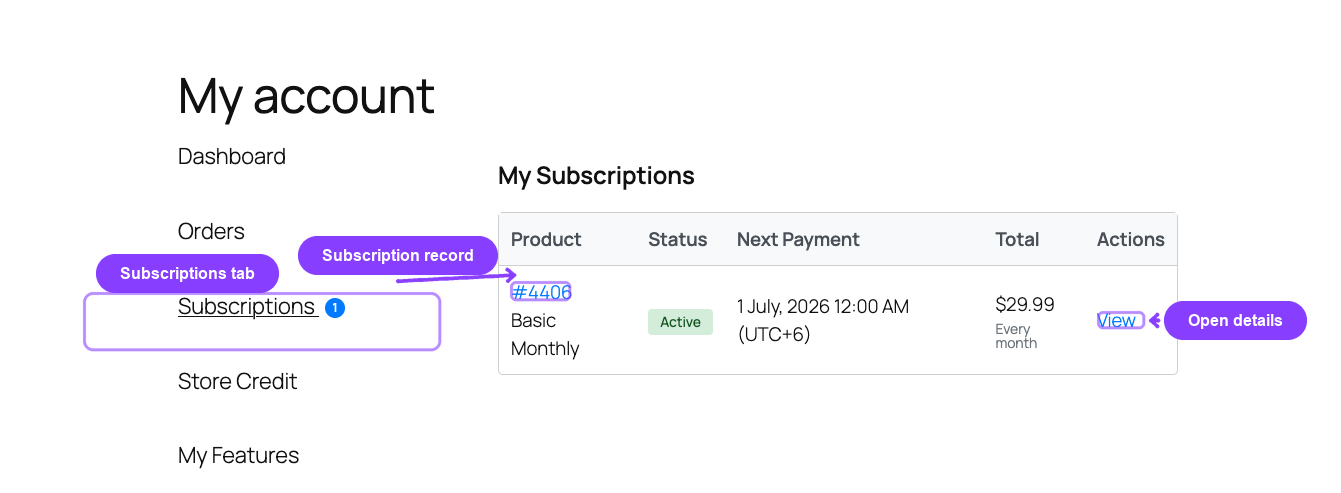
ArraySubs adds a Subscriptions tab to the WooCommerce My Account page. This tab gives customers a complete view of their subscriptions and lets them take actions like cancelling, changing plans, skipping renewals, or pausing — depending on the settings you have enabled.
With the Pro plugin active, additional My Account tabs and inline features become available:
- My Features — shows product entitlements and usage tracking
- Store Credit — shows credit balance, transaction history, and purchase options
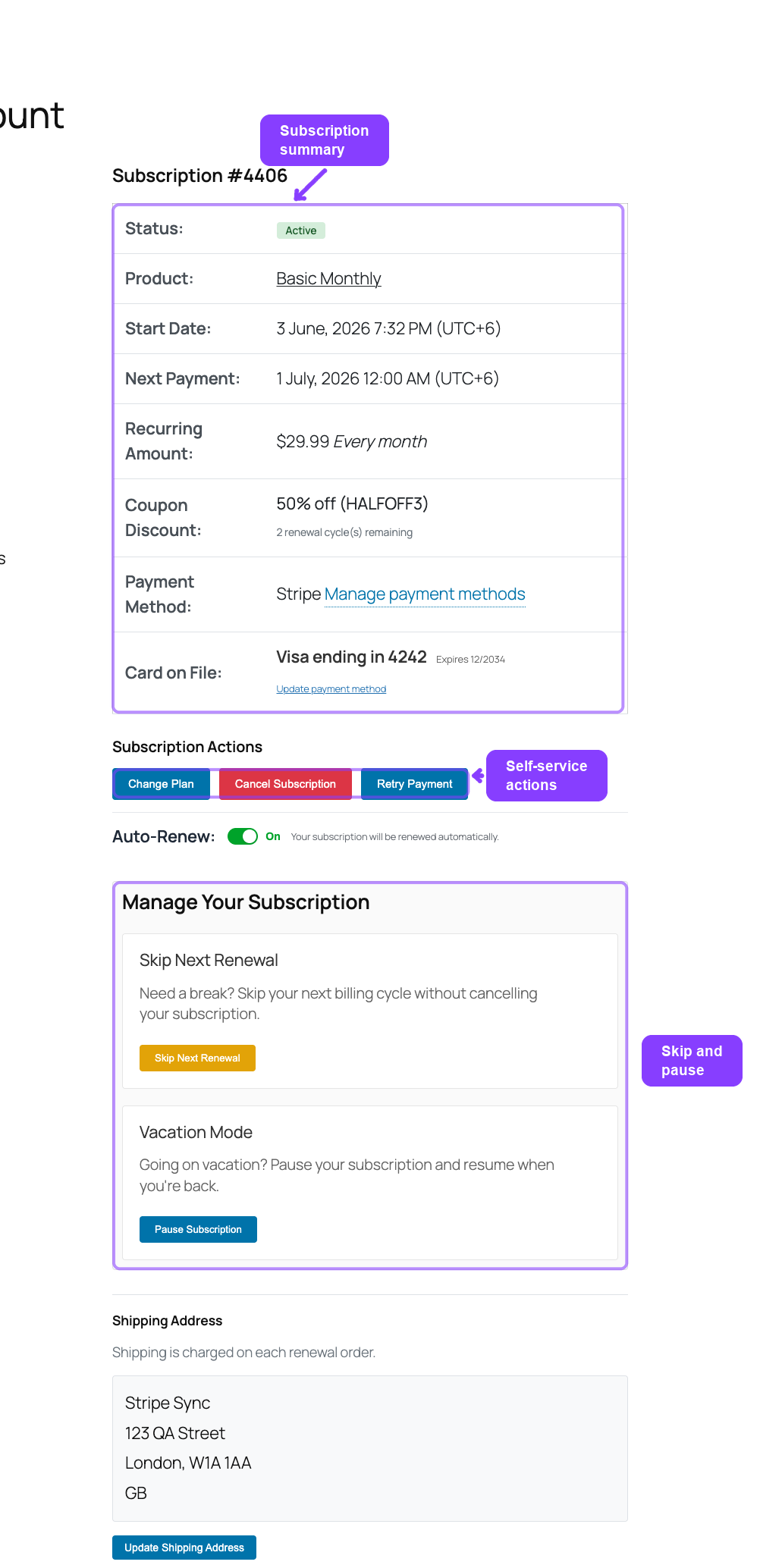
- Auto-renew toggle — lets customers turn automatic billing on or off
- Payment method details — displays the card on file with an update link
- Shipping address updates — lets customers change their shipping address before the next renewal
In This Section
Customer Portal Pages
The pages customers see in their account area: the subscription list, the subscription detail page, the My Features page Pro, and the Store Credit page Pro.
Subscription Self-Service Actions
Everything a customer can do from the subscription detail page: cancel, undo a scheduled cancellation, accept retention offers, skip renewals, pause, resume, change plan, and reactivate.
Payment and Shipping Actions
Managing payment methods, the auto-renew toggle Pro, and updating the shipping address for future renewals Pro.
How It Works
The customer portal builds on the standard WooCommerce My Account page. When ArraySubs is active, it registers custom endpoints and adds menu items to the account navigation. Customers see a Subscriptions link that takes them to a list of their subscriptions. Clicking View on any subscription opens the detail page where all self-service actions are available.
If you want to rename or reorder the Subscriptions tab itself, use ArraySubs → Profile Builder → My Account.
The portal respects your store's settings. If you have disabled customer cancellation, the cancel button does not appear. If skip or pause features are turned off, those sections are hidden. Customers only see actions they are permitted to take on their current subscription.
Quick Reference
| Portal Page | URL Path | Availability |
|---|---|---|
| My Subscriptions | /my-account/subscriptions/ |
Free |
| View Subscription | /my-account/view-subscription/{id}/ |
Free |
| My Features | /my-account/features/ |
Pro |
| Store Credit | /my-account/store-credit/ |
Pro |
| Self-Service Action | Available Statuses | Controlled By |
|---|---|---|
| Cancel subscription | Active, Trial, Pending | General Settings → Customer Actions |
| Undo scheduled cancellation | Active (with pending cancel) | Automatic when end-of-period cancel is used |
| Retention offers | Active, Trial | Retention Flow settings |
| Change plan | Active | General Settings → Customer Actions and plan linking |
| Skip next renewal | Active, Trial | General Settings → Skip & Renewal |
| Pause subscription | Active, Trial | General Settings → Pause Subscription |
| Resume subscription | On-Hold (paused) | Automatic when paused |
| Update shipping address | Active, On-Hold, Trial | Automatic for shippable subscriptions |
| Auto-renew toggle | Active, On-Hold, Trial | General Settings → Automatic Payments Pro |
| Update payment method | Active, On-Hold, Trial | Requires automatic payment gateway Pro |
Related Guides
- General Settings — Customer action toggles, cancellation timing, skip and pause settings
- Lifecycle Management — Status transitions and what each status means
- Subscription Detail Cards — The admin-side view of cancellation, skip, pause, coupon, and gateway cards