
Before You Launch
Understand what ArraySubs needs, how subscriptions work, and which features are included in Free versus Pro — all before you write a single line of configuration.
Availability: Free + Pro
Page Navigation
- Current guide: Before You Launch
- Where to open it: WordPress Admin -> ArraySubs
- Section overview: Open overview
- Previous guide: README
- Next guide: cron-job-setup
- Troubleshooting: Audits, Logs, and Troubleshooting
Overview
ArraySubs is a WooCommerce subscription engine that adds recurring billing, a self-service customer portal, and membership access control to any WooCommerce store. It works as two plugins: a free core plugin that covers all essential subscription functionality, and an optional Pro addon that adds automatic payments, advanced analytics, store credit, checkout customization, and more.
This guide covers everything you need to know before installing: system requirements, core concepts, subscription statuses, and the full feature map.
Requirements
Before installing, make sure your hosting environment and WordPress setup meet these minimums:
| Requirement | Minimum Version |
|---|---|
| PHP | 8.1 or higher |
| WordPress | 6.0 or higher |
| WooCommerce | 8.0 or higher |
ArraySubs declares full compatibility with WooCommerce High-Performance Order Storage (HPOS). No special configuration is required.
Installation Order
If you are installing both plugins:
- Install and activate WooCommerce first.
- Install and activate ArraySubs (the core plugin).
- Install and activate ArraySubsPro (the Pro addon).
The Pro addon checks for the core plugin at startup. If ArraySubs core is missing or below version 1.0, the Pro addon will show an admin notice and will not activate.
Always activate the core plugin before the Pro addon. Activating Pro without the core plugin installed results in a dependency error notice and the Pro features will not load.
What Gets Checked Automatically
Both plugins run dependency checks on every page load. If any requirement is not met, you will see an admin notice with the specific issue:
- Core plugin checks: PHP version, WordPress version, WooCommerce version.
- Pro addon checks: PHP version, WordPress version, WooCommerce version, and ArraySubs core plugin version.
You do not need to do anything manually — the system tells you exactly what is missing.
Core Concepts
Understanding these concepts makes everything else in the manual easier to follow.
Subscription Products
A subscription product is a standard WooCommerce product with the Subscription checkbox enabled. When a customer purchases it, the system creates a recurring subscription instead of a one-time order.
ArraySubs supports two WooCommerce product types:
- Simple subscription products — A single subscription plan with fixed billing terms.
- Variable subscription products — Multiple plan variations (e.g., Monthly, Quarterly, Annual) under one product, each with its own billing schedule, price, trial, and signup fee.
Billing Cycle
Every subscription has a billing cycle that determines how often the customer is charged. A billing cycle is defined by two values:
- Billing period — The unit of time:
Day,Week,Month,Year, orLifetime Deal. - Billing interval — How many periods between charges (1–12).
Examples:
| Billing Period | Billing Interval | Result |
|---|---|---|
| Month | 1 | Charged every month |
| Month | 3 | Charged every 3 months (quarterly) |
| Week | 2 | Charged every 2 weeks |
| Year | 1 | Charged once per year |
| Day | 7 | Charged every 7 days |
Subscription Length
Subscription length controls how many billing cycles a subscription runs before automatically expiring. Set it to 0 for unlimited/never-expires subscriptions.
Example: A 12-month plan with monthly billing has a subscription length of 12. After 12 successful payments, the subscription expires automatically.
Free Trials
A trial period gives customers access for a set time before the first paid billing cycle begins. When a trial is active, the subscription status is Trial and no recurring payment is collected until the trial ends.
Trials are configured with:
- Trial length — Number of trial periods (0 = no trial).
- Trial period — Unit of time:
Day,Week,Month, orYear.
Example: A 14-day trial means the customer gets 14 days of access before the first payment is due.
Trials and signup fees are independent. A product can have a trial, a signup fee, both, or neither. The signup fee is always charged at checkout regardless of the trial.
Signup Fees
A signup fee is a one-time charge collected at the initial checkout, separate from the recurring price. It appears as part of the first order total but is never charged again.
Example: A $49.99/month plan with a $9.99 signup fee means the customer pays $59.98 at checkout and $49.99 on each subsequent renewal.
Different Renewal Pricing
You can set a different price that takes effect after a specified number of billing cycles. This is useful for introductory pricing models.
Example: Charge $29.99/month for the first 3 months, then $49.99/month from the 4th month onward.
Locked-In Pricing
When a customer purchases a subscription, the price is captured at checkout time. Future product price changes do not affect existing subscriptions. If the product is on sale at checkout, the sale price becomes the locked-in recurring amount.
Subscription Statuses
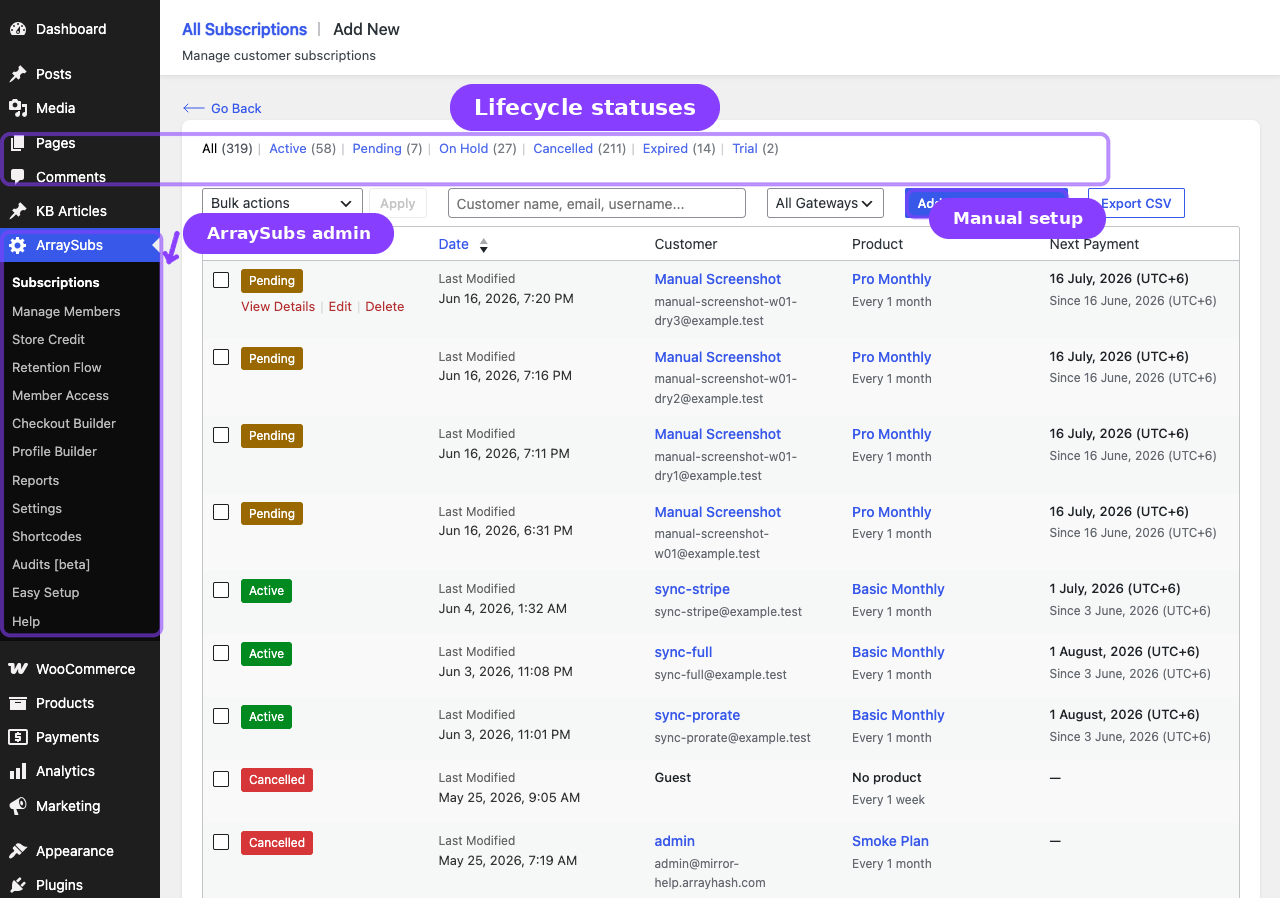
Every subscription has a status that determines customer access and billing behavior. There are six statuses:
Pending
The initial state when a subscription is first created from checkout, before the first payment is confirmed. A subscription stays in Pending until the initial order is marked as paid.
- Customer access: None
- Billing: Waiting for first payment
Trial
Active when the subscription includes a free trial period. The customer has access but no recurring payment is collected until the trial ends.
- Customer access: Full access
- Billing: No charges until trial ends
Active
The subscription is fully paid and current. Renewals are processed on schedule.
- Customer access: Full access
- Billing: Recurring charges on the billing schedule
On Hold
The subscription entered the grace period because a renewal payment was not received on time. Customer access is restricted.
- Customer access: Restricted (no access)
- Billing: Waiting for overdue payment
Cancelled
The subscription was cancelled — either by the customer, by the admin, or automatically by the system after the grace period expired.
- Customer access: None
- Billing: No future charges
Expired
The subscription reached its subscription length limit and ended naturally. This only applies to subscriptions with a defined length (not unlimited/never-expires plans).
- Customer access: None
- Billing: No future charges
Status transition summary
Checkout → Pending → Active (when paid) or → Trial (if trial exists)
Trial end → Active (when trial converts)
Missed payment → Active stays active for 3 grace days → On Hold for 7 more days → Cancelled
Customer cancels → Cancelled immediately or at end of billing period (configurable)
Length reached → Expired
Grace Period System
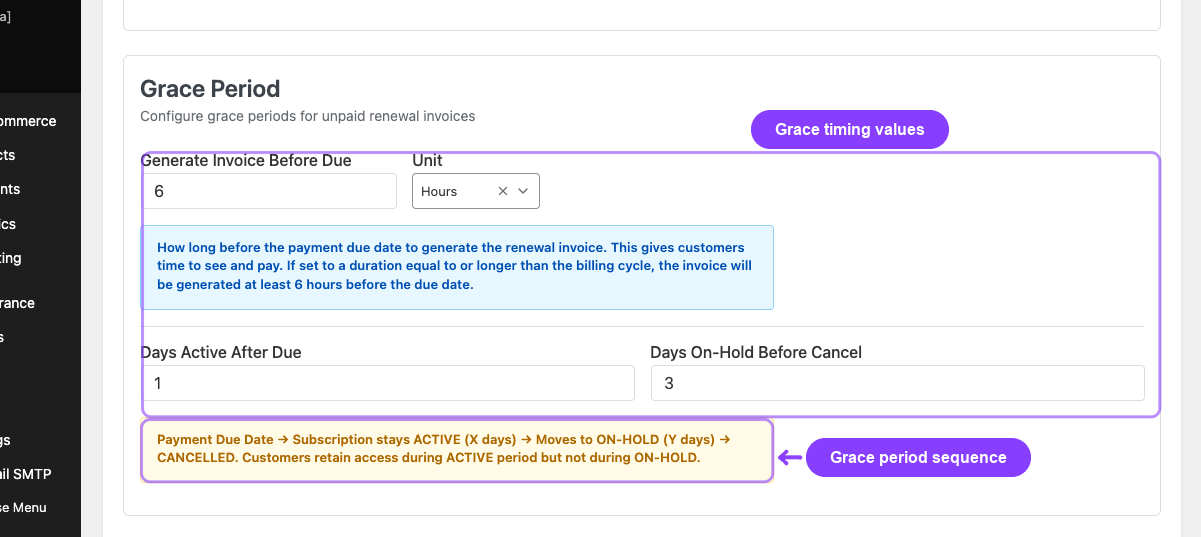
When a renewal payment is due and not received, ArraySubs does not cancel the subscription immediately. Instead, it follows a two-phase grace period:
Phase 1 — Active grace (3 days by default)
The subscription stays Active for 3 days after the payment due date. The customer retains full access during this time.
Phase 2 — On-Hold grace (7 days by default)
After the active grace period, the subscription moves to On Hold for 7 more days. Customer access is restricted during this phase.
Automatic cancellation After both phases (10 days total by default), the subscription is automatically cancelled by the system.
Both grace period durations are configurable in ArraySubs → Settings → General.
If the customer pays the outstanding renewal invoice at any point during the grace period, the subscription immediately returns to Active status.
Customer Portal
ArraySubs adds a Subscriptions tab to the WooCommerce My Account area. This is where customers manage their subscriptions without contacting support.
The portal includes two pages:
- My Subscriptions — A table listing all of the customer's subscriptions with columns for product name, status badge, next payment date, and recurring total.
- View Subscription — A detail page for a single subscription showing the full billing schedule, related orders, payment information, and available self-service actions.
Depending on your settings, customers can perform actions like:
| Cancel their subscription | Change their subscription plan |
| Undo a scheduled cancellation | Skip upcoming renewals |
| Pause and resume their subscription | Reactivate a cancelled subscription |
| Update their payment method Pro | Toggle automatic renewal on/off Pro |
The available self-service actions are configurable in ArraySubs → Settings → General. The Subscriptions tab label and its menu order are managed separately in ArraySubs → Profile Builder → My Account.
Free vs Pro Feature Map
ArraySubs ships as two plugins. The core plugin is free and covers all essential subscription functionality. The Pro addon adds advanced features for stores that need more control, automation, and analytics.
Dedicated Manual Module Count
The manual tracks 27 dedicated product modules. Documentation-only sections such as Getting Started and Settings are not included in this count. 20 modules are available from the free/core side of the product, including mixed modules where Pro adds optional capabilities. 7 modules require ArraySubs Pro.
| Count | Module Group |
|---|---|
| 20 | Free/core-accessible modules |
| 7 | Pro-only modules |
| 27 | Total dedicated modules |
Free/Core-Accessible Dedicated Modules
| Module | Availability Notes |
|---|---|
| Easy Setup Wizard | Free guided setup with Pro-only options when Pro is active |
| Admin Bar Visibility | Free |
| Admin Dashboard Access | Free |
| WordPress Login Page | Free |
| Login as User | Free |
| Coupons | Free |
| Subscription Products | Free core with Pro product extensions |
| Manage Subscriptions | Free core with Pro-only cards where applicable |
| Subscription Notes | Free |
| Customer Portal | Free core with Pro payment/shipping actions |
| Analytics | Free reports hub with Pro analytics extensions |
| Retention Analytics | Free |
| Emails | Free core emails with Pro store-credit/gateway emails |
| Shortcodes | Free shortcodes with one Pro store-credit shortcode |
| Profile Builder | Free core with Pro menu integrations |
| Member Access | Free core with Pro login-limit extension |
| Checkout and Payments | Free checkout flow with Pro automatic payments |
| Billing and Renewals | Free renewal engine with Pro automatic collection |
| Retention, Cancellation, and Refunds | Free core with Pro store-credit refund extension |
| Audits, Logs, and Troubleshooting | Free troubleshooting with Pro audit/log screens |
Pro-Only Dedicated Modules
| Module | What It Adds |
|---|---|
| Login Limit | Concurrent session limits and plan-level session overrides |
| Redirect Product Page | Product URL redirects or 404 handling |
| Subscription Shipping | One-time or recurring shipping charges for physical subscriptions |
| Member Insight | Unified member profile, commerce history, shortcuts, and support actions |
| Store Credit | Credit wallet, purchase products, credit history, and credit refunds |
| Feature Manager | Product entitlements, feature display, and feature logs |
| Gateway Health | Gateway status cards, webhook URLs, capabilities, and webhook event log |
Subscription Fundamentals
| Feature | Free | Pro |
|---|---|---|
| Simple subscription products | ✅ | ✅ |
| Variable subscription products | ✅ | ✅ |
| Billing cycles (day, week, month, year, lifetime) | ✅ | ✅ |
| Free trials | ✅ | ✅ |
| Signup fees | ✅ | ✅ |
| Different renewal pricing | ✅ | ✅ |
| Subscription length limits | ✅ | ✅ |
| Locked-in checkout pricing | ✅ | ✅ |
| Coupon integration with cycle limits | ✅ | ✅ |
Billing and Renewals
| Feature | Free | Pro |
|---|---|---|
| Recurring billing engine | ✅ | ✅ |
| Renewal invoice generation | ✅ | ✅ |
| Grace period system (active + on-hold) | ✅ | ✅ |
| Manual renewal payments | ✅ | ✅ |
| Automatic gateway payments (Stripe, PayPal, Paddle) | — | ✅ |
| Auto-renew customer toggle | — | ✅ |
| Gateway health dashboard | — | ✅ |
Customer Portal and Self-Service
| Feature | Free | Pro |
|---|---|---|
| My Subscriptions list | ✅ | ✅ |
| View subscription detail | ✅ | ✅ |
| Cancel subscription | ✅ | ✅ |
| Undo scheduled cancellation | ✅ | ✅ |
| Plan switching (upgrade, downgrade, crossgrade) | ✅ | ✅ |
| Skip next renewal | ✅ | ✅ |
| Pause and resume subscription | ✅ | ✅ |
| Reactivate cancelled subscription | ✅ | ✅ |
| Update payment method | — | ✅ |
| Toggle auto-renew on/off | — | ✅ |
| Update shipping address | — | ✅ |
Retention and Cancellation
| Feature | Free | Pro |
|---|---|---|
| Cancellation reasons (require reason, predefined list) | ✅ | ✅ |
| Retention offers (discount, pause, downgrade, contact support) | ✅ | ✅ |
| Retention analytics (churn rate, offer performance, trends) | ✅ | ✅ |
| Refund processing (immediate, end-of-period, prorated) | ✅ | ✅ |
| Refund to store credit | — | ✅ |
Member Access and Restrictions
| Feature | Free | Pro |
|---|---|---|
| Role mapping rules | ✅ | ✅ |
| URL restriction rules | ✅ | ✅ |
| Post type / taxonomy restriction rules | ✅ | ✅ |
| Discount rules for members | ✅ | ✅ |
| Shop access purchase restrictions | ✅ | ✅ |
| Download access and rate limiting | ✅ | ✅ |
| Scheduled / drip content access | ✅ | ✅ |
| Content restriction shortcodes | ✅ | ✅ |
Admin and Analytics
| Feature | Free | Pro |
|---|---|---|
| All Subscriptions list with filters | ✅ | ✅ |
| Create and edit subscriptions | ✅ | ✅ |
| Subscription notes and timeline | ✅ | ✅ |
| Export subscriptions (CSV, JSON) | ✅ | ✅ |
| Subscription email notifications | ✅ | ✅ |
| Overview analytics dashboard | — | ✅ |
| WooCommerce Analytics extension (order types, subscription filters) | — | ✅ |
| Activity audit logs | — | ✅ |
| Scheduled job logs | — | ✅ |
| Manage Members page (member profiles, insights) | — | ✅ |
Products and Checkout
| Feature | Free | Pro |
|---|---|---|
| Subscription product editor | ✅ | ✅ |
| Product test links (direct add-to-cart) | ✅ | ✅ |
| Linked products (upgrade/downgrade paths) | ✅ | ✅ |
| Auto-downgrade on expire/cancel | ✅ | ✅ |
| Product lifecycle handling (deleted products) | ✅ | ✅ |
| Fixed period membership (absolute end date) | — | ✅ |
| Product feature/entitlement manager | — | ✅ |
| Redirect product page (301 or 404) | — | ✅ |
| Subscription shipping (one-time vs recurring) | — | ✅ |
| Checkout builder (custom fields, multistep) | — | ✅ |
Profile and Account Customization
| Feature | Free | Pro |
|---|---|---|
| Custom profile fields | ✅ | ✅ |
| My Account menu editor | ✅ | ✅ |
| Custom endpoint pages | ✅ | ✅ |
| Avatar upload settings | ✅ | ✅ |
| Shortcodes reference page | ✅ | ✅ |
Site Access Toolkit
| Feature | Free | Pro |
|---|---|---|
| Admin Bar Visibility | ✅ | ✅ |
| Admin Dashboard Access | ✅ | ✅ |
| WordPress Login Page | ✅ | ✅ |
| Login as User (admin impersonation) | ✅ | ✅ |
| Multi-Login Prevention (session limits, plan overrides) | — | ✅ |
Store Credit
| Feature | Free | Pro |
|---|---|---|
| Store credit management | — | ✅ |
| Store credit purchase product | — | ✅ |
| Store credit expiration | — | ✅ |
| Auto-apply credit to renewals | — | ✅ |
| Store credit email notifications | — | ✅ |
Related Guides
- First-Time Setup — Create your first subscription product and place a test order.
- Essential Daily Workflows — How the subscription lifecycle works day to day.
FAQ
Do I need the Pro addon to run a subscription store?
No. The free core plugin includes everything you need for subscription products, recurring billing, a customer portal, retention offers, member access control, and email notifications. The Pro addon adds automatic payments, advanced analytics, store credit, checkout customization, and other premium features.
Can I install the Pro addon without the core plugin?
No. The Pro addon requires the core ArraySubs plugin (version 1.0 or higher) to be installed and activated. It checks for this on every page load.
Does ArraySubs work with WooCommerce block checkout?
Yes. ArraySubs supports both the classic WooCommerce checkout and the block-based checkout (Store API). Subscriptions are created through whichever checkout method your store uses.
What happens if my hosting does not meet the requirements?
You will see an admin notice explaining which requirement is not met (PHP version, WordPress version, or WooCommerce version). The plugin will not fully activate until all requirements are satisfied.
Are existing subscriptions affected when I change product prices?
No. Subscription prices are locked in at checkout time. Changing a product's price only affects future purchases, not existing subscriptions.
Can one customer have multiple active subscriptions?
Yes, by default. You can restrict this in ArraySubs → Settings → General using the "One per customer" or "One per product" toggles.