
Auto-Renew and Manual Fallback
ProHow the customer-facing auto-renew toggle works, what happens when automatic billing is turned off, and how subscriptions fall back to manual invoice collection.
Availability: Pro
Page Navigation
- Current guide: Auto-Renew and Manual Fallback
- Where to open it: Storefront checkout and WordPress Admin -> ArraySubs -> Checkout Builder
- Section overview: Open overview
- Previous guide: trial-management
- Next guide: Gateway Health
- Troubleshooting: Audits, Logs, and Troubleshooting
Overview
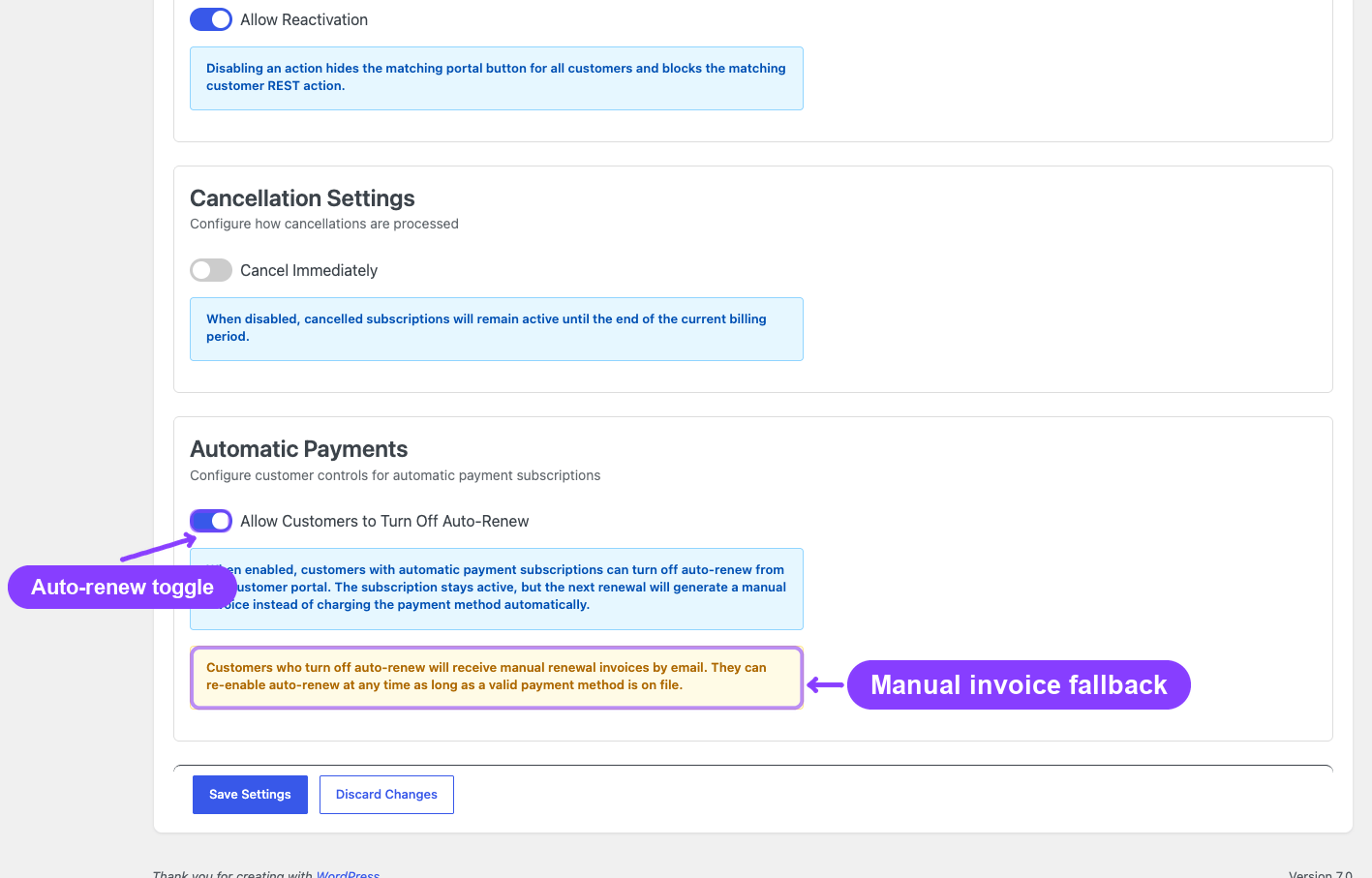
Subscriptions created through an automatic payment gateway (Stripe, PayPal, or Paddle) are configured for automatic renewal by default — the gateway charges the stored payment method on each billing date without any customer action.
ArraySubs Pro adds an auto-renew toggle that lets customers switch between automatic and manual billing. When a customer turns off auto-renew, their subscription continues but future renewals generate invoices that the customer must pay manually.
How Auto-Renew Works
Default State
When a customer completes checkout with an automatic payment gateway, their subscription is set up for automatic renewals. The gateway stores the payment method and ArraySubs schedules charges on the billing dates.
Customer Toggle
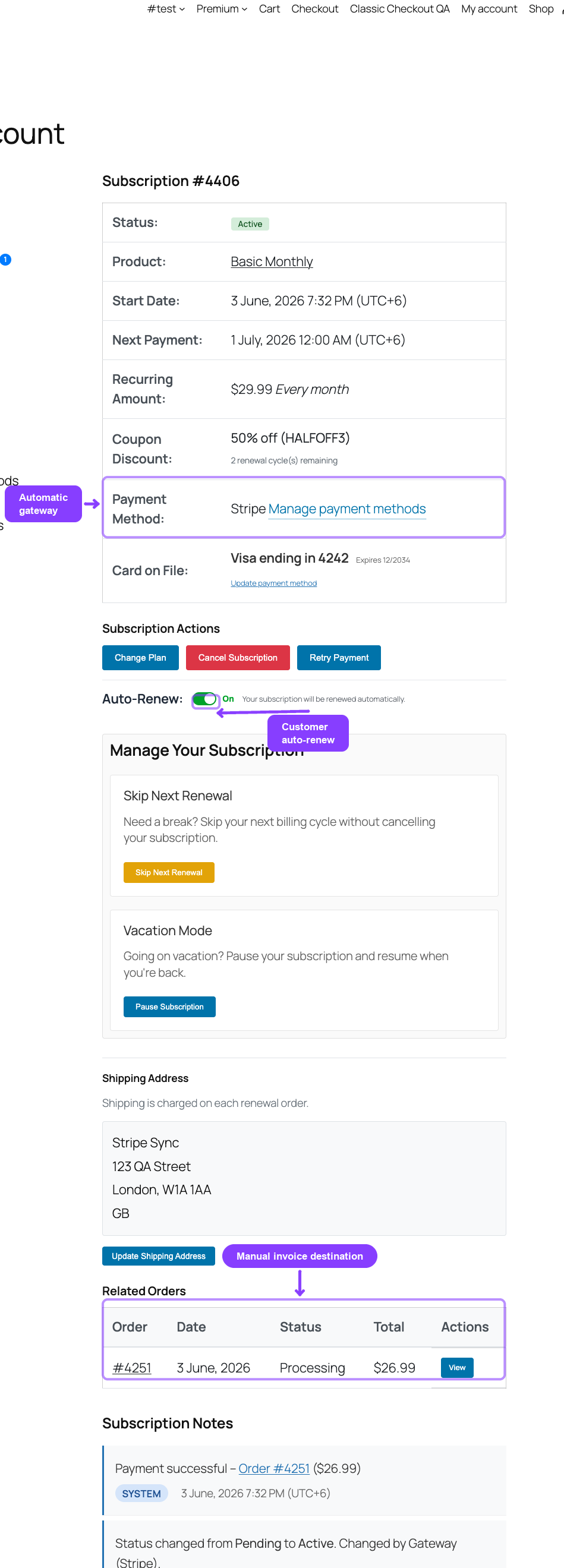
The auto-renew toggle appears on the Customer Portal → View Subscription page, below the payment method details. It looks like a simple on/off switch.
To enable the toggle globally: Go to ArraySubs → Settings → General Settings → Automatic Payment Controls and enable Allow customers to toggle auto-renew.
Toggle Requirements
The toggle only appears when all of these are true:
- Auto-renew toggle is allowed globally in settings
- The subscription was created with an automatic payment gateway
- The gateway is still connected (status is not
detached) - The subscription is in an eligible status:
Active,On-Hold, orTrial - There is no pending cancellation on the subscription
- A valid payment method exists (required for enabling auto-renew)
Manual gateway subscriptions — read-only hint
If the global toggle setting is on but the subscription was paid with a manual gateway (Bank Transfer / BACS, Cheque, Cash on Delivery, etc.), there is no toggle to flip — the gateway never had automatic billing in the first place. To prevent the customer from seeing an empty Subscription Actions box and assuming the feature is broken, the portal renders a passive read-only line:
Auto-Renew: Not available for this payment method. You will receive an invoice for manual payment at each renewal.
This appears only on otherwise-eligible subscriptions (active / on-hold / trial, not pending-cancel, not lifetime, not on an automatic gateway). It is informational — there is no button to click. To enable a real toggle for these subscribers, you would need to migrate them to an automatic gateway via a fresh checkout.
Turning Off Auto-Renew
When a customer disables auto-renew:
- The subscription stays active — it does not cancel
- Future renewals will not charged the stored payment method automatically
- Instead, renewal invoices are generated as unpaid orders
- The customer receives an invoice email with a Pay Now link
- The customer must manually pay the invoice through WooCommerce's order payment page
- Grace period rules still apply — if the invoice is not paid within the grace period, the subscription transitions to On-Hold and eventually Cancelled
Turning off auto-renew does not remove the stored payment method. The card on file remains attached to the subscription in case the customer re-enables auto-renew later.
What the Customer Sees
- Toggle off: A confirmation that future renewals will require manual payment
- Next renewal behavior: An invoice email arrives before the due date, and the customer pays through the link in the email or from their order list in My Account
Turning On Auto-Renew
When a customer enables auto-renew:
- The system verifies a valid payment method is stored
- If the gateway supports pause/resume (Paddle only) and the gateway status is
paused, a resume request is sent to the gateway - The gateway status is updated to
active - Future renewals will be charged automatically again
If no payment method is stored, the customer must update their payment method before they can enable auto-renew.
Manual Invoice Collection Flow
When auto-renew is off, renewals follow this path:
- Invoice generation: The renewal engine creates an invoice (WooCommerce order) with
Pendingpayment status at the scheduled time - Invoice email: The customer receives an email with the invoice amount, due date, and a payment link
- Customer payment: The customer clicks the link and pays through WooCommerce's standard order payment page — they can choose any available payment method at that point
- Payment confirmation: Once paid, ArraySubs processes the renewal and extends the subscription's next payment date
- Non-payment: If the invoice is not paid within the grace period, the standard overdue flow applies (Active → On-Hold → Cancelled depending on grace period settings)
When a customer pays a manual renewal invoice using a different payment gateway than the original, the subscription's stored payment method is not updated. If the customer later re-enables auto-renew, the original gateway's payment method is used.
Real-Life Use Cases
Budget-Conscious Customers
A customer on a tight budget wants to review each renewal charge before it goes through. They disable auto-renew to receive invoices and decide manually whether to continue each month.
Temporary Payment Method Issues
A customer knows their card is about to expire and cannot update it yet. They disable auto-renew to prevent a failed charge, then re-enable it once they have a new card set up.
Organizational Approvals
A business subscriber needs internal approval before each renewal payment. Manual invoices give them a document to submit for approval before paying.
Edge Cases and Important Notes
- Gateway-managed billing (PayPal, Paddle): Turning off auto-renew may have different effects depending on gateway capabilities. For Paddle, a pause request is sent. For PayPal, the billing agreement remains active but ArraySubs blocks local processing.
- Subscription already in grace period: Toggling auto-renew does not reset or extend grace period deadlines
- Trial subscriptions: The auto-renew toggle can be used during a trial. If auto-renew is off when the trial ends, the first real renewal is generated as a manual invoice.
- Admin detach vs. customer toggle: An admin can detach the gateway entirely (removes all payment method data). The customer toggle only controls automatic vs. manual billing without removing the stored method.
Related Docs
- Gateway Overview — How automatic payment gateways work
- General Settings — Auto-renew toggle setting
- Customer Portal — Payment and Shipping — Customer-facing toggle and payment method management
- Lifecycle Management — Grace period and overdue flow
FAQ
Does turning off auto-renew cancel the subscription? No. The subscription remains active. Only the billing method changes — from automatic charges to manual invoice collection.
Can I disable the auto-renew toggle for all customers? Yes. Go to ArraySubs → Settings → General Settings → Automatic Payment Controls and disable the toggle. Customers will not see the option in their portal.
What happens if a customer turns off auto-renew but doesn't pay the invoice? The standard grace period applies. After the active grace period (default 3 days), the subscription moves to On-Hold. After the on-hold grace period (default 7 days), the subscription is cancelled.
Can the customer choose a different payment method for manual renewals? Yes. The invoice payment page shows all available WooCommerce payment methods. However, paying with a different method does not change the subscription's stored automatic payment method.