
Customer Emails
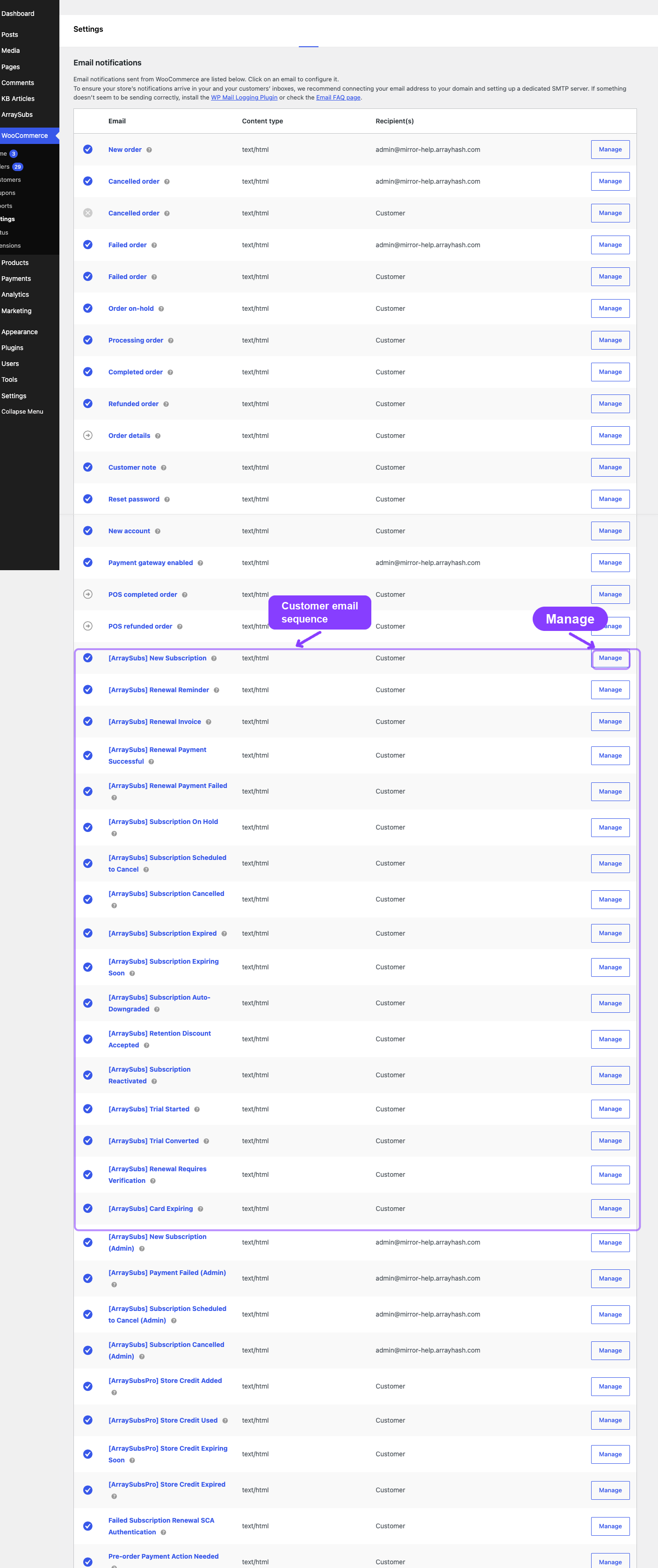
Seventeen automated emails keep your customers informed throughout the entire subscription lifecycle — from activation and trials to renewals, payment issues, status changes, retention offers, saved-card expiry, and gateway verification.
Availability: Free (gateway-specific trigger events require Pro gateway integrations)
Page Navigation
- Current guide: Customer Emails
- Where to open it: WordPress Admin -> WooCommerce -> Settings -> Emails
- Section overview: Open overview
- Previous guide: admin-emails
- Next guide: README
- Troubleshooting: Audits, Logs, and Troubleshooting
Overview
ArraySubs sends customer emails automatically when key subscription events occur. Each email is registered with WooCommerce and appears in WooCommerce → Settings → Emails for full customization. All customer emails are enabled by default and support the placeholder system documented in the Email Overview.
This page is a detailed per-email reference. For general email configuration, template overrides, and the full placeholder list, see the Email Overview.
New Subscription
Sent to the customer when a subscription moves from Pending, Trial, or Auto-Draft to Active status.
WooCommerce email ID: arraysubs_new_subscription
Default subject: [{site_title}] Your subscription #{subscription_id} is active
Default heading: Your subscription is now active!
Trigger: Fires on the arraysubs_data_status_changed hook when the new status is Active and the old status is Pending, Trial, or Auto-Draft.
What the Email Contains
- Personalized greeting using the customer's first name
- Confirmation that the subscription is active
- Subscription details table:
- Product name
- Price and billing period (e.g., "$29.99 / every month")
- Start date
- Next payment date
- End date (if a fixed-length subscription)
- Link to view the subscription in the customer portal
When It Is Sent
| Scenario | Sent? |
|---|---|
| Customer completes checkout and the subscription activates immediately | Yes |
| Admin manually creates a subscription and sets status to Active | Yes |
| Trial subscription converts to Active | Yes |
| Subscription reactivated after cancellation/on-hold | No — the Reactivated email fires instead |
Specific Placeholders
Uses the base placeholders only. No additional email-specific placeholders.
Trial Started
Sent when a subscription enters the Trial status.
WooCommerce email ID: arraysubs_trial_started
Default subject: [{site_title}] Your free trial for {product_name} has started
Default heading: Your free trial has started!
Trigger: Fires on the arraysubs_trial_started hook, dispatched by the FreeTrials feature when a trial period begins.
What the Email Contains
- Personalized greeting
- Confirmation that the free trial has begun
- Trial details table:
- Product name
- Trial length (e.g., "14 days")
- Trial end date
- What happens after the trial (pricing and billing period)
- Link to the customer portal
Specific Placeholders
| Placeholder | Description |
|---|---|
{trial_end_date} |
The date when the trial period ends |
{trial_length} |
Human-readable trial duration (e.g., "14 days", "1 month") |
Trial Converted
Sent when a trial subscription converts to a paid subscription.
WooCommerce email ID: arraysubs_trial_converted
Default subject: [{site_title}] Your trial for {product_name} has converted to a paid subscription
Default heading: Your trial has been converted to a paid subscription
Trigger: Fires on the arraysubs_trial_converted hook, dispatched by the Recurring Billing system during trial conversion processing.
What the Email Contains
- Personalized greeting
- Confirmation that the trial has ended and the paid subscription is now active
- Subscription details:
- Product name
- Subscription price and billing period
- Next payment date
- Link to the customer portal
When It Is Sent
| Scenario | Sent? |
|---|---|
| Trial period ends and subscription converts to Active | Yes |
| Trial is manually converted to Active by admin via status change | No — the New Subscription email may fire instead, depending on the status transition |
Specific Placeholders
| Placeholder | Description |
|---|---|
{next_payment_date} |
The date of the first paid renewal |
{subscription_price} |
The recurring price of the paid subscription |
Renewal Reminder
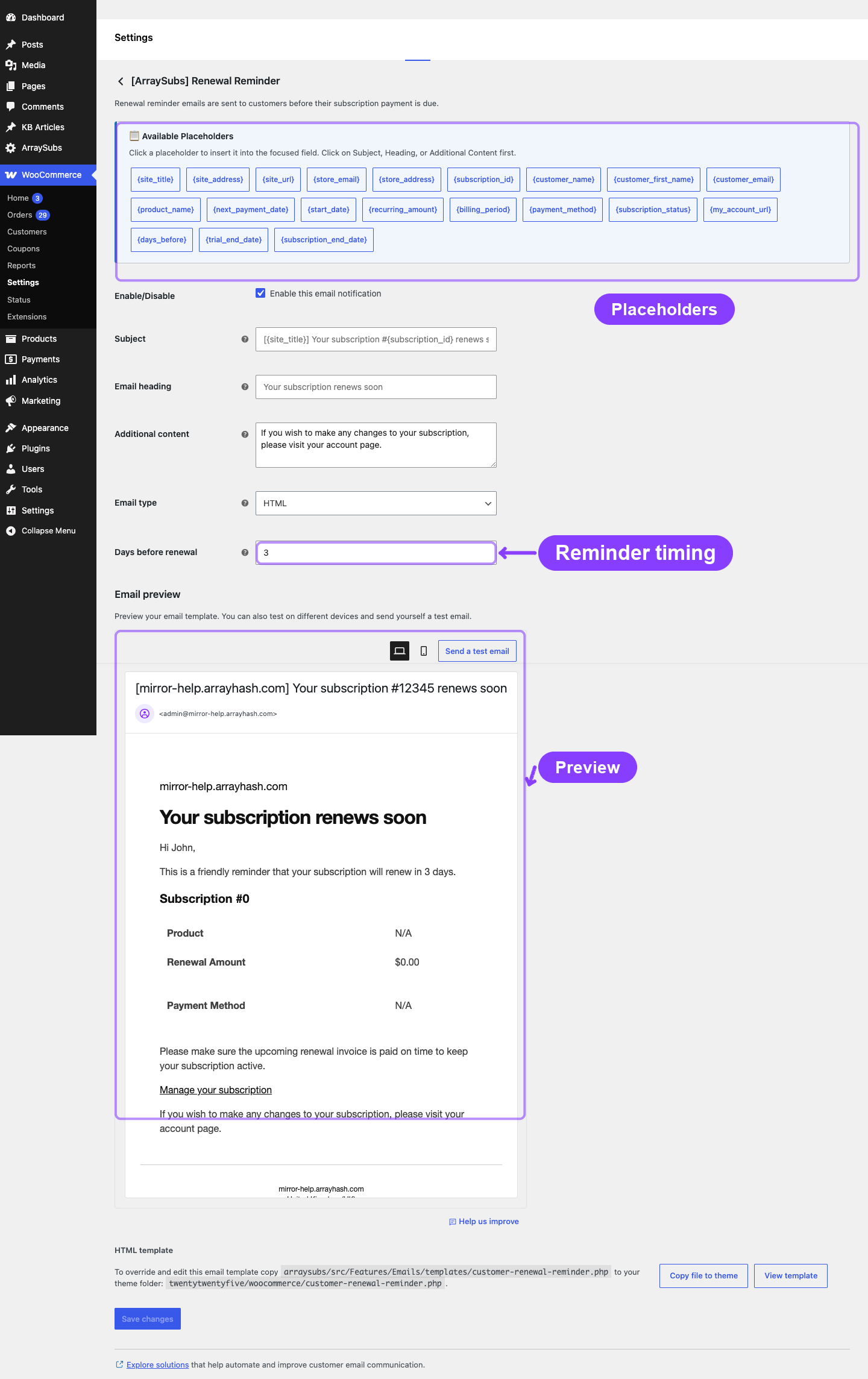
Sent a configurable number of days before the next payment is due. This is the only customer email delivered via the Action Scheduler rather than immediately.
WooCommerce email ID: arraysubs_renewal_reminder
Default subject: [{site_title}] Your subscription #{subscription_id} renews soon
Default heading: Your subscription renews soon
Trigger: The Action Scheduler fires arraysubs_send_renewal_reminder at the scheduled time. The schedule is set when a subscription activates or after each successful renewal.
What the Email Contains
- Personalized greeting
- Advance notice that the subscription is about to renew
- Subscription details:
- Product name
- Recurring amount and billing period
- Next payment date
- Link to the customer portal
Timing Configuration
Configure the advance notice period in ArraySubs → Settings → General Settings → Email Reminder Schedule:
| Setting | Default | Range |
|---|---|---|
| Renewal Reminder (Days Before) | 3 | 1 – 30 |
For example, if set to 5, the Renewal Reminder email is sent 5 days before the next payment date.
Specific Placeholders
| Placeholder | Description |
|---|---|
{days_before} |
The number of days until the next payment date |
Scheduling Behavior
- The reminder is scheduled when a subscription first activates or after each successful renewal payment.
- If the next payment date changes (e.g., due to a skip or date adjustment), the previously scheduled reminder is cancelled and a new one is scheduled.
- If the subscription is cancelled, paused, or put on hold before the reminder fires, the reminder may still send if the Action Scheduler job has already been dispatched. The email content reflects the subscription's state at the time of sending.
Renewal Invoice
Sent when a renewal invoice (order) is created for an upcoming payment.
WooCommerce email ID: arraysubs_renewal_invoice
Default subject: [{site_title}] Invoice for subscription #{subscription_id}
Default heading: Your renewal order
Trigger: Fires on the arraysubs_renewal_invoice_created hook when the Recurring Billing system generates a renewal order.
What the Email Contains
- Personalized greeting
- Notification that a renewal order has been created
- Order details:
- Subscription ID
- Order number
- Order total
- Due date
- Conditional "Pay for this order" link (only when the order still requires payment — i.e., for manual payment subscriptions)
- Link to the customer portal
When It Is Sent
Renewal invoices are created a configurable number of hours before the due date. This timing is controlled by system constants, not email settings.
| Scenario | Sent? |
|---|---|
| Automatic payment subscription — invoice created before due date | Yes |
| Manual payment subscription — invoice created for customer to pay | Yes |
| Admin manually creates a renewal order | No — only programmatic renewal invoice creation triggers this email |
Specific Placeholders
| Placeholder | Description |
|---|---|
{order_id} |
The renewal order number |
{order_total} |
The renewal order total (formatted with currency) |
{order_pay_url} |
Direct link for the customer to pay the order |
Payment Successful
Sent when a renewal payment is completed successfully.
WooCommerce email ID: arraysubs_payment_successful
Default subject: [{site_title}] Payment received for subscription #{subscription_id}
Default heading: Payment received
Trigger: Fires on the arraysubs_renewal_payment_complete hook when a renewal order is marked as paid.
What the Email Contains
- Personalized greeting
- Confirmation that the renewal payment was received
- Payment details:
- Subscription ID
- Order number
- Order total
- Payment method used
- Next payment date
- Link to the customer portal
Specific Placeholders
| Placeholder | Description |
|---|---|
{order_id} |
The renewal order number |
{order_total} |
The amount paid |
{payment_method} |
The payment method used (e.g., "Visa ending in 4242") |
Payment Failed
Sent when a renewal payment attempt fails.
WooCommerce email ID: arraysubs_payment_failed
Default subject: [{site_title}] Payment failed for subscription #{subscription_id}
Default heading: Payment failed
Trigger: Fires on any of these hooks:
arraysubs_payment_failed— general payment failurearraysubs_renewal_payment_failed— renewal-specific payment failurearraysubs_gateway_payment_failed— gateway-triggered failure (with gateway slug)
What the Email Contains
- Personalized greeting
- Warning that the payment could not be processed
- Reason callout explaining why the charge failed — e.g. "Reason: insufficient funds on the card." or "Reason: the bank requires customer authentication (3D Secure)." — only shown when the gateway returned a recognizable error code
- Subscription details:
- Subscription status (Active or On Hold)
- Order number and total
- Red-highlighted warning about potential service interruption
- Conditional "Pay Now" button (if a retry/payment URL is available)
- Link to manage the subscription in the customer portal
The Payment Failed email uses strong urgency styling — a red warning box and a prominent "Pay Now" call-to-action button — to encourage the customer to resolve the issue quickly.
Failure reason categories
The plugin classifies the gateway error code (Stripe decline_code / error.code, equivalents on PayPal and Paddle) into a stable category and renders the customer-friendly description in the callout. Recognized categories:
| Category | Reason text shown to the customer |
|---|---|
insufficient_funds |
insufficient funds on the card |
card_declined |
the card was declined by the issuer |
expired_card |
the card has expired |
incorrect_cvc |
the card security code (CVC) was incorrect |
invalid_card |
the card details on file are invalid |
authentication_required |
the bank requires customer authentication (3D Secure) |
processing_error |
a temporary processing error occurred at the gateway |
generic_decline |
the card was declined |
unknown |
(no callout shown — only the raw gateway message goes to the subscription notes) |
The chosen category is also written to _last_payment_failure_category subscription meta so the same wording can drive future dunning rules. See Payment Recovery Tools for the retry-pipeline interaction.
When It Is Sent
| Scenario | Sent? |
|---|---|
| Automatic payment renewal fails at the gateway | Yes |
| Manual payment order expires without payment | No |
| Gateway webhook reports a failed charge | Yes |
Specific Placeholders
| Placeholder | Description |
|---|---|
{order_id} |
The failed renewal order number |
{order_total} |
The amount that failed |
{order_pay_url} |
Payment link for the failed order |
{retry_url} |
Direct retry payment link |
Subscription On Hold
Sent when a subscription transitions to the On Hold status.
WooCommerce email ID: arraysubs_subscription_on_hold
Default subject: [{site_title}] Your subscription #{subscription_id} is on hold
Default heading: Your subscription is on hold
Trigger: Fires on the arraysubs_data_status_changed hook when the new status is On Hold.
What the Email Contains
- Personalized greeting
- Notification that the subscription has been placed on hold
- Subscription details:
- Product name
- Subscription ID
- Recurring amount and billing period
- Explanation of what "on hold" means for the customer's access and billing
- Link to the customer portal
When It Is Sent
| Scenario | Sent? |
|---|---|
| Grace period expires and subscription moves from Active to On Hold | Yes |
| Admin manually sets subscription to On Hold | Yes |
| Customer requests hold (via customer portal, if allowed) | Yes |
Specific Placeholders
Uses the base placeholders only. No additional email-specific placeholders.
Subscription Cancelled
Sent when a subscription transitions to the Cancelled status.
WooCommerce email ID: arraysubs_subscription_cancelled
Default subject: [{site_title}] Your subscription #{subscription_id} has been cancelled
Default heading: Your subscription has been cancelled
Trigger: Fires on the arraysubs_data_status_changed hook when the new status is Cancelled.
What the Email Contains
- Personalized greeting
- Confirmation that the subscription has been cancelled
- Cancellation details:
- Subscription ID and product name
- Cancellation date
- Cancellation reason (if the customer provided one)
- Information about what happens next (access changes, billing stops)
- Link to the customer portal (for potential reactivation, if allowed)
When It Is Sent
| Scenario | Sent? |
|---|---|
| Customer cancels from the customer portal | Yes |
| Scheduled end-of-period cancellation executes | Yes |
| Admin cancels the subscription | Yes |
| On-hold grace period expires and subscription auto-cancels | Yes |
Specific Placeholders
| Placeholder | Description |
|---|---|
{cancellation_date} |
The date the subscription was cancelled |
{cancellation_reason} |
The reason the customer selected during cancellation |
Subscription Pending Cancellation
Sent when the customer schedules an end-of-period cancellation. The subscription remains active until the scheduled cancellation date, and the customer can undo the scheduled cancellation from their account while it is still pending.
WooCommerce email ID: arraysubs_subscription_pending_cancellation
Default subject: [{site_title}] Subscription #{subscription_id} scheduled to cancel on {scheduled_cancel_date}
Default heading: Your subscription is scheduled to cancel
Templates:
- HTML:
customer-subscription-pending-cancellation.php - Plain:
plain/customer-subscription-pending-cancellation.php
Specific Placeholders
| Placeholder | Description |
|---|---|
{scheduled_cancel_date} |
Date the subscription will cancel, or "end of billing period" |
{cancellation_reason} |
Customer-selected reason, or "Not specified" |
Subscription Expired
Sent when a subscription transitions to the Expired status.
WooCommerce email ID: arraysubs_subscription_expired
Default subject: [{site_title}] Your subscription #{subscription_id} has expired
Default heading: Your subscription has expired
Trigger: Fires on the arraysubs_data_status_changed hook when the new status is Expired.
What the Email Contains
- Personalized greeting
- Notification that the subscription has reached its end date and expired
- Expiration details:
- Subscription ID and product name
- Expiration date
- Information about access changes
- Link to the customer portal
When It Is Sent
| Scenario | Sent? |
|---|---|
| Fixed-length subscription reaches its end date | Yes |
| Admin manually sets subscription to Expired | Yes |
Specific Placeholders
| Placeholder | Description |
|---|---|
{expiration_date} |
The date the subscription expired |
Subscription Expiring Soon
Sent before a fixed-length subscription reaches its end date. It uses the same reminder template family as Renewal Reminder, but the date context is the subscription end date rather than the next payment date.
WooCommerce email ID: arraysubs_expiring_soon
Default subject: [{site_title}] Your subscription #{subscription_id} is ending soon
Default heading: Your subscription is ending soon
Templates:
- HTML:
customer-renewal-reminder.php - Plain:
plain/customer-renewal-reminder.php
Specific Placeholders
| Placeholder | Description |
|---|---|
{days_before} |
Number of days before the end date |
{subscription_end_date} |
The subscription end date |
Subscription Reactivated
Sent when a subscription is reactivated after being cancelled, on hold, or expired.
WooCommerce email ID: arraysubs_subscription_reactivated
Default subject: [{site_title}] Your subscription for {product_name} has been reactivated
Default heading: Your subscription has been reactivated!
Trigger: Fires on the arraysubs_data_reactivated hook, dispatched by the Subscriptions feature when the reactivateSubscription() method completes.
What the Email Contains
- Personalized greeting
- Confirmation that the subscription is active again
- Subscription details:
- Product name
- Next payment date
- Recurring amount and billing period
- Link to the customer portal
When It Is Sent
| Scenario | Sent? |
|---|---|
| Customer reactivates from the customer portal | Yes |
| Admin reactivates the subscription | Yes |
| Customer pays a pending renewal and the subscription is restored | Yes |
Specific Placeholders
| Placeholder | Description |
|---|---|
{next_payment_date} |
The next scheduled payment date after reactivation |
The Reactivated email always fires regardless of the email settings toggles — it does not have a separate enable/disable setting in the settings helper defaults. It can still be toggled off in the WooCommerce email settings page.
Auto-Downgrade
Sent when a subscription is automatically switched to a lower-tier plan.
WooCommerce email ID: arraysubs_auto_downgrade
Default subject: [{site_title}] Your subscription #{subscription_id} has been changed to {new_product_name}
Default heading: Your subscription plan has changed
Trigger: Fires on the arraysubs_auto_downgrade_completed hook, dispatched by the Plan Switching feature when the auto-downgrade handler completes execution.
What the Email Contains
- Personalized greeting
- Notification that the plan has been automatically changed
- Plan change details:
- Old product/plan name
- New product/plan name
- Updated pricing and billing period
- Explanation of why the change occurred
- Link to the customer portal
When It Is Sent
| Scenario | Sent? |
|---|---|
| Subscription expires and auto-downgrade target is configured | Yes |
| Subscription cancelled and auto-downgrade on cancel is configured | Yes |
| Trial expires and auto-downgrade on trial expire is configured | Yes |
| Customer manually switches plans | No — this is only for automatic downgrades |
Specific Placeholders
| Placeholder | Description |
|---|---|
{old_product_name} |
The name of the previous plan |
{new_product_name} |
The name of the new (downgraded) plan |
Retention Discount Accepted
Sent when a customer accepts a retention discount offer during the cancellation flow.
WooCommerce email ID: arraysubs_retention_discount_accepted
Default subject: [{site_title}] Your retention discount for {product_name} is active
Default heading: Your subscription discount is now active
Trigger: Fires on the arraysubs_retention_offer_accepted hook when the Cancellation Flow feature processes an accepted discount offer.
What the Email Contains
- Personalized greeting
- Confirmation that the discount is now applied
- Discount details:
- Discount percentage
- Number of renewal cycles the discount applies
- Original recurring amount
- New discounted amount
- Savings per renewal cycle
- Link to the customer portal
When It Is Sent
| Scenario | Sent? |
|---|---|
| Customer accepts a discount offer in the cancellation modal | Yes |
| Admin applies a discount manually | No — only the retention flow triggers this email |
| Customer accepts a pause, downgrade, or contact-support offer | No — this email is specific to discount offers |
Specific Placeholders
| Placeholder | Description |
|---|---|
{discount_value} |
The discount percentage (e.g., "20%") |
{discount_duration} |
Number of renewal cycles the discount lasts |
{base_recurring_amount} |
Original price before the discount |
{discounted_recurring_amount} |
New price after the discount |
{savings_per_renewal} |
Amount saved per renewal cycle |
Card Expiring Notice
Sent when the Stripe gateway reports that the saved payment card for a subscription is expiring soon.
WooCommerce email ID: arraysubs_card_expiring
Default subject: [{site_title}] Update the card for subscription #{subscription_id}
Default heading: Your card is expiring soon
Trigger: Fires on the arraysubs_card_expiring hook. The core email class is registered with WooCommerce, and the event is dispatched by the Pro Stripe gateway integration when Stripe reports an expiring saved card.
Notifies customers that their saved card is about to expire, encouraging them to update their payment method before the next renewal attempt.
Template files:
- HTML:
customer-card-expiring.php - Plain:
plain/customer-card-expiring.php
Key fields shown: card last four digits, card expiry date, and a payment-method update link.
Renewal Requires Verification
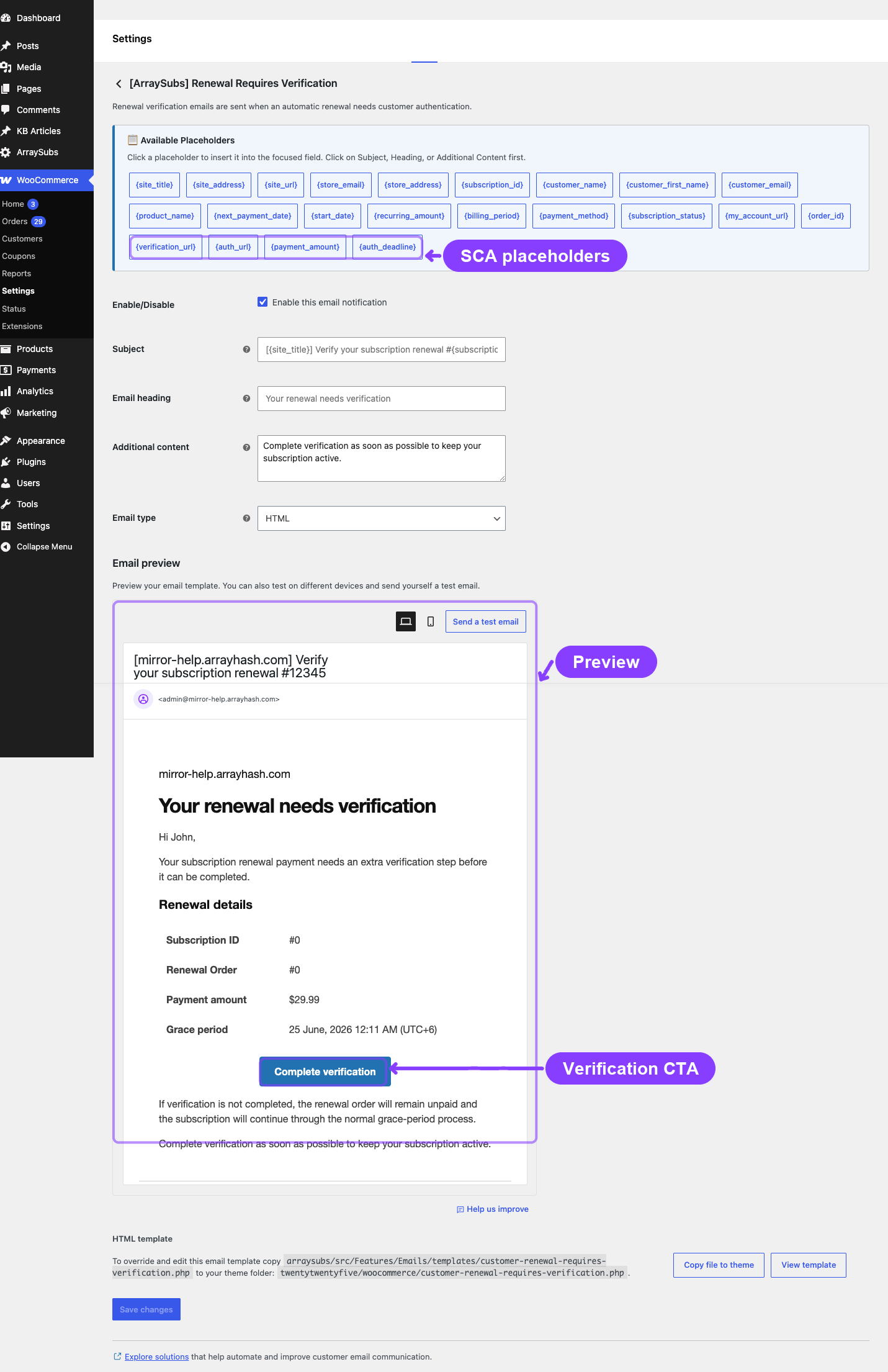
Sent when an automatic renewal needs customer authentication such as Strong Customer Authentication (SCA / 3D Secure).
WooCommerce email ID: arraysubs_renewal_requires_verification
Default subject: [{site_title}] Verify your subscription renewal #{subscription_id}
Default heading: Your renewal needs verification
Trigger: Fires on the arraysubs_renewal_requires_verification hook. The core email class is registered with WooCommerce, and the event is dispatched by the Pro Stripe gateway integration when a renewal payment intent requires customer action.
Notifies customers with a link to complete the verification step before the renewal grace period ends.
Template files:
- HTML:
customer-renewal-requires-verification.php - Plain:
plain/customer-renewal-requires-verification.php
Key fields shown: subscription ID, renewal order ID, payment method summary, grace-period date, and verification link.
Real-Life Use Cases
Use Case 1: Reducing Involuntary Churn
A customer's credit card fails during an automatic renewal. ArraySubs sends the Payment Failed email with a red warning, the amount owed, and a prominent Pay Now button. The customer clicks the link, completes the payment, and the subscription stays active. At the same time, the Admin Payment Failed email alerts the store owner to monitor the situation.
Use Case 2: Smooth Trial-to-Paid Transition
A customer signs up for a 14-day free trial. They receive the Trial Started email confirming the trial length and end date. Three days before the trial ends, the Renewal Reminder prompts them that a charge is upcoming. When the trial converts, the Trial Converted email confirms the paid subscription with updated pricing and the next payment date.
Use Case 3: Retention Offer Communication
A customer clicks "Cancel Subscription" in their account. The retention flow offers a 20% discount for 3 months. The customer accepts, and the Retention Discount Accepted email confirms the new discounted amount, savings per cycle, and how many cycles the discount covers — reinforcing the decision to stay.
Use Case 4: Subscription Lifecycle Visibility
A fixed-length 12-month subscription nearing expiration sends the Subscription Expired email when the end date passes. If the product has an auto-downgrade target configured, the Auto-Downgrade email follows, explaining the plan change and the new pricing.
Troubleshooting
| Problem | Likely Cause | What to Do |
|---|---|---|
| Customer did not receive the New Subscription email | Email is disabled, or the subscription did not fully transition to Active status | Check the email toggle in WooCommerce settings and verify the subscription status in the admin |
| Renewal Reminder sent at the wrong time | The days-before setting does not match expectations, or the next payment date changed after scheduling | Check ArraySubs → Settings → General Settings → Email Reminder Schedule and verify the subscription's next payment date |
| Payment Failed email not sent | The failure hook did not fire (e.g., the payment method was not attempted) | Verify the gateway processed the payment attempt. Check Action Scheduler for pending or failed jobs. |
| Customer received both New Subscription and Reactivated emails | The subscription was reactivated from a non-standard state | This is uncommon. The system checks the previous status to prevent overlap, but edge cases in manual admin actions can trigger both. |
| Auto-Downgrade email shows wrong product | The auto-downgrade target product was changed after the downgrade was scheduled | Verify the Linked Products tab on the original product. The email reflects the product at the time of downgrade execution. |
Related Guides
- Email Overview — How ArraySubs emails work, placeholder reference, and template overrides.
- Admin Emails — Admin notification emails for new subscriptions, payment failures, and cancellations.
- Store Credit Emails — Store Credit notification emails Pro.
- Lifecycle Management — Subscription status transitions that trigger these emails.
- Billing and Renewals — Renewal and grace period settings that affect billing emails.
FAQ
Are all customer emails enabled by default?
Yes. Every customer email ships enabled. You can disable any individual email in WooCommerce → Settings → Emails.
Can I change the "From" name and email for subscription emails?
Yes — but it is a WooCommerce-wide setting, not per-email. Go to WooCommerce → Settings → Emails and update the "From" name and "From" address at the top of the page. This applies to all WooCommerce and ArraySubs emails.
Does the Renewal Reminder reschedule automatically after a renewal?
Yes. After each successful renewal payment, the system cancels the old reminder and schedules a new one based on the updated next payment date.
What email does a customer get when their trial converts?
The Trial Converted email. The New Subscription email is not sent for trial-to-active conversions because the Trial Converted email covers that transition specifically.
Can I preview an email before it is sent?
Not directly from the ArraySubs settings. However, WooCommerce email settings pages include a preview link that shows the HTML template with placeholder data.
Are Card Expiring and SCA Authentication emails available now?
Yes. Both email classes are registered in WooCommerce. They are sent when the Pro Stripe gateway dispatches the corresponding card-expiry or renewal-verification event.