
Coupons
Apply WooCommerce coupons to subscription products with support for one-time and recurring discounts, cycle limits, and initial-checkout counting.
Availability: Free
Page Navigation
- Current guide: Coupons
- Where to open it: WordPress Admin -> Marketing -> Coupons
- Section overview: Open overview
- Previous guide: store-credit-settings
- Next guide: Create and Configure Subscription Products
- Troubleshooting: Audits, Logs, and Troubleshooting
Overview
ArraySubs extends WooCommerce coupons with subscription-specific settings. When a coupon is flagged to apply to subscriptions, it can discount the initial subscription checkout and, when configured as recurring, future renewal orders for a configurable number of cycles. Standard WooCommerce coupon types (percentage, fixed product, fixed cart) are supported once the coupon is enabled for subscriptions.
When to Use This
- You want to offer a promotional discount that applies to the first few renewal payments.
- You need a one-time checkout discount that only affects the initial order.
- You want to run a "first 3 months at 50% off" promotion.
- You need to track coupon usage across the subscription lifecycle.
Prerequisites
- WooCommerce installed and active.
- ArraySubs core plugin installed and active.
- At least one subscription product created.
- A WooCommerce coupon created (Marketing → Coupons or WooCommerce → Coupons).
How It Works
- You create a standard WooCommerce coupon and enable the Apply to subscriptions option.
- You choose whether the discount is one-time (initial order only) or recurring (applies to future renewals).
- For recurring coupons, you set the number of renewal cycles the discount applies to (or leave it unlimited).
- The customer applies the coupon at checkout.
- ArraySubs captures the coupon data and stores it on the subscription.
- On each renewal, the system checks whether the coupon still has remaining cycles and applies the discount to the renewal order automatically.
- When the configured cycles are exhausted, the coupon stops applying and a note is added to the subscription.
Only one subscription coupon per order is captured. If a customer applies multiple coupons at checkout and more than one has the "Apply to subscriptions" flag, only the first applicable coupon is stored on the subscription.
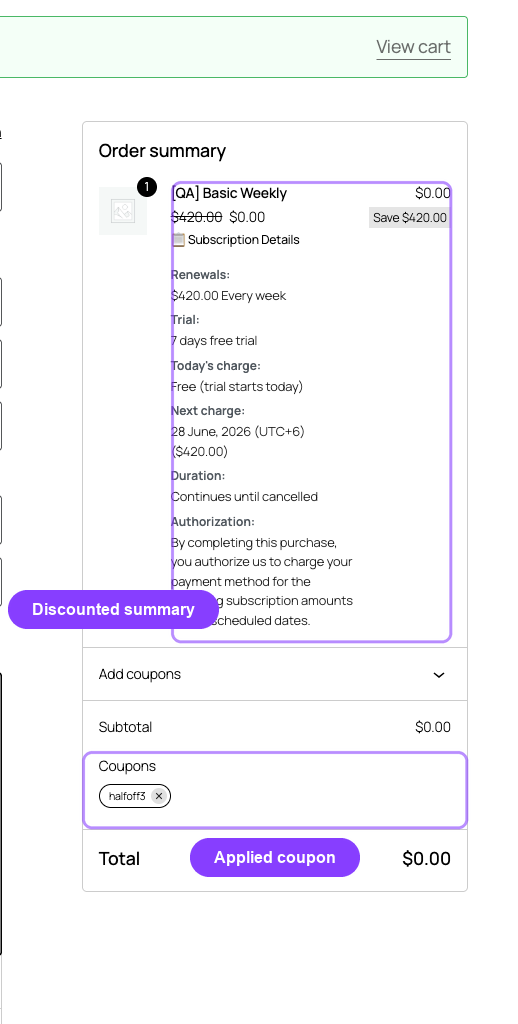
Setting Up a Subscription Coupon
Step 1: Create or Edit a Coupon
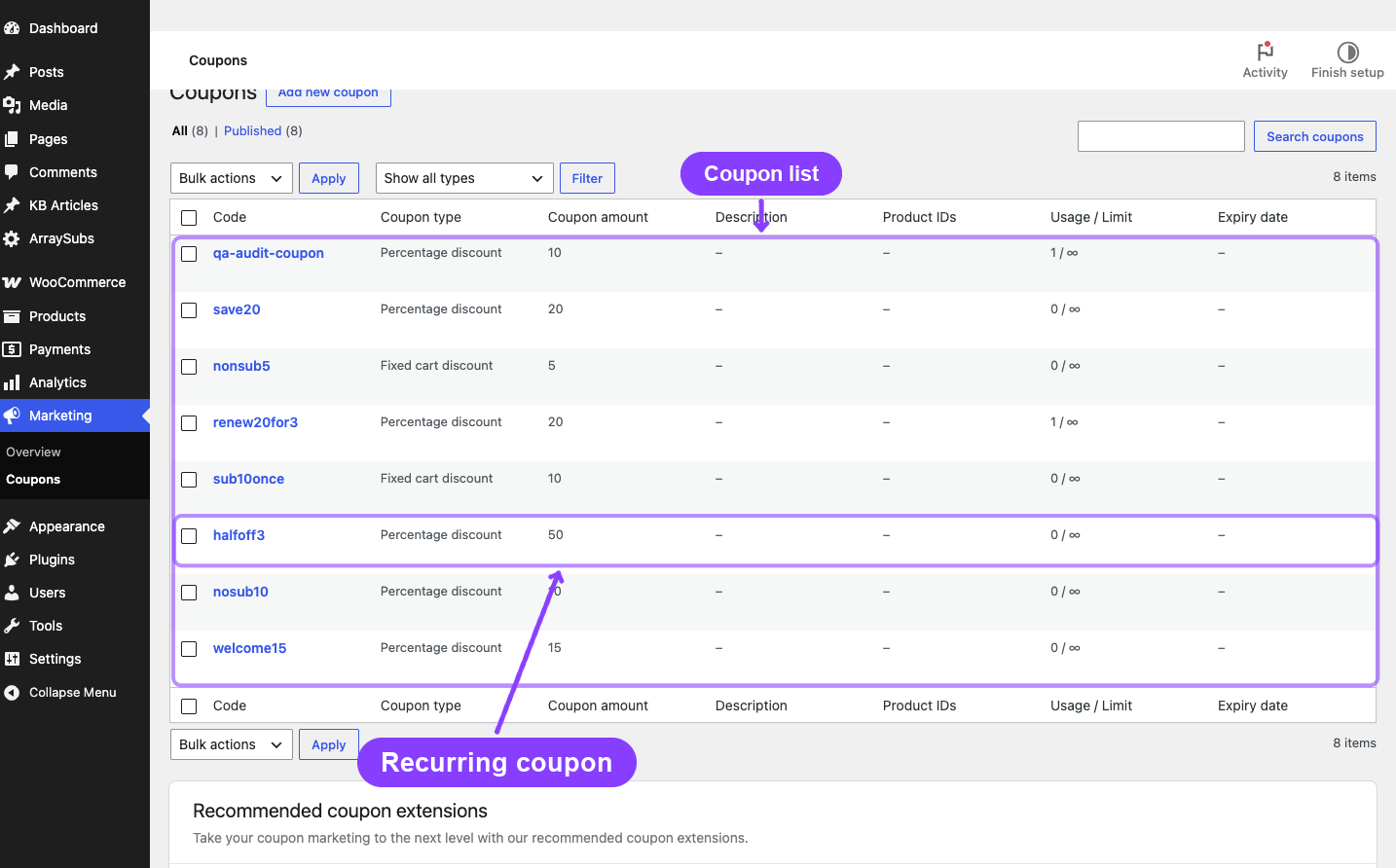
- Go to Marketing → Coupons (or WooCommerce → Coupons).
- Click Add coupon or open an existing coupon.
- Configure the standard WooCommerce coupon settings (discount type, amount, usage limits, product restrictions, etc.).
Step 2: Enable Subscription Settings
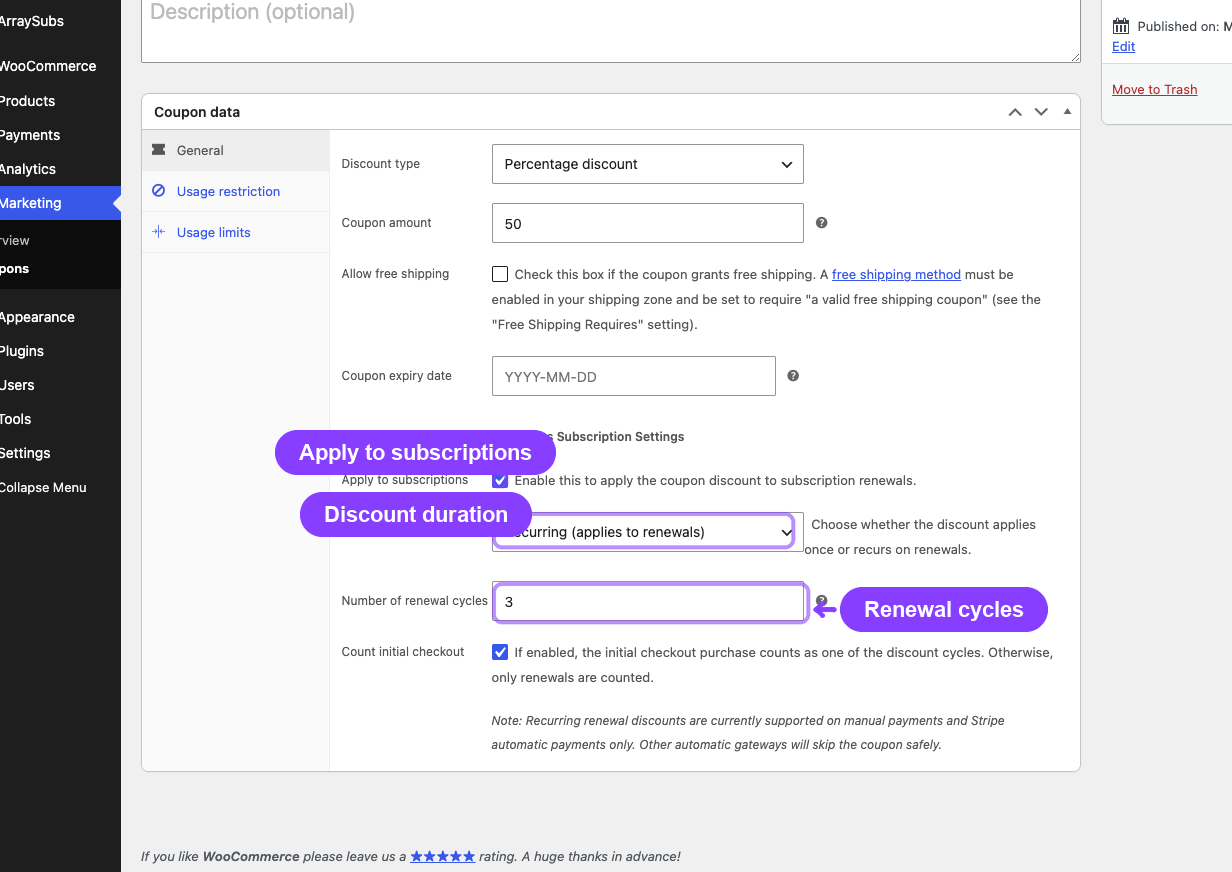
Scroll down to the ArraySubs Subscription Settings section on the coupon edit page. You will see these fields:
| Field | Type | Description |
|---|---|---|
| Apply to subscriptions | Checkbox | Enable this coupon for subscription products. When unchecked, the coupon does not discount subscription items and subscription-only carts reject it. |
| Discount duration | Select | One-time — discount applies to the initial checkout order only. Recurring — discount applies to future renewal orders. |
| Number of renewal cycles | Number | How many renewal cycles the discount applies to. Only visible when duration is Recurring. Set to 0 for unlimited cycles. |
| Count initial checkout | Checkbox | Include the initial checkout order as one of the cycles. Only visible when duration is Recurring and cycles > 0. |
Step 3: Save the Coupon
Click Update (or Publish for new coupons). The coupon is now ready for subscription use.
Discount Duration Explained
One-Time
When Apply to subscriptions is enabled and the duration is One-time, the coupon discount applies only to the initial checkout order. The customer gets the discount at checkout, and all future renewals are charged at full price.
Use case: A "WELCOME20" coupon that gives 20% off the first payment.
Recurring
The coupon discount carries forward to renewal orders. Each time a renewal order is created, ArraySubs checks if the coupon still has remaining cycles and applies the same discount automatically.
Use case: A "SAVE50" coupon that gives 50% off the first 3 months.
Cycle Counting
For recurring coupons with a cycle limit, the system tracks how many cycles remain.
Without "Count Initial Checkout"
The initial checkout order does not consume a cycle. The cycle count starts with the first renewal.
| Event | Remaining Cycles | Discount Applied? |
|---|---|---|
| Checkout (initial order) | 3 | Yes (standard WC coupon behavior at checkout) |
| 1st renewal | 2 | Yes |
| 2nd renewal | 1 | Yes |
| 3rd renewal | 0 | Yes (last cycle) |
| 4th renewal onward | 0 | No — full price |
Total discounted payments: 1 (initial) + 3 (renewals) = 4 payments at the discounted price.
With "Count Initial Checkout" Enabled
The initial checkout order consumes one cycle, reducing the number of discounted renewals.
| Event | Remaining Cycles | Discount Applied? |
|---|---|---|
| Checkout (initial order) | 2 (started at 3, initial counted) | Yes |
| 1st renewal | 1 | Yes |
| 2nd renewal | 0 | Yes (last cycle) |
| 3rd renewal onward | 0 | No — full price |
Total discounted payments: 1 (initial) + 2 (renewals) = 3 payments at the discounted price.
Unlimited Cycles
Set the number of renewal cycles to 0 for a coupon that applies to every renewal indefinitely, as long as the coupon exists and has not expired in WooCommerce.
How Discounts Are Applied to Renewals
When a renewal order is created, ArraySubs:
- Checks if the subscription has a captured coupon with the
recurringduration. - Verifies the coupon still has remaining cycles (or is unlimited).
- Confirms the original WooCommerce coupon still exists and has not expired.
- Validates that the coupon still applies to the subscription's product (respects product inclusions/exclusions and "exclude sale items" settings).
- Calculates the discount using the stored coupon values (not the current coupon settings — see important notes below).
- Applies the discount as a negative fee item on the renewal order.
- After successful payment, decrements the remaining cycle count.
The discount uses the coupon values stored at the time of capture, not the current coupon settings. If you change a coupon from 20% to 10% after a customer has already subscribed with it, their subscription continues to receive the original 20% discount.
Discount Calculation by Coupon Type
| WooCommerce Coupon Type | How Discount Is Calculated |
|---|---|
| Percentage | Order subtotal × percentage ÷ 100 |
| Fixed product | Coupon amount × quantity (capped at line item price) |
| Fixed cart | Coupon amount prorated across eligible line items |
Discount Caps
The coupon discount is capped so it never exceeds the renewal order total. If the subscription also has a retention discount active, both discounts are applied but the total discount across both does not exceed the order total (preventing negative totals).
Subscription Coupon Display
Admin Subscription Detail
When viewing a subscription in the admin, the coupon information appears in a dedicated Coupon card showing:
- Coupon code (with a "deleted" indicator if the WooCommerce coupon has been removed)
- Discount amount and type (percentage or fixed)
- Renewal cycle info (unlimited or remaining/total)
- Whether initial checkout is counted
- Capture date
- Status badge (Active or Expired)
Customer Portal
Customers see the coupon discount reflected in their subscription detail page and in renewal order totals. The specific coupon code and cycle information are visible to the customer.
Renewal Orders
On each discounted renewal order, the coupon discount appears as a negative fee line item with the coupon code as the fee name. This is visible in WooCommerce order details for both admins and customers.
Real-Life Use Cases
Use Case 1: Welcome Discount (One-Time)
Offer 15% off the first payment for new subscribers.
- Coupon code: WELCOME15
- Discount type: Percentage — 15%
- Apply to subscriptions: Yes
- Discount duration: One-time
The customer gets 15% off at checkout. All renewals are at full price.
Use Case 2: First 3 Months Half Price (Recurring)
Run a promotion where new subscribers pay half price for their first 3 months.
- Coupon code: HALFOFF3
- Discount type: Percentage — 50%
- Apply to subscriptions: Yes
- Discount duration: Recurring
- Number of renewal cycles: 3
- Count initial checkout: Yes
The customer pays 50% off on the initial order, then 50% off on the next 2 renewals (3 total discounted payments), then full price from the 4th payment onward.
Use Case 3: Lifetime Recurring Discount
Give a permanent 10% discount to customers who subscribe during a launch event.
- Coupon code: LAUNCH10
- Discount type: Percentage — 10%
- Apply to subscriptions: Yes
- Discount duration: Recurring
- Number of renewal cycles: 0 (unlimited)
Every renewal for the lifetime of the subscription receives 10% off, as long as the coupon exists in WooCommerce.
Settings Reference
These fields appear on the WooCommerce coupon edit page under the ArraySubs Subscription Settings section.
| Setting | Type | Default | What It Controls |
|---|---|---|---|
| Apply to subscriptions | Checkbox | Off | Whether this coupon is captured on subscriptions |
| Discount duration | Select | One-time | One-time (initial order only) or Recurring (renewal orders) |
| Number of renewal cycles | Number | 0 | How many renewals the discount applies to (0 = unlimited). Only visible when duration is Recurring. |
| Count initial checkout | Checkbox | Off | Whether the initial checkout order counts as a cycle. Only visible when duration is Recurring with cycles > 0. |
Edge Cases and Important Notes
- Stored values, not live values. The discount amount and type are locked in when the coupon is captured at checkout. Changing the WooCommerce coupon afterward does not affect active subscriptions. This prevents unexpected changes to recurring billing.
- One coupon per subscription. Only the first applicable subscription coupon from the checkout order is captured. If a customer has two subscription coupons, only one is stored.
- Coupon deletion. If the WooCommerce coupon is deleted after capture, the subscription continues tracking cycles but renewal discount application depends on the coupon still existing for validation. The admin display marks the coupon as "deleted."
- Coupon expiration. If the WooCommerce coupon's expiration date passes, the recurring discount stops applying to new renewals even if cycles remain.
- Product restrictions. WooCommerce coupon product inclusion/exclusion rules and "exclude sale items" settings are checked on each renewal. If the subscription product no longer matches the coupon's restrictions (e.g., it was removed from the included products list), the discount is skipped.
- Gateway compatibility. Recurring coupon discounts are fully supported on manual payments and Stripe automatic payments. Other automatic gateways will safely skip the coupon discount on renewals.
- Retention + coupon interaction. Both a subscription coupon and a retention discount can be active simultaneously. Both are applied to renewal orders, but the total discount is capped at the order total to prevent negative amounts.
Troubleshooting
| Problem | Likely Cause | What to Do |
|---|---|---|
| Coupon is not captured on the subscription | "Apply to subscriptions" is not checked on the coupon | Edit the coupon and enable the "Apply to subscriptions" checkbox |
| Recurring discount not applying to renewals | Cycles exhausted, coupon expired, or coupon deleted | Check the subscription's coupon card for remaining cycles and coupon status |
| Discount amount is different than expected | The coupon values were changed after capture | Stored values are used, not current coupon values — this is by design |
| Customer sees discount on initial order but not renewals | Discount duration is set to "One-time" | Change the duration to "Recurring" on the coupon (affects future subscriptions only) |
| Coupon card shows "deleted" | The WooCommerce coupon was trashed or permanently deleted | The coupon tracking continues but renewal discounts may not apply. Restore the coupon if needed. |
| Discount not applying despite remaining cycles | Coupon product restrictions changed or coupon expired | Check the WooCommerce coupon's product restrictions and expiration date |
Related Guides
- Create and Configure Subscription Products — Set up the products that coupons will apply to.
- Product Experience and Display — How coupon discounts appear in the subscription detail.
- General Settings — Store-wide subscription settings.
- Advanced Analytics — Order List Enhancements Pro — Filter orders by coupon code and view coupon usage alongside order types.
FAQ
Can I use a regular WooCommerce coupon on a subscription product?
Only when the coupon is explicitly enabled for subscriptions. Coupons that do not have Apply to subscriptions enabled are filtered away from subscription items and are rejected on subscription-only carts. Enable Apply to subscriptions and choose One-time for an initial checkout discount, or Recurring to carry the discount into renewals.
Can a customer apply a new coupon to an existing subscription?
No. Coupons are captured only at the time of initial checkout. There is no self-service mechanism for customers to add a coupon to an already-active subscription. Admins can manage coupon data through the subscription detail page.
What happens if I change the coupon amount after customers have subscribed?
Nothing changes for existing subscriptions. The discount amount stored at the time of capture is used for all future renewals. Only new subscriptions created after the change will use the updated coupon value.
Does the coupon carry over when a customer switches plans?
Yes. Coupon tracking is preserved during plan switches. If the coupon still has remaining cycles, it continues to apply to renewals on the new plan.
Can I set up a coupon that only discounts the signup fee?
No. Subscription coupons apply to the recurring product price. The signup fee is handled as a separate WooCommerce cart fee and follows standard WooCommerce coupon behavior for fees.
How do I see which subscriptions are using a specific coupon?
Check the subscription list in ArraySubs → Subscriptions. Each subscription with an active coupon shows the coupon information in its detail page. You can also check renewal orders for the coupon fee line item.