
Settings
Central configuration for subscription behavior, checkout rules, customer portal, renewal timing, and site administration tools.
Overview

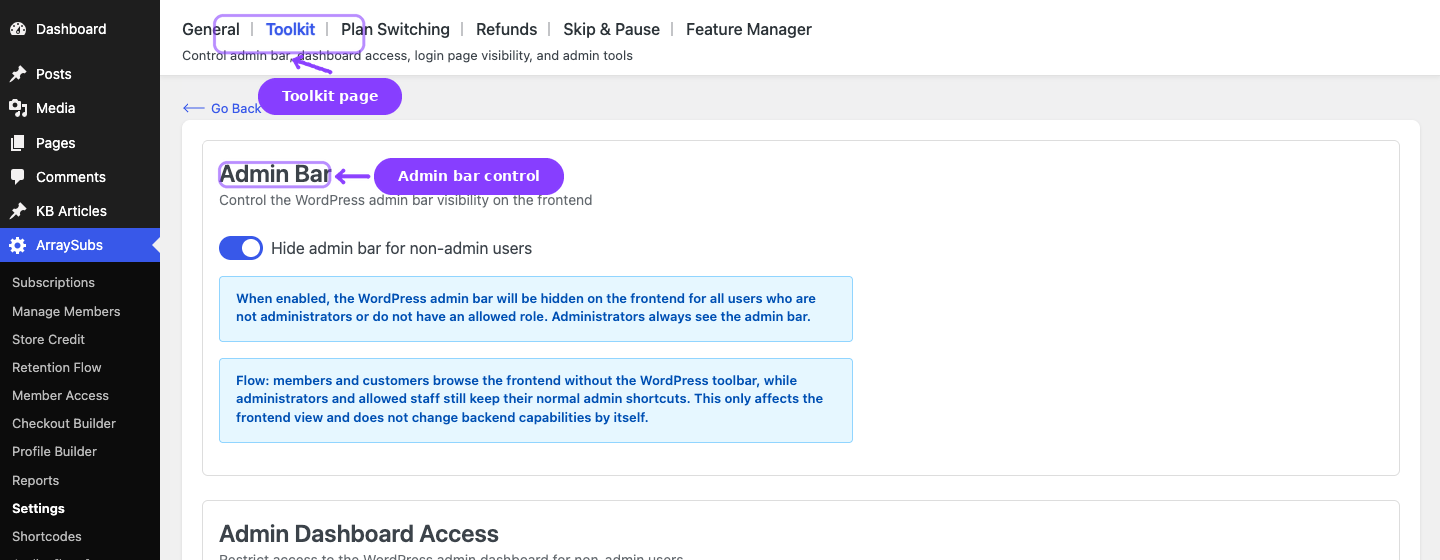
The Settings area in ArraySubs is organized into the main General and Toolkit pages plus module-specific settings tabs. Use General for shared subscription behavior, Toolkit for admin/security utilities, and the module tabs when a feature has its own dedicated settings screen.
| Page | What it covers | Navigation path |
|---|---|---|
| General Settings | Subscription cart rules, checkout and trial behavior, button text, grace periods, email reminder timing, customer portal, customer self-service actions, cancellation timing, and automatic-payment controls | ArraySubs → Settings → General |
| Toolkit Settings | Field-by-field configuration for the dedicated Toolkit modules: admin bar visibility, wp-admin access restrictions, WordPress login page hiding, and admin impersonation | ArraySubs → Settings → Toolkit |
| Plan Switching | Upgrade, downgrade, and switching behavior for subscription products | ArraySubs → Settings → Plan Switching |
| Refunds | Refund policy, gateway refund routing, prorated refunds, and minimum refund settings | ArraySubs → Settings → Refunds |
| Skip & Pause | Customer skip-renewal and pause behavior | ArraySubs → Settings → Skip & Pause |
| Feature Manager | Feature entitlement and usage-limit configuration | ArraySubs → Settings → Feature Manager |
The module-specific settings pages are documented in their owning feature topics. This section focuses on the General and Toolkit guides and links out to those feature guides when needed.
Guides
- General Settings — Every setting on the General page, explained with defaults, options, and practical guidance.
- Toolkit Settings — Admin-facing security and convenience tools for controlling dashboard access, login flows, and session limits.
- Admin Bar Visibility — Hide the WordPress frontend toolbar for customers.
- Admin Dashboard Access — Redirect unauthorized users away from
/wp-admin. - WordPress Login Page — Route customer login traffic through WooCommerce My Account.
- Login as User — Impersonate customers for support and verification.
- Member Access — Login Limit Pro — Limit concurrent sessions per account from Member Access -> Login Limit.
Page Navigation
- Current guide: Settings
- Where to open it: WordPress Admin -> ArraySubs -> Settings
- Section overview: Open overview
- Previous guide: general-settings
- Next guide: toolkit-settings
- Troubleshooting: Audits, Logs, and Troubleshooting