
Analytics & Reports
Track subscription revenue, growth, churn, retention, and customer behavior across a central Reports hub and extended WooCommerce Analytics screens.
Overview
ArraySubs gives you analytics at two levels:
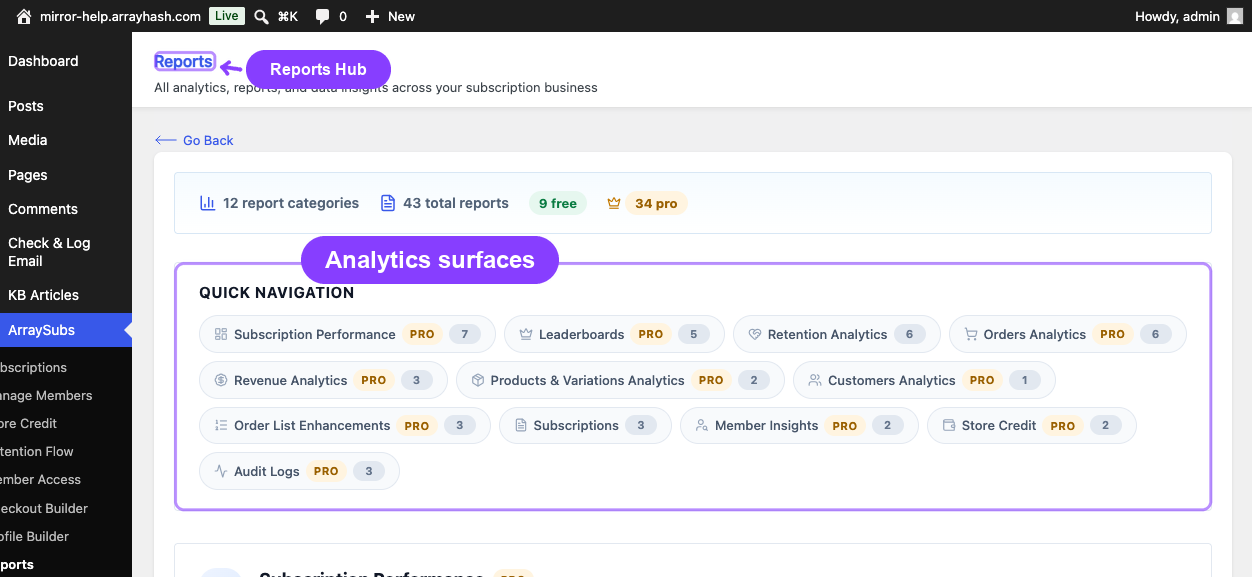
- Reports Hub (Free) — A central directory page inside the ArraySubs admin that links to every report and data screen in the ecosystem, organized by category.
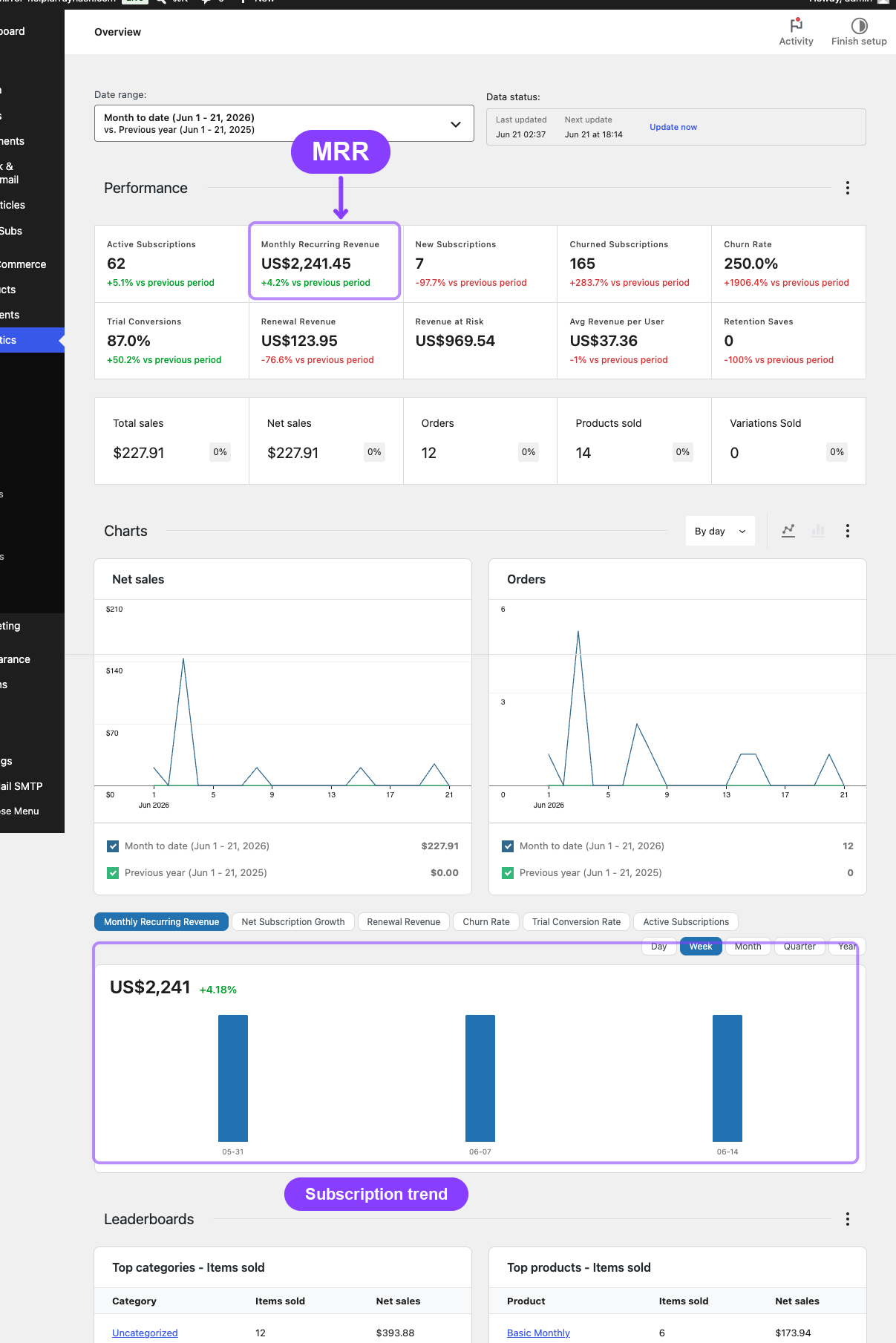
- Advanced Analytics (Pro) — A full subscription performance dashboard, retention analytics, and extended WooCommerce Analytics reports with subscription-specific filters, columns, and metrics.
Together they answer the questions every subscription merchant asks daily:
- How much recurring revenue am I earning?
- Are subscriptions growing or shrinking?
- Which products drive the most renewals?
- How many trials convert to paid?
- Where is revenue at risk?
- Why are customers cancelling?
- Are retention offers working?
The analytics ecosystem has five major surfaces:
| Surface | Where it appears | Availability | What it shows |
|---|---|---|---|
| Reports Hub | ArraySubs → Reports | Free | Central directory of 40+ report links organized into 12 categories |
| Subscription Performance Dashboard | WooCommerce → Analytics → Overview | Pro | 10 KPI cards, 6 time-series charts, 5 leaderboards |
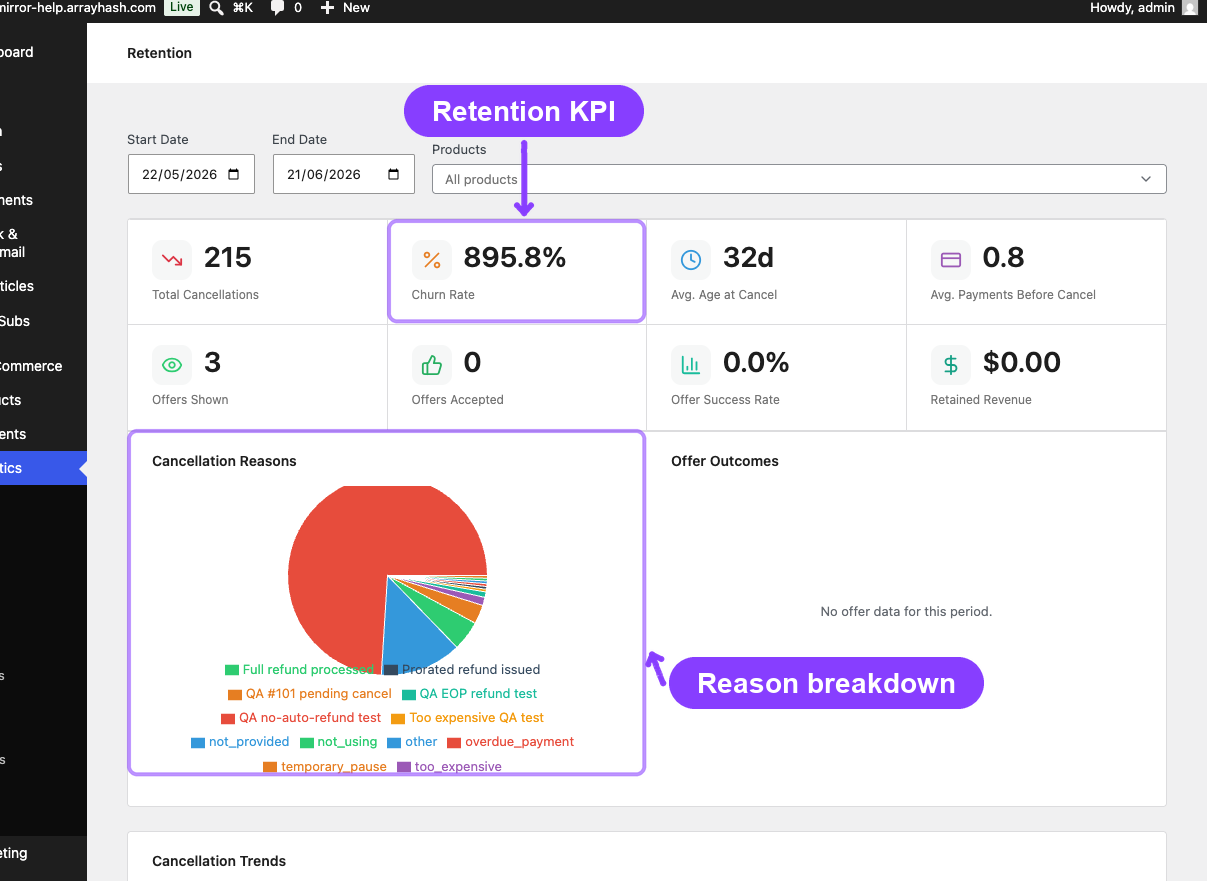
| Retention Analytics | WooCommerce → Analytics → Retention | Free | Churn/retention KPIs, reason charts, offer effectiveness, trend analysis |
| WooCommerce Analytics Extension | WooCommerce → Analytics → Orders / Revenue / Products / Variations / Customers | Pro | Type column, type filters, subscription revenue cards, subscription-only filters, member links |
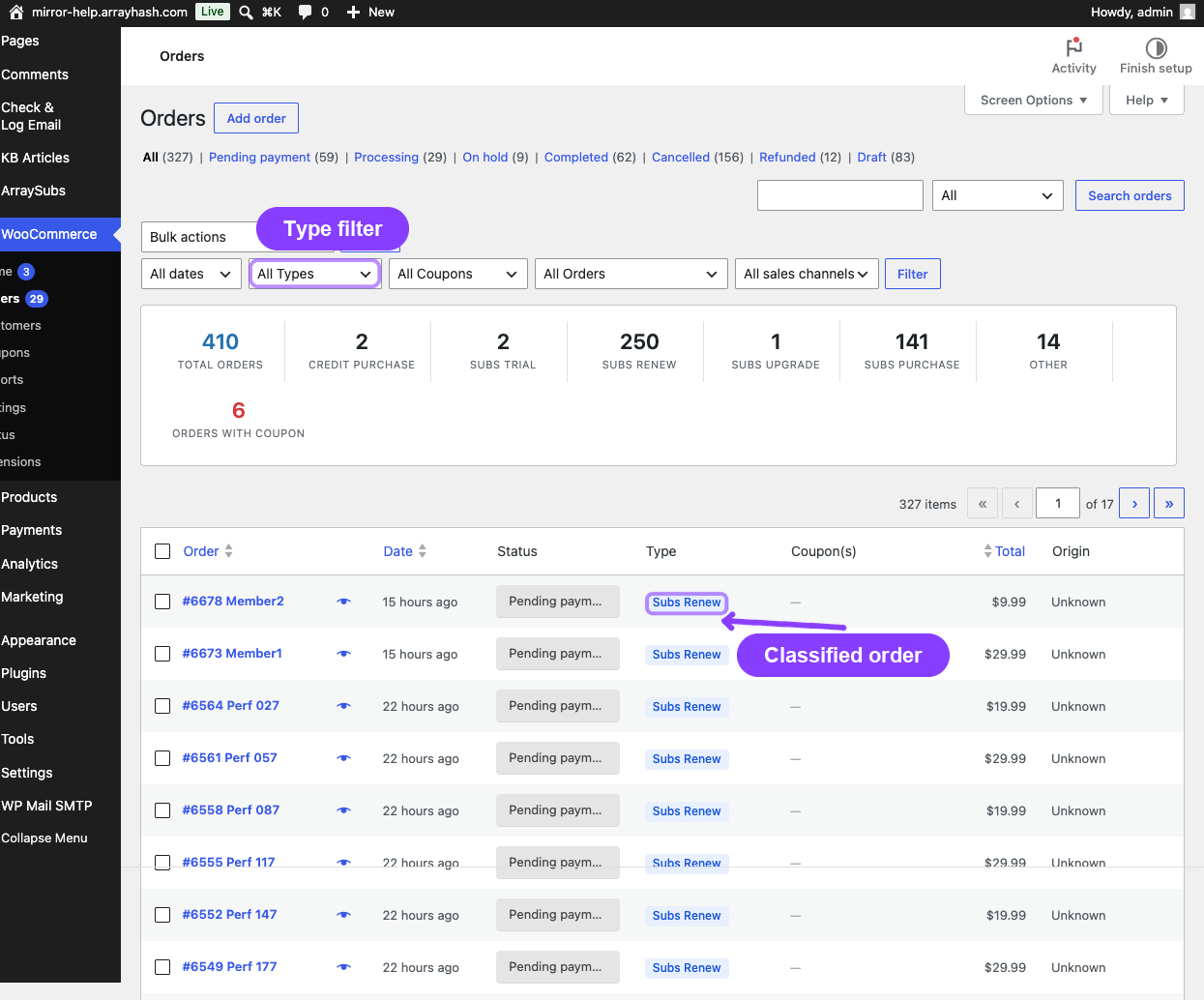
| Order List Enhancements | WooCommerce → Orders | Pro | Type and coupon columns, filter dropdowns, embedded report panel, order type backfill |
All three surfaces share a unified order type classification system that automatically labels every WooCommerce order as one of six subscription-related types.
Order Type Classification
Every order that passes through the store is automatically classified into one of six types. This classification powers the filters, columns, and metrics across all analytics surfaces.
Page Navigation
- Current guide: Analytics & Reports
- Where to open it: WordPress Admin -> ArraySubs -> Reports and WooCommerce -> Analytics
- Section overview: Open overview
- Previous guide: order-list-enhancements
- Next guide: reports-hub
- Troubleshooting: Audits, Logs, and Troubleshooting
| Type | Label | When assigned |
|---|---|---|
Credit Purchase |
Credit Purchase | Order contains at least one Store Credit product |
Subs Trial |
Subs Trial | Initial subscription order where the subscription has a trial period |
Subs Renew |
Subs Renew | Renewal order created by the billing engine |
Subs Upgrade |
Subs Upgrade | Plan switch order (upgrade, downgrade, or crossgrade) |
Subs Purchase |
Subs Purchase | Initial subscription purchase with no trial |
Other |
Other | Regular WooCommerce order with no subscription involvement |
Types are resolved in priority order — if an order qualifies as both a credit purchase and a subscription order, Credit Purchase wins.
The classification is stored as order meta (_arraysubs_computed_type) and recomputed whenever an order is created, updated, or paid. A second flag (_arraysubs_has_subscription_product) marks whether the order contains any subscription product, regardless of type.
The Subs Trial classification is permanent. Even after a trial converts to an active paid subscription, the original order keeps its Subs Trial label because it uses the immutable _trial_end_date meta rather than the subscription's current status.
Prerequisites
- ArraySubs (free) for the Reports Hub and Retention Analytics
- ArraySubs Pro for the Subscription Performance Dashboard, WooCommerce Analytics Extension, and Order List Enhancements
- WooCommerce 8.0+ with WooCommerce Admin (included by default)
- At least one subscription product and a few orders to populate metrics
What's in This Section
- Reports Hub — The central directory page that links to every report in the ArraySubs ecosystem.
- Subscription Performance Dashboard Pro — The overview page with KPI cards, charts, and leaderboards.
- Retention Analytics — Churn rate, retention effectiveness, cancellation reasons, and trend charts.
- WooCommerce Analytics Extension Pro — How the Orders, Revenue, Products, Variations, and Customers reports gain subscription data.
- Order List Enhancements Pro — Columns, filters, and the summary panel on the WooCommerce Orders page.
Related Guides
- Lifecycle Management — Status transitions that drive churn and renewal metrics.
- Admin Tools and Records — Subscription export and related orders.
- Store Credit Management — Credit purchase orders that appear in analytics.
- Member Lookup and Profiles — The member detail page linked from the Customers report.
- General Settings — Grace periods and renewal timing that affect billing metrics.
- Audits & Logs — Scheduled job logs, activity audits, and failure diagnostics.
FAQ
Do I need to do anything to start seeing analytics data?
The Reports Hub and Retention Analytics are available immediately with the free plugin — no extra setup required. For the Pro analytics surfaces (Performance Dashboard, WC Analytics Extension, Order List Enhancements), the module begins classifying orders as soon as the Pro plugin is activated. For orders that existed before activation, use the Compute Order Types backfill tool on the WooCommerce Orders page — see Order List Enhancements.
Where is the Reports Hub?
Navigate to ArraySubs → Reports in your WordPress admin sidebar. It is a free feature and available without the Pro plugin.
Does this replace WooCommerce Analytics?
No. It extends the existing WooCommerce Analytics screens. All native WooCommerce report features remain available alongside the subscription additions.
How often is data refreshed?
Performance cards and chart data are cached for 1 hour. The cache is automatically invalidated whenever a subscription changes status or an order status changes. WooCommerce Analytics report data (Orders, Revenue, etc.) uses WooCommerce's own data store and updates in near real-time.
What happens if I deactivate the Pro plugin?
The subscription-specific columns, filters, cards, charts, and leaderboards disappear from the analytics screens. The underlying order meta (_arraysubs_computed_type) remains on your orders and will be used again if the Pro plugin is reactivated.