
URL
Protect frontend page paths and URL patterns with priority-based access rules.
Availability: Free
Page Navigation
- Current guide: URL
- Where to open it: WordPress Admin -> ArraySubs -> Member Access -> URL
- Direct route:
/wp-admin/admin.php?page=arraysubs-mainadmin#/members-access/url-rules - Section overview: Member Access
- Previous guide: Shop Access
- Next guide: Post Types
- Troubleshooting: Audits, Logs, and Troubleshooting
Overview
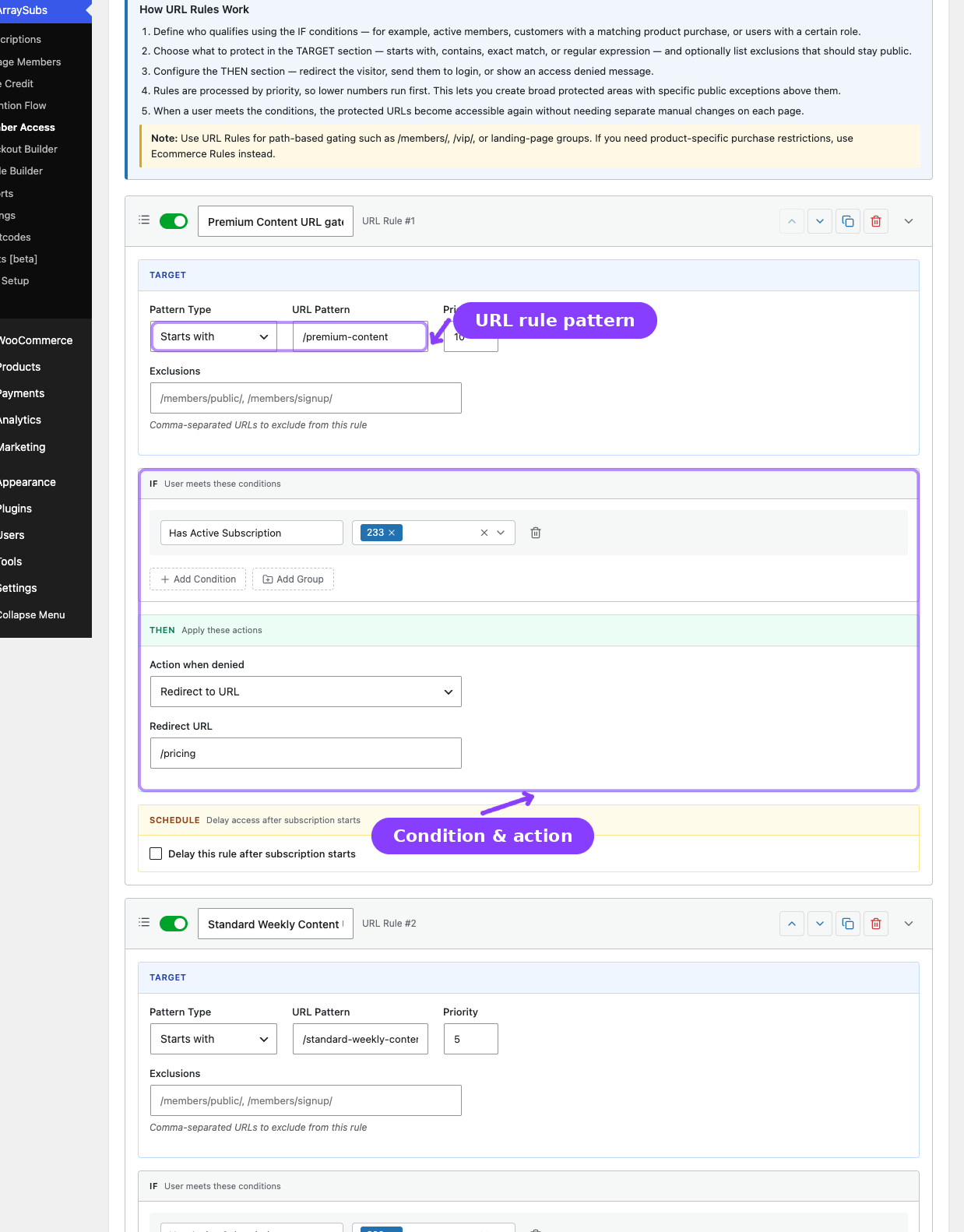
The URL tab protects paths and URL patterns across the frontend. Inside the plugin, the screen heading is URL Rules and the tab label is URL.
Use this tab for:
/members/or/vip/sections- Exact page-level URLs
- Pattern groups that should redirect or deny access
- Broad protected areas with public exceptions
How URL Rules Work
- Define who qualifies using IF conditions.
- Choose how to match the path in the TARGET section.
- Configure the denial behavior in the THEN section.
- Lower priority numbers run first.
- The first failing matching rule decides what happens.
Pattern Types
| Pattern Type | Matches | Example |
|---|---|---|
| Starts with | The path begins with the pattern | /members/ |
| Contains | The path contains the pattern anywhere | premium |
| Exact match | Only one exact path matches | /members/secret-page |
| Regular expression | A regex pattern is evaluated | ^/courses/level-[0-9]+$ |
Configuring a URL Rule
- Go to ArraySubs -> Member Access -> URL.
- Click Add New Rule.
- Configure the TARGET section:
| Field | What It Does |
|---|---|
| Pattern Type | Controls how the path is matched |
| URL Pattern | The path or regex to protect |
| Priority | Lower number = evaluated earlier |
| Exclusions | Paths that should stay public even if the pattern matches |
- Set the IF conditions.
- Set the THEN action:
| Action | What Happens |
|---|---|
| Redirect to URL | Sends the visitor to a chosen URL |
| Show message | Shows a denied-access message |
| Show 403 forbidden | Returns 403 |
| Redirect to login | Sends the visitor to the login page |
- Optionally enable scheduling.
- Click Save Rules.
Practical Notes
- URL rules affect frontend paths, not wp-admin or REST requests.
- Query strings are not the main matching surface; the path is what matters.
- Use exclusions to carve out public pages from a broad protected path.
- If the protected resource is really WooCommerce product access, use Shop Access instead.
Related Guides
- Post Types — Restrict posts and pages by content type instead of raw URL pattern.
- Conflicts — Review URL rules that overlap higher-priority per-post overrides.
- Access-Rule Conflicts — Deeper troubleshooting guide.
FAQ
Can I use regex?
Yes. Choose the regex pattern type and enter a standard expression.
Do URL rules affect REST API endpoints?
No. They are designed for frontend path access, not wp-admin or REST API traffic.