
Payment Recovery Tools
ProAutomatic retries, manual retry buttons, gateway sync, and gateway-side handling of pending cancellations — the operational tools that keep automatic billing reliable when something goes wrong.
Availability: Pro
Page Navigation
- Current guide: Payment Recovery Tools
- Where to open it: Storefront checkout and WordPress Admin -> ArraySubs -> Checkout Builder
- Section overview: Open overview
- Previous guide: paddle
- Next guide: paypal
- Troubleshooting: Audits, Logs, and Troubleshooting
Overview
Automatic recurring billing fails sometimes. A card declines, a customer's bank flags the charge, a webhook is missed during a brief outage, a network hiccup interrupts a charge attempt. This page documents the four tools ArraySubs Pro provides to keep things on track:
- Automatic retry — Stripe failed renewals retry on the built-in retry policy with pre-retry charge verification to avoid double-charging.
- Manual retry button — admin and customer can both trigger an immediate retry without waiting for the scheduled retry.
- Sync from Gateway — admin button on the subscription detail page that pulls authoritative state from Stripe/PayPal/Paddle and reconciles missed-webhook drift.
- PayPal/Paddle pending-cancel handling — when a customer schedules an end-of-period cancellation, the plugin tells PayPal/Paddle to stop charging on its own schedule so the customer is never charged for a period they cancelled.
When to Use This
- You see a customer was charged but the order is still marked failed → Sync from Gateway (case: missed webhook).
- A renewal failed and you don't want to wait 24 hours for the auto-retry → Manual Retry.
- Stripe retry timing is not site-configurable in the current UI. Stripe-backed ArraySubs renewals use the built-in retry policy: retries enabled, up to 3 attempts, 24 hours apart.
- A customer reports duplicate charges after a manual retry → check the subscription notes; the pre-retry verification will say whether a real second charge happened (it shouldn't).
How It Works
Stripe automatic retry
When a Stripe renewal charge fails, the plugin schedules another attempt based on the built-in Stripe retry policy. Before each retry runs, the plugin queries Stripe to confirm the customer was not already charged via a missed webhook. If a successful PaymentIntent matching the renewal order is found, the local order is reconciled (marked paid) without a new charge. If no charge exists, the retry proceeds normally.
The retry counter is tracked in _payment_retry_attempts meta and visible in the subscription's notes. Stripe-backed ArraySubs renewals use the built-in retry policy: retries are enabled, the maximum is 3 attempts, and the interval is 24 hours. After the retry maximum is reached, the subscription continues into the standard grace-period flow (Active → On-Hold → Cancelled) but no further automatic retries are scheduled.
PayPal and Paddle use their own gateway-side retry policies (PayPal Smart Retry, Paddle automatic retry); the plugin does not schedule local retries for those gateways. Their webhooks notify the plugin when they finish retrying.
Manual retry button
Both admins and customers can click a button to retry a failed renewal immediately. The button:
- Runs the same pre-retry charge verification as the automatic flow, so it's safe even if the customer is unsure whether the previous attempt charged them.
- Forces the retry counter to at least 1 so the verification always runs.
- Logs a private subscription note recording who initiated the retry.
- Returns a clear message indicating success, the specific failure reason (e.g. "card declined"), or "no failed renewal to retry" if the subscription is already current.
Failure reason in customer notifications
When a renewal fails, the plugin classifies the gateway error code into a stable category and shows the customer-friendly reason in two places:
- The "Renewal Payment Failed" email displays the reason in a highlighted callout above the order details — for example "Reason: insufficient funds on the card." or "Reason: the bank requires customer authentication (3D Secure)."
- The subscription notes include both the human reason and the raw gateway message — for example "Renewal payment failed: the card has expired. Gateway message: 'Your card has expired.'"
Categories the plugin recognizes:
| Category | Customer-facing text |
|---|---|
insufficient_funds |
insufficient funds on the card |
card_declined |
the card was declined by the issuer |
expired_card |
the card has expired |
incorrect_cvc |
the card security code (CVC) was incorrect |
invalid_card |
the card details on file are invalid |
authentication_required |
the bank requires customer authentication (3D Secure) |
processing_error |
a temporary processing error occurred at the gateway |
generic_decline |
the card was declined |
unknown |
(no callout shown — only the raw gateway message goes in notes) |
The category is stored in the _last_payment_failure_category subscription meta so it can also drive future dunning rules (e.g. "do not auto-retry an expired_card").
Sync from Gateway (Resync)
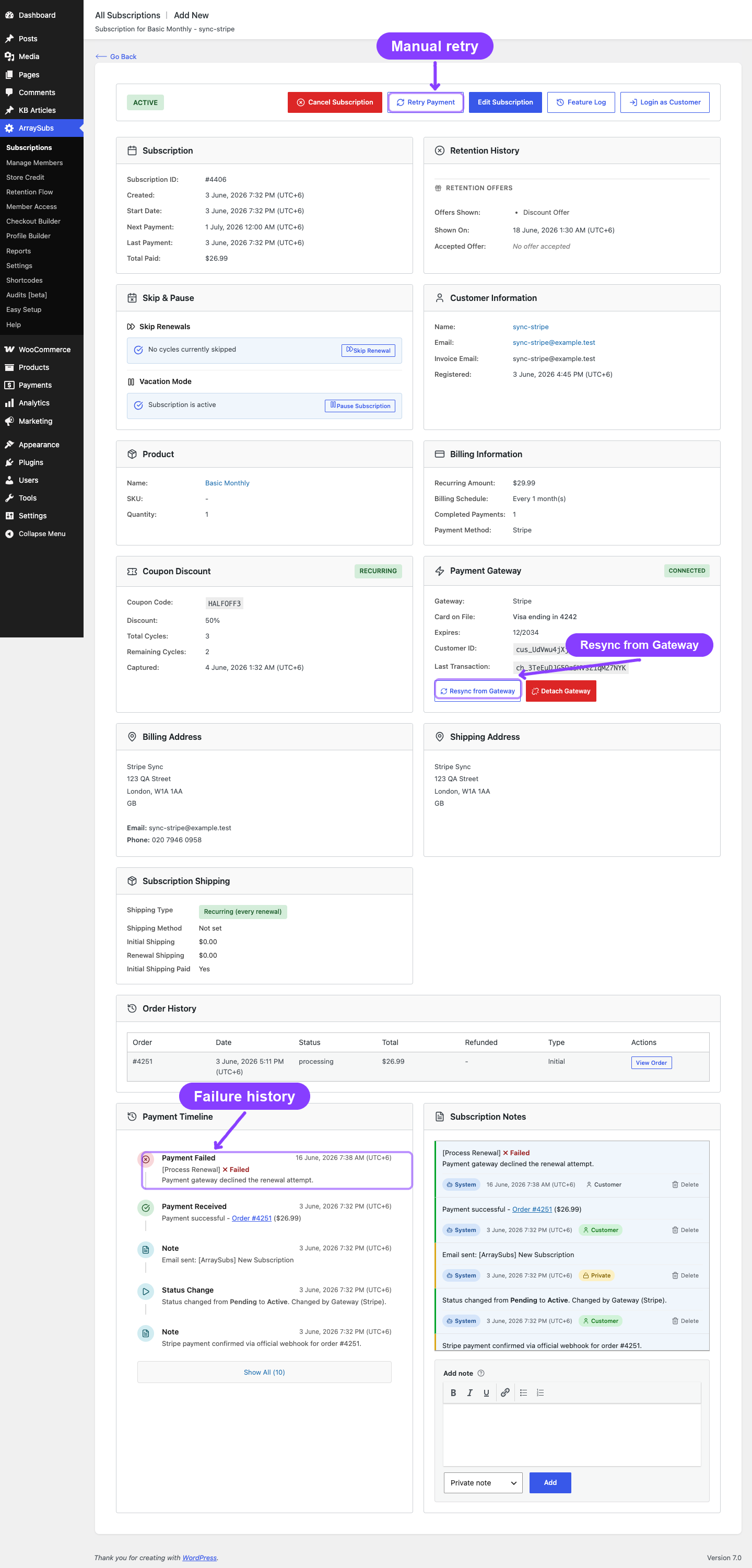
The admin subscription detail page has a Resync from Gateway button inside the Payment Gateway card (next to Detach Gateway), shown only when the attached gateway is automatic and explicitly supports gateway sync. The card itself only renders for automatic gateways — manual gateways like BACS / Cheque / COD do not show the card or any of its actions, since there is no remote state to pull. Clicking Resync asks the gateway "what is the current state of this subscription?" and applies safe corrections to local data:
_gateway_status(active/paused/inactive) — overwritten if the gateway differs._next_payment_date— overwritten when the gateway reports it (PayPal/Paddle; Stripe is plugin-scheduled so no value is reported).- Card brand / last 4 / expiry — refreshed from the gateway so portal display is accurate after card auto-updates.
- Recent successful charges that don't have a corresponding paid order locally — marked paid via
WC_Order::payment_complete()with a clear "missed webhook" note.
The sync is read-mostly. It does not change product, plan, or amount; it does not delete or create subscriptions; it does not refund. It's a reconciliation tool, not a configuration tool.
If the gateway does not declare sync support, the button is hidden or the request returns a safe unsupported-gateway message. This prevents support staff from relying on sync where a gateway cannot provide authoritative reconciliation.
Pending-cancel gateway handling (PayPal / Paddle)
When a customer schedules an end-of-period cancellation on a Stripe subscription, the plugin's renewal pipeline blocks any further charges — Stripe never has a chance to bill. PayPal and Paddle, however, run their own billing schedules and would still charge during the pending-cancel window unless told to stop.
The pro plugin handles this automatically:
- Paddle: call Paddle's
cancelSubscription(effective_from='next_billing_period')so the gateway schedules its own cancellation at the end of the current period. If the customer undoes the cancellation, the plugin reverses the scheduled change at Paddle. - PayPal: PayPal billing agreements cannot be scheduled for a future cancel — they're terminal. The plugin cancels the agreement immediately at PayPal and disables auto-renew locally. The local subscription stays active until the scheduled date so the customer keeps access. If the customer undoes the cancellation, the plugin logs a clear note that they must re-authorize automatic payments to resume billing — the old PayPal agreement cannot be reactivated.
Real-Life Use Cases
Use Case 1: Card Declined, Customer Updates It Same Day
A customer's renewal fails because of a fraud flag on their card. They call their bank, get it cleared, and want their subscription reactivated immediately. They click Retry Payment in the customer portal. The plugin verifies with Stripe that no charge went through, runs a fresh PaymentIntent, succeeds, and the subscription continues without waiting for the scheduled retry.
Use Case 2: Missed Webhook During Maintenance
The site is down for two hours during a weekly maintenance window. During that time, a Paddle subscription was charged successfully but the webhook delivery failed. After the site comes back, the renewal order is still marked failed. An admin opens the subscription detail page, clicks Sync from Gateway, and the order is automatically reconciled — Paddle confirms the charge went through, the order is marked paid, and the subscription continues normally.
Use Case 3: Stripe Smart Retry vs Plugin Retry
A merchant noticed that Stripe was already retrying failed cards on its own schedule. They check the plugin's retry settings and reduce the plugin's max retries from 3 to 1, leaving Stripe's Smart Retry as the primary recovery path. The plugin retry now acts as a final safety net.
Use Case 4: PayPal Customer Schedules End-of-Period Cancel
A customer paying via PayPal clicks "Cancel at end of period" on the 5th of the month, with their next billing date on the 20th. Without gateway-side handling, PayPal would charge on the 20th regardless. With this feature enabled, the PayPal billing agreement is cancelled immediately, no charge happens on the 20th, and the customer keeps access until the 20th. They never see a charge for a month they cancelled.
Steps / Configuration
Review Stripe recovery configuration
- Go to WooCommerce → Settings → Payments → ArraySubs Stripe Configs.
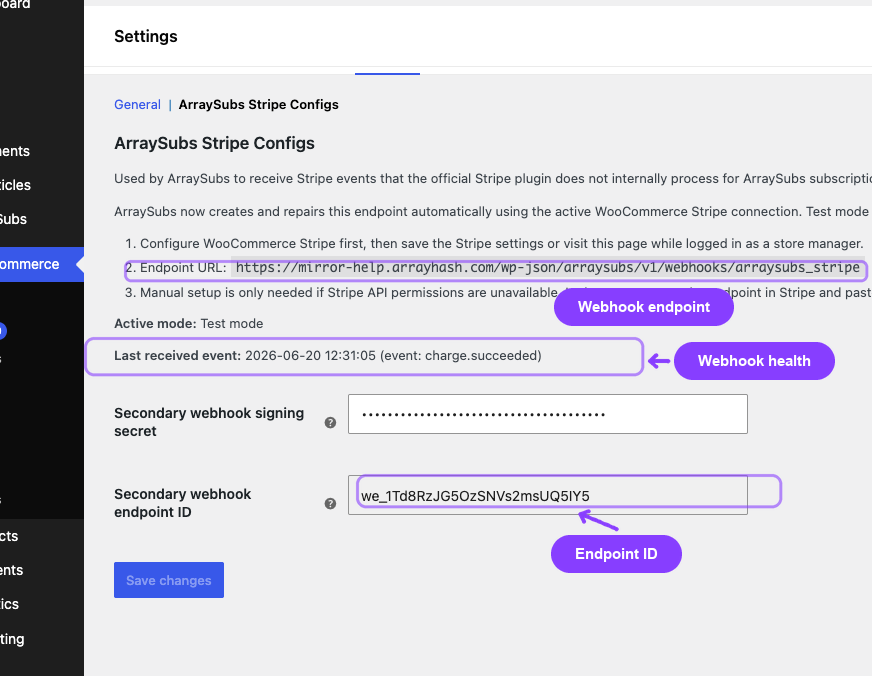
- Confirm the secondary webhook endpoint is healthy. The page shows:
- Webhook status (
EnabledorDisabled) from a live Stripe-side check. - Refresh link for checking and repairing the endpoint.
- Endpoint URL used by ArraySubs for Stripe subscription events.
- Active Stripe mode (test or live).
- Last received Stripe event.
- Secondary webhook signing secret.
- Secondary webhook endpoint ID.
- Webhook status (
- If the Webhook status is not
Enabled, click Refresh. ArraySubs verifies the endpoint in Stripe and recreates it if it was deleted, disabled, pointed at the wrong URL, missing required events, or missing a locally stored signing secret. - If automatic endpoint creation is unavailable, create the endpoint in Stripe manually and paste the
whsec_signing secret. - Click Save changes only when you have changed the signing secret.
The Stripe retry policy itself is code-level in this version: retries are enabled, up to 3 attempts, 24 hours apart. There is no visible admin field for max retry attempts or retry interval.
Trigger a manual retry (admin)
- Open the subscription detail page in the admin (Subscriptions → click any subscription).
- If a payment failure is recorded, the Retry Payment button appears in the action bar.
- Click it. Confirm the prompt.
- The plugin runs pre-retry verification, then attempts the charge. The result is shown as a toast and recorded as a subscription note.
Trigger a manual retry (customer)
- Customer logs in and goes to My Account → Subscriptions.
- Opens the subscription with a failed renewal.
- Clicks the Retry Payment button in the Subscription Actions section.
- Confirms the prompt and waits for the result.
Resync from Gateway (admin)
- Open the subscription detail page in the admin.
- Scroll to the Payment Gateway card.
- Click Resync from Gateway (the button sits next to Detach Gateway).
- The toast shows the number of changes applied (e.g. "3 changes applied from gateway state.") or "Local state already matches gateway. No changes were applied."
- Subscription notes record exactly what was changed.
If the Payment Gateway card itself is missing, the subscription is on a manual gateway and there is nothing to resync.
Settings Reference
| Setting | What It Controls | Recommended Use | Example |
|---|---|---|---|
| Secondary webhook signing secret | Verifies ArraySubs-specific Stripe webhook events | Auto-managed; edit only when manually repairing the endpoint | whsec_... |
| Secondary webhook endpoint ID | Stores the Stripe endpoint created for ArraySubs events | Read-only; confirm it exists when troubleshooting missing webhooks | we_... |
| Webhook status and Refresh | Checks whether the Stripe-side ArraySubs endpoint is enabled and listening for required events | Use Refresh when customers/admins deleted or disabled the auto-created endpoint | Enabled |
| Stripe retry policy | Built-in retry behavior for failed Stripe renewals | No UI field in this version; default policy is used automatically | 3 attempts, 24 hours apart |
What Happens After Saving
- New webhook secret changes take effect after saving the WooCommerce settings page.
- The Refresh link does not require Save changes. It runs a protected endpoint check/repair action and returns to the same settings page with updated status.
- Stripe retry timing is not changed from this page. In-progress retry schedules continue according to the built-in policy.
- Existing subscription notes and order notes are unaffected.
Edge Cases / Important Notes
- Pre-retry verification only runs when the retry counter is > 0. Manual retries force the counter to at least 1 so the check always runs.
- The verification uses
metadata.subscription_idandmetadata.order_idon Stripe PaymentIntents to find a match. These metadata keys are written by the plugin at PaymentIntent creation, so the match is exact. PaymentIntents created by other tools or older plugin versions will not be matched and will trigger a fresh charge. - The retry counter resets to 0 on a successful charge. If a customer's first retry fails but the second succeeds, the counter resets and they start fresh on the next renewal cycle.
- Manual retry uses the same verification path as automatic retry. Even when support staff starts the retry, the plugin checks Stripe first to avoid duplicate charges.
- Sync from Gateway does not modify amounts, plans, or products. Those are deliberate merchant decisions. If the gateway's amount has drifted from local (rare; only if someone changed it directly at the dashboard), reconcile manually.
- Sync from Gateway is read-mostly. It cannot create subscriptions or refund charges; it only updates fields the gateway is authoritative for and reconciles paid status on existing failed orders.
- Sync support is explicit. Do not assume a gateway can sync just because it is attached to the subscription. The action appears only for gateways that opt in.
- Stripe webhook Refresh repairs configuration, not billing history. It can recreate the secondary Stripe endpoint and save a new signing secret, but it does not replay old webhook events or change existing subscription/order payment state. Use Sync from Gateway for one-subscription payment reconciliation.
- Pending-cancel gateway handling for PayPal is destructive on undo. The customer must re-authorize automatic payments — the original PayPal agreement is gone. This is unavoidable because PayPal billing agreements are terminal.
- Pending-cancel gateway handling for Paddle is reversible. If the customer undoes the scheduled cancellation, the plugin tells Paddle to clear the scheduled change, and billing continues normally.
Troubleshooting
| Problem | Likely Cause | What to Do |
|---|---|---|
| Customer sees "Retry Payment" but the click does nothing | Last-payment-failure meta is set but the renewal order is missing or already paid | Run Sync from Gateway first; the failure flag may be stale |
| Manual retry returns "no failed renewal to retry" | The renewal order is already paid (recent webhook landed) or has been cancelled | No action needed — the subscription is current |
| Retries keep failing with the same decline code | The card itself is the problem (expired, blocked, fraud flag) | Ask customer to update payment method via the customer portal; retry will then succeed |
| Sync from Gateway shows "no remote subscription linked" | The subscription was created without a gateway, was detached, or the gateway IDs are missing | Check _payment_gateway meta; if empty, sync isn't applicable |
| Sync from Gateway button is missing | The subscription is not in a syncable state or the attached gateway does not explicitly support sync | Confirm the gateway, subscription status, and Pro gateway capabilities |
| Sync changes look wrong | Gateway's webhook had not yet landed; you synced too quickly | Wait a few minutes and re-sync, or check the gateway dashboard directly |
| Stripe secondary webhook shows Disabled | The auto-created endpoint was deleted/disabled in Stripe, points to the wrong URL, is missing required events, or ArraySubs no longer has the signing secret | Open WooCommerce → Settings → Payments → ArraySubs Stripe Configs and click Refresh. Then send or wait for a Stripe test event and confirm Gateway Health updates |
| PayPal undo cancellation log shows "must re-authorize" but customer says they didn't cancel | Multiple admins/agents may have acted on the same subscription; check the subscription's notes for who scheduled the cancel | Confirm with the customer whether a fresh authorization is needed |
| Paddle pending-cancel didn't roll back on undo | Paddle's update call failed (network error, API change) |
Check the subscription notes for the error; if needed, manually reverse via the Paddle dashboard |
Related Guides
- Stripe Gateway — Stripe-specific configuration
- PayPal Gateway
- Paddle Gateway
- Cron Job Setup — Required for retries to fire on time
- Recovery and Grace Flows — Subscription state transitions after retries are exhausted
- Renewal Failures Audit — Where to find logs of failed renewals
- Gateway Health Dashboard — Webhook delivery status
FAQ
How does the pre-retry charge verification actually prevent double-charging?
Before each retry, the plugin asks Stripe: "Did this customer's PaymentIntent for this renewal order succeed?" using the same subscription_id and order_id we wrote at creation. If Stripe says yes (status succeeded), the plugin marks the order paid using that transaction ID and skips the new charge. The verification adds one Stripe API call per retry — a tiny cost for safety.
Can the customer trigger this from the portal too?
Yes. The same Retry Payment button appears in the customer portal when a renewal has failed. The customer's retry uses the same verification, so they can click safely without worrying about being charged twice.
Does this work for PayPal and Paddle?
The retry counter and pre-retry verification are Stripe-specific. PayPal and Paddle use their own gateway-side retry policies. The manual Retry Payment button is available for all gateways but only really triggers a fresh charge attempt for plugin-controlled gateways (Stripe). For gateway-controlled gateways, it tells the plugin to look at the existing renewal flow.
What's the difference between Sync from Gateway and the Gateway Health Dashboard?
The Gateway Health Dashboard shows webhook delivery health across all subscriptions. Sync from Gateway is a per-subscription action that pulls authoritative state for that one subscription and reconciles drift. Use the dashboard to spot systemic webhook problems; use sync to fix one customer's data.
Should I disable Stripe Smart Retry if I'm using the plugin's retry?
Not necessarily. They complement each other: Stripe Smart Retry handles transient declines (network errors, soft declines) within hours. The plugin retry handles longer-term failures with explicit verification. A common config is to enable both with a 24-hour plugin retry — Stripe handles minute-level retries, the plugin handles day-level retries.
What if my site is down when an automatic retry is scheduled?
Action Scheduler stores the job in the database. When the site comes back, the cron resumes and the missed retry runs as soon as the system cron triggers — usually within a minute. The retry counter and verification still work correctly because they're tied to the order, not the schedule.
Does sync ever push state to the gateway?
No. Sync is one-way: it pulls from the gateway and updates local data. To change state at the gateway, use the gateway's own dashboard or the plugin's other admin actions (cancel, refund, change payment method).
Should I test these tools before relying on them?
Yes. On staging, deliberately fail a renewal (use a Stripe test card like 4000 0000 0000 9995 for insufficient funds) and confirm: the auto-retry schedules correctly, the manual retry button verifies and re-charges, the subscription notes describe everything that happened. Then test Sync from Gateway by manually creating a test charge in Stripe with matching metadata and confirming the local order reconciles.