
Audits, Logs, and Troubleshooting
ProTrack every action that happens inside your subscription store, monitor scheduled jobs, review gateway health, and resolve common issues.
Availability: Pro (audit and log screens) / Free + Pro (troubleshooting)
Page Navigation
- Current guide: Audits, Logs, and Troubleshooting
- Where to open it: WordPress Admin -> ArraySubs -> Audits [beta]
- Section overview: Open overview
- Previous guide: portal-action-failures
- Next guide: renewal-failures
- Troubleshooting: Audits, Logs, and Troubleshooting
Overview
ArraySubs records a detailed trail of everything that happens to subscriptions, members, products, orders, coupons, emails, and settings. The Audits section gives you searchable, filterable views into this activity so you can answer support questions, diagnose billing problems, and verify that scheduled automation is running correctly.
Use this section as the manual's troubleshooting hub. If a merchant says "the plugin did the wrong thing," start here before changing settings. The audit pages tell you whether the action happened, which actor triggered it, which scheduled job ran, which gateway event arrived, and which customer/subscription/order IDs were involved.
This topic covers three admin screens and four troubleshooting guides:
| Screen | What It Shows | Availability |
|---|---|---|
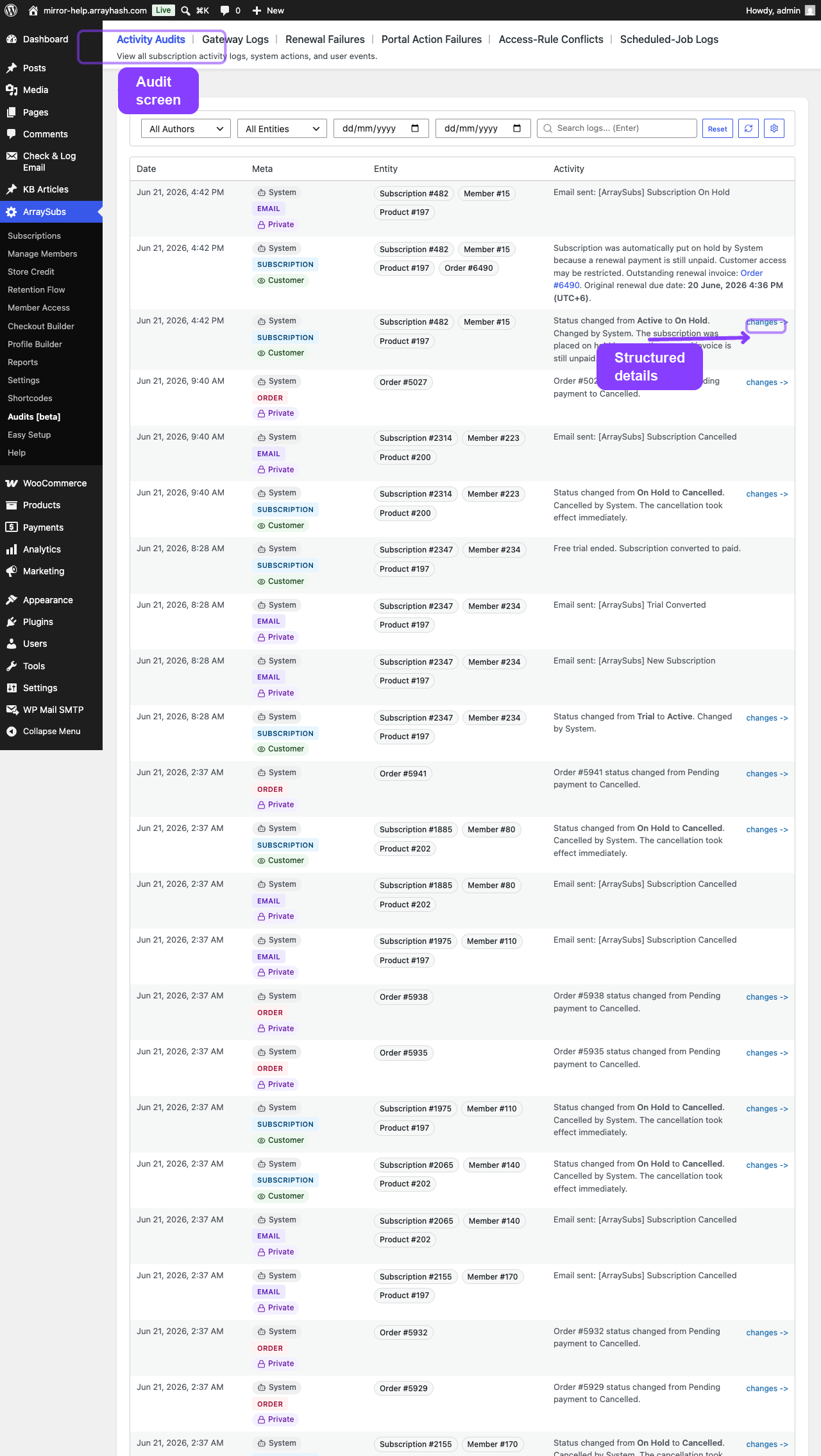
| Activity Audits | Every logged action across the subscription lifecycle — who did what, when, and to which entity | Pro |
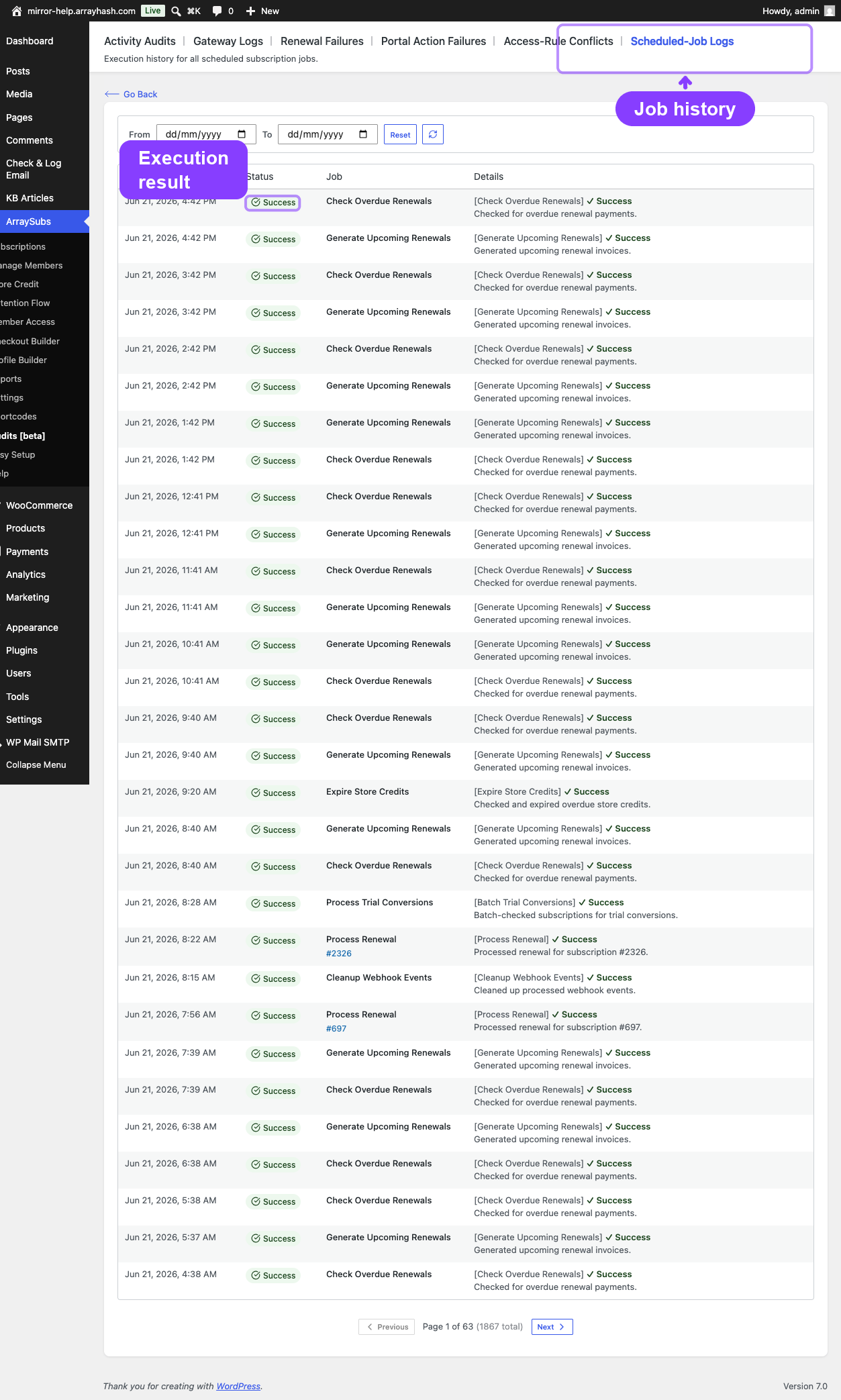
| Scheduled-Job Logs | Execution history for all Action Scheduler jobs — renewals, status changes, emails, maintenance | Pro |
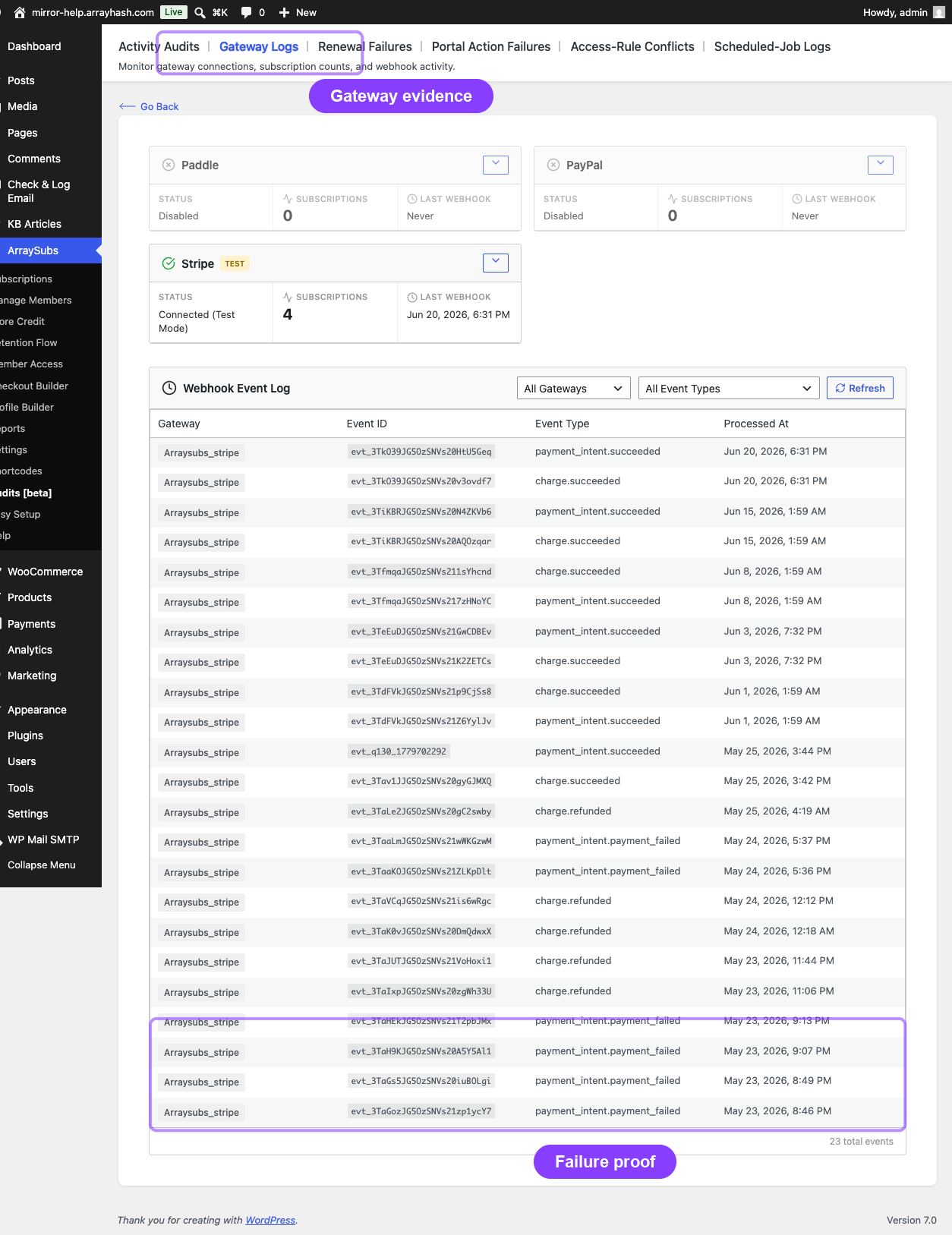
| Gateway Health Dashboard | Gateway connection status, subscription counts, capabilities, and webhook event log | Pro |
The troubleshooting guides cover common problems independent of whether you run the free or Pro plugin:
| Guide | Covers |
|---|---|
| Renewal Failures and Billing Issues | Failed renewals, missing invoices, grace period behavior, duplicate orders |
| Portal Action Failures | Cancellation, pause, skip, plan switch, and reactivation errors in the customer portal |
| Access-Rule Conflicts | Overlapping membership rules, condition evaluation, and content restriction debugging |
| Payment Method and Shipping Update Issues | Auto-renew toggle errors, card update failures, shipping address cutoff problems |
Troubleshooting Entry Points
Use this decision table when you know the symptom but not the root cause yet.
| What the user reports | Start here | Then check |
|---|---|---|
| "A renewal did not charge" | Renewal Failures and Billing Issues | Scheduled-Job Logs, Gateway Health Dashboard, subscription notes |
| "The customer paid, but the subscription is still on-hold" | Gateway Health Dashboard | Webhook event log, order notes, subscription payment timeline |
| "The customer cannot cancel, pause, skip, reactivate, or switch plans" | Portal Action Failures | Customer portal page, subscription status, feature settings, gateway capabilities |
| "Content access is wrong" | Access-Rule Conflicts | Member Access rules, role mapping, subscription status, cache compatibility |
| "Card update or auto-renew toggle failed" | Payment Method and Shipping Update Issues | Gateway capability card, payment token status, customer ownership |
| "Shipping address update failed" | Payment Method and Shipping Update Issues | Subscription shipping card, cutoff window, next payment date |
| "An admin changed something and we need to know who" | Activity Audits | Entity filter, author filter, date range, per-subscription notes |
| "A scheduled action is stuck or delayed" | Scheduled-Job Logs | Action Scheduler admin, hook name, job arguments, retry history |
How to Investigate Any Issue
- Capture the exact subscription ID, order ID, customer ID, and customer email from the report.
- Open the subscription detail page and read the status, payment timeline, order history, and notes.
- If money is involved, open the Gateway Health Dashboard and confirm the relevant webhook event arrived.
- If timing is involved, open Scheduled-Job Logs and look for renewal, reminder, expiry, pause, skip, or cancellation jobs.
- If access is involved, open Access-Rule Conflicts and compare the customer's active subscriptions with the matching rules.
- If a customer-facing button failed, open Portal Action Failures and verify the action's eligibility rules.
- Record the finding in the subscription notes or support ticket with the IDs you checked.
Common Evidence Sources
| Evidence source | Use it for | Where to find it |
|---|---|---|
| Subscription notes | Status changes, manual actions, gateway messages, admin notes | Subscription detail screen |
| Order notes | Payment completion, failed payment messages, refund records, store-credit reversal notes | WooCommerce order screen |
| Payment timeline | Gateway events, payment attempts, retry outcomes | Subscription detail screen |
| Activity Audits | Cross-entity changes by admin, customer, gateway, or system | ArraySubs -> Audits [beta] |
| Scheduled-Job Logs | Whether renewal, reminder, expiry, cancellation, or pause jobs executed | ArraySubs -> Audits [beta] |
| Gateway Health Dashboard | Connection state, webhook URL, webhook event log, gateway capability matrix | ArraySubs -> Settings -> Gateway Health |
| Customer portal state | Whether the customer saw the expected button, message, or disabled state | My Account -> Subscriptions |
Edge-Case Map
Some issues look similar but need different fixes:
| Symptom | Distinguish it from | Why it matters |
|---|---|---|
| Renewal order exists but is unpaid | No renewal order was generated | Unpaid orders point to gateway/payment recovery; missing orders point to scheduling or renewal generation |
| Customer can see content but should not | Customer has another active subscription or mapped role | Check all active subscriptions and role rules before changing one access rule |
| Auto-renew toggle is hidden | Auto-renew toggle appears but fails | Hidden usually means gateway/status/feature ineligibility; failure means a request reached validation or the gateway |
| Shipping update is blocked | Shipping update is unavailable | Blocked may be cutoff-period logic; unavailable may mean the subscription does not need shipping |
| Scheduled cancellation did not end access immediately | Immediate cancellation failed | End-of-period cancellation intentionally keeps access until the paid term ends |
| Store credit disappeared after failed renewal | Store credit was reversed after failure | Check credit history for a matching reversal before manually adjusting the balance |
Can I Use This as a Support Playbook?
Yes. For support teams, the quickest workflow is:
- Search the customer in Manage Members.
- Open the subscription from the member profile.
- Review notes, orders, timeline, and cards.
- Use the symptom table above to open the correct troubleshooting guide.
- Use Login as Customer only when you need to see the customer's portal state exactly.
Can I Troubleshoot Without Pro?
Yes, but with fewer screens. The free plugin still provides subscription details, notes, order history, lifecycle status, customer portal pages, and the settings that control core behavior. Pro adds Activity Audits, Scheduled-Job Logs, Gateway Health, Store Credit, Feature Manager, Checkout Builder, advanced portal actions, and payment/shipping tools.
Where to Find Audits in the Admin
All audit and log screens are accessible from the main ArraySubs menu:
ArraySubs → Audits [beta] → Activity Audits ArraySubs → Audits [beta] → Scheduled-Job Logs ArraySubs → Audits [beta] → Gateway Logs
The Audits menu appears only when the Pro plugin is active. Gateway Logs links to the Gateway Health Dashboard inside the Settings area.
Related Guides
- Lifecycle Management — status transitions that generate audit entries
- Subscription Detail Cards — per-subscription notes and change history
- Automatic Payments — gateway behavior, webhook handling, auto-renew, and manual fallback
- Customer Portal Self-Service Actions — customer-facing cancellation, pause, skip, switch, and reactivation behavior
- Member Access — rules that control access, discounts, downloads, sessions, and restricted content